
1. Pwodwi souview
The Schneider SC600SND is a versatile 2.0 channel soundbar designed to enhance your audio experience. It offers a total output power of 30W (15W x 2) and supports multiple connectivity options including Bluetooth, HDMI (ARC), Optical, and Aux. A unique feature of this soundbar is its convertible design, allowing it to be used as a single horizontal unit or split into two vertical speaker columns.

Image 1.1: The Schneider SC600SND Soundbar in its standard monoblock configuration.
2. Enstalasyon
2.1 Debalaj ak plasman
Carefully remove all components from the packaging. Ensure you have the soundbar unit, remote control, and 3.5mm Jack cable.
The SC600SND soundbar offers two primary placement options:
- Monoblock Configuration: Use the soundbar as a single horizontal unit, ideal for placing below your television.
- Split Column Configuration: The soundbar can be separated into two vertical speaker columns. This allows for flexible placement on either side of your television or entertainment unit. To split, gently twist and pull the two halves apart at the central connection point. Attach the provided bases to each column for stability.

Image 2.1: Detail of the central connection point, allowing the soundbar to be split into two columns.
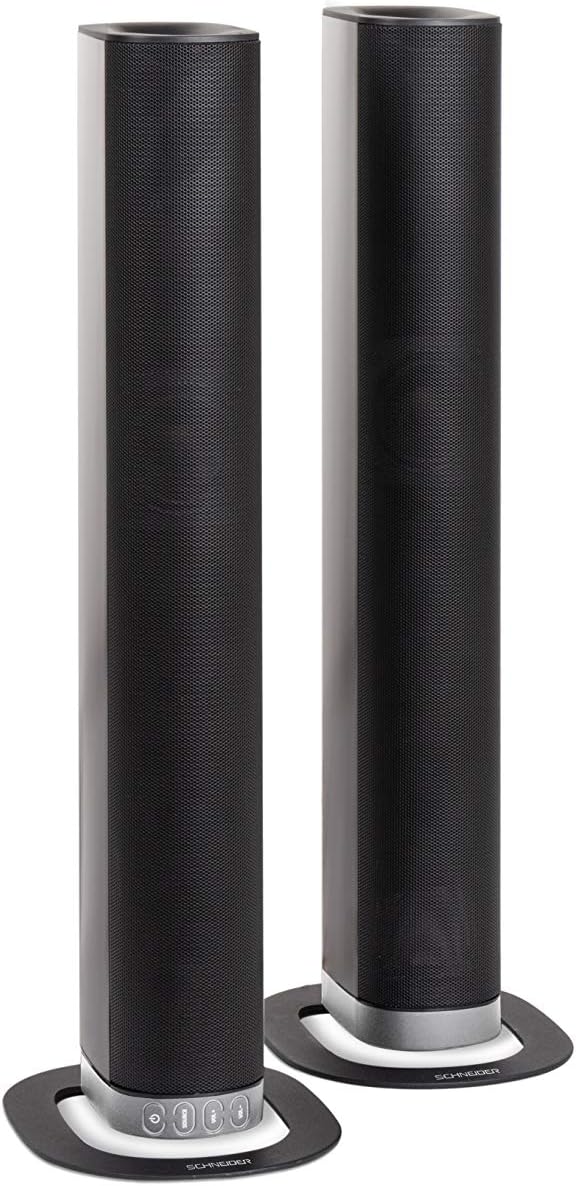
Image 2.2: The soundbar configured as two independent vertical speaker columns.
2.2 Konekte sou pouvwa
Connect the power cable to the soundbar's power input and then to a suitable wall outlet. The soundbar will enter standby mode.
2.3 Koneksyon Audio
Chwazi youn nan metòd sa yo pou konekte sous odyo ou a:
- HDMI (ARC): For optimal audio quality and control, connect an HDMI cable from the soundbar's HDMI ARC port to your TV's HDMI ARC port. This allows your TV remote to control the soundbar's volume.
- Optik: Connect an optical cable from the soundbar's OPTICAL input to your TV's optical output.
- AUX: Use the included 3.5mm Jack cable to connect the soundbar's AUX input to the headphone jack or audio output of your device (e.g., TV, smartphone, MP3 player).
- Bluetooth: For wireless connection, refer to the Bluetooth pairing instructions in the Operating section.
3. Operasyon Enstriksyon
3.1 Power On/Off
Peze a Pouvwa bouton ki sou ba son an oswa sou kontwòl remote la pou limen oswa etenn aparèy la.
3.2 Seleksyon Sous
Peze a SOUS button on the soundbar or the remote control to cycle through the available input sources: Bluetooth (BT), HDMI (ARC), Optical, and AUX.

Image 3.1: On-unit control buttons for power, source selection, and volume adjustment.
3.3 Kontwòl Volim
Sèvi ak la VOL+ epi VOL- buttons on the soundbar or remote control to adjust the volume. Press the BÈN bouton sou telekòmand lan pou fèmen odyo a tanporèman.
3.4 Bluetooth Pairing
- Select Bluetooth as the source input. The soundbar will enter pairing mode, indicated by a flashing LED.
- Sou aparèy mobil ou a (telefòn entelijan, tablèt, elatriye), aktive Bluetooth epi chèche aparèy ki disponib yo.
- Select "SC600SND" from the list of devices.
- Once paired, the LED indicator on the soundbar will stop flashing and remain solid. You can now play audio wirelessly from your device.
3.5 Mòd son
The remote control includes dedicated buttons for different sound modes to optimize your listening experience:
- NOUVEL: Enhances vocal clarity for news broadcasts and dialogue.
- FILM: Provides a more immersive soundstage pou fim.
- MIZIK: Optimize odyo pou lèktur mizik.

Image 3.2: The included remote control with dedicated buttons for power, source, volume, mute, and sound modes.
4. Antretyen
Pou asire lonjevite ak pèfòmans optimal soundbar ou a, swiv gid antretyen sa yo:
- Netwayaj: Use a soft, dry cloth to clean the exterior surfaces of the soundbar. Do not use liquid cleaners, aerosols, or abrasive materials, as these can damage the finish or internal components.
- Vantilasyon: Asire w ouvèti vantilasyon ba son an pa bloke. Bon sikilasyon lè anpeche l chofe twòp.
- Depo: Si w ap sere soundbar la pou yon bon bout tan, dekonekte l nan kouran an epi sere l nan yon kote ki fre epi sèk, lwen limyè solèy dirèk ak tanperati ekstrèm.
- Manyen: Evite lage ba son an oswa soumèt li a gwo enpak.
NAN. Depanaj
If you encounter issues with your SC600SND soundbar, refer to the following common problems and solutions:
- Pa gen pouvwa:
- Ensure the power cable is securely connected to both the soundbar and a working power outlet.
- Tcheke si priz kouran an ap fonksyone lè w branche yon lòt aparèy ladan l.
- Pa gen son:
- Verify that the correct input source (HDMI, Optical, AUX, Bluetooth) is selected on the soundbar.
- Increase the volume on both the soundbar and your connected audio source (e.g., TV, smartphone).
- Asire w ke ba son an pa sou silans.
- Check all audio cables for secure connections and damage. Try a different cable if possible.
- If using HDMI ARC, ensure your TV's HDMI ARC function is enabled in its settings.
- Poor Sound Quality / Distorted Audio:
- Ajiste nivo volim yo pou evite distòsyon.
- Try switching between the different sound modes (NEWS, MOVIE, MUSIC) to see if one improves the audio for your content.
- Ensure the soundbar is placed on a stable surface and not vibrating excessively.
- If using Bluetooth, ensure your device is within range and there are no obstructions causing interference.
- Pwoblèm Bluetooth Pairing:
- Ensure the soundbar is in Bluetooth pairing mode (flashing LED).
- Make sure your device's Bluetooth is enabled and it is searching for new devices.
- Deplase aparèy ou an pi pre ba son an.
- Si li te deja konekte, eseye dekonekte aparèy la epi konekte l ankò.
- Kontwòl Remote pa travay:
- Tcheke epi ranplase pil yo nan kontwòl remote la.
- Asire w pa gen okenn obstak ant kontwòl remote la ak detèktè ba son an.
- Montre remote la dirèkteman nan ba son an.
6. Espesifikasyon
| Karakteristik | Spesifikasyon |
|---|---|
| Nimewo Modèl | SC600SND |
| Chanèl | 2.0 |
| Sortie pouvwa | 30W (15W x 2) |
| Koneksyon Teknoloji | Bluetooth, HDMI (ARC), Optical, Aux |
| Kominikasyon san fil | Bluetooth |
| Metòd kontwòl | Kontwòl Remote |
| Kalite Oratè | Ba son |
| Gwosè Oratè | 2 pous |
| Sous pouvwa | Kab elektrik |
| Product Dimensions (Monoblock) | 80.5 x 6.2 x 9 cm |
| Pwa pwodwi | 2.5 Kilogram |
| Konpozan ki enkli | Remote Control, 3.5mm Jack Cable |
| Koulè | Nwa |
7. Garanti ak sipò
7.1 Garanti limite
This Schneider SC600SND Soundbar is covered by a Limited Warranty. Please refer to the warranty card included with your product or contact your retailer for specific terms and conditions regarding warranty coverage and duration.
7.2 Sipò pou Kliyan
For technical assistance, troubleshooting beyond this manual, or warranty claims, please contact the retailer where you purchased the product or visit the official Schneider websit pou jwenn enfòmasyon sou sipò.