
1. Entwodiksyon
Mèsi pou acha aasing the SHARP EL-MA71-X 10-Digit Mini Calculator. This manual provides essential information for the proper setup, operation, and maintenance of your calculator. Please read it thoroughly before use and keep it for future reference.
2. Pwodwi souview
The SHARP EL-MA71-X is a compact 10-digit calculator designed for everyday use. It features dual tax rate buttons (8% and 10%) to accommodate various tax calculations, making it suitable for office and personal financial tasks. The calculator operates on both solar power and a button battery, ensuring reliable performance.

Figi 2.1: Devan view of the SHARP EL-MA71-X 10-Digit Mini Calculator, showing the display and key layout.
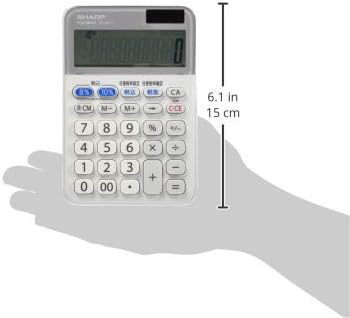
Figi 2.2: Side view of the SHARP EL-MA71-X 10-Digit Mini Calculator, highlighting its slim profile.
3. Enstalasyon
3.1 Sous pouvwa
The EL-MA71-X calculator utilizes a dual power system: solar power and a button battery. Under sufficient lighting conditions, the calculator will operate using solar power. In low-light environments, it automatically switches to battery power.
3.2 Premye Itilizasyon
Upon first use, or after prolonged storage, ensure the calculator is exposed to light to activate the solar panel. If the display remains blank, the button battery may need replacement (refer to Section 5.2).
4. Operasyon Enstriksyon
4.1 Kalkil debaz
- Adisyon (+): Antre premye nimewo a, peze +, antre dezyèm nimewo a, epi peze =.
- Soustraksyon (-): Antre premye nimewo a, peze -, antre dezyèm nimewo a, epi peze =.
- Multiplication (×): Antre premye nimewo a, peze ×, antre dezyèm nimewo a, epi peze =.
- Divizyon (÷): Antre premye nimewo a, peze ÷, antre dezyèm nimewo a, epi peze =.
4.2 Tax Calculations
The calculator features dedicated buttons for tax calculations at 8% and 10% rates.
- Fikse to taks: The calculator comes with preset tax rates. To adjust, consult the full user manual for detailed instructions on tax rate setting.
- Tax Included (税込): Enter the base amount, then press the 税込 button to calculate the amount including tax.
- Tax Excluded (税抜): Enter the amount including tax, then press the 税抜 button to calculate the base amount excluding tax.
4.3 Fonksyon Memwa
- Memory Plus (M+): Ajoute valè ki parèt la nan memwa a.
- Memory Minus (M-): Soustrè valè ki parèt la nan memwa a.
- Memory Recall/Clear (MRC): Peze yon fwa pou raple valè memwa a. Peze de fwa pou efase memwa a.
4.4 Fonksyon Klè
- All Clear (CA): Efase tout antre ak memwa, retabli kalkilatris la nan eta inisyal li.
- Clear Entry (C/CE): Clears the last entered number or the current calculation entry. Pressing it repeatedly may clear the entire calculation.
5. Antretyen
5.1 Netwayaj
To clean the calculator, wipe it gently with a soft, dry cloth. Do not use abrasive cleaners, solvents, or excessive moisture, as this may damage the device or its display.
5.2 Ranplasman batri
If the display becomes dim or unresponsive even in bright light, the button battery may need replacement. Refer to the battery compartment on the back of the calculator for the specific battery type (usually a standard button cell like LR1130 or similar). Use a small screwdriver to open the compartment, replace the battery with a new one of the same type, and securely close the cover. Dispose of used batteries according to local regulations.
5.3 Depo
Store the calculator in a cool, dry place away from direct sunlight, extreme temperatures, and high humidity. Avoid placing heavy objects on top of the calculator to prevent damage to the keys or display.
NAN. Depanaj
- Ekspozisyon an vid: Ensure the calculator is in sufficient light for solar power. If not, the battery may be depleted. Replace the button battery as described in Section 5.2.
- Kalkil ki pa kòrèk: Peze a CA button to clear all previous entries and memory. Re-enter your calculation carefully. Check if the correct tax rate is applied if using tax functions.
- Kle yo pa reponn: Clean the keys and surrounding areas with a soft, dry cloth. If the issue persists, the calculator may require service.
7. Espesifikasyon
| Mak | SHARP |
| Modèl | EL-MA71-X |
| Montre chif yo | 10 chif |
| Sous pouvwa | Solar and Button Battery |
| Pwa | 0.13 kg |
| Peyi orijin | Japon |
8. Garanti ak sipò
8.1 Enfòmasyon sou Garanti
This SHARP EL-MA71-X calculator comes with a 1-year warranty from the date of purchase. Please retain your proof of purchase for warranty claims. The warranty covers manufacturing defects under normal use. It does not cover damage caused by misuse, accidents, unauthorized repairs, or normal wear and tear.
8.2 Sipò pou Kliyan
For technical assistance, troubleshooting beyond this manual, or warranty service, please contact SHARP customer support. Refer to the official SHARP website or the product packaging for the most current contact information in your region.