
Entwodiksyon
This manual provides instructions for the Ematic NSWC012W Wired Controller. This controller is designed for use with Nintendo Switch and PC devices, offering an ergonomic design, responsive controls, rumble feedback, and a 7.2-foot USB cable for a reliable gaming experience.
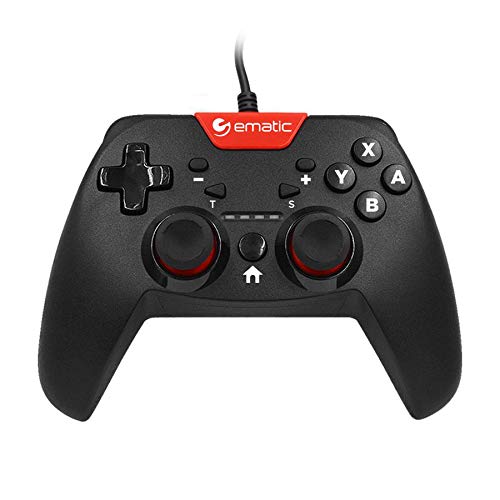
Image: Two individuals are shown holding Ematic wired controllers, actively engaged in a video game displayed on a television. The controllers are black with red accents, featuring joysticks and face buttons.
Kontni pake
- Ematic NSWC012W Wired Controller
- Manyèl Enstriksyon (dokiman sa a)
Enstalasyon
Konekte ak Nintendo Switch la
- Ensure your Nintendo Switch console is powered on and docked.
- Plug the USB connector of the Ematic NSWC012W controller into an available USB port on the Nintendo Switch dock.
- The controller should be automatically recognized by the console. You may need to navigate to the 'Controllers' menu on your Switch to confirm connection.
- Kontwolè a pare pou itilize kounye a.
Connecting to PC (Windows)
- Asire w ke PC ou limen.
- Plug the USB connector of the Ematic NSWC012W controller into an available USB port on your computer.
- The operating system will typically install the necessary drivers automatically. This process may take a few moments.
- Once drivers are installed, the controller will be recognized as a standard game controller. You can verify its functionality in your PC's device settings or within compatible games.
Enstriksyon Operasyon
Layout ak Fonksyon Kontwolè
The Ematic NSWC012W controller features a standard button layout for intuitive gameplay.
- Baton analòg: Two clickable analog sticks for precise movement and camera control.
- Pad direksyonèl (D-Pad): For directional input in games.
- Bouton figi (A, B, X, Y): Bouton aksyon pou kòmandman nan jwèt la.
- Shoulder Buttons (L, R): Top-mounted buttons.
- Trigger Buttons (ZL, ZR): Bottom-mounted triggers.
- Bouton HOME: Returns to the console's home screen (Nintendo Switch).
- PLUS (+) / MINUS (-) Buttons: For in-game menu navigation and options.
- Bouton Ekran: Captures screenshots during gameplay (Nintendo Switch).
- Bouton TURBO: Activates turbo function for assigned buttons.
Using TURBO Mode
- Peze epi kenbe la TURBO bouton.
- Pandan w ap kenbe TURBO, press the desired action button (e.g., A, B, X, Y, L, R, ZL, ZR) you wish to assign the turbo function to.
- Lage tou de bouton yo. Bouton ki asiyen an ap repete rapidman sa l te antre a lè w kenbe l peze.
- To disable TURBO mode for a specific button, repeat steps 1 and 2.
Fonksyon Ekran
Peze a Bouton Ekran during gameplay on Nintendo Switch to capture an image of your screen. The captured image will be saved to your console's album.
Antretyen
- Kenbe kontwolè a pwòp lè w siye l avèk yon twal mou epi sèk.
- Evite ekspoze kontwolè a nan tanperati ekstrèm, imidite, oswa limyè solèy dirèk.
- Do not use abrasive cleaners or solvents on the controller.
- Store the controller in a safe place when not in use to prevent damage to the cable or buttons.
- Pa eseye demonte kontwolè a, paske sa ap anile garanti a.
Depanaj
Kontwolè pa reponn
- Tcheke Koneksyon Kab: Asire w kab USB a byen branche nan tou de kontwolè a ak konsole/PC a.
- Eseye yon lòt pò USB: Connect the controller to another USB port on your console or PC.
- Rekòmanse aparèy: Restart your Nintendo Switch or PC and try connecting the controller again.
- PC Driver Check: On PC, verify that the controller drivers are installed correctly in Device Manager.
Buttons or Joysticks Not Working Correctly
- Kontwolè pwòp: Asire w pa gen debri ki kole ozalantou bouton yo oswa joystick yo.
- Tès nan yon lòt jwèt/aplikasyon: Determine if the issue is specific to one game or widespread.
- Recalibrate (PC): On PC, you may be able to recalibrate the controller through Windows Game Controller settings.
Espesifikasyon
| Nimewo Modèl | NSWC012W |
| Mak | Ematik |
| Aparèy konpatib | Nintendo Switch, PC, Windows |
| Koneksyon Teknoloji | USB |
| Longè kab | 7.2 pye (apeprè 2.2 mèt) |
| Karakteristik adisyonèl | Ergonomic design, Rumble feedback, TURBO button, Screenshot button |
| Kantite bouton | 10 (excluding D-Pad and analog stick clicks) |
| Sous pouvwa | Elektrik ak fil (via USB) |
| UPC | 815592024156 |
Enfòmasyon sou Garanti
This Ematic product is covered by a STANDARD 90 DAYS warranty from the date of purchase. This warranty covers manufacturing defects under normal use. It does not cover damage caused by misuse, accidents, unauthorized modifications, or normal wear and tear. Please retain your proof of purchase for warranty claims.
Sipò
For further assistance, technical support, or warranty inquiries, please refer to the official Ematic websit entènèt la oubyen kontakte depatman sèvis kliyan yo. Anjeneral, ou ka jwenn enfòmasyon pou kontakte yo sou anbalaj pwodwi a oubyen sou dokiman ofisyèl manifakti a. websit.
Remak: Espesifikasyon ak karakteristik pwodwi yo ka chanje san avètisman alavans.