
1. Entwodiksyon
This manual provides essential information for the safe and effective operation of your Aputure 300d II LED Video Light. Please read this manual thoroughly before using the product to ensure proper setup, usage, and maintenance. Retain this manual for future reference.
Ki sa ki nan bwat la:
- 1 x Aputure LS C300D II Led video light
- 1 x 300D II Light Cover
- 1 x bwat kontwòl
- 1 x Hang Buckle
- 1 x pouvwa kòd

Image: The Aputure 300d II LED Video Light and its accessories neatly packed in the included grey carry case.
2. Enfòmasyon sou Sekirite
Always observe basic safety precautions when using electrical equipment to reduce the risk of fire, electric shock, or injury. This product is designed for professional use in controlled environments.
- Do not operate the light with wet hands or near water.
- Asire bon vantilasyon pou anpeche surchof.
- Pa gade dirèkteman nan sous limyè a lè li aktif.
- Use only approved power cables and accessories.
- Kenbe soti nan atenn timoun yo.
3. Pwodwi souview
The Aputure 300d Mark II is an advanced LED video light offering enhanced brightness, durability, and intelligent control features. It is designed for professional photography and video production, providing high-quality daylight-balanced illumination.
Karakteristik kle:
- Ogmantasyon klète: 20% brighter than its predecessor, capable of up to 80,000 lux when combined with the Fresnel 2X.
- Exceptional Color Fidelity: 5500K daylight-balanced with CRI and TLCI ratings of 96+ and 97+ respectively.
- Konsepsyon solid: Features a new yoke for 360° rotation and a handbrake locking mechanism for secure positioning.
- Operasyon an silans: The all-in-one control box operates silently.
- Built-in Lighting FX: Includes 8 special effects: Paparazzi, Spark, Lightning, Faulty Bulb, TV, Pulse, Flash, and Explosion.
- Kontwòl versatile: DMX512-compatibility, 2.4Ghz Aputure Wireless remote, and Sidus Link App control via Bluetooth mesh network.

Image: The Aputure 300d II LED Video Light with a standard reflector, showcasing its robust build.

Imaj: Dèyè view of the Aputure 300d II, highlighting the power connection and product labeling.
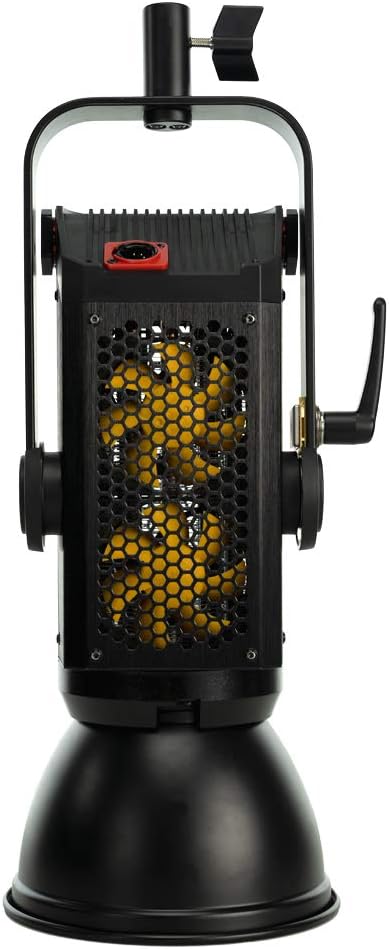
Imaj: Bò kote view of the Aputure 300d II, revealing the cooling vents for efficient heat dissipation.
4. Enstalasyon
Follow these steps to set up your Aputure 300d II LED Video Light for operation.
- Monte limyè a: Secure the light fixture onto a compatible light stand using the integrated yoke and handbrake locking mechanism. Ensure it is stable before proceeding.
- Connecting the Control Box: Connect the light fixture to the all-in-one control box using the provided cable. The control box can be mounted on the light stand or placed nearby.
- Koneksyon pouvwa: Connect the power cord from the control box to a suitable power outlet. The control box also supports V-mount batteries for portable operation (batteries not included).
- Attaching Modifiers: Attach any desired light modifiers, such as the included reflector or a softbox, to the front of the light fixture.

Image: The Aputure 300d II LED Video Light fully assembled on a stand with a reflector, ready for use.
Videyo: Yon ofisyèl finiview of the Aputure LS C300d II LED Video Light, demonstrating its features and components.
5. Operasyon Enstriksyon
The Aputure 300d II offers multiple control methods for flexibility in various shooting scenarios.
Control Box Operation:
- Limen/Etenyen: Press the power button on the control box to turn the light on or off.
- Ajiste klète: Use the brightness dial to adjust the light intensity from 0% to 100%.
- Access FX Modes: Press the 'FX' button to cycle through the 8 built-in lighting effects. Use the 'Trigger' button to activate effects instantly.
- Channel/Group Selection: Use the 'Channel' and 'Group' buttons to assign the light to specific channels or groups for multi-light setups.
Kontwòl san fil:
- 2.4Ghz Remote: Use the included Aputure Wireless remote to control basic functions and trigger FX modes.
- Sidus Link App: Download the Sidus Link App on your smartphone or tablet to control the light via Bluetooth mesh network. The app provides advanced control over brightness, effects, and other settings.

Image: The control box display of the Aputure 300d II, showing current settings for brightness, channel, and group.
6. Antretyen
Regular maintenance ensures the longevity and optimal performance of your Aputure 300d II LED Video Light.
- Netwayaj: Use a soft, dry cloth to clean the light fixture and control box. Avoid abrasive cleaners or solvents.
- Depo: Store the light in its original carry case in a cool, dry place when not in use.
- Enspeksyon kab: Periodically check all cables for signs of wear or damage. Replace any damaged cables immediately.
- Mizajou mikrolojisyèl: Check the Aputure website for any available firmware updates to ensure your light has the latest features and performance enhancements.
NAN. Depanaj
If you encounter issues with your Aputure 300d II, refer to the following common solutions:
- Limyè pa limen: Ensure the power cord is securely connected to both the control box and the power outlet. Check if the power button on the control box is pressed. If using V-mount batteries, ensure they are charged and properly seated.
- No Wireless Control: Verify that the 2.4Ghz remote or your device with the Sidus Link App is within range and properly paired with the light. Check battery levels on the remote.
- Avètisman Surchof: Ensure the light's vents are not obstructed and that it is operating in a well-ventilated area. Reduce brightness if the warning persists.
- Klate ki pa konsistan: Check all cable connections. If using V-mount batteries, ensure they provide sufficient power for the desired brightness level.
For further assistance, contact Aputure customer support.
8. Espesifikasyon
| Dimansyon pwodwi | 13.1 x 11.1 x 24.9 pous |
| Pwa atik | 24.7 liv |
| Nimewo Modèl Atik | Aputure C300d II |
| Mak | Apiti |
| Koneksyon Teknoloji | Bluetooth, Radio Frequency, USB |
| Entèfas Materyèl | Bluetooth, USB |
| UPC | 712350138745 |
9. Garanti ak sipò
Aputure products are designed for reliability and performance. This product comes with a standard manufacturer's warranty. Please refer to the warranty card included in your product packaging for specific terms and conditions.
For technical support, service, or warranty claims, please visit the official Aputure website or contact their customer service department. Ensure you have your product model number (C300d II) and proof of purchase available when seeking support.