
1. Entwodiksyon
This manual provides comprehensive instructions for the installation, operation, and maintenance of your BirdDog Eyes P200 Full NDI PTZ Camera. Please read this manual thoroughly before using the product to ensure proper and safe operation.
The BirdDog Eyes P200 is a high-performance 1080p60 PTZ camera featuring BirdDog's custom NDI silicon chip, a 30x optical zoom, and a Sony backlit sensor and image module. It is designed for professional video production environments, offering visually lossless full NDI for high-quality video transmission.
2. Enfòmasyon sou Sekirite
Always observe the following safety precautions to prevent damage to the product or injury to yourself and others.
- Pwovizyon pou pouvwa: Use only the specified power adapter. Ensure the power source matches the camera's requirements.
- Anviwònman: Do not expose the camera to rain, moisture, or extreme temperatures. Operate within the recommended temperature and humidity ranges.
- Manyen: Handle the camera with care. Avoid dropping or subjecting it to strong vibrations.
- Netwayaj: Dekonekte kouran an anvan ou netwaye. Sèvi ak yon twal mou epi sèk. Pa sèvi ak pwodui netwayaj likid oswa ayewosòl.
- Sèvis: Pa eseye ouvri oswa fè reparasyon kamera a tèt ou. Konfye tout antretyen bay pèsonèl kalifye.
3. Pake kontni
Verifye ke tout atik ki nan lis anba a yo enkli nan pakè ou a:
- BirdDog Eyes P200 PTZ Camera (White)
- Adaptè pouvwa
- IR Remote Control
- Mounting Bracket (if applicable)
- Gid Quick Start
4. Enstalasyon
4.1 Kamera souview
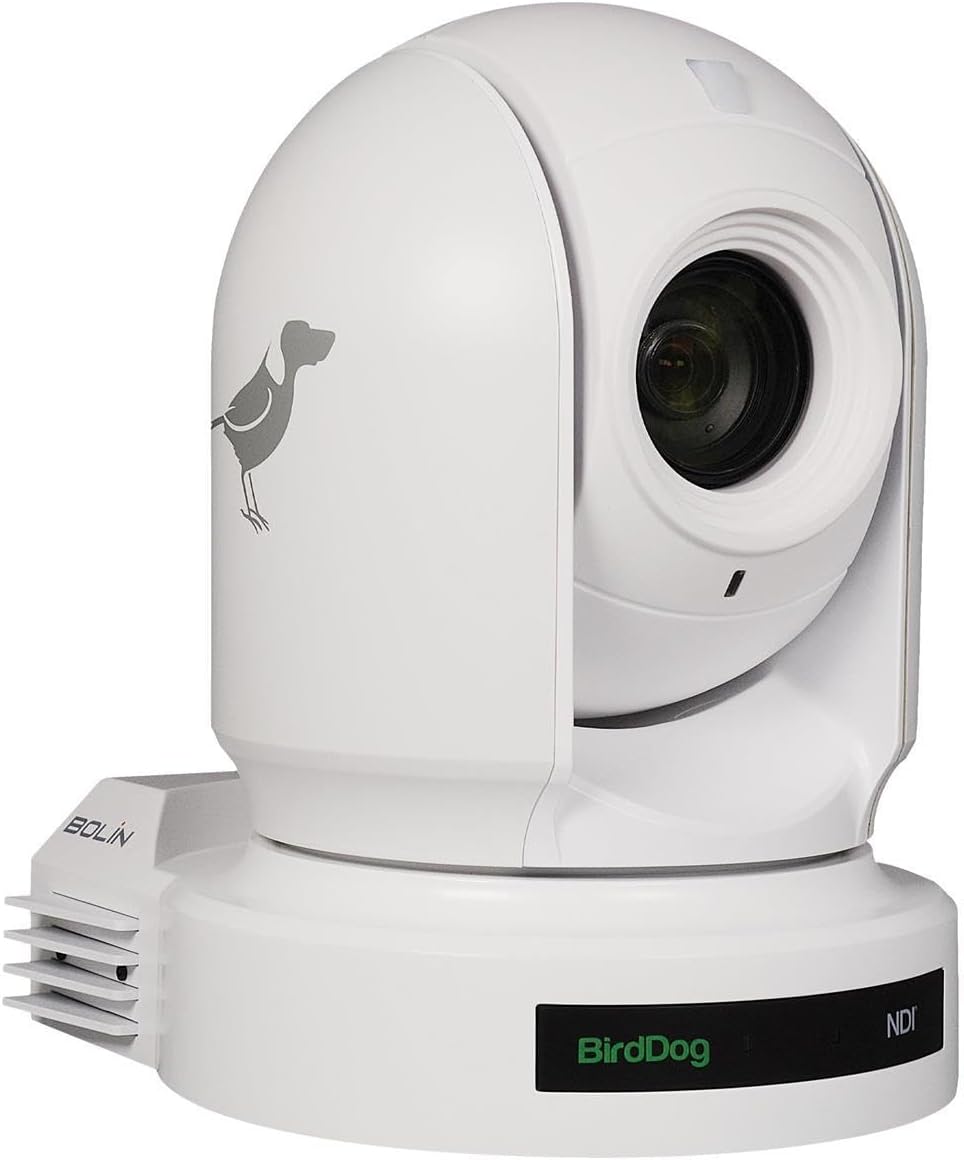
Figi 4.1: Devan view of the BirdDog Eyes P200 PTZ Camera, showing the lens and the BirdDog logo on the base.

Figi 4.2: Dèyè view of the BirdDog Eyes P200 PTZ Camera, detailing the various connectivity ports including DC 12V, RS232, RS422, NDI Video/PoE Network, HDMI, and 3G-SDI.
4.2 Enstalasyon Fizik
- Montaj: Securely mount the camera on a stable surface using the provided mounting bracket (if applicable). Ensure the camera is level and has a clear line of sight to the desired area.
- Koneksyon pouvwa: Connect the supplied power adapter to the DC 12V input port on the rear of the camera (refer to Figure 4.2). Plug the adapter into a suitable power outlet. Alternatively, if using Power over Ethernet (PoE), connect an Ethernet cable from a PoE-enabled switch to the NDI Video/PoE Network port.
- Sòti videyo: Connect your video display or capture device to the camera using either the HDMI or 3G-SDI output ports. For NDI workflows, connect an Ethernet cable from the NDI Video/PoE Network port to your network.
- Koneksyon kontwòl: For external control, connect RS232 or RS422 cables to compatible control devices as needed.
4.3 Network Configuration (NDI)
The BirdDog P200 supports Full NDI for high-quality, low-latency video over IP. Upon connecting to a network, the camera will typically acquire an IP address via DHCP. You can access the camera's web interface for advanced settings.
- Discovering the Camera: Use BirdDog Central Lite or a similar NDI discovery tool on your network to find the camera's IP address.
- Aksè Web Entèfas: Louvri a web browser and enter the camera's IP address. Log in using the default credentials (refer to the Quick Start Guide for details).
- Anviwònman rezo: Nan la web interface, you can configure network settings, including static IP address, NDI stream settings, and video parameters.
5. Itilizasyon Kamera a
5.1 Operasyon debaz
- Pouvwa sou: Once connected to power, the camera will automatically power on. The status indicator will illuminate.
- Pan/Tilt/Zoom (PTZ) Control: Use the IR remote control or a compatible NDI controller to adjust the camera's pan, tilt, and zoom.
- Konsantre: The P200 features auto-focus. Manual focus adjustments can be made via the web interface or compatible control software.
- Prereglaj: Save and recall camera positions (pan, tilt, zoom, focus) as presets for quick scene changes. Refer to your controller's manual for preset management.
5.2 Paramèt Avanse (Web Entèfas)
The camera's web interface provides access to a wide range of advanced settings:
- Anviwònman Videyo: Adjust resolution, frame rate, exposure, white balance, and color settings.
- Anviwònman odyo: Configure audio input levels and embedding options.
- NDI Settings: Manage NDI stream name, group, and bandwidth.
- Anviwònman rezo: Configure IP address, DNS, and other network parameters.
- Anviwònman sistèm: Update firmware, reset to factory defaults, and manage user accounts.
6. Antretyen
- Netwaye lantiy la: Sèvi ak yon twal mou ki pa gen pousyè, espesyalman fèt pou lantiy optik. Pa sèvi ak materyèl abrazif oswa pwodui chimik ki agresif.
- Mizajou mikrolojisyèl: Periodically check the BirdDog website for firmware updates. Keeping your camera's firmware up-to-date ensures optimal performance and access to new features. Follow the instructions provided with the firmware update package carefully.
- Kondisyon anviwònman: Ensure the camera is operated and stored in a clean, dry environment within the specified temperature and humidity ranges to prevent damage.
NAN. Depanaj
| Pwoblèm | Kòz posib | Solisyon |
|---|---|---|
| Pa gen pouvwa | Power adapter not connected; Power outlet faulty; PoE not active. | Check power connections. Test power outlet. Ensure PoE switch is active and providing power. |
| Pa gen Sòti Videyo | Incorrect cable connection; Incorrect input selected on display; NDI stream not active. | Verify HDMI/SDI cable connections. Select correct input on monitor. Check NDI settings in web koòdone. |
| Camera Not Responding to Control | IR remote battery low; Incorrect control protocol; Network issue. | Replace IR remote batteries. Verify control protocol (RS232/RS422/NDI) settings. Check network connectivity. |
| Pòv Kalite Imaj | Lens dirty; Lighting conditions; Incorrect video settings. | Clean the lens. Adjust lighting. Configure exposure, white balance, and other video settings in the web koòdone. |
8. Espesifikasyon
| Karakteristik | Detay |
|---|---|
| Modèl | BDP200W |
| Rezolisyon Capture Videyo | 1080p |
| Zoom optik | 30x |
| Koneksyon Teknoloji | HDMI, 3G-SDI, NDI (Ethernet), RS232, RS422 |
| Sous pouvwa | AC/DC, PoE |
| Koulè | Blan |
| Dimansyon (L x W x H) | 12.3 x 12.3 x 9.9 pous |
| Pwa atik | 7.09 liv |
| Teknoloji Capteur Foto | CMOS |
| Rating Pwoteksyon Entènasyonal | IP54 |
| Itilizasyon Rekòmande | Indoor Security, Professional Video Production |
9. Garanti ak sipò
For warranty information and technical support, please refer to the official BirdDog website or contact your authorized BirdDog dealer. Keep your proof of purchase for warranty claims.
Official BirdDog Websit: www.birddog.tv