
ipega PG-9078
Manyèl Itilizatè Kontwolè Jwèt Inivèsèl San Fil Bluetooth ipega PG-9078 la
Modèl: PG-9078
1. Entwodiksyon
This manual provides detailed instructions for the setup, operation, maintenance, and troubleshooting of your ipega PG-9078 Universal Wireless Bluetooth Game Controller. Please read this manual carefully before use to ensure proper functionality and to extend the lifespan of your device. The PG-9078 is designed to provide a versatile gaming experience across multiple platforms including Android, iOS, Tablet, TV, and PC.

Figure 1.1: Package Contents - ipega PG-9078 Controller, detachable bracket, USB cable, and user manual.
2. Enstalasyon
2.1. Chaje Kontwolè a
Before initial use, fully charge the controller. Connect the supplied USB cable to the Micro-USB port on the controller and the other end to a USB power source (e.g., computer USB port, USB wall adapter). The charging indicator light will illuminate during charging and turn off when fully charged.
2.2. Attaching the Phone Bracket
The PG-9078 comes with a detachable bracket for holding smartphones. To attach, align the bracket's base with the slot on the top of the controller and slide it into place until it clicks securely. To remove, gently press the release button (if present) or slide it off in the opposite direction.

Figure 2.1: Controller with Phone Bracket Attached.
2.3. Pè Bluetooth
The pairing process varies slightly depending on the operating system. Ensure the controller is charged before attempting to pair.
- Android/PC Mode: Press and hold the 'X' button + 'HOME' button simultaneously until the indicator light flashes rapidly. On your device, enable Bluetooth, search for "PG-9078" and select it to pair.
- Mòd iOS: Press and hold the 'Y' button + 'HOME' button simultaneously until the indicator light flashes rapidly. On your iOS device, enable Bluetooth, search for "PG-9078" and select it to pair.
- Direct Play Mode (Android/iOS): For certain games, press and hold the 'A' button + 'HOME' button. This mode is designed for direct connection without mapping.
- PC Wired Mode: Connect the controller directly to your PC using the USB cable. The controller will be recognized as a standard gamepad.

Figure 2.2: Controller Paired with a Smartphone.
3. Operasyon Enstriksyon
3.1. Layout Kontwolè a
Familiarize yourself with the buttons and controls of the PG-9078 controller:
- Stick analog gòch la: Kontwòl mouvman.
- D-Pad (Pad Direksyon): Antre direksyonèl.
- Bouton SELECT: Function varies by game/system.
- Bouton HOME: Power on/off, pairing mode, return to home screen.
- Bouton START: Function varies by game/system.
- Stick analog dwat la: Camera control or secondary movement.
- Bouton Aksyon (A, B, X, Y): Primary game actions.
- Bouton zepòl (L1, R1): Top triggers.
- Trigger Buttons (L2, R2): Bottom triggers.
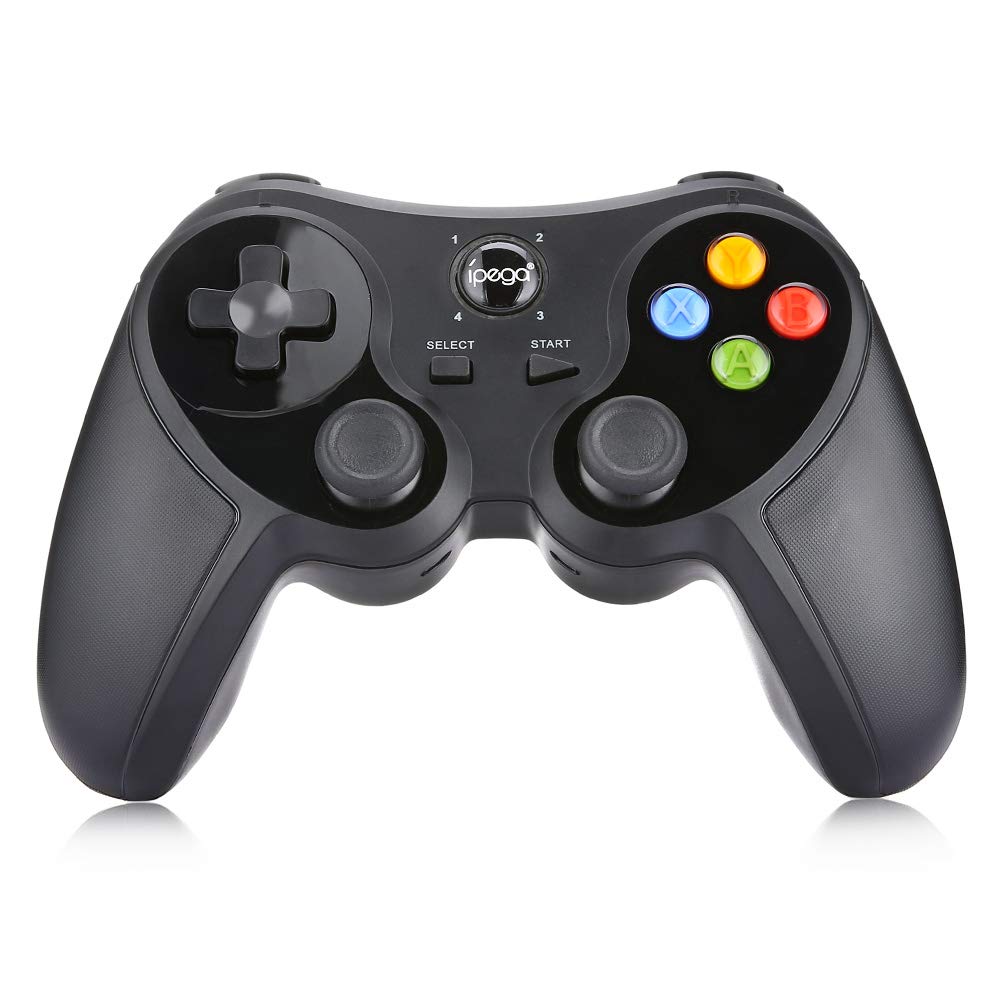
Figi 3.1: Devan View nan Kontwolè a.
3.2. Gaming Experience
Once paired, the controller should be recognized by compatible games and applications. For optimal performance, ensure your device's operating system and game applications are up to date. Some games may require in-game controller settings adjustments.

Figure 3.2: Hands-on View of the Controller in Use.
4. Antretyen
- Netwayaj: Sèvi ak yon twal mou epi sèk pou netwaye kontwolè a. Pou pousyè tè ki difisil pou retire, yon ti kras twal mouye.amp Ou ka itilize yon twal, men asire w pa gen imidite ki antre nan aparèy la. Pa sèvi ak pwodui chimik ki agresif oswa pwodui netwayaj abrazif.
- Depo: Store the controller in a cool, dry place away from direct sunlight and extreme temperatures. If storing for extended periods, ensure the battery is partially charged (around 50%) to preserve battery health.
- Swen batri: Avoid fully discharging the battery frequently. Recharge the controller when the low battery indicator appears. Do not attempt to replace the internal battery yourself.
NAN. Depanaj
| Pwoblèm | Kòz posib | Solisyon |
|---|---|---|
| Kontwolè pa limen. | Batri ki ba. | Chaje kontwolè a nèt. |
| Pa ka konekte atravè Bluetooth. | Incorrect pairing mode; Bluetooth interference; device not discoverable. | Ensure correct pairing mode (Android/iOS) is selected. Turn off and on Bluetooth on your device. Move closer to the device. Try resetting the controller (if a reset button is available, usually a small pinhole). |
| Bouton yo pa reponn oswa yo gen ralanti. | Low battery; software conflict; distance from device. | Recharge the controller. Restart the game/device. Ensure no other Bluetooth devices are causing interference. |
| Kontwolè a dekonekte souvan. | Low battery; distance from device; interference. | Charge the controller. Stay within effective Bluetooth range. Reduce wireless interference. |
6. Espesifikasyon
- Modèl: PG-9078
- Koneksyon: Bluetooth Wireless
- Konpatibilite: Android, iOS, Tablet, TV, PC
- Antre Voltage: DC5V
- Antre aktyèl: 500mA
- Kouran travay: 30mA
- Faktori: Te fè nan peyi Lachin

Figure 6.1: Controller Back Panel with Specifications.
7. Garanti ak sipò
Pou enfòmasyon sou garanti a ak sipò teknik, tanpri gade dokiman yo te bay lè w te achte a oswa kontakte revandè w la. Kenbe prèv acha w la pou nenpòt reklamasyon garanti.
Ask a question about this manual
Ask about setup, troubleshooting, compatibility, parts, safety, or missing instructions. Manuals+ will review the question and use this page’s manual context to help answer it.