
Entwodiksyon
This manual provides instructions for the Beyution 6-in-1 Replacement Remote Control, designed for use with various Mitsubishi television models. This remote is a direct replacement and typically requires no programming. Please read these instructions carefully before use.
Kontni pake
- 1 x Beyution 6-in-1 Replacement Remote Control
Remak: Pil yo pa enkli epi yo dwe achte separeman.
Enstalasyon ak Enstalasyon Batri
To begin using your remote control, you must first install the batteries.
- Jwenn lòj batri a sou do a nan kontwòl remote la.
- Glise kouvèti konpatiman batri a anba oubyen peze lokèt la epi leve l pou ouvri l.
- Insert two (2) new AAA alkaline batteries, ensuring the positive (+) and negative (-) terminals match the diagrams inside the compartment.
- Remèt kouvèti konpatiman batri a, epi asire w li byen klike nan plas li.

Figure 1: Battery compartment with cover removed, showing battery placement.
The remote control is designed to work immediately after battery installation with compatible Mitsubishi TV models. No additional programming is typically required.
Operasyon
This remote control provides full functionality for your compatible Mitsubishi television. Point the remote directly at the TV's infrared receiver for optimal performance.
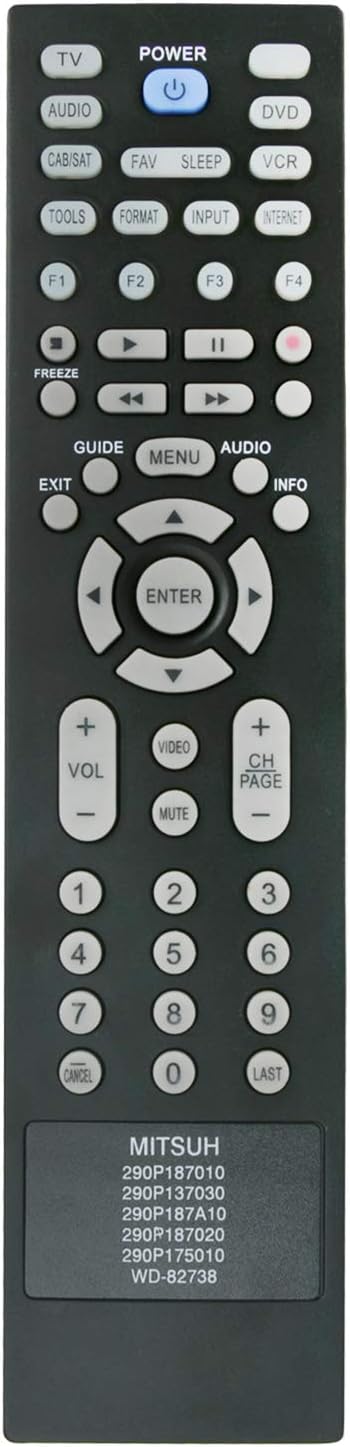
Figi 2: Devan view nan kontwòl remote la ak layout bouton yo.
Fonksyon kle:
- POUVWA: Limen oswa etenn televizyon an.
- TV/AUDIO/DVD/VCR/CAB/SAT: Chwazi sous la opinyon.
- VOL +/-: Ajiste nivo volim.
- PAJ CH +/-: Chanjman chanèl yo.
- Bèbè: Aktive oubyen dezaktive son televizyon an.
- Bouton nimewo (0-9): Seleksyon dirèk chanèl.
- GUIDE/MENU/AUDIO/INFO: Accesses TV menu functions.
- Pavè direksyon (Monte/Desann/Agoch/Dwat) & ANTRE: Navige nan meni yo epi konfime seleksyon yo.
- Sòti: Sòti nan meni oswa fonksyon aktyèl la.
- FAV/SLEEP/TOOLS/FORMAT/INPUT/INTERNET: Additional function buttons as supported by your TV model.
Modèl konpatib
This replacement remote control is compatible with a wide range of Mitsubishi TV models, including but not limited to:
- WD-60C9, WD-65C9, WD-73C9
- LT-40151, LT-40153, LT-40164
- LT-46151, LT-46153, LT-46164, LT-46265
- LT-52151, LT-52153
- LT-55154, LT-55164, LT-55265
- WD-60638, WD-60737, WD-60738, WD-60C10
- WD-65638, WD-65737, WD-65738, WD-65837, WD-65838, WD-65C10
- WD-73638, WD-73640, WD-73642, WD-73737, WD-73738, WD-73837, WD-73838, WD-73C10, WD-73C11, WD-73C12
- WD-82642, WD-82737, WD-82738, WD-82837, WD-82838, WD-82C12
- 290P137030, 290P175010, 290P187010, 290P187020, 290P187A10
- WD-60638CA, WD-65638CA
If your specific TV model is not listed, please verify compatibility with the seller before purchase.
Depanaj
| Pwoblèm | Kòz posib | Solisyon |
|---|---|---|
| Kontwòl remote pa travay. |
|
|
| Some buttons do not respond. |
|
|
Si pwoblèm yo pèsiste apre ou fin swiv etap sa yo, tanpri kontakte vandè a pou plis asistans.
Espesifikasyon
- Mak: Beyution
- Nimewo Modèl: BE-MITSUH-6in1-290P187010
- Koneksyon Teknoloji: Enfrawouj (IR)
- Kalite kontwolè: Kontwòl bouton
- Ranje maksimòm: 10 mèt (apeprè 33 pye)
- Sous pouvwa: 2 pil alkalin AAA (pa enkli)
- Pwa atik: Apeprè 2 ons
- Karakteristik espesyal: Ergonomik konsepsyon
- Max Kantite Aparèy Sipòte: 1 (direct replacement for specific Mitsubishi models)
Enfòmasyon sou antretyen ak sekirite
- Keep the remote control dry. Avoid exposure to water or excessive humidity.
- Do not expose the remote control to extreme temperatures.
- Netwaye telekòmand lan avèk yon twal mou epi sèk. Pa sèvi ak pwodui netwayaj abrazif oswa solvan.
- Si ou pa pral itilize telekòmand lan pou yon bon bout tan, retire pil yo pou anpeche yo koule.
- Jete pil yo itilize dapre règleman lokal yo.
- Pa eseye demonte oswa modifye kontwòl remote la.