
1. Entwodiksyon
The MASTECH MS8260E is a versatile 2000-count digital multimeter designed for a wide range of electrical and electronic measurements. It features a large LCD display, non-contact voltage (NCV) detection, and capabilities for measuring AC/DC voltage, AC/DC current, resistance, capacitance, and inductance. This manual provides essential information for the safe and effective operation, maintenance, and troubleshooting of your device.
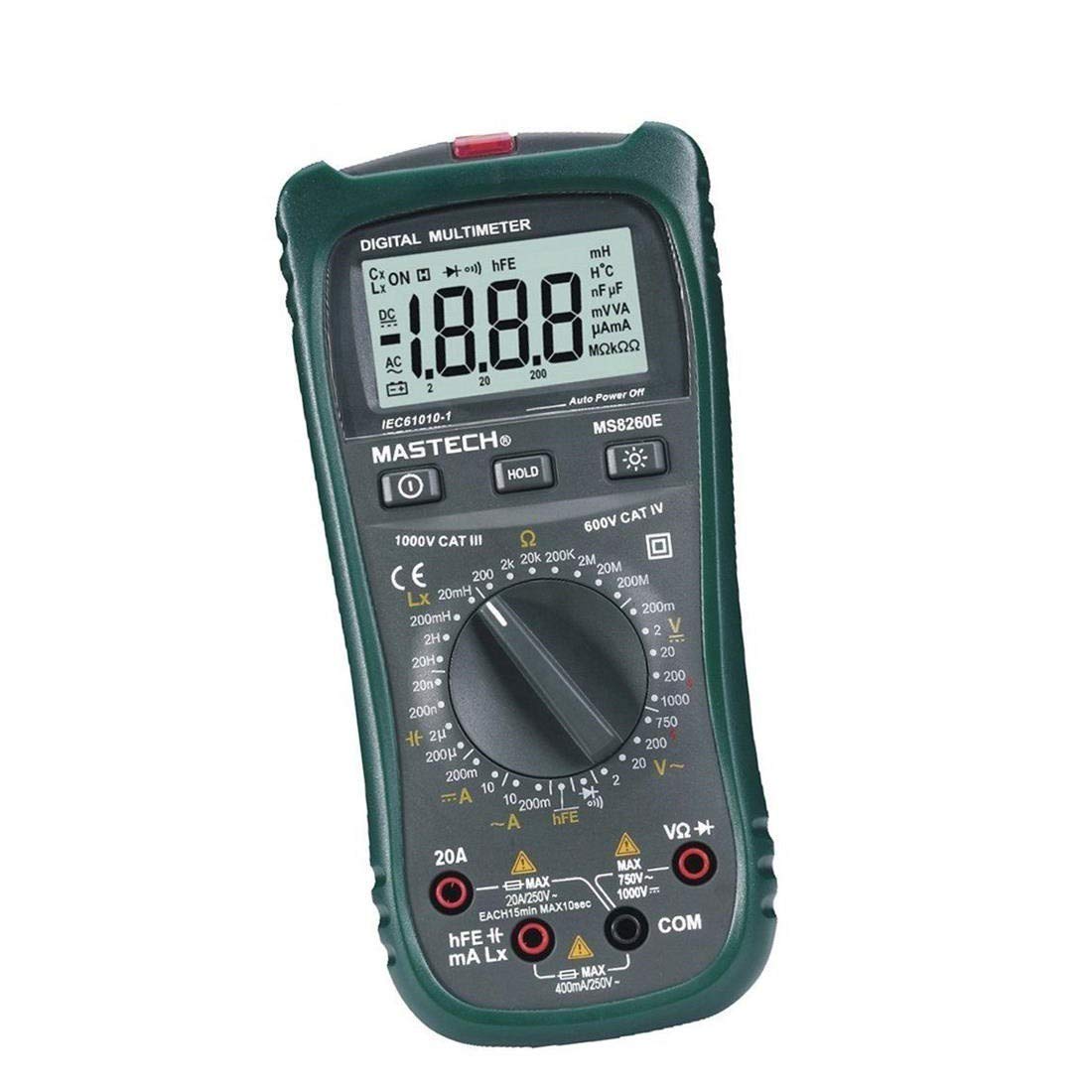
Figi 1: Devan view of the MASTECH MS8260E Digital Multimeter, showing the LCD display, function rotary switch, and input jacks.
2. Enfòmasyon sou Sekirite
To ensure safe operation and service of the meter, follow these safety guidelines:
- Read and understand all instructions in this manual before using the meter.
- Toujou respekte kòd sekirite lokal ak nasyonal yo.
- Pa sèvi ak mèt la si li sanble domaje oswa si izolasyon sou fil tès yo konpwomèt.
- Observe the input limits for each measurement range to prevent electrical shock or damage to the meter. This meter is rated for CAT.IV 600V.
- Pran prekosyon lè w ap travay ak voltagpi wo pase 30V AC RMS, 42V pik, oswa 60V DC. Volim sa yotages poze yon danje chòk.
- Toujou dekonekte kouran sikwi a epi dechaje tout gwo vòltaj yo.tage capacitors before making resistance, continuity, diode, or capacitance measurements.
- Ranplase pil la imedyatman lè endikatè pil ki fèb la parèt pou asire lekti ki egzak.
- Pa sèvi ak mèt la nan anviwònman ki gen gaz, vapè, oswa pousyè ki ka eksploze.
3. Pwodwi souview
The MS8260E multimeter is equipped with several features to facilitate accurate and convenient measurements:
- Large 2000 Counts LCD Display: Provides clear digital readings.
- Bati-an ki pa Peye-Kontak Voltage (NCV) Detector: Detekte AC voltage greater than 110V without physical contact, indicated by a flash warning.
- Fonksyon kenbe done: Li bloke lekti ki parèt la pou anrejistreman fasil.
- Ekspozisyon ekleraj: Improves visibility in dimly lit conditions.
- Auto Power Off: Conserves battery life by automatically turning off the meter after a period of inactivity.
- Endikasyon batri ki ba: Alerts the user when the battery needs replacement.
- Endikasyon polarite: Automatically displays negative polarity.
- 30-Range Rotary Switch: Selects various measurement functions including AC/DC voltage, AC/DC current, resistance, capacitance, inductance, diode check, continuity test, and transistor (hFE) check.
4. Enstalasyon
4.1 Enstalasyon batri
The MS8260E requires one 9V battery (NEDA 1604/6F22). To install or replace the battery:
- Ensure the meter is turned off and disconnect all test leads from the input terminals.
- Jwenn kouvèti konpatiman pil la sou dèyè mèt la.
- Devise vis (yo) ki kenbe yo epi retire kouvèti a.
- Insert the 9V battery, observing the correct polarity.
- Remèt kouvèti konpatiman batri a epi byen sere l ak vis(yo).
4.2 Konekte fil tès yo
Always connect the black test lead to the "COM" (common) input jack. Connect the red test lead to the appropriate input jack based on the desired measurement:
- Pou Voltage, Resistance, Capacitance, Inductance, Diode, Continuity, and hFE measurements: Connect the red lead to the "VΩCAPHz" jack.
- For Current measurements up to 200mA: Connect the red lead to the "mA" jack.
- For Current measurements up to 10A: Connect the red lead to the "10A" jack.
Ensure test leads are fully inserted into the jacks before taking measurements.
5. Operasyon Enstriksyon
Turn the rotary switch to the desired function. The meter will display "OL" (Overload) if no input is present or if the input exceeds the range.
5.1 DC Voltage Mezi (DCV)
- Set the rotary switch to the desired DCV range (200mV, 2V, 20V, 200V, 1000V).
- Connect the black test lead to the "COM" jack and the red test lead to the "VΩCAPHz" jack.
- Konekte fil tès yo atravè konpozan oswa sikwi ou vle mezire a, pandan w ap obsève polarite a.
- Li voltage valè sou ekspozisyon LCD a.
5.2 AC Voltage Mezi (ACV)
- Set the rotary switch to the desired ACV range (2V, 20V, 200V, 750V).
- Connect the black test lead to the "COM" jack and the red test lead to the "VΩCAPHz" jack.
- Konekte fil tès yo atravè vòltaj AC a.tage sous.
- Li voltage valè sou ekspozisyon LCD a.
5.3 DC Current Measurement (DCA)
- Set the rotary switch to the desired DCA range (200mA, 10A).
- For measurements up to 200mA, connect the red lead to the "mA" jack. For measurements up to 10A, connect the red lead to the "10A" jack. The black lead connects to "COM".
- Open the circuit where current is to be measured and connect the meter in series with the load.
- Li valè aktyèl la sou ekspozisyon LCD a.
5.4 AC Current Measurement (ACA)
- Set the rotary switch to the desired ACA range (200mA, 10A).
- For measurements up to 200mA, connect the red lead to the "mA" jack. For measurements up to 10A, connect the red lead to the "10A" jack. The black lead connects to "COM".
- Open the circuit where current is to be measured and connect the meter in series with the load.
- Li valè aktyèl la sou ekspozisyon LCD a.
5.5 Mezi Rezistans (Ω)
- Set the rotary switch to the desired Ω range (200Ω, 2kΩ, 20kΩ, 200kΩ, 2MΩ, 20MΩ, 200MΩ).
- Connect the black test lead to "COM" and the red test lead to "VΩCAPHz".
- Asire w ke sikwi a pa gen enèji epi tout kondansateur yo dechaje.
- Connect the test leads across the resistor or component.
- Li valè rezistans lan sou ekran LCD a.
5.6 Mezi Kapasitans (CAP)
- Set the rotary switch to the desired CAP range (20nF, 200nF, 2uF, 200uF).
- Connect the black test lead to "COM" and the red test lead to "VΩCAPHz".
- Asire w ke kondansateur a dechaje nèt anvan ou konekte fil tès yo.
- Konekte fil tès yo atravè kondansateur a.
- Li valè kapasite a sou ekspozisyon LCD a.
5.7 Inductance Measurement (L)
- Set the rotary switch to the desired Inductance range (20mH, 200mH, 2H, 20H).
- Connect the black test lead to "COM" and the red test lead to "VΩCAPHz".
- Connect the test leads across the inductor.
- Read the inductance value on the LCD display.
5.8 Tès Dyòd
- Set the rotary switch to the Diode symbol.
- Connect the black test lead to "COM" and the red test lead to "VΩCAPHz".
- Connect the red lead to the anode and the black lead to the cathode of the diode. A forward voltage drop (typically 0.5V to 0.8V for silicon diodes) will be displayed.
- Reverse the leads. The display should show "OL" for a good diode.
5.9 Tès kontinwite
- Set the rotary switch to the Continuity symbol.
- Connect the black test lead to "COM" and the red test lead to "VΩCAPHz".
- Konekte fil tès yo atravè sikwi a oswa konpozan an.
- Si rezistans lan anba apeprè 30Ω, vibrer la ap sonnen, pou endike kontinwite.
5.10 Tès Tranzistò (hFE)
- Mete switch rotary a nan pozisyon hFE.
- Identify the type (NPN or PNP) and pinout (Emitter, Base, Collector) of the transistor.
- Insert the transistor leads into the corresponding sockets in the hFE test socket on the meter.
- Read the hFE (DC current gain) value on the LCD display.
5.11 Voltage (NCV) Deteksyon
- Mete switch rotary a nan pozisyon NCV la.
- Hold the top front part of the meter near the AC voltage source (e.g., an electrical outlet or insulated wire).
- Si AC voltage greater than 110V is detected, the NCV indicator light will flash, and the buzzer may sound.
6. Antretyen
6.1 Netwayaj
Siye kontè a ak piblisiteamp twal ak yon savon dou. Pa sèvi ak pwodui abrazif oswa solvang. Asire w ke mèt la sèk anvan ou itilize li.
6.2 Ranplasman batri
When the "BAT" symbol appears on the display, the battery needs to be replaced. Refer to Section 4.1 for battery installation instructions.
6.3 Ranplasman Fuse
If the current measurement function fails, the fuse may need replacement. This operation should only be performed by qualified personnel. Refer to the service manual or contact customer support for fuse specifications and replacement procedures.
6.4 Depo
If the meter is not to be used for an extended period, remove the battery to prevent leakage and damage to the meter. Store the meter in a cool, dry place away from direct sunlight.
NAN. Depanaj
| Pwoblèm | Kòz posib | Solisyon |
|---|---|---|
| Pa gen ekspozisyon oswa ekspozisyon fèb | Low battery; Meter off | Replace battery; Turn on meter |
| "OL" parèt | Input exceeds range; Open circuit (for resistance/continuity) | Select higher range; Check circuit connection |
| Lekti ki pa kòrèk | Low battery; Incorrect range selected; Poor test lead contact | Replace battery; Select appropriate range; Ensure good contact |
| Mezi aktyèl la pa fonksyone | Kònen fuse | Replace fuse (by qualified personnel) |
8. Espesifikasyon
| Fonksyon Mezi | Range | Presizyon |
|---|---|---|
| DC Voltage (DCV) | 200mV, 2V, 20V, 200V, 1000V | ±0.5% (200mV-200V), ±0.8% (1000V) |
| AC Voltage (ACV) | 2V, 20V, 200V, 750V | ±0.8% (2V-200V), ±1.2% (750V) |
| DC aktyèl (DCA) | 200mA, 10A | ±1.5% (200mA), ±2.0% (10A) |
| AC aktyèl (ACA) | 200mA, 10A | ±1.8% (200mA), ±3.0% (10A) |
| Rezistans (Ω) | 200Ω, 2kΩ, 20kΩ, 200kΩ, 2MΩ, 20MΩ, 200MΩ | ±0.8% (200Ω-2MΩ), ±1.0% (20MΩ), ±5.0% (200MΩ) |
| Kapasite (CAP) | 20nF, 200nF, 2uF, 200uF | ±4.0% (20nF-2uF), ±5.0% (200uF) |
| Enduktans (L) | 20mH, 200mH, 2H, 20H | ± 3.0% |
| Kontinwite ki tande | Buzzer sounds at <30Ω | N/A |
| Tès dyòd | 1mA, 2.8V | N/A |
| Transistor (hFE) | 0 - 1,000 | N/A |
Espesifikasyon jeneral:
- Ekspozisyon: 2000 konte LCD
- Evalyasyon sekirite: CAT.IV 600V
- Pouvwa: 9V battery (NEDA 1604/6F22)
- Pwa: Approximately 1 kg (including battery)
9. Garanti ak sipò
For warranty information, technical support, or service inquiries, please refer to the warranty card included with your product or visit the official Mastech website. Do not attempt to repair the meter yourself, as this may void the warranty and pose safety risks.