
1. Entwodiksyon
This manual provides detailed instructions for the installation, operation, and maintenance of your Dynavin N7-VT7 PRO Radio Navigation System. This system is designed as a direct replacement for the factory radio in VW Touareg models from 2003 to 2009, integrating seamlessly with your vehicle's existing systems.
Karakteristik kle yo enkli:
- 7-inch capacitive LCD touch screen display (1024 x 600 resolution)
- Integrated GPS navigation with maps for North America, Europe, or Australia
- Bluetooth pou apèl men lib ak difizyon odyo
- Apple CarPlay and Android Auto compatibility via USB
- USB and Micro SD card media playback
- AM/FM radio tuner
- Backup camera readiness
- Integration with vehicle's DSP processor (if equipped)
2. Enfòmasyon sou Sekirite
Avi legal enpòtan:
- Installation must be performed by a trained specialist.
- Ensure the vehicle is de-energized before beginning installation.
- In some cases, the vehicle battery may need to be disconnected. Consult your vehicle manufacturer's guidelines.
- Modifying vehicle electronics may affect manufacturer warranty.
Always prioritize safety during installation and operation. Avoid operating the system's complex functions while driving to prevent distractions.
3. Enstalasyon ak Enstalasyon
The Dynavin N7-VT7 PRO is designed for plug-and-play installation, integrating with your vehicle's factory wiring and controls. Professional installation is highly recommended to ensure proper functionality and to avoid damage to the unit or vehicle.
3.1 Kontni pake a
Verifye ke tout konpozan yo prezan nan pake a:
- Dynavin N7-VT7 PRO Head Unit
- GPS antèn
- USB kab
- Wiring Harnesses (vehicle-specific)
- Manyèl Itilizatè (dokiman sa a)
- External Microphone (if included)
3.2 Enstalasyon souview
The unit replaces the existing factory radio. Specific steps for removal of the old unit and installation of the new Dynavin system will vary slightly depending on your vehicle's trim. Refer to a qualified installer or vehicle-specific guides for detailed instructions.

Figi 3.1: The Dynavin N7-VT7 PRO unit seamlessly integrated into a Volkswagen Touareg dashboard, demonstrating its OEM-look design.
After physical installation, connect all wiring harnesses, the GPS antenna, and any external accessories like a backup camera or SiriusXM tuner (sold separately).
4. Operasyon Enstriksyon
The Dynavin N7-VT7 PRO features an intuitive touchscreen interface. Most functions are accessible via the main menu or dedicated physical buttons.
4.1 Entèfas prensipal laview
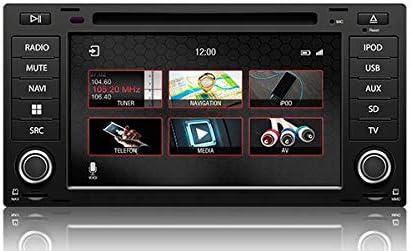
Figi 4.1: The main menu screen displaying various function icons such as Radio, Navigation, Telephone, Media, and AV input.
From the main screen, tap on the desired icon to access functions like Radio, Navigation, Bluetooth (Telefon), Media (USB/SD), and AV input.
4.2 Operasyon radyo
Tap the "Radio" icon from the main menu or press the physical "RADIO" button. You can tune to AM/FM stations, save presets, and access features like RDS (Radio Data System) where available.

Figi 4.2: The radio interface showing station presets and current frequency. Users can navigate between stations using the on-screen arrows or physical controls.
For SiriusXM compatibility, an SXV300 Tuner (sold separately) is required. Once installed, access SiriusXM through the dedicated icon or source selection.

Figi 4.3: The SiriusXM interface displaying channel information and presets, allowing access to satellite radio content.
4.3 Sistèm Navigasyon
Tap the "Navigation" icon to launch the integrated GPS navigation software. The system comes pre-loaded with maps for North America, Europe, or Australia, depending on your region.
- Antre Destinasyon: Enter addresses, points of interest, or coordinates.
- Gidans Itinerè: Follow turn-by-turn voice prompts and on-screen directions.
- Kat jeyografik View: Chanje ant 2D ak 3D views, adjust zoom levels.
4.4 Koneksyon Bluetooth
Pè smartphone ou atravè Bluetooth pou apèl men-gratis ak difizyon odyo.
- Go to the "Telefon" (Bluetooth) menu.
- Pèmèt Bluetooth sou smartphone ou epi chèche aparèy ki disponib.
- Select "Dynavin" from the list on your phone and confirm the pairing code.
- Once paired, you can make/receive calls and stream music.
4.5 Apple CarPlay ak Android Auto
Connect your compatible smartphone via USB to use Apple CarPlay or Android Auto. This allows you to access select phone apps directly on the Dynavin display.

Figi 4.4: The Apple CarPlay interface displaying common applications like Phone, Music, Maps, and Messages, integrated with the Dynavin unit.
Ensure your phone's operating system is up to date for optimal performance with CarPlay or Android Auto.
4.6 Media Playback (USB/SD)
Insert a USB drive or Micro SD card into the designated ports. The system supports various audio and video formats. Tap the "Media" icon to browse and play content.
4.7 Anviwònman son
Access the sound settings to adjust audio output, equalizer, and balance/fader controls. The system integrates with your vehicle's DSP processor if equipped.

Figi 4.5: The sound settings interface, allowing users to adjust audio parameters such as balance, fader, and specific sound profiles within the vehicle cabin.
Additional sound options may include confirmation tones, PDC (Park Distance Control) and warning tones, and settings for factory amplifikatè.
4.8 Anviwònman Sistèm
The system settings menu allows you to configure various aspects of the unit, including:
- Rejyon: Set the geographical region for radio and navigation.
- Koulè: Adjust display color schemes.
- Kamera: Configure backup camera settings.
- Klate: Manually adjust screen brightness.
- Zòn Tan: Mete zòn tan ki kòrèk la.
- Ranvèse: Configure reverse camera and PDC integration.

Figi 4.6: The system settings interface, showing options for region, display color, camera settings, brightness adjustment, time zone, and reverse camera configuration.
5. Antretyen
5.1 Netwaye Display la
Sèvi ak yon twal mou ki pa gen pousyè pou siye ekran tactile a dousman. Pou tach ki difisil pou retire, siye yon ti kras.ampLave twal la avèk dlo oswa yon pwodui netwayaj ki pa danjere pou ekran. Evite materyèl abrazif oswa pwodui chimik ki agresif.
5.2 Mizajou Firmware
Periodic firmware updates may be released to improve performance, add features, or address issues. Check the official Dynavin website or contact your distributor for information on available updates and instructions for installation.
NAN. Depanaj
If you encounter issues with your Dynavin N7-VT7 PRO, refer to the following common solutions:
- Pa gen pouvwa: Check all wiring connections and vehicle fuses. Ensure the vehicle battery is properly connected.
- Pa gen son: Verifye koneksyon oratè yo. Tcheke nivo volim yo ak paramèt silans yo. Asire w ke sous odyo ki kòrèk la chwazi.
- Pèt siyal GPS: Asire w antèn GPS la byen enstale epi li gen yon vizyon klè. view nan syèl la.
- Pwoblèm Bluetooth Pairing: Delete previous pairings from both the unit and your phone. Restart both devices and attempt pairing again.
- Ekran taktil la pa reponn: Perform a soft reset (refer to specific instructions from Dynavin support if available).
- Apple CarPlay/Android Auto pa konekte: Ensure your phone is compatible and its operating system is updated. Try a different USB cable.
For persistent issues, contact Dynavin customer support or your authorized dealer for assistance.
7. Espesifikasyon
| Karakteristik | Spesifikasyon |
|---|---|
| Nimewo Modèl | N7-VWTG-PRO |
| Gwosè ekspozisyon | 7 pous |
| Rezolisyon ekspozisyon | 1024 x 600 |
| Kalite ekspozisyon | Capacitive LCD, Anti-glare Touchscreen |
| Sistèm operasyon | DynOS |
| Koneksyon | USB, Bluetooth |
| Kalite kat jeyografik | North America, Europe, or Australia (region-specific) |
| Kalite Sèvis Machin | Car (VW Touareg 2003-2009) |
| Dimansyon pake | 13 x 11 x 9 pous |
8. Garanti ak sipò
For warranty information, please refer to the documentation provided with your purchase or contact your authorized Dynavin dealer. J&T Distributing is the official distributor of Dynavin in North America and can provide support for products purchased through their channels.
For technical assistance, troubleshooting, or inquiries regarding firmware updates, please visit the official Dynavin websit oswa kontakte sipò kliyan yo.