
Entwodiksyon
Thank you for choosing the Mipro MR-823 Dual Hand Wireless Microphone system. This manual provides detailed instructions for the proper setup, operation, and maintenance of your new wireless microphone system. Please read this manual thoroughly before using the product to ensure optimal performance and longevity.
Enfòmasyon sou Sekirite
- Pa ekspoze aparèy la anba lapli oswa imidite pou evite dife oswa chòk elektrik.
- Pa mete objè ki ranpli ak likid, tankou vaz, sou aparèy la.
- Asire bon vantilasyon; pa bouche okenn ouvèti vantilasyon.
- Itilize sèlman atachman/akseswa manifakti a espesifye.
- Refere tout sèvis yo bay pèsonèl sèvis ki kalifye yo. Antretyen obligatwa lè aparèy la te domaje nan okenn fason.
Kontni pake
Tanpri verifye sa ki nan pake a pou asire w ke tout atik yo la:
- 1 x Mipro MR-823 Wireless Receiver Unit
- 2 x Handheld Wireless Microphones
- Adaptè pouvwa
- Audio Kab
Pwodwi souview
The Mipro MR-823 system consists of a receiver unit and two handheld wireless microphones, designed for clear and reliable audio transmission.
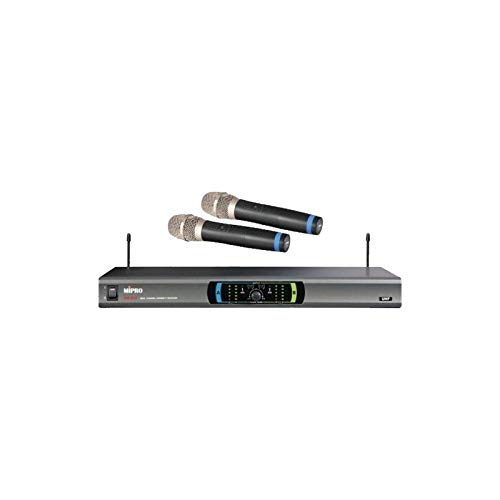
This image displays the complete Mipro MR-823 Dual Hand Wireless Microphone system. It features a sleek, rectangular receiver unit with a control panel and two antennas, accompanied by two black handheld wireless microphones. The microphones have silver grilles and blue accents near the base of the grille.
Receiver Unit Features:
- Front panel display for channel and status indication.
- Volume controls for each microphone channel.
- Antenna inputs for optimal signal reception.
- Audio output jacks (XLR and 1/4" unbalanced) on the rear panel.
Handheld Microphone Features:
- Integrated transmitter.
- Pouvwa switch.
- Lòj batri.
Enstalasyon
- Depake konpozan: Retire tout atik yo nan anbalaj la avèk prekosyon.
- Pozisyon Reseptè: Place the receiver unit on a stable, flat surface, away from potential sources of interference (e.g., computers, Wi-Fi routers). Ensure adequate ventilation around the unit.
- Konekte antèn: Screw the two antennas securely into their respective connectors on the rear of the receiver. Position them vertically for best reception.
- Konekte Audio Sòti: Connect the receiver's audio output (XLR or 1/4" unbalanced) to your mixer, amplifier, or sound system using the provided audio cable.
- Konekte pouvwa: Plug the power adapter into the DC input on the receiver and then into a suitable power outlet. Do not power on the unit yet.
- Install Microphone Batteries: Open the battery compartment of each handheld microphone and insert fresh batteries, observing the correct polarity.
- Pouvwa sou: Turn on your audio system first, then power on the Mipro MR-823 receiver. Finally, turn on each handheld microphone.
Enstriksyon Operasyon
Sinkronizasyon chanèl:
The MR-823 system typically features automatic frequency synchronization. Once the receiver and microphones are powered on, they should automatically link to an available clear channel. Refer to the receiver's display for channel information.
Ajiste Volim:
Use the individual volume control knobs on the front panel of the receiver to adjust the output level of each microphone. Start with a low volume and gradually increase it to avoid feedback or distortion.
Itilizasyon Mikwofòn:
- Hold the microphone approximately 2-6 inches from your mouth for optimal sound pickup.
- Avoid covering the microphone grille with your hand, as this can affect sound quality and signal strength.
- Ensure a clear line of sight between the microphones and the receiver for best wireless performance.
Antretyen
- Netwayaj: Use a soft, dry cloth to clean the exterior of the receiver and microphones. Do not use liquid cleaners or abrasive chemicals.
- Ranplasman batri: Replace microphone batteries when the low battery indicator appears or when audio quality degrades. Always use fresh, high-quality batteries.
- Depo: When not in use for extended periods, remove batteries from the microphones and store the system in a cool, dry place, away from direct sunlight and extreme temperatures.
- Swen antèn: Handle antennas carefully to avoid bending or breaking.
Depanaj
| Pwoblèm | Kòz posib | Solisyon |
|---|---|---|
| Pa gen son nan mikwofòn | Microphone not powered on; Low or dead batteries; Receiver not powered on; Volume too low; Microphone out of range; Frequency mismatch. | Ensure microphone and receiver are on; Replace batteries; Check receiver power; Increase volume; Move closer to receiver; Re-sync frequencies if necessary. |
| Move kalite son / Statik | Interference; Low batteries; Microphone too far from receiver; Obstructions; Incorrect gain settings. | Change operating frequency (if available); Replace batteries; Reduce distance; Remove obstructions; Adjust receiver volume. |
| Fidbak (son rèl) | Microphone too close to speakers; Volume too high; Room acoustics. | Move microphone away from speakers; Lower volume; Adjust speaker placement or use acoustic treatment. |
| Kout ranje san fil | Obstructions; Interference; Antenna position. | Ensure clear line of sight; Re-position antennas; Avoid placing receiver near metal objects or other wireless devices. |
Espesifikasyon
| Karakteristik | Spesifikasyon |
|---|---|
| Mak | MIPRO |
| Modèl | MR-823 |
| Enpedans | 250 Ohm |
| Sous pouvwa | Batri Powered |
| Siyal-a-bwi Pwopòsyon | 78 dB |
| Gamme frekans | 100 Hz - 10 KHz |
| Repons Frekans | 16 KHz |
| Dimansyon pake | 34.01 x 24.99 x 21.01 cm |
| Pwa atik | 122 g |
| Batri obligatwa | No (for receiver, but yes for microphones) |
| Karakteristik espesyal | San fil |
| Koulè | Nwa |
| Modèl polè | Omnidireksyon |
Garanti ak sipò
For warranty information and technical support, please refer to the warranty card included with your product or visit the official MIPRO websit la. Kenbe resi acha ou kòm prèv acha pou nenpòt reklamasyon garanti.
If you encounter issues not covered in this manual, please contact MIPRO customer service or your authorized dealer for assistance.