
1. Pwodwi souview
The Intermatic ET2725C is a versatile electronic timer designed for precise control of electrical loads. It features an easy-to-use interface for scheduling, offering to-the-minute programming capabilities for a wide range of applications. This model supports 50 holiday blocks with independent scheduling and up to 96 ON/OFF events, accommodating complex scheduling requirements. A key feature is its 100-hour backup power, provided by a supercapacitor, eliminating the need for batteries.
Karakteristik kle:
- 100-hour supercapacitor backup, eliminating battery requirements.
- Up to 96 programmable set points or events.
- Up to 50 holiday blocks with independent scheduling capabilities.
- Otomatik antre voltage selection from 120 to 277 Vac, 60 Hz.
- Additional mode of operation that converts ON/OFF buttons into 2-hour overrides.
2. Ki sa ki nan bwat la
Lè w ap ouvri pake a, verifye si tout konpozan yo la epi yo pa domaje.
- Intermatic Electronic Timer (Model ET2725C)
- Manyèl Enstriksyon (dokiman sa a)
3. Enfòmasyon sou Sekirite
AVÈTISMAN: Risk dife oswa chòk elektrik
- Always disconnect power at the circuit breaker(s) or disconnect switch(es) before installing or servicing this equipment.
- More than one circuit breaker or disconnect switch may be required to de-energize the equipment completely before servicing.
- Installation and/or wiring must be performed in accordance with all national and local electrical code requirements.
- Use COPPER conductors ONLY for wiring connections.
- Do NOT remove the internal insulator.
For wiring, lift the terminal cover, remove the screw, and swing it aside. Replace the screw and plastic insulator covering the terminal before powering on the device.
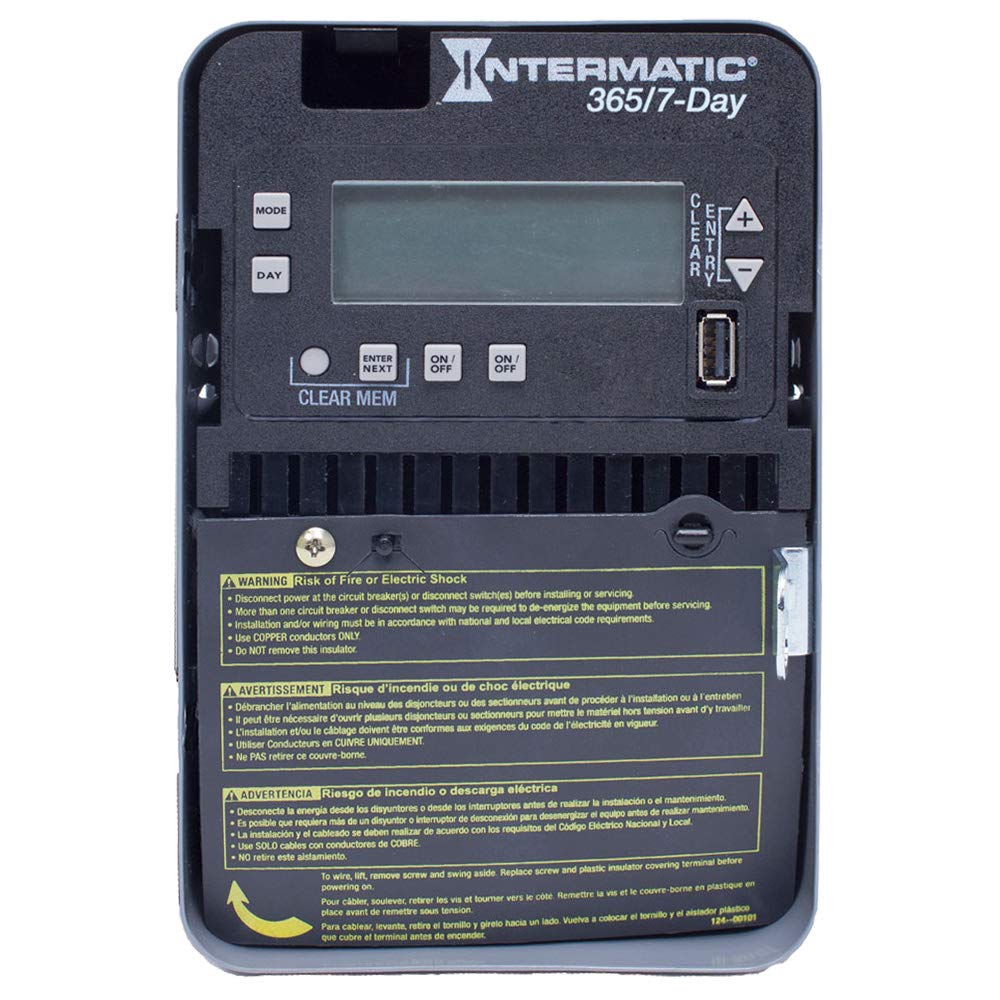
Figure 1: Front panel of the Intermatic ET2725C Electronic Timer, showing the display, control buttons (MODE, DAY, ENTER/NEXT, ON/OFF, CLEAR/ENTRY, +, -), and multi-language safety warnings at the bottom.
4. Enstalasyon ak fil elektrik
Proper installation is crucial for the safe and reliable operation of the ET2725C timer. Ensure all safety precautions are followed.
4.1 Montaj
Mount the timer securely in a suitable enclosure or location, ensuring it is protected from environmental elements and accessible for programming and maintenance. Refer to local electrical codes for specific mounting requirements.
4.2 Enstriksyon fil elektrik
- Dekonekte pouvwa: Before beginning any wiring, ensure that power to the circuit is completely disconnected at the main circuit breaker or disconnect switch. Verify with a voltage tèsteur.
- Access Terminals: To access the wiring terminals, lift the terminal cover, remove the retaining screw, and swing the cover aside.
- Konekte fil elektrik: Connect the appropriate copper conductors to the timer terminals as per the wiring diagram provided with the unit and local electrical codes. The timer supports 120 to 277 Vac, 60 Hz.
- Koneksyon an sekirite: Asire w ke tout koneksyon fil yo sere epi an sekirite.
- Replace Insulator: Before restoring power, replace the plastic insulator covering the terminals and secure the terminal cover with its screw. This is critical for safety.
- Retabli pouvwa: Yon fwa tout fil elektrik yo fini epi yo verifye, retabli kouran an nan sikwi a.
5. Operation and Programming
The ET2725C timer features a user-friendly interface for setting time, date, and programming events. The display and buttons (MODE, DAY, ENTER/NEXT, ON/OFF, CLEAR/ENTRY, +, -) are used for navigation and input.
5.1 Initial Setup (Setting Time and Date)
- Upon initial power-up or after a prolonged power outage (beyond 100 hours), the display may show default settings or require time/date input.
- Peze a MÒD bouton pou antre nan meni an konfigirasyon.
- Sèvi ak la + or - bouton yo pou ajiste lè aktyèl la (lè ak minit).
- Peze JOU pou fikse jou aktyèl la nan semèn nan.
- Peze ANTRE / PWOCHÈ to confirm settings and move to the next parameter.
- Continue adjusting year, month, and day as prompted until the current date and time are correctly set.
5.2 Pwogramasyon Evènman ON/OFF
The timer allows for up to 96 ON/OFF events. Each event can be programmed for specific times and days.
- Peze MÒD repeatedly until "PROG" or "EVENT" mode is displayed.
- Sèvi ak ANTRE / PWOCHÈ to select an event number (e.g., P1 ON).
- Sèvi ak + or - to set the desired ON time for the event.
- Peze JOU to select the days of the week for this event (e.g., Mon-Fri, Daily, Weekends, or individual days).
- Peze ANTRE / PWOCHÈ to move to the OFF time for the same event (e.g., P1 OFF).
- Repeat steps 3-4 for the OFF time.
- Kontinye ak ANTRE / PWOCHÈ to program additional events or exit programming mode.
5.3 Holiday Programming
The ET2725C supports up to 50 holiday blocks, allowing for temporary schedule overrides for specific dates.
- Access the holiday programming mode (refer to the on-screen prompts or specific button combinations).
- Select a holiday block.
- Mete dat yo kòmanse ak fen pou peryòd fèt la.
- Define the desired ON/OFF state or program a specific schedule for the holiday period.
- Confirm and save the holiday block.
5.4 Manyèl Override
The ON/OFF buttons can be used for manual overrides. In a specific mode, these buttons can provide a 2-hour override function, temporarily changing the load state without affecting the programmed schedule.
- Peze a ON/OFF button to manually switch the load ON or OFF.
- In override mode, a single press may activate a 2-hour override. Consult the display for confirmation.
5.5 Clearing Memory
To clear all programmed events and reset the timer to factory defaults (excluding current time/date), use the CLEAR MEM function. This typically involves pressing and holding the CLEAR MEM button for a few seconds until the display confirms the reset.
6. Antretyen
The Intermatic ET2725C timer is designed for long-term, reliable operation with minimal maintenance.
- Netwayaj: Periodically wipe the exterior of the timer with a soft, dry cloth. Do not use abrasive cleaners or solvents.
- Koneksyon: Annually, or as required by local codes, inspect wiring connections to ensure they remain tight and free from corrosion. Always disconnect power before inspecting connections.
- Superkondensateur: The internal supercapacitor provides backup power for up to 100 hours. No user maintenance or replacement is required for this component.
NAN. Depanaj
If you encounter issues with your ET2725C timer, refer to the following common troubleshooting steps:
| Pwoblèm | Kòz posib | Solisyon |
|---|---|---|
| Ekran revèy la vid. | No power to the unit; circuit breaker tripped. | Check circuit breaker and ensure power is supplied to the timer. Verify wiring connections. |
| Pwogram yo pa ap mache. | Incorrect time/date setting; program not enabled; manual override active. | Verify current time and date. Ensure programs are correctly set and enabled. Check for active manual overrides. |
| Load does not switch ON/OFF. | Incorrect wiring; faulty load; timer malfunction. | Verify wiring connections (power off first). Test the load independently. If issues persist, contact Intermatic support. |
| Time/date resets after power outage. | Pouvwa outage exceeded 100-hour supercapacitor backup. | Reset the current time and date manually. This is normal behavior if the outage se pwolonje. |
If troubleshooting steps do not resolve the issue, please contact Intermatic customer support.
8. Espesifikasyon
| Karakteristik | Detay |
|---|---|
| Nimewo Modèl | ET2725C |
| Voltage | 120 to 277 Vac, 60 Hz (Automatic Selection) |
| Ampepòk | 30 Amps |
| Mòd operasyon | 7/365 Jou |
| Kantite Chanèl | 2 |
| Evènman pwogram yo | Up to 96 ON/OFF events |
| Holiday Blocks | Up to 50 with independent scheduling |
| Pouvwa sovgad | 100-hour supercapacitor (no batteries required) |
| Materyèl | Plastik |
| Dimansyon pwodwi | 7"P x 7"L x 7"H (apeprè) |
| Pwa atik | 0.01 ons (apeprè) |
9. Garanti ak sipò
For warranty information, technical support, or service inquiries regarding your Intermatic ET2725C Electronic Timer, please contact Intermatic customer service directly. Refer to the official Intermatic websit la oswa anbalaj pwodwi a pou jwenn enfòmasyon kontak ak kondisyon garanti ki pi resan yo.
Manifakti: Intermatic
Dat premye disponib: 13 me 2019