
1. Entwodiksyon ak souview
This manual provides comprehensive instructions for the setup, operation, maintenance, and troubleshooting of your SHARP 4T-C55BJ3EF2NB 55-inch 4K UHD Smart LED TV. Please read this manual thoroughly before using your television to ensure proper functionality and safety.
The SHARP 4T-C55BJ3EF2NB is a 55-inch 4K Ultra HD Smart LED TV, offering a resolution of 3840 x 2160 pixels. It features Active Motion 400, HDR10, HLG, Aquos UltraClear, and Aquos Motion technologies for smooth and clear image movements. The integrated Harman/Kardon speaker system, with 2 x 10W output, Dolby Digital, Dolby Digital Plus, DTS-HD, DTS Studio Sound, and Sound Equalizer, delivers an immersive audio experience. This TV also includes a Triple Tuner for satellite, cable, and antenna reception, along with a range of pre-installed smart applications.

Figi 1.1: Devan view of the Sharp 4T-C55BJ3EF2NB 55-inch 4K UHD Smart LED TV, displaying colorful content and smart app logos.
2. Enfòmasyon sou Sekirite
Toujou swiv prekosyon sekirite debaz yo lè w ap itilize televizyon sa a pou diminye risk dife, chòk elektrik, ak blesi.
- Pa ekspoze televizyon an ak lapli oswa imidite.
- Pa bloke ouvèti vantilasyon.
- Asire w ke ou pa mache sou kòd elektrik la oswa ke ou pa kwense l.
- Dekonekte televizyon an pandan tanpèt zèklè oswa lè ou pa itilize li pou yon bon bout tan.
- Refere tout sèvis yo bay pèsonèl sèvis kalifye.
3. Pake kontni
Depake televizyon ou avèk atansyon epi verifye si tout bagay sa yo ladan l:
- 1 x SHARP 4T-C55BJ3EF2NB 55-inch 4K UHD Smart LED TV
- 1 x Remote Control (including 2 x AAA batteries)
- 1 x TV Stand with Installation Package (screws, etc.)
- 1 x Gid Quick Start
- 1 x Manyèl Itilizatè (dokiman sa a)
4. Enstalasyon
4.1 Enstalasyon fizik (Sipò oswa Monte sou miray)
You can either install the TV on its included stand or mount it on a wall. Ensure the TV is placed on a stable, level surface if using the stand.
Enstalasyon kanpe:
- Mete ekran televizyon an anba sou yon sifas ki plat e mou pou evite li domaje.
- Attach the stand components to the bottom of the TV using the provided screws from the installation package.
- Asire ke tout vis yo byen sere.
Montaj mi:
The TV supports VESA standard mounting 400 x 200 mm. Use a compatible wall mount bracket (not included) and follow the instructions provided with the wall mount. Ensure the wall can support the TV's weight (approximately 21.4 kg).
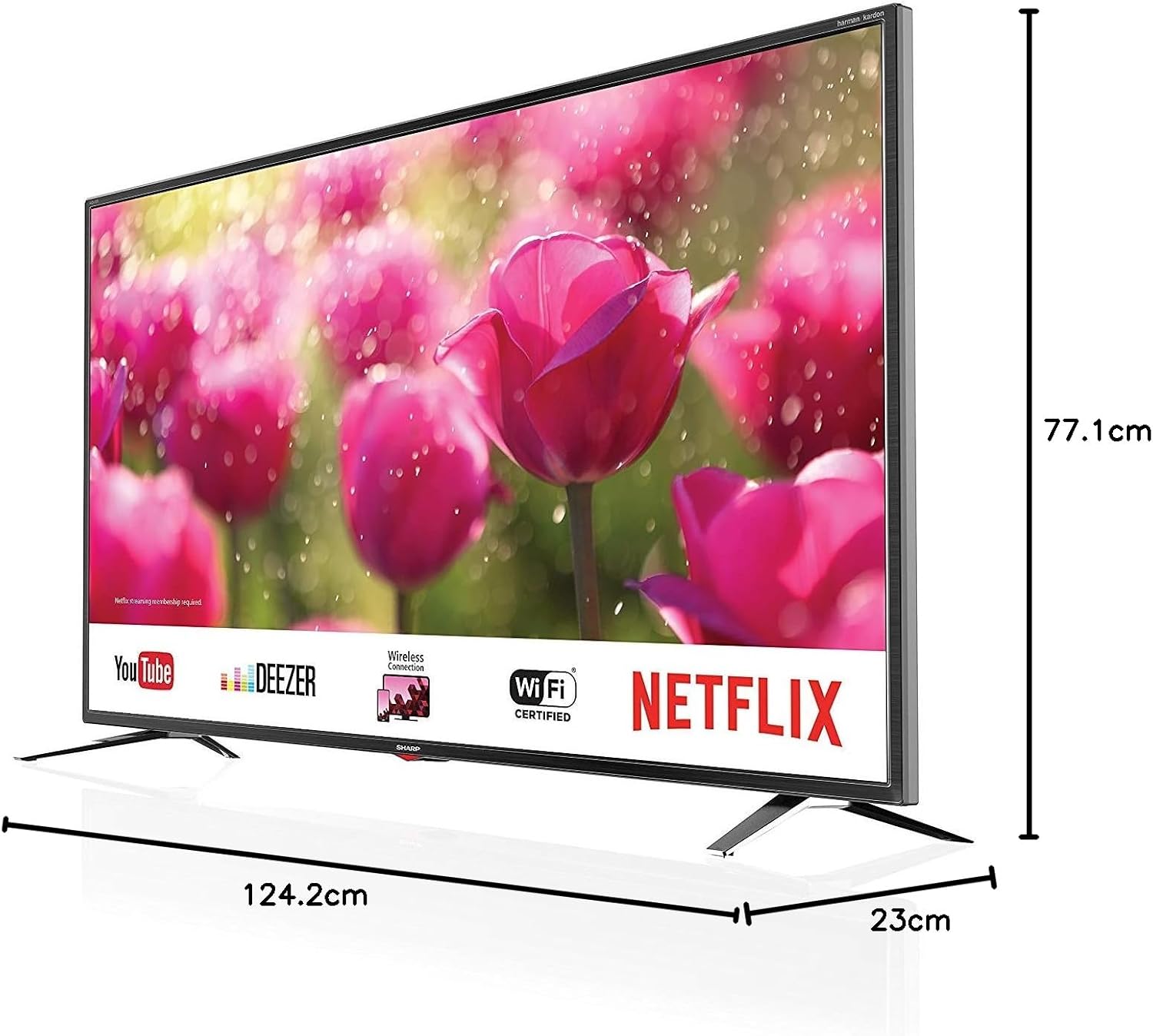
Figure 4.1: Product dimensions of the Sharp 4T-C55BJ3EF2NB 55-inch 4K UHD Smart LED TV.
4.2 Koneksyon
Connect your external devices to the TV using the appropriate ports located on the rear panel.

Figi 4.2: Dèyè view ki montre pò koneksyon yo.
- HDMI: Konekte jiska 3 aparèy HDMI (pa egzanp, yon lektè Blu-ray, yon konsole jwèt).
- USB: Connect USB storage devices for media playback (3 ports available).
- Antenna/Cable/Satellite: Connect your antenna, cable, or satellite feed to the Triple Tuner input.
- LAN (RJ-45): Pou koneksyon entènèt filaire.
- Sòti Digital Optical Audio: Pou konekte ak yon sistèm odyo ekstèn.
- Audio/Headphone (3.5 mm jack): Pou kas ekoutè oswa oratè ekstèn.
- Plas CI+: For Conditional Access Modules (CAM) for encrypted channels.
- Plas kat SD: For media playback from SD cards.
4.3 Premye Enstalasyon
After connecting all necessary cables and plugging in the power cord, press the power button on the remote control or TV. The TV will guide you through the initial setup process, including language selection, network connection (Wi-Fi or LAN), channel scanning, and time zone settings.
5. Opere
5.1 Operasyon debaz
- Limen/Etenyen: Peze bouton pouvwa a sou kontwòl remote la.
- Kontwòl Volim: Sèvi ak bouton VOL +/- yo.
- Seleksyon chanèl: Use the CH +/- buttons or number buttons.
- Sous Antre: Press the SOURCE button to select between HDMI, TV (Tuner), USB, etc.
- Navigasyon nan meni: Use the arrow keys and OK button to navigate menus.
5.2 Karakteristik televizyon entelijan
Your SHARP TV is equipped with smart functionalities, allowing access to various online content and applications via the Sharp Aquos Net+ App Store.
- Aplikasyon pre-enstale: Access popular services like YouTube, Deezer, Rakuten TV, Chili, Netflix, Eurosport Player, Joyn, and Prime Video directly from the home screen.
- Web Navigatè: Navige sou entènèt la dirèkteman sou televizyon ou.
- Wireless Connection (WLAN): Konekte ak rezo Wi-Fi lakay ou pou jwenn aksè a entènèt la.
5.3 Anviwònman Imaj ak Son
Customize ou vieweksperyans mizik ak koute atravè meni paramèt televizyon an.
- Mòd foto: Select from various preset picture modes (e.g., Standard, Movie, Game) or customize brightness, contrast, color, and sharpness.
- Sipò HDR: Televizyon an sipòte HDR10 ak HLG pou amelyore kontras ak koulè ak kontni konpatib.
- Mòd son: Choose from preset sound modes or adjust bass, treble, and balance. The Harman/Kardon speaker system provides high-quality audio.
- Egalizè Son: Fine-tune audio frequencies for a personalized sound profile.
5.4 Triple Tuner Operation
The integrated Triple Tuner supports DVB-T/T2 (terrestrial), DVB-C (cable), and DVB-S/S2 (satellite) signals. After initial channel scanning, you can access digital channels directly.
- Lis chanèl: View and manage your scanned channels.
- Gid Pwogram Elektwonik (EPG): Access program information and schedules.
6. Antretyen
6.1 Netwayaj
- Ekran: Siye ekran an dousman avèk yon twal mou ki pa gen pousyè. Pou mak ki difisil pou retire, sèvi ak yon solisyon netwayaj ekran ki fèt espesyalman pou televizyon, aplike sou twal la, pa dirèkteman sou ekran an.
- Kabinè: Siye kabinè televizyon an ak yon twal mou epi sèk. Pa sèvi ak pwodui netwayaj abrazif oswa solvan.
6.2 Mizajou lojisyèl
Periodically check for software updates to ensure optimal performance and access to the latest features. Updates can typically be performed via the TV's settings menu when connected to the internet.
NAN. Depanaj
Si w rankontre pwoblèm ak televizyon w lan, gade pwoblèm ak solisyon komen sa yo:
| Pwoblèm | Solisyon posib |
|---|---|
| Pa gen pouvwa | Tcheke si kòd kouran an byen branche nan televizyon an ak nan priz miray la. Eseye yon lòt priz. |
| Pa gen imaj, men gen son | Asire w ou chwazi bon sous done a. Tcheke koneksyon kab yo ak aparèy ekstèn yo. |
| Pa gen son, men imaj la la | Tcheke nivo volim nan ak estati silans lan. Verifye koneksyon kab odyo a. Tcheke paramèt pwodiksyon odyo televizyon an. |
| Remote kontwòl pa travay | Ranplase pil yo. Asire w pa gen okenn obstak ant telekòmand lan ak detèktè IR televizyon an. |
| Pa ka konekte ak Wi-Fi | Check Wi-Fi password. Restart your router. Ensure the TV is within range of the Wi-Fi signal. |
For more complex issues, consult the full user manual (if available in print) or contact Sharp customer support.
8. Espesifikasyon
| Karakteristik | Deskripsyon |
|---|---|
| Nimewo Modèl | 4T-C55BJ3EF2NB |
| Mak | Sharp |
| Gwosè ekran | 55 pous (139 cm) |
| Teknoloji ekspozisyon | dirije |
| Rezolisyon | 4K Ultra HD (3840 x 2160 piksèl) |
| Rafrechisman pousantaj | 60 Hz |
| Sipò HDR | HDR10, HLG |
| Teknoloji Mouvman | Active Motion 400, Aquos UltraClear, Aquos Motion |
| Sistèm son | Harman/Kardon, 2 x 10W (8 Ohm), Dolby Digital, Dolby Digital Plus, DTS-HD, DTS Studio Sound, Sound Equalizer |
| Tuner | Triple Tuner (DVB-T/T2/C/S/S2) with HEVC/H.265 (10-bit), MPEG4/H.264, VP9 support |
| Koneksyon | 3x HDMI 4K, 3x USB, Audio/Headphone (3.5 mm jack), Digital Optical Audio Output, LAN (RJ-45), WLAN (2.412 GHz – 2.472 GHz), 1x SD Card Slot, CI+ Slot |
| Karakteristik entelijan | Web Browser, Sharp Aquos Net+ App Store, Pre-installed apps (YouTube, Netflix, Deezer, Prime Video, etc.) |
| Dimansyon pwodwi (ak sipò) | 124.2 x 77.1 x 23 cm (W x H x P) |
| Pwa pwodwi (ak sipò) | 21.4 kg |
| VESA Mounting Standard | 400 x 200 mm |
| Manifakti | Sharp |
| Premye Dat ki disponib | 15 janvye 2020 |
9. Garanti ak sipò
Pou enfòmasyon sou garanti a, tanpri gade kat garanti ki vini ak pwodwi w la oswa vizite sit ofisyèl Sharp la. website. For technical support, troubleshooting assistance beyond this manual, or service requests, please contact Sharp customer service.
Sipò sou entènèt: www.sharp.eu