
1. Enstriksyon Sekirite Enpòtan
Please read all instructions carefully before using the UNIC UC28+ projector. Keep this manual for future reference.
- Pwovizyon pou pouvwa: Use only the specified power adapter. Ensure the power outlet voltage koresponn ak egzijans pwojektè a.
- Vantilasyon: Pa bloke ouvèti vantilasyon yo. Asire w ke gen ase espas ozalantou pwojektè a pou bon sikilasyon lè a ka anpeche l chofe twòp.
- Chalè: Pwojektè a lamp generates heat. Avoid touching the lens or ventilation areas immediately after use.
- Imidite: Do not expose the projector to rain, moisture, or immerse it in water. Keep liquids away from the device.
- Netwayaj: Unplug the projector before cleaning. Use a soft, dry cloth. Do not use liquid or aerosol cleaners.
- Sekirite je: Pa gade dirèkteman nan lantiy pwojektè a lè l ap limen.amp Limyè klere a ka lakòz domaj nan je yo.
- Plasman: Mete pwojektè a sou yon sifas ki plat e ki estab. Evite mete l anba limyè solèy dirèk oswa toupre sous chalè.
- Sèvis: Pa eseye fè sèvis pwodui sa a tèt ou. Refere tout sèvis yo bay pèsonèl sèvis kalifye.
2. Pwodwi souview
The UNIC UC28+ is a portable LED projector designed for home cinema and entertainment. It supports a native resolution of 1920x1080 and offers multiple input options for versatile connectivity.
2.1 Konpozan Pwojektè yo

Imaj 1: Top view of the UNIC UC28+ projector. This image displays the manual control buttons located on the top panel, including 'ENTER', navigation arrows, 'INPUT' for source selection, and 'ESC' for exiting menus. The focus ring is also visible at the front.

Imaj 2: Devan ak bò view of the UNIC UC28+ projector. This image highlights the main projection lens and the ventilation grilles on the side, essential for heat dissipation during operation.
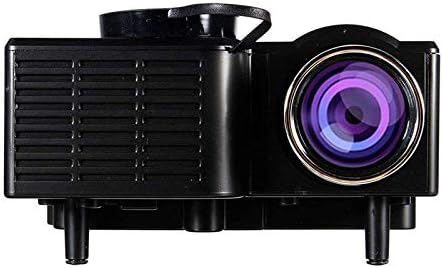
Imaj 3: Side view of the UNIC UC28+ projector. This image clearly shows the various input ports available: HDMI, USB, AV, SD card slot, and VGA, providing multiple options for connecting external devices.
3. Enstalasyon
3.1 Kontni pake a
- UNIC UC28+ LED Projector
- Adaptè pouvwa
- Kontwòl Remote
- AV Kab
- Manyèl itilizatè
3.2 Plasman Pwojektè
Position the projector on a stable, flat surface. Ensure the projection surface (screen or wall) is clean and smooth. The optimal projection distance will vary based on desired screen size. Adjust the projector's angle to achieve a rectangular image.
3.3 Koneksyon pouvwa
- Konekte adaptè kouran an nan pò antre kouran pwojektè a.
- Ploge adaptè pouvwa a nan yon priz elektrik apwopriye.
- Limyè endikatè pouvwa a sou pwojektè a ap limen.
3.4 Konekte Aparèy Antre
The UC28+ supports various input sources:
- HDMI: Connect a device (e.g., laptop, Blu-ray player, gaming console) using an HDMI cable to the HDMI port.
- USB: Mete yon kle USB nan pò USB a pou li medya yo files dirèkteman.
- DE: Use the provided AV cable to connect older devices (e.g., DVD player, VCR) to the AV port.
- Kat SD: Insert an SD card into the SD card slot to play media files.
- VGA: Connect a computer or laptop using a VGA cable to the VGA port.

Imaj 4: Connectivity diagram for the UNIC UC28+ projector. This illustration demonstrates how various external devices such as computers, gaming consoles, smartphones, and media players can be connected to the projector using its multiple input options.
3.5 Ajisteman Konsantre
After powering on and selecting an input source, rotate the focus ring located around the lens until the projected image appears clear and sharp.
4. Operasyon Enstriksyon
4.1 Limen/Etenyen
- Pouvwa sou: Press the power button on the projector or the remote control. The projector will start up, and the lamp pral eklere.
- Pouvwa Off: Press the power button again. The projector will initiate a shutdown sequence. Allow the projector to cool down completely before unplugging or moving it.
4.2 Seleksyon Sous Antre
Press the 'INPUT' button on the projector or remote control to cycle through available input sources (HDMI, USB, AV, SD, VGA). Select the source corresponding to your connected device.
4.3 Navigasyon meni
Use the navigation arrows on the projector or remote control to move through menu options. Press 'ENTER' to confirm a selection and 'ESC' to go back or exit the menu.
4.4 Anviwònman debaz yo
- Mòd Foto: Ajiste klète, kontras, koulè, ak netteté.
- Rapò aspè: Select between 16:9, 4:3, or Auto to match your content.
- Son: Adjust volume or mute the audio output.
5. Antretyen
Antretyen regilye asire pèfòmans optimal epi pwolonje dire lavi pwojektè ou a.
- Netwayaj lantiy: Use a soft, lint-free cloth or lens cleaning paper to gently wipe the lens. Avoid abrasive materials or excessive pressure.
- Projector Body Cleaning: Wipe the exterior of the projector with a soft, dry cloth. Do not use harsh chemicals or solvents.
- Vantilasyon: Periodically check and clean the ventilation grilles to prevent dust buildup, which can impede airflow and cause overheating. Use a soft brush or compressed air.
- Depo: Lè w pa itilize pwojektè a pou yon bon bout tan, sere l nan yon kote ki fre, sèk, epi san pousyè. Sèvi ak anbalaj orijinal la oswa yon kouvèti pwoteksyon.
NAN. Depanaj
Si ou rankontre pwoblèm ak pwojektè ou a, gade pwoblèm ak solisyon komen sa yo:
| Pwoblèm | Kòz posib | Solisyon |
|---|---|---|
| Pa gen pouvwa | Kab kouran an dekonekte, pwoblèm priz kouran | Tcheke koneksyon kab kouran an. Eseye yon lòt priz kouran. |
| Pa gen Imaj | Incorrect input source, cable not connected, device not powered on | Select correct input source. Ensure all cables are securely connected. Power on the source device. |
| Imaj flou | Focus not adjusted, incorrect projection distance | Adjust the focus ring. Reposition the projector for optimal distance. |
| Pa gen Son | Volume too low, audio cable disconnected, source device muted | Increase projector volume. Check audio cable connections. Unmute source device. |
| Avètisman Surchof | Blocked ventilation, prolonged use | Ensure ventilation openings are clear. Allow the projector to cool down. |
7. Espesifikasyon
| Karakteristik | Detay |
|---|---|
| Mak | UNIC |
| Nimewo Modèl | UC28+ |
| Kalite ekspozisyon | dirije |
| Rezolisyon natif natal | 1920 x 1080 piksèl |
| Rezolisyon ekspozisyon maksimòm | 1920 x 1080 piksèl |
| Klète | 400 Lumen |
| Koneksyon Teknoloji | HDMI, USB, AV, SD, VGA |
| Faktè fòm | Pòtab |
| Kalite aliye | Tabletop mòn |
| Konsomasyon pouvwa | 70 Watts |
8. Garanti ak sipò
For warranty information or technical support, please refer to the warranty card included with your product or contact the retailer where the product was purchased. Keep your proof of purchase for warranty claims.