
1. Entwodiksyon
Mèsi pou acha aasing the UHAPPY U18 Portable Mini HD LED Projector. This manual provides essential information for the safe and efficient operation of your device. Please read it thoroughly before use and retain it for future reference.
Prekosyon Sekirite
- Pa gade dirèkteman nan lantiy pwojektè a lè l ap limen.amp se sou.
- Asire bon vantilasyon alantou pwojektè a pou anpeche surchof.
- Pa ekspoze pwojektè a anba lapli oswa imidite.
- Sèvi sèlman ak adaptè kouran ki vini ak pwojektè a.
- Pa eseye ouvri oswa repare pwojektè a tèt ou. Konfye tout antretyen bay pèsonèl kalifye.
2. Pwodwi souview
Familiarize yourself with the components and ports of your UHAPPY U18 projector.
Kontni pake
The following items are included in your projector package:

Image: Contents of the UHAPPY U18 projector package, including the projector, power adapter, AV cable, remote control, and user manual.
- UHAPPY U18 Mini LED Projector
- Adaptè pouvwa
- AV Kab
- Kontwòl Remote
- Manyèl Itilizatè (dokiman sa a)
Projector Components and Ports

Image: Angled top-down view of the UHAPPY U18 projector, highlighting the lens, focus adjustment, and control panel.

Imaj: Anlè view of the UHAPPY U18 projector, showing the integrated control buttons.

Imaj: Devan view of the UHAPPY U18 projector, focusing on the projection lens.
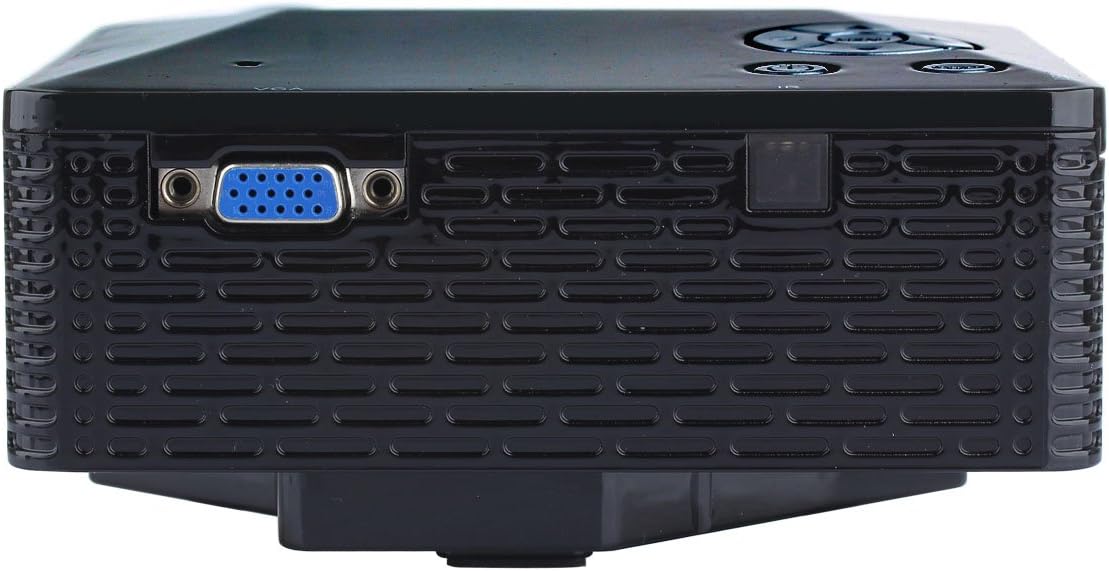
Imaj: Bò kote view of the UHAPPY U18 projector, illustrating the VGA input port.
The projector features various input ports for connectivity:
- Antre HDMI: For connecting devices like laptops, gaming consoles, or media players.
- Pò USB: For connecting USB storage devices to play media directly.
- Plas kat SD: For inserting SD memory cards to play media directly.
- Antre AV: Pou konekte ansyen aparèy yo lè l sèvi avèk kab AV ki enkli a.
- Antre VGA: For connecting computers or laptops with a VGA output.
- DC-IN: Pò D 'pouvwa.
- Sòti ekoutè: For connecting external audio devices or headphones.
- Bouton konsantre: Located near the lens for adjusting image clarity.
3. Enstalasyon
3.1 Plasman
Place the projector on a stable, flat surface. Ensure there is adequate space around the projector for ventilation. The ideal projection distance is between 1 to 4 meters, yielding an image size of 20 to 80 inches.
3.2 Koneksyon pouvwa
- Connect the power adapter to the DC-IN port on the projector.
- Ploge adaptè pouvwa a nan yon priz elektrik apwopriye.
3.3 Konekte Aparèy Antre
Choose the appropriate cable and port based on your source device:
- HDMI: Connect an HDMI cable from your device (e.g., laptop, DVD player) to the projector's HDMI port.
- VGA: Connect a VGA cable from your computer to the projector's VGA port.
- DE: Use the provided AV cable to connect devices with AV output (e.g., older DVD players, set-top boxes) to the projector's AV port.
- USB/SD kat: Mete yon kle USB nan pò USB a oubyen yon kat SD nan fant kat SD a.
4. Operasyon Enstriksyon
4.1 Limen/Etenyen
- Pou limen: Press the power button on the projector or the remote control. The LED indicator will light up.
- Pou etenn: Press the power button again. It is recommended to allow the projector to cool down for a few minutes before unplugging it.
4.2 Seleksyon Sous
After powering on, you may need to select the input source:
- Press the 'Source' button on the projector or the remote control.
- Use the navigation buttons to select the desired input (HDMI, VGA, AV, USB, SD) and press 'OK' or 'Enter'.
4.3 Ajisteman Konsantre
If the projected image appears blurry:
- Rotate the focus knob located near the projector lens until the image becomes clear and sharp.
4.4 Navigasyon meni
Use the 'Menu' button on the projector or remote to access settings. Use the navigation arrows to move through options and 'OK' or 'Enter' to confirm selections. The projector supports multiple languages including English, Czech, Slovak, Danish, German, Spanish, French, Croatian, Italian, Hungarian, Dutch, Norwegian, Polish, Portuguese, Romanian, Slovene, Serbian, Finnish, Swedish, Bulgarian, Greek, Russian, and Chinese.
4.5 Fòma medya sipòte
When playing media directly from USB or SD card, the projector supports the following formats:
- Imaj: BMP, JPEG, PNG
- Videyo: MPEG1, MPEG2, MPEG4, RM, RMVB, AVI, FLV, WMV
5. Antretyen
5.1 Netwaye Lantiy la
Sèvi ak yon twal mou ki pa gen pousyè, espesyalman fèt pou lantiy optik, pou siye lantiy pwojektè a dousman. Evite itilize materyèl abrazif oswa pwodui chimik ki agresif.
5.2 Netwayaj jeneral
Wipe the projector's exterior with a soft, dry cloth. Do not use liquid cleaners directly on the device. Ensure ventilation openings are free from dust and obstructions.
5.3 Depo
When not in use, store the projector in a cool, dry place, away from direct sunlight and extreme temperatures. It is advisable to cover the lens to protect it from dust.
NAN. Depanaj
Si ou rankontre pwoblèm ak pwojektè ou a, gade pwoblèm ak solisyon komen sa yo:
| Pwoblèm | Kòz posib | Solisyon |
|---|---|---|
| Pa gen imaj sou ekran an | Sous opinyon pa kòrèk chwazi Koneksyon kab ki lach Aparèy sous la pa limen | Chwazi sous ki kòrèk la. Tcheke tout koneksyon kab yo. Asire w ke aparèy sous la limen epi li ap bay yon siyal. |
| Imaj la twoub | Konsantrasyon an pa ajiste | Rotate the focus knob until the image is clear. |
| Pa gen son | Volim twò ba External audio device not connected Paramèt odyo aparèy sous la | Increase projector volume. Connect external speakers/headphones to the audio output. Check audio settings on your source device. |
| Pwojektè a chofe twòp epi li fèmen | Bloke vantilasyon Itilizasyon pwolonje nan anviwònman cho | Asire ouvèti vantilasyon yo klè. Allow the projector to cool down. Operate in a well-ventilated area. |
7. Espesifikasyon
Technical specifications for the UHAPPY U18 Portable Mini HD LED Projector:
- Sistèm imaj: LCD
- Rezolisyon natif natal: 320x240
- Lamp: dirije
- Dirije lavi: 20,000 èdtan
- Klate: 60 LM
- Kontras: 300:1
- Lantiy: F = 125
- Gwosè imaj: 20-80 pous
- Distans pwojeksyon: 1-4 mèt
- Mòd pwojeksyon: Pwojeksyon devan
- Mòd operasyon: Manyèl/Remote kontwòl
- Antre Tèminal: AV, VGA, USB, SD, HDMI
- Sòti: Ekoutè
- Pouvwa: 24W
- Koulè: 16.77 milyon koulè
- Oratè: 1.0W * 2
- Tanperati travay: 10-35 °C
- Dimansyon: 135 x 132 x 52 mm
- Pwa: 0.44 kg
8. Garanti ak sipò
This product is manufactured by Generic. For warranty information and technical support, please refer to the documentation provided at the time of purchase or contact your retailer. Keep your purchase receipt as proof of purchase.