
Entwodiksyon
This manual provides instructions for the VINABTY MKJ36998126 Replacement Remote Control. This remote is designed as a direct replacement for various LG TV models, including the 32LV2400, 42LV4400, 47LV4400, and 55LV4400 series. It is pre-programmed and requires no additional setup beyond battery installation.
The remote control offers a comfortable, ergonomic design and provides full functionality for your compatible LG television, allowing you to control power, volume, channels, input, and other essential TV functions.
Enstalasyon
1. Enstalasyon batri
The VINABTY MKJ36998126 remote control requires two (2) AAA batteries (not included) for operation. Follow these steps to install the batteries:
- Jwenn lòj batri a sou do a nan kontwòl remote la.
- Peze sou lokèt la epi glise kouvèti batri a anba pou ouvri li.
- Mete de pil AAA ladan l, asire w ke tèminal pozitif (+) ak negatif (-) yo byen aliyen ak mak ki anndan konpatiman an.
- Glise kouvèti batri a tounen nan plas li jiskaske li klike byen.
Nòt: Toujou ranplase tou de pil yo an menm tan ak pil nèf. Pa melanje pil fin vye granmoun ak pil nèf, oubyen diferan kalite pil.
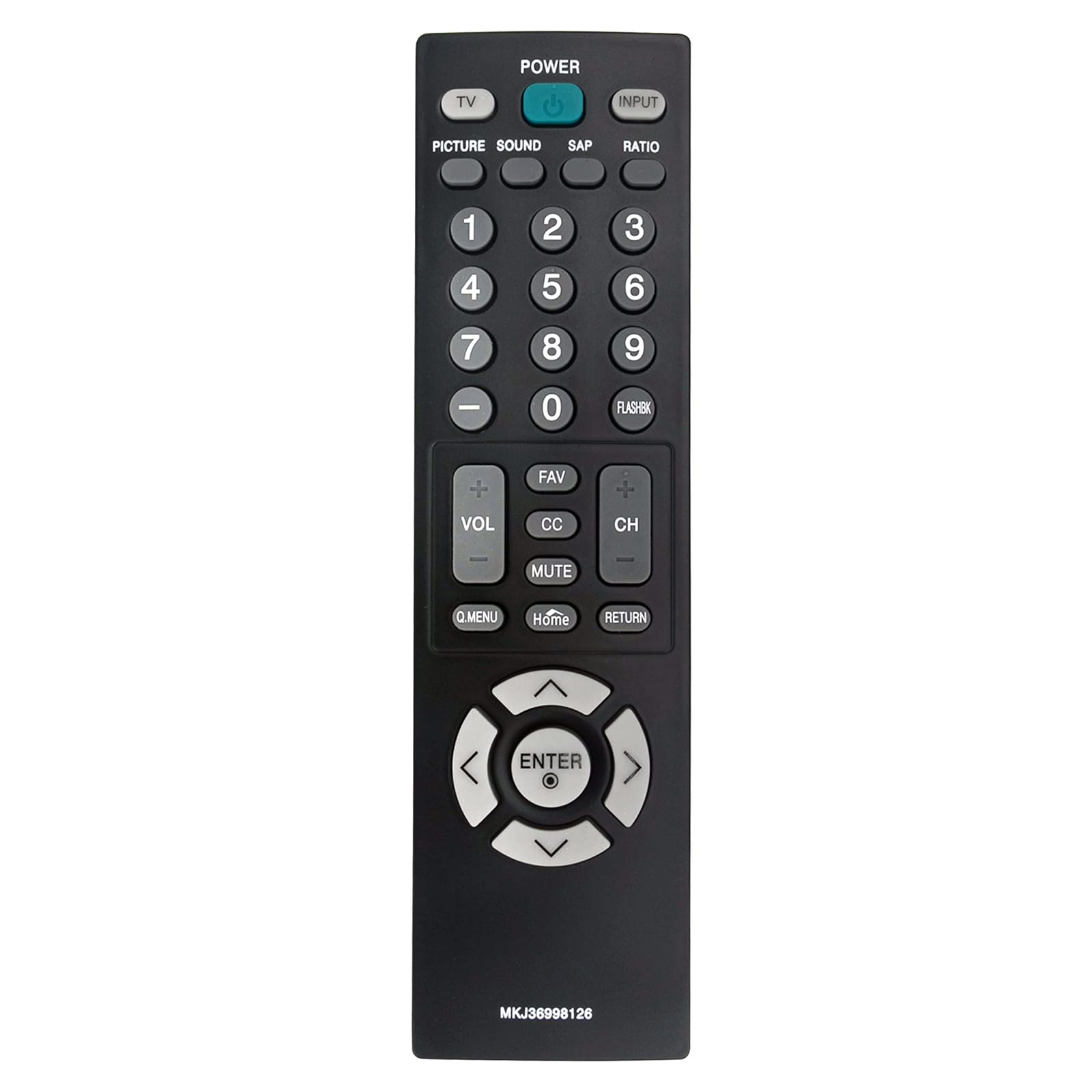
Imaj: Devan view of the VINJABTY MKJ36998126 remote control, showing the button layout. The battery compartment is on the reverse side.
2. Premye Itilizasyon
This remote control is pre-programmed for compatible LG TV models. Once batteries are installed, it is ready for immediate use. No additional programming or pairing is required.
Enstriksyon Operasyon
The VINABTY MKJ36998126 remote control provides intuitive access to your LG TV's functions. Below is a general overview of the main buttons and their functions:

Imaj: Yon fasad detaye view of the VINABTY MKJ36998126 remote control, highlighting the various buttons and their labels for easy identification.
- POUVWA: Limen oswa etenn televizyon an.
- Televizyon: Chanje nan mòd televizyon.
- ENTRÈ: Selects the input source (HDMI, AV, Component, etc.).
- FOTO: Adjusts picture settings.
- SON: Adjusts sound settings.
- SAP: Selects Secondary Audio Program (if available).
- RELASYON: Chanje rapò aspè ekran an.
- Bouton nimewo (0-9): Chwazi chanèl dirèkteman oubyen antre valè nimerik.
- FLASHBK: Recalls the previously viewed chanèl.
- VOL (+/-): Ogmante oswa diminye volim la.
- CH (+/-): Chanje kanal la monte oswa desann.
- FAV: Aksè chanèl pi renmen yo.
- CC: Aktive oubyen dezaktive sous-titres yo.
- Bèbè: Aktive oubyen dezaktive son televizyon an.
- Q.MENI: Accesses the Quick Menu for common settings.
- Kay: Returns to the TV's home screen or main menu.
- RETOUNEN: Retounen nan ekran oswa meni anvan an.
- Pavé navigasyon (Anwo, Anba, Agoch, Adwat, ANTRE): Navige nan meni yo epi konfime seleksyon yo.

Image: The VINABTY MKJ36998126 remote control shown next to a compatible LG television, illustrating its intended use.
Antretyen
Ranplasman batri
When the remote control's performance degrades or it stops responding, it is likely time to replace the batteries. Follow the battery installation steps outlined in the 'Setup' section.
Netwayaj
Pou netwaye kontwòl remote la, sèvi ak yon twal mou epi sèk. Pou pousyè tè ki difisil pou retire, siye l yon ti kras.ampRense twal la avèk dlo oswa yon pwodui netwayaj dou ki pa abrazif. Pa sèvi ak pwodui chimik ki agresif oswa plonje telekòmand lan nan dlo.
Depo
Store the remote control in a dry place, away from direct sunlight and extreme temperatures. If the remote will not be used for an extended period, it is recommended to remove the batteries to prevent leakage.
Depanaj
- Remote pa reponn:
- Ensure batteries are correctly installed with the correct polarity.
- Ranplase pil fin vye yo ak pil AAA nèf.
- Tcheke pou nenpòt obstak ant kontwòl remote la ak detèktè enfrawouj televizyon an.
- Ensure you are within the maximum operating range (approximately 33 feet) and pointing the remote directly at the TV.
- Bouton espesifik ki pa fonksyone:
- Clean the remote control, especially around the affected buttons, to remove any debris that might be causing sticking.
- If cleaning does not resolve the issue, the button may be worn or damaged.
- TV not listed as compatible:
- This remote is specifically designed for the listed LG TV models. If your TV model is not listed, full compatibility cannot be guaranteed.
Espesifikasyon
| Karakteristik | Detay |
|---|---|
| Mak | VINABTY |
| Non modèl | MKJ36998126 |
| Aparèy konpatib | LG Television (32LV2400, 42LV4400, 47LV4400, 55LV4400 series) |
| Koneksyon Teknoloji | Enfrawouj |
| Kantite pil ki nesesè | 2 |
| Kalite batri | AAA (Alkaline recommended) |
| Maksimòm Range | 33 pye |
| Kantite bouton | 30 |
| Dimansyon atik (L x W x H) | 5"L x 1.9"L x 0.5"H |
| Karakteristik espesyal | Ergonomik |

Image: The VINABTY MKJ36998126 remote control with its length (7.28 inches) and width (1.97 inches) clearly marked.
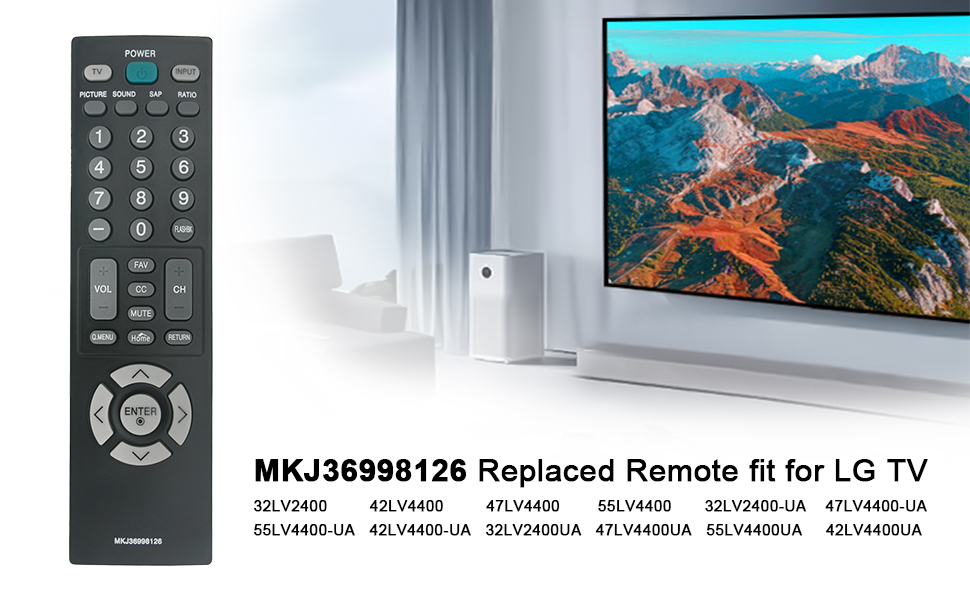
Image: The VINABTY MKJ36998126 remote control displayed alongside a list of compatible LG TV models, including 32LV2400, 42LV4400, 47LV4400, and 55LV4400 series.
Enfòmasyon sou Garanti
Specific warranty details for the VINABTY MKJ36998126 remote control may vary. Please refer to the retailer's return policy or contact the manufacturer directly for comprehensive warranty information.
Sipò
For further assistance, troubleshooting, or inquiries regarding your VINABTY MKJ36998126 remote control, please contact your point of purchase or the product manufacturer. Ensure you have your product model number (MKJ36998126) available when seeking support.