
1. Entwodiksyon
Thank you for choosing the Dacom Athlete G05 Bluetooth Headset. This manual provides comprehensive instructions to help you set up, operate, and maintain your new wireless headphones. Please read this manual carefully before use to ensure optimal performance and longevity of your device.
2. Pake kontni
Verifye ke tout atik ki nan lis anba a yo enkli nan pakè ou a:
- 1 x Dacom Athlete G05 Bluetooth Headset
- 1 x USB Chaje Kab
- 1 x Manyèl Itilizatè (dokiman sa a)
3. Pwodwi souview
The Dacom Athlete G05 is a wireless stereo earphone designed for sports and running, featuring a comfortable in-ear design with ear hooks for secure fit. It connects via Bluetooth V4.1.
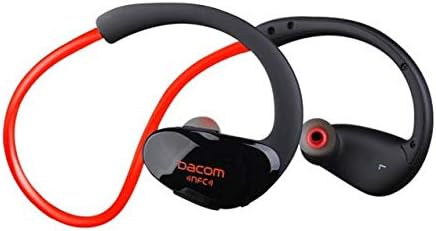
Figi 3.1: Devan view of the Dacom Athlete G05 Bluetooth Headset, showing the earbud and ear hook design.
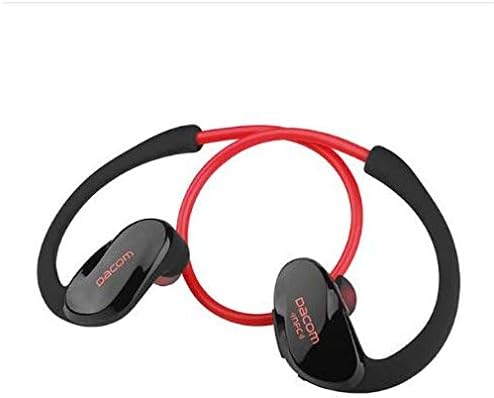
Figi 3.2: Dèyè view of the Dacom Athlete G05 Bluetooth Headset, illustrating the connecting cable between the two earbuds.
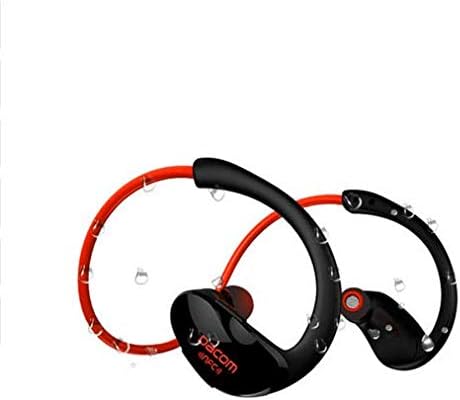
Figi 3.3: Dacom Athlete G05 Bluetooth Headset demonstrating water resistance, suitable for sports activities.
4. Enstalasyon
4.1 Chaje kas ekoutè a
Before first use, fully charge your Dacom Athlete G05 headset. A full charge typically takes approximately 1.5 to 2 hours.
- Connect the provided USB charging cable to the charging port on the headset.
- Connect the other end of the USB cable to a power adapter (DC5V 150mAh output recommended) or a computer's USB port.
- The battery indicator light will illuminate during charging and change color or turn off once fully charged.
A fully charged headset provides approximately 8 hours of talk time or music playback, and up to 180 hours of standby time.
4.2 Bluetooth Pairing
To connect your headset to a Bluetooth-enabled device (e.g., smartphone, tablet):
- Ensure the headset is fully charged and turned off.
- Press and hold the multi-function button on the headset until the Bluetooth indicator light flashes red and blue alternately, indicating it is in pairing mode.
- Sou aparèy ou an, aktive Bluetooth epi chèche aparèy ki disponib.
- Select "Dacom Athlete G05" (or similar name) from the list of found devices.
- Si yo mande w pou yon modpas, antre "0000" (kat zewo).
- Once paired, the Bluetooth indicator light will flash blue slowly or turn solid blue, and you will hear a confirmation tone.
The headset supports Bluetooth V4.1 and profiles such as Headset, Handsfree, A2DP, AVRC, and APT-X.
5. Operasyon Enstriksyon
5.1 Power On/Off
- Pouvwa sou: Press and hold the multi-function button for approximately 3 seconds until the indicator light flashes blue and you hear a power-on tone.
- Pouvwa Off: Press and hold the multi-function button for approximately 5 seconds until the indicator light flashes red and you hear a power-off tone.
5.2 Jesyon Apèl
- Reponn apèl: Short press the multi-function button when a call comes in.
- Fini apèl: Short press the multi-function button during a call.
- Rejte apèl: Peze epi kenbe bouton milti-fonksyon an pandan 2 segonn lè yon apèl antre.
- Recomposition Dènye Nimewo: Peze bouton milti-fonksyon an de fwa lè w pa nan yon apèl.
5.3 Mizik lèktur
- Jwe/Poz: Kout peze bouton milti-fonksyon an.
- Pwochen Track: Peze bouton Volim + la pandan lontan.
- Track Previous: Peze bouton Volim - la pandan lontan.
- Volim moute: Peze bouton Volim + la yon ti tan.
- Volim desann: Peze bouton Volim - la yon ti tan.
Note: The headset features touch control for various functions.
6. Antretyen ak Swen
- Keep the headset dry. Do not expose it to extreme temperatures or humidity.
- Clean the earbuds and charging contacts regularly with a soft, dry cloth.
- Evite lage kas ekoutè a oswa soumèt li a gwo enpak.
- Sere kas ekoutè a nan yon kote ki fre epi sèk lè w pa ap itilize li.
- Do not attempt to disassemble or modify the headset, as this will void the warranty.
NAN. Depanaj
| Pwoblèm | Solisyon posib |
|---|---|
| Kas ekoutè a pa limen. | Ensure the headset is fully charged. Connect to a power source and try again. |
| Pa ka konekte ak aparèy la. |
|
| Pa gen son oswa volim nan ba. |
|
| Koneksyon tanzantan. |
|
8. Espesifikasyon
| Karakteristik | Detay |
|---|---|
| Non pwodwi | Athlete sports Bluetooth headset |
| Nimewo Modèl | G05 |
| Bluetooth vèsyon | V4.1 |
| Bluetooth Klas | Klas 2 |
| Sipò pou Profiles | Headset, Handsfree, A2DP, AVRC, APT-X |
| Chaje Antre | DC5V 150mAh (Power adapter output) |
| Kalite batri | High-performance lithium polymer battery |
| Tan pale | Apeprè 8 èdtan |
| Jwe Tan | Apeprè 8 èdtan |
| Tan sibstiti | Apeprè 180 èdtan |
| Audio Frekans Range | 20Hz-20kHz |
| BT Radio Frequency | 2.400-2.481GHz |
| Enpedans Sòti | 16Ω 3mW |
| Sansiblite | 100-105dB |
| Ekoutè fòm faktè | Nan Zòrèy |
| Koneksyon Teknoloji | San fil |
| Metòd kontwòl | Manyen |
| Materyèl | Plastik |
| Koulè | Wouj |
9. Garanti ak sipò
Dacom products are manufactured to the highest quality standards. For warranty information or technical support, please refer to the warranty card included with your purchase or visit the official Dacom websit la. Tanpri konsève prèv acha ou a pou reklamasyon garanti.