
Calvas CLS-D41D8CD98F00B204E9800998ECF8427E
Fetcus Remote Control for Hitachi Air Conditioner User Manual
Model Compatibility: RAS-D10EX, RAR-5E1, RAS-10XH1, RAR-5E2, RAR-5E3, RAR-5E4, RAR-5E5, RAR-5E6, RAS-D14EX2
1. Entwodiksyon
This manual provides comprehensive instructions for the operation and maintenance of your Fetcus Universal Remote Control, designed for various Hitachi Air Conditioner models. Please read this manual thoroughly before using the remote control to ensure proper function and longevity.
This remote control is a direct replacement or compatible alternative for original Hitachi air conditioner remote models including RAS-D10EX, RAR-5E1, RAS-10XH1, RAR-5E2, RAR-5E3, RAR-5E4, RAR-5E5, RAR-5E6, and RAS-D14EX2.
2. Pwodwi Features
- Inivèsèl konpatibilite: Designed to work with a wide range of Hitachi air conditioner models.
- Koneksyon enfrawouj: Utilizes standard infrared signals for reliable communication with your AC unit.
- Dedicated AC Functions: Includes specific buttons for common air conditioner operations such as power, mode selection, temperature adjustment, fan speed, and more.
- Konsepsyon kontra enfòmèl ant: Ergonomic and easy to handle.
- No App Support: Operates independently without the need for a smartphone application.
- Frekans: Operates at 433 MHz for signal transmission.
3. Enstalasyon
3.1 Enstalasyon batri
The remote control requires appropriate batteries for operation. Follow these steps to install or replace batteries:
- Jwenn lòj batri a sou do a nan kontwòl remote la.
- Slide the battery compartment cover downwards or press the latch to open it.
- Insert new batteries, ensuring the positive (+) and negative (-) terminals align correctly with the markings inside the compartment. Typically, two AAA batteries are required, though specific battery type should be confirmed by checking the compartment markings.
- Fèmen kouvèti konpatiman batri a byen fèm jiskaske li fè yon klik an plas.

Figi 3.1: Dèyè view of the Fetcus remote control with the battery compartment open, revealing the two battery slots and a label with battery safety warnings. This image illustrates the correct orientation for battery insertion.
Enpòtan: Retire pil yo si ou pa pral itilize kontwòl remote la pou yon peryòd tan pwolonje pou anpeche flit ak domaj.
4. Operasyon Enstriksyon
Familiarize yourself with the buttons on your remote control. The remote features a main display and various control buttons for your air conditioner.
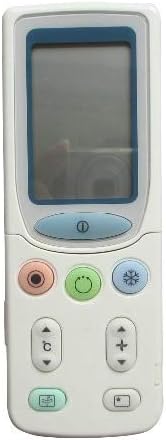
Figi 4.1: Devan view of the Fetcus remote control, highlighting the LCD screen and the primary control buttons for power, mode, and temperature adjustment.
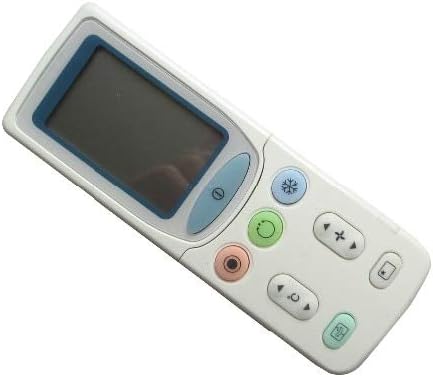
Figi 4.2: Angle view of the Fetcus remote control, showing the main display and primary function buttons including power, mode, and fan speed controls.
4.1 Fonksyon debaz
- Bouton pouvwa (1): Peze pou limen oswa etenn èkondisyone a.
- Bouton Mòd (↻): Press repeatedly to cycle through operating modes: Auto, Cool, Dry, Fan, Heat (if applicable to your AC unit).
- Bouton Ajisteman Tanperati (+ / -): Peze pou ogmante oswa diminye tanperati ou vle a.
- Bouton Vitès Vantilatè (❄): Press to adjust the fan speed (e.g., Auto, Low, Medium, High).
4.2 Advanced Functions (Under Sliding Cover)
Some advanced functions are accessible by sliding down the cover on the remote control. This reveals additional buttons for more specific controls.

Figi 4.3: Angle view of the Fetcus remote control with the sliding cover open, exposing additional advanced function buttons beneath the main display.
- Kontwòl balansman/jalèt: Adjusts the direction of the airflow (vertical or horizontal swing).
- Timer/Sleep Mode: Sets a timer for the AC unit to turn on or off, or activates a sleep-friendly operating mode.
- C/F Switch (℃): Baskile ekspozisyon tanperati ant Celsius ak Fahrenheit.
- Bouton Reyajiste: Used to reset the remote control settings or clear certain functions. Consult your AC unit's manual for specific reset procedures if needed.
- Other Specific Buttons: Depending on your specific Hitachi AC model, other buttons may control functions like Quiet mode, Turbo mode, or Health functions. Refer to your AC unit's original manual for detailed explanations of these specific icons.
5. Antretyen
- Netwayaj: Siye kontwòl remote la avèk yon twal mou epi sèk. Pa sèvi ak pwodui netwayaj likid oswa materyèl abrazif, paske yo ka domaje sifas la oswa konpozan entèn yo.
- Ranplasman batri: Replace batteries when the remote's range decreases or the display becomes dim. Always replace all batteries at the same time with new ones of the same type.
- Depo: Sere kontwòl remote la nan yon kote ki fre, sèk lwen limyè solèy la dirèk ak tanperati ekstrèm.
NAN. Depanaj
| Pwoblèm | Kòz posib | Solisyon |
|---|---|---|
| Telekòmand lan pa reponn. | Pil ki mouri oswa ki mal enstale. | Ranplase pil yo, asire polarite ki kòrèk la (+/-). |
| Pòte a distans lan fèb. | Pil fèb; Obstriksyon ant kontwòl remote la ak inite AC a. | Ranplase pil yo. Asire w ke gen yon liy vizyon klè ak reseptè enfrawouj inite èkondisyone a. |
| AC unit not responding to specific functions. | Remote not fully compatible with all AC unit features; AC unit does not support the function. | Verify the function exists on your specific AC model. This remote is a universal replacement and may not support all obscure functions of every original remote. |
| Ekran an fèb oswa vid. | Ba pouvwa batri. | Ranplase pil. |
7. Espesifikasyon
| Karakteristik | Detay |
|---|---|
| Mak | tach chòv |
| Nimewo Modèl (Entèn) | CLS-D41D8CD98F00B204E9800998ECF8427E |
| Aparèy konpatib | Air Conditioner (Hitachi RAS-D10EX, RAR-5E1, RAS-10XH1, RAR-5E2, RAR-5E3, RAR-5E4, RAR-5E5, RAR-5E6, RAS-D14EX2) |
| Koneksyon Teknoloji | Enfrawouj |
| Frekans | 433 MHz |
| Max Kantite Aparèy Sipòte | 1 |
| Materyèl | Other (Durable Plastic) |
| Deskripsyon batri | Lithium (Typically uses AAA batteries, please check compartment) |
| Karakteristik espesyal | Universal, Wireless |
| Kantite pake atik | 1 |
| Dat Premye Disponib | 8 me 2019 |
8. Garanti ak sipò
This Fetcus Remote Control comes with a 90-jou garanti from the date of purchase. This warranty covers manufacturing defects and ensures the product functions as intended under normal use.
For warranty claims or technical support, please contact your retailer or the manufacturer with your purchase details. Please retain your proof of purchase for warranty validation.
Ask a question about this manual
Ask about setup, troubleshooting, compatibility, parts, safety, or missing instructions. Manuals+ will review the question and use this page’s manual context to help answer it.