
Entwodiksyon
This manual provides instructions for the proper setup, operation, and maintenance of your Calvas 2020B0-B1 remote control. This remote is designed to be compatible with Shaw LCD LED televisions, offering a convenient replacement or secondary control unit. Please read this manual thoroughly before using the device.

Imaj: Devan view of the Calvas 2020B0-B1 remote control.
Enstalasyon
1. Enstalasyon batri
- Jwenn lòj batri a sou do a nan kontwòl remote la.
- Peze sou lokèt la epi glise kouvèti batri a soti.
- Mete de pil AAA (pa enkli), asire w ke tèminal pozitif (+) ak negatif (-) yo byen aliyen ak mak ki anndan konpatiman an.
- Glise kouvèti batri a tounen nan plas li jiskaske li klike byen.

Imaj: Dèyè view kontwòl remote la ak konpatiman pil la louvri.
2. Quick Setup for TV Control
The remote features a quick setup function for initial pairing with your television. Follow these steps:
- Peze epi kenbe la SETUP button until the LED light blinks twice.
- Peze a POUVWA TELEVIZYON bouton.
- Peze epi kenbe la OK bouton.
- Lage a OK key when your TV turns off. This indicates successful pairing.
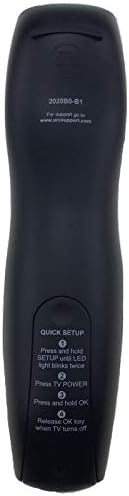
Image: Back of the remote control displaying quick setup instructions.
Note: If the TV does not turn off, repeat the steps or consult the TV's manual for specific remote programming codes if available.
Enstriksyon Operasyon
The Calvas 2020B0-B1 remote control utilizes infrared (IR) technology. Ensure a clear line of sight between the remote's IR emitter and your TV's IR receiver for optimal performance.
Fonksyon bouton:
- POUVWA: Limen oswa etenn televizyon an.
- VOL +/-: Ogmante oswa diminye volim la.
- CH +/-: Chanje kanal la monte oswa desann.
- Bèbè: Sere oswa dekole odyo televizyon an.
- KLAVYE NIMEWO (0-9): Antre nimewo chanèl yo dirèkteman.
- GID: Montre gid pwogram lan.
- MENI: Aksè nan meni prensipal televizyon an.
- ENFO: Montre enfòmasyon sou pwogram aktyèl la.
- OK / Flèch Navigasyon: Konfime seleksyon yo epi navige nan meni yo.
- Sòti: Sòti meni oswa ekran aktyèl la.
- DÈNYE: Retounen nan anvan an viewed chanèl.
- DAY +/-: Navigates through days in the program guide.
- MUSIC / FAV: Accesses music channels or favorite channels (functionality may vary by TV model).
Antretyen
Netwayaj:
- Siye kontwòl remote la ak yon twal mou epi sèk.
- Pou pousyè tè ki difisil pou retire, yon ti kras dampht twal la ak dlo oswa yon pwodui netwayaj dou, ki pa abrazif.
- Pa sèvi ak pwodui chimik ki fò, solvan, oswa kousen netwayaj abrazif, paske sa yo ka domaje sifas telekòmand lan oswa konpozan entèn yo.
Ranplasman batri:
- Replace batteries when the remote's response becomes sluggish or the LED indicator fails to light up.
- Toujou ranplase tou de pil yo an menm tan ak nouvo pil AAA.
- Pa melanje ansyen ak nouvo pil, oswa diferan kalite pil.
- Retire pil yo si ou pa pral itilize telekòmand lan pou yon peryòd tan pwolonje pou anpeche flit.
Depo:
- Sere telekòmand lan nan yon kote ki fre epi sèk, lwen limyè solèy dirèk ak tanperati ekstrèm.
- Evite lage telekòmand lan oswa ekspoze li nan twòp imidite.
Depanaj
- Remote pa reponn:
- Tcheke si pil yo byen mete epi yo pa fin itilize. Ranplase yo si sa nesesè.
- Ensure there is a clear line of sight between the remote and the TV's IR receiver. Remove any obstructions.
- Try re-pairing the remote with the TV using the "Quick Setup" steps.
- Se sèlman kèk bouton ki fonksyone:
- This might indicate a partial pairing issue or a specific button malfunction. Try re-pairing the remote.
- Clean the remote's surface, especially around the unresponsive buttons, to ensure no debris is interfering.
- Kout ranje fonksyònman:
- Ranplase pil yo ak pil fre.
- Asire w pa gen okenn sous limyè fò (tankou limyè solèy dirèk oswa limyè fliyoresan klere) ki entèfere ak siyal IR la.
Espesifikasyon
| Mak | tach chòv |
| Nimewo Modèl | 2020B0-B1 (Mfr Part Number: CLS-D41D8CD98F00B204E9800998ECF8427E) |
| Aparèy konpatib | Television (Shaw LCD LED TVs) |
| Koneksyon Teknoloji | Enfrawouj (IR) |
| Kalite kontwolè | Kontwòl bouton |
| Maximum Number of Supported Devices | 1 |
| Maksimòm Range | 10 mèt |
| Karakteristik espesyal | Ergonomik konsepsyon |
Enfòmasyon sou Garanti
This product is typically covered by a limited warranty provided by the seller or manufacturer. Please refer to your purchase documentation or contact the retailer directly for specific warranty terms and conditions. Keep your proof of purchase for any warranty claims.
Sipò
For further assistance, technical support, or inquiries regarding your Calvas 2020B0-B1 remote control, please contact the seller or manufacturer through the platform where the product was purchased. Provide your model number (2020B0-B1) and any relevant purchase details when seeking support.