
1. Entwodiksyon
This manual provides comprehensive instructions for the setup, operation, maintenance, and troubleshooting of your Canyon CNS-SW71SS Smartwatch. Please read this manual carefully before using your device to ensure proper function and longevity.
The Canyon CNS-SW71SS Smartwatch is designed to help you monitor your fitness activities and stay connected. It features a 1.22-inch color screen, multi-sport modes, heart rate monitoring, sleep tracking, and notification alerts. Its IP68 water resistance makes it suitable for various environments.
2. Pwodwi souview
2.1 Karakteristik kle
- 1.22-inch color touch screen display.
- Multi-sport mode for tracking various activities.
- Daily activity monitoring: calories, steps, heart rate, and sleep.
- Notifications for incoming calls, SMS, emails, calendar events, and social media.
- Music control and remote camera function.
- Smart alarm and weather data display.
- Jiska 7 jou nan lavi batri.
- IP68 water resistance (submersible up to 1 meter for 30 minutes).
- Koneksyon Bluetooth 4.0.
- Compatible with iOS and Android operating systems.
- Comes with two interchangeable wristbands: metal and TPU.
2.2 Eleman
The Canyon CNS-SW71SS Smartwatch consists of the main watch unit, interchangeable wristbands, and a charging cable.

Figi 1: Devan view of the Canyon CNS-SW71SS Smartwatch, showing the display with steps, distance, calories, and heart rate data.

Figi 2: Angle view of the Canyon CNS-SW71SS Smartwatch, featuring a silver metal mesh strap and a round display.
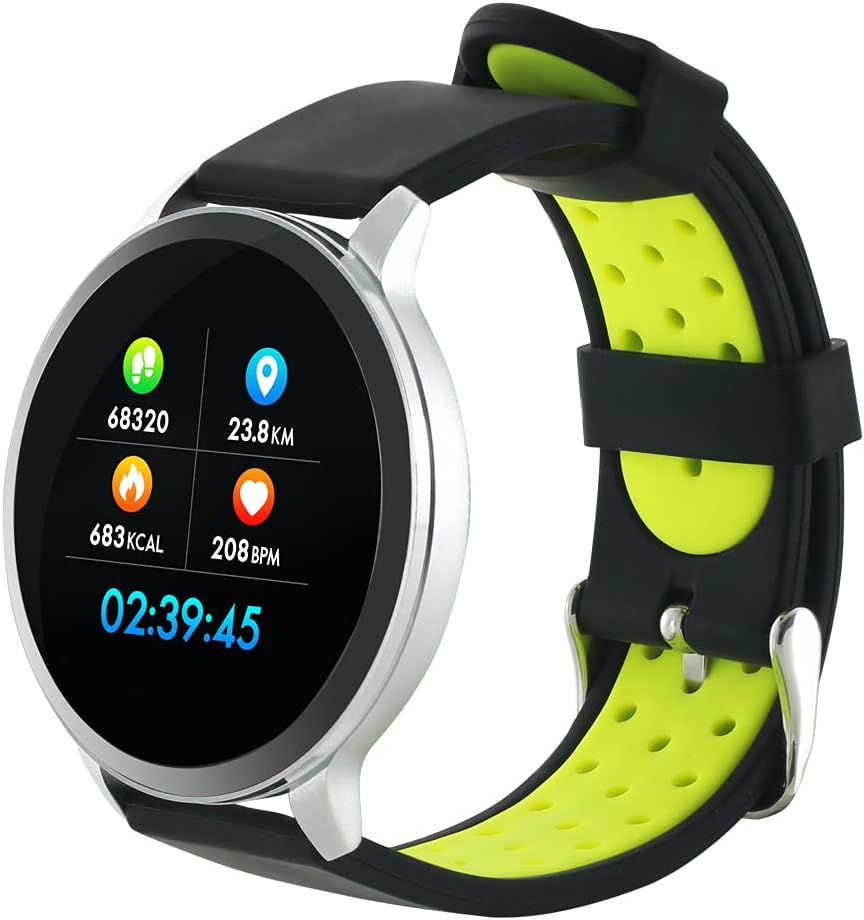
Figure 3: The Canyon CNS-SW71SS Smartwatch shown with an alternative black and lime green TPU strap, highlighting its interchangeable design.

Figi 4: Dèyè view of the Canyon CNS-SW71SS Smartwatch, displaying the optical heart rate sensor and magnetic charging contacts.

Figure 5: The retail packaging for the Canyon CNS-SW71SS Smartwatch, illustrating key features and the included two straps.
3. Enstalasyon
3.1 Chaje mont entelijan an
- Konekte kab chaje a nan yon adaptè kouran USB (pa enkli) oubyen nan yon pò USB òdinatè.
- Align the magnetic charging pins of the cable with the charging contacts on the back of the smartwatch. The watch will vibrate and display a charging icon.
- Allow approximately 2-3 hours for a full charge. A full charge provides up to 7 days of usage.
3.2 Installing the Canyon Fit Application
- Scan the QR code provided in the packaging or search for "Canyon Fit" in your smartphone's app store (Google Play Store for Android, Apple App Store for iOS).
- Telechaje epi enstale aplikasyon an.
- Open the Canyon Fit app and follow the on-screen instructions to create an account and set up your profile.
3.3 Konekte ak telefòn entelijan ou
- Asire w ke mont entelijan ou an chaje epi li limen.
- Pèmèt Bluetooth sou smartphone ou.
- Louvri aplikasyon Canyon Fit la.
- Navigate to the device pairing section within the app (usually found under 'Device' or 'Profile').
- Select your smartwatch (e.g., "CNS-SW71SS") from the list of available devices.
- Confirm the pairing request on both your smartphone and smartwatch if prompted.
3.4 Attaching/Changing Wristbands
The smartwatch comes with two wristbands (metal and TPU) that can be interchanged. To attach or change a wristband, locate the quick-release pins on the underside of the strap. Slide the pin to detach the current strap and then align and slide the pin of the new strap into the corresponding holes on the watch body until it clicks into place.
4. Operasyon Enstriksyon
4.1 Navigasyon debaz
- Ekran manyen: Swipe left/right to navigate through different functions and menus. Swipe up/down to view notifikasyon oswa paramèt rapid.
- Bouton bò: Press the side button to return to the main watch face or to wake up the screen. A long press may access power options or specific features depending on the context.
4.2 Suivi Fòm
- Mòd milti-espò: Access the 'Workout' or 'Sport' menu on your watch. Select your desired activity (e.g., running, cycling, walking) to start tracking. The watch will record duration, distance, calories burned, and heart rate.
- Aktivite chak jou: Mont lan otomatikman swiv pa ou yo, distans ou fè, ak kalori ou boule pandan tout jounen an. View these statistics on the watch face or in the Canyon Fit app.
- Siveyans batman kè: The watch continuously monitors your heart rate. You can also manually initiate a heart rate measurement from the heart rate interface.
- Suivi dòmi: Wear the smartwatch to bed, and it will automatically track your sleep patterns, including deep sleep, light sleep, and wake times. View detailed sleep analysis in the Canyon Fit app.
4.3 Notifikasyon
Once paired with your smartphone and with notification permissions granted in the Canyon Fit app, your smartwatch will display alerts for:
- Apèl k ap fèk ap rantre
- Mesaj SMS
- Imèl
- Kalandriye Evènman
- Social Media Apps (e.g., WhatsApp, Facebook, Instagbelye mouton)
Swipe up on the watch face to view recent notifications. You can dismiss notifications from the watch.
4.4 Fonksyon adisyonèl
- Kontwòl Mizik: While music is playing on your phone, you can use the watch to play/pause, skip tracks, and adjust volume.
- Kamera Remote: Open the camera function in the Canyon Fit app. Use your smartwatch as a remote shutter button to take photos on your phone.
- Alam entelijan: Set alarms through the Canyon Fit app. The watch will vibrate to wake you up gently.
- Done metewolojik: Once connected to your phone, the watch will display current weather conditions and forecasts for your location.
5. Antretyen
5.1 Netwayaj
- Siye ekran ak kò mont lan avèk yon twal mou,amp twal.
- For the metal strap, use a soft brush to gently clean any debris. For the TPU strap, wash with mild soap and water.
- Asire w ke kontak chaj yo pwòp epi sèk anvan ou chaje yo.
- Evite itilize pwodwi chimik piman bouk oswa materyèl abrazif pou netwaye.
5.2 Rezistans dlo (IP68)
The Canyon CNS-SW71SS Smartwatch is IP68 rated, meaning it is resistant to dust and can be immersed in water up to 1 meter deep for a maximum of 30 minutes. While it can withstand splashes, rain, and brief immersion, it is not recommended for hot showers, saunas, or diving, as steam and high water pressure can compromise the seals.
- Do not press any buttons while the watch is submerged.
- Dry the watch thoroughly after exposure to water.
5.3 Swen Batri
- Evite dechaje batri a nèt souvan.
- Chaje aparèy la regilyèman, menm si w pa ap itilize l, pou batri a rete an bon eta.
- Sere mont lan nan yon kote ki fre epi sèk lè w pa itilize li pou yon bon bout tan.
NAN. Depanaj
- Mont lan pa limen: Asire w ke mont lan chaje nèt. Konekte l nan plato a pou omwen 30 minit.
- Pa ka konekte ak telefòn entelijan an:
- Asire w ke Bluetooth pèmèt sou telefòn ou.
- Ensure the Canyon Fit app has necessary permissions.
- Rekòmanse telefòn ou ak mont entelijan an.
- Eseye dekonekte epi konekte aparèy la ankò atravè aplikasyon an.
- Notifikasyon yo pa parèt:
- Check notification settings in the Canyon Fit app and your phone's system settings.
- Asire w ke mont lan konekte via Bluetooth.
- Done sou batman kè/aktivite ki pa egzak:
- Asire w ke mont lan byen sere sou ponyèt ou, ni twò sere ni twò lach.
- Netwaye detèktè ki sou dèyè mont lan.
- Environmental factors or certain movements can affect accuracy.
- Ekran an pa reponn: Try restarting the smartwatch by holding down the side button. If unresponsive, allow the battery to fully drain and then recharge.
7. Espesifikasyon
| Non modèl | CNS-SW71SS |
| Mak | KANYON |
| Gwosè ekspozisyon | 1.22 pous |
| Sistèm operasyon konpatibilite | Android, iOS |
| Koneksyon Teknoloji | Bluetooth 4.0 |
| Evalyasyon rezistans dlo | IP68 |
| Karakteristik espesyal | Wireless Charging (implied by product data), Multi-Sport Mode, Heart Rate Monitor, Sleep Tracker, Notifications |
| Aparèy konpatib | Smartphone |
| Batri | Rechargeable (1 enkli) |
| Opsyon koulè | Black, Lime Green, Silver |
8. Garanti ak sipò
For warranty information and technical support, please refer to the documentation included with your purchase or visit the official Canyon website. You can also contact Canyon customer service for assistance with product issues or inquiries.
Sipò sou entènèt: https://canyon.eu/support/ (Egzample link, please verify official support page)