
1. Entwodiksyon ak souview
This manual provides detailed instructions for the Hilitand Digital Cyclic Adjustable Delay Relay DC 12V. This versatile module is designed for precise timing control in various electronic applications, offering a wide adjustable range and multiple operating modes.
Karakteristik kle:
- Wide Adjustable Range: Time settings from 0.1 seconds to 999 hours.
- Doub Ekspozisyon Dijital: Separate displays for setting ON and OFF delay times (T1 and T2).
- Mòd operasyon miltip: Features 6 commonly used timing modes to suit diverse application needs.
- Segondè Kapasite aktyèl: Capable of controlling AC/DC loads up to 5A.
- Fonksyon memwa: Settings are retained even after power loss.
2. Enfòmasyon sou Sekirite
Please read and understand all safety instructions before operating this device. Failure to follow these instructions may result in electric shock, fire, or damage to the product.
- Asire ekipman pou pouvwa a voltage matches the device's specified input (DC 12V).
- Do not exceed the maximum load current of 5A.
- All wiring should be performed by qualified personnel and with the power disconnected.
- Avoid exposing the device to moisture, extreme temperatures, or corrosive environments.
- Pa eseye demonte oswa modifye aparèy la.
3. Konpozan pwodwi ak dyagram
Familiarize yourself with the components and connections of your delay relay module.
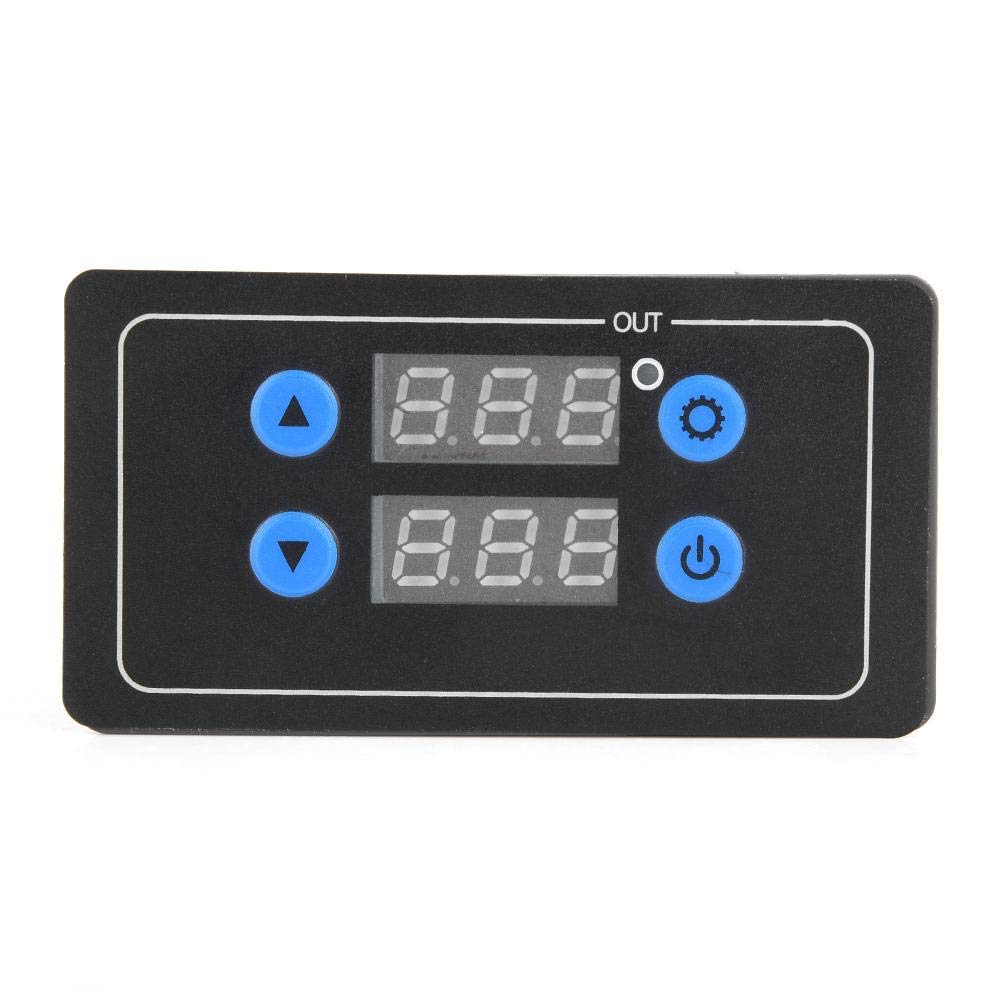
Figi 3.1: Layout panèl devan
This image shows the front panel of the delay relay. It features two digital displays for Delay Time T1 and Delay Time T2, an 'OUT' indicator, a Working Indicator, an Increase button (up arrow), a Decrease button (down arrow), a Setting button (gear icon), and a Confirm button (power icon).
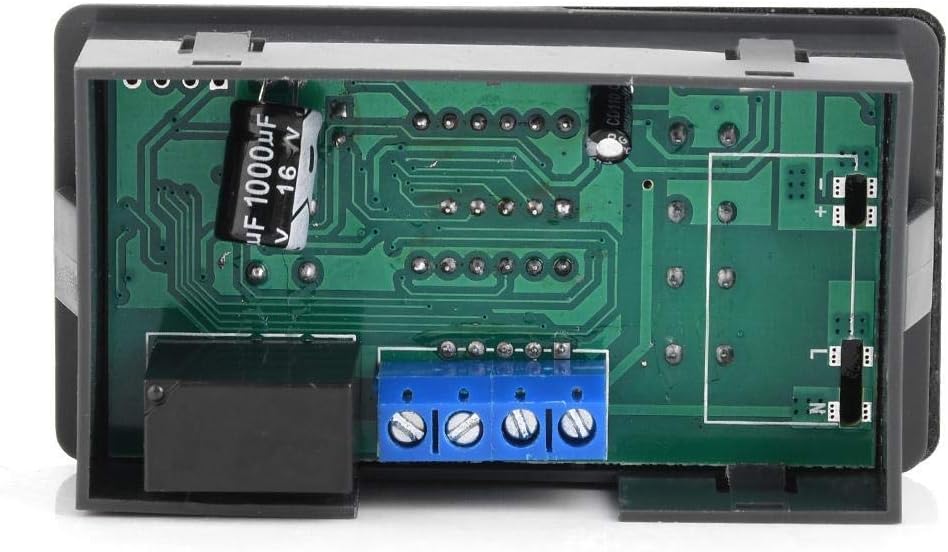
Figi 3.2: Dèyè View with Circuit Board and Terminals
This image displays the rear of the module, revealing the circuit board and the blue screw terminal block for electrical connections. The relay component is visible on the left side.

Figi 3.3: Side View of Terminal Block
This image provides a closer side view of the blue screw terminal block, highlighting the four connection points for wiring the power input and load.
Koneksyon tèminal:
- V+: Positive DC 12V power input.
- V-: Negative DC 12V power input (Ground).
- NON: Normally Open contact of the relay.
- COM: Kontak komen nan relè a.
- NC: Normally Closed contact of the relay (not always present or used, refer to specific model for details).
Note: The relay output is a dry contact (potential-free). Connect your load between COM and NO for normally open operation, or COM and NC for normally closed operation.
4. Enstalasyon
4.1 Enstriksyon fil elektrik
- Koneksyon ekipman pou pouvwa: Connect your DC 12V power supply to the V+ and V- terminals. Ensure correct polarity.
- Koneksyon chaj: Connect your device or load to the relay output terminals. For most applications, connect one side of your load to the COM terminal and the other side to the NO (Normally Open) terminal. This means the load will be activated when the relay switches ON.
- Koneksyon an sekirite: Asire w tout koneksyon fil yo sere epi byen fèm pou anpeche kontak ki lach ak danje potansyèl.
4.2 Premye pouvwa sou
After wiring, apply DC 12V power. The digital displays should illuminate, and the module will enter its default or last-saved operating mode.
5. Operasyon Enstriksyon
The module offers 6 different operating modes and allows for precise setting of two delay times, T1 (ON time) and T2 (OFF time).
5.1 Ajisteman Mòd Operasyon an
- Peze epi kenbe la Anviwònman bouton (gear icon) for approximately 3 seconds until the display shows 'P-X' (where X is the current mode number).
- Sèvi ak la Ogmante bouton (flèch anlè) oubyen Diminye bouton (down arrow) to cycle through the 6 available operating modes (P-1 to P-6).
- Peze a Konfime bouton (power icon) to select the desired mode and exit the mode setting interface.
5.2 Setting Delay Times (T1 and T2)
- In the normal operating state, a short press of the Anviwònman bouton (gear icon) will allow you to cycle through setting T1, T2, and the time unit.
- When T1 or T2 is flashing, use the Ogmante bouton (flèch anlè) oubyen Diminye bouton (down arrow) to adjust the time value.
- To change the time unit (seconds, minutes, hours), press the Anviwònman bouton until the decimal point position flashes. The decimal point indicates the unit:
- No decimal point: Hours (e.g., 123 = 123 hours)
- Decimal point on the rightmost digit: Seconds (e.g., 12.3 = 12.3 seconds)
- Decimal point on the middle digit: Minutes (e.g., 1.2.3 = 12.3 minutes)
- After setting the desired time and unit, press the Konfime bouton (power icon) to save the settings and return to the normal operating state.
5.3 Understanding Operating Modes (P-1 to P-6)
Each mode defines how T1 and T2 interact to control the relay output. Refer to the specific mode descriptions below:
- P-1: Delay ON (Single Trigger)
Upon trigger, the relay turns ON after T1, then turns OFF. - P-2: Delay OFF (Single Trigger)
Upon trigger, the relay turns ON immediately, then turns OFF after T1. - P-3: Cyclic ON/OFF (Continuous)
The relay cycles ON for T1, then OFF for T2, continuously. - P-4: Cyclic OFF/ON (Continuous)
The relay cycles OFF for T1, then ON for T2, continuously. - P-5: Delay ON with Trigger Reset
Upon trigger, the relay turns ON after T1. If triggered again during T1, the timer resets. - P-6: Delay OFF with Trigger Reset
Upon trigger, the relay turns ON immediately. After T1, it turns OFF. If triggered again during T1, the timer resets.
Note: Specific trigger inputs (if applicable for P-1, P-2, P-5, P-6) are typically connected to a separate input terminal, not explicitly detailed in the provided product information. For models requiring an external trigger, consult the product's specific wiring diagram.
6. Antretyen
The Hilitand Digital Cyclic Adjustable Delay Relay is designed for low maintenance. Follow these guidelines to ensure optimal performance and longevity:
- Kenbe aparèy la pwòp epi san pousyè ak debri. Sèvi ak yon twal mou epi sèk pou netwaye.
- Ensure proper ventilation around the module to prevent overheating.
- Regularly check wiring connections for tightness, especially in environments with vibration.
- Store the device in a dry, cool environment when not in use.
NAN. Depanaj
If you encounter issues with your delay relay, refer to the following common problems and solutions:
| Pwoblèm | Kòz posib | Solisyon |
|---|---|---|
| Aparèy pa limen. | Pa gen ekipman pou kouran; vòltaj ki pa kòrèktage; incorrect wiring polarity. | Check DC 12V power supply connection. Verify V+ and V- are correctly wired. |
| Relay does not activate/deactivate. | Incorrect load wiring; incorrect mode setting; time values set to zero. | Verify load is connected between COM and NO. Check selected operating mode and ensure T1/T2 are set to non-zero values. |
| Timing is inaccurate. | Incorrect time unit selected (seconds, minutes, hours). | Re-enter time setting mode and verify the decimal point position corresponds to the desired time unit. |
| Settings are not saved. | Settings not confirmed. | Ensure you press the Konfime bouton (power icon) after making changes to save them. |
Si pwoblèm nan pèsiste apre ou fin eseye solisyon sa yo, tanpri kontakte sèvis kliyan.
8. Espesifikasyon
| Karakteristik | Spesifikasyon |
|---|---|
| Mak | Hilitan |
| Modèl | B07QHVS7HD |
| Antre Voltage | DC 12V |
| Tan Range | 0.1 segonn a 999 èdtan |
| Sòti aktyèl | Max 5A (AC/DC load) |
| Kantite Mòd Operasyon | 6 |
| Kalite ekspozisyon | Doub Digital Display |
| Koulè | Nwa |
| Materyèl | Material (as per product data) |
| Peyi orijin | Lachin |
9. Garanti ak sipò
9.1 Enfòmasyon sou Garanti
This Hilitand product is covered by a standard manufacturer's warranty against defects in materials and workmanship. The warranty period typically begins from the date of purchase. Please retain your proof of purchase for warranty claims. For specific warranty terms and conditions, refer to the documentation provided with your purchase or contact your retailer.
9.2 Sipò pou Kliyan
If you require technical assistance, have questions about product operation, or need to report a defect, please contact the retailer from whom you purchased the product. They will be able to provide support or guide you to the appropriate service channels.