
1. Entwodiksyon
Thank you for choosing the Targus W620 Wireless Optical Mouse. This manual provides detailed instructions for setting up, operating, and maintaining your mouse to ensure optimal performance and longevity. The Targus W620 offers reliable 2.4 GHz wireless connectivity, a precise 1600 DPI optical sensor, and a compact design suitable for both office and mobile use.
2. Pake kontni
Tanpri tcheke pake a pou atik sa yo:
- Targus W620 Wireless Optical Mouse
- Reseptè USB
- 2 x AAA pil
3. Pwodwi souview
Familiarize yourself with the components of your Targus W620 Wireless Optical Mouse.
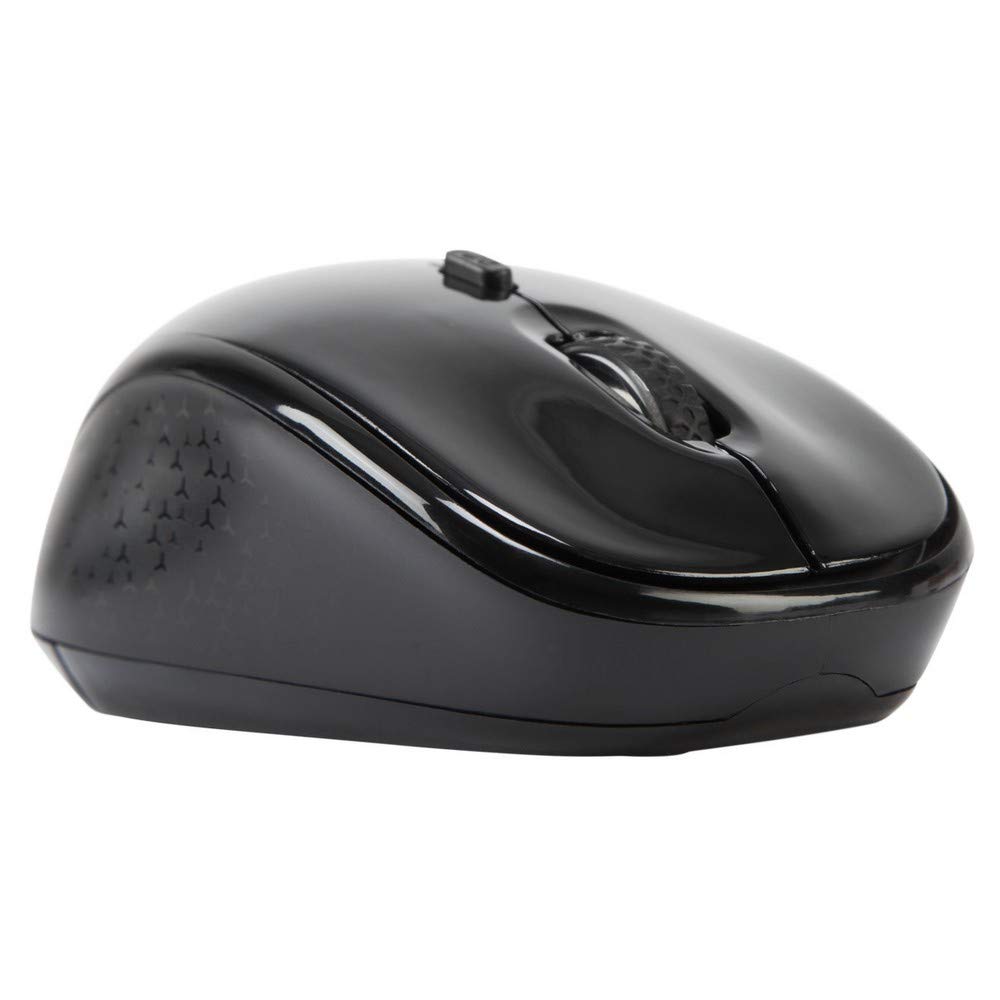
Imaj 3.1: Top view of the Targus W620 Wireless Optical Mouse. This image displays the primary buttons and scroll wheel.
- Bouton Klike Goch: Fonksyon klike prensipal estanda.
- Bouton Klike Dwat: Fonksyon klike segondè estanda.
- wou woulo liv: Pou defile vètikal ak fonksyon klike sou bouton mitan an.
- Bouton DPI: Ajiste sansiblite sourit la (DPI).
- Optical sensor: Located on the bottom, detects mouse movement.
- Lòj batri: Located on the bottom, holds two AAA batteries.
- Depo Reseptè USB: A dedicated slot on the bottom for storing the USB receiver when not in use.

Imaj 3.2: Anba view of the mouse, highlighting the battery compartment and optical sensor.
4. Enstriksyon Enstalasyon
Follow these steps to set up your Targus W620 Wireless Optical Mouse:
- Enstale pil:
- Jwenn kouvèti konpatiman batri a anba sourit la.
- Glise kouvèti a louvri.
- Mete de pil AAA yo nan plas yo, asire w polarite a kòrèk (+/-).
- Fèmen kouvèti lòj batri a byen.
- Konekte reseptè USB:
- The USB receiver is typically stored in a slot on the bottom of the mouse for transport. Gently remove it.
- Ploge reseptè USB a nan yon pò USB ki disponib sou òdinatè w lan.

Imaj 4.1: The mouse with its USB receiver, ready for connection.
- Pouvwa sou:
- There is no explicit power switch on this model; the mouse activates upon movement and connection.
- Odinatè w la ta dwe detekte epi enstale chofè ki nesesè yo otomatikman. Sa ka pran kèk segond.
- Once drivers are installed, the mouse is ready for use.
5. Operasyon Enstriksyon
The Targus W620 Wireless Optical Mouse is designed for intuitive use. Here are its primary functions:
- Navigasyon debaz: Deplase sourit la sou yon sifas plat pou kontwole kurseur a sou ekran an.
- Klike Goch: Sèvi ak li pou chwazi atik, ouvri files, oubyen aktive fonksyon.
- Klike sou dwa: Use for accessing context menus or secondary functions.
- wou woulo liv: Rotate the wheel to scroll vertically through documents and web pages. Press the scroll wheel for a middle-click function, often used for opening links in new tabs or auto-scrolling.
- Ajisteman DPI: Press the DPI button (located behind the scroll wheel) to cycle through the available DPI settings (800, 1200, 1600 DPI). This changes the sensitivity of the mouse cursor. A higher DPI means the cursor moves further with less physical mouse movement.
6. Antretyen
Proper maintenance ensures the longevity and performance of your mouse.
- Netwayaj: Sèvi ak yon twal mou, sèk, ki pa gen pousyè pou netwaye deyò sourit la. Pou pousyè tè ki difisil pou retire, siye l yon ti kras.ampRense twal la avèk dlo. Evite itilize pwodui chimik ki agresif oswa pwodui netwayaj abrazif.
- Optical sensor: Keep the optical sensor area on the bottom of the mouse clean and free from dust or debris to ensure accurate tracking.
- Ranplasman batri: When the mouse performance degrades or stops responding, it is likely time to replace the batteries. Follow the steps in Section 4.1 to replace the two AAA batteries.
- Depo: When transporting or storing the mouse, always place the USB receiver back into its dedicated storage slot on the bottom of the mouse to prevent loss.
NAN. Depanaj
If you encounter issues with your Targus W620 mouse, try the following solutions:
| Pwoblèm | Solisyon posib |
|---|---|
| Mouse not responding or cursor not moving. |
|
| Mouvman kurseur a pa regilye oswa li sote. |
|
| DPI button not changing sensitivity. |
|
| Pwoblèm koneksyon san fil. |
|
8. Espesifikasyon
| Mak | Targus |
| Nimewo Modèl | AMW620AP |
| Koneksyon Teknoloji | 2.4 GHz san fil (frekans radyo) |
| Teknoloji deteksyon mouvman | Optical (BlueTrace Technology) |
| Nivo DPI | 800 / 1200 / 1600 DPI (Reglabl) |
| Kantite bouton | 4 (Agoch, Adwat, Moul, DPI) |
| Oryantasyon men | Right (Comfortable for ambidextrous use) |
| Sous pouvwa | 2 x AAA pil (Enkli) |
| Pwa atik | 26 gram |
| Sistèm operasyon konpatibilite | Linux, Windows XP (Compatible with modern Windows and macOS) |
| Platfòm pyès ki nan konpitè | Mac, PC |
| Koulè | Nwa |
9. Garanti ak sipò
Enfòmasyon sou garanti: The Targus W620 Wireless Optical Mouse comes with a Garanti manifakti 3 zan apati dat acha a. Garanti sa a kouvri domaj nan materyèl ak nan fabrikasyon anba itilizasyon nòmal. Tanpri konsève prèv acha ou pou reklamasyon garanti.
Sipò Kliyan: For technical assistance, troubleshooting beyond this manual, or warranty inquiries, please visit the official Targus website or contact their customer support service. Refer to the contact information provided with your product packaging or on the Targus official websit.