
Ipega PG-9068
Manyèl Itilizatè Kontwolè Jwèt San Fil IPEGA PG-9068 Bluetooth Gamepad
Model: PG-9068 | Brand: Ipega
Entwodiksyon
This manual provides detailed instructions for the IPEGA PG-9068 Bluetooth Wireless Game Controller Gamepad. It covers setup, operation, maintenance, and troubleshooting to ensure optimal performance and longevity of your device. This gamepad is designed for use with Android, iOS, and PC systems, as well as Smart TVs and set-top boxes.
Pwodwi souview

Figi 1: Devan view of the IPEGA PG-9068 Bluetooth Wireless Game Controller, showing the dual analog sticks, D-pad, action buttons (A, B, X, Y), and central function buttons.

Figi 2: Angle view of the IPEGA PG-9068, highlighting the ergonomic grip and shoulder buttons.
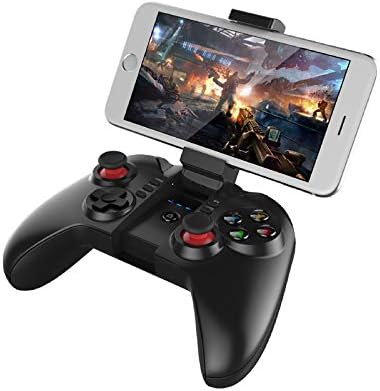
Figure 3: The IPEGA PG-9068 with a smartphone securely mounted in its integrated holder, demonstrating its mobile gaming capability.
Enstalasyon ak Koneksyon
Chaje Gamepad la
Before initial use, fully charge the gamepad. Connect the provided USB charging cable to the gamepad's charging port and to a DC5V power source (e.g., computer USB port, USB wall adapter). The charging indicator light will show the charging status.
- Chaje Voltage/Kounye a: DC5V/500mA
- Kapasite batri: 350mAh
- Itilizasyon kontinyèl: Approximately 10 hours on a full charge
- Tan sibstiti: Up to 30 days when fully charged
Bluetooth Pairing Enstriksyon
The PG-9068 supports various connection modes for different devices. Ensure the gamepad is sufficiently charged before attempting to pair.
- Pouvwa sou: Peze epi kenbe la LAKAY button for 3 seconds to power on the gamepad.
- Antre nan Mode Pè:
- Mòd estanda android: Peze epi kenbe X + LAKAY until the indicator light flashes rapidly.
- iOS Standard Mode: Peze epi kenbe Y + LAKAY until the indicator light flashes rapidly.
- PC/Direct Play Mode: Peze epi kenbe A + LAKAY until the indicator light flashes rapidly.
- Aktive Bluetooth sou aparèy la: On your smartphone, tablet, or PC, go to Bluetooth settings and enable Bluetooth.
- Chèche pou Aparèy: Scan for available Bluetooth devices. The gamepad will appear as "PG-9068" or "IPEGA-9068".
- Konekte: Select "PG-9068" to pair. Once connected, the indicator light on the gamepad will become solid.
- Travay Voltage: DC3.7V
- Distans transmisyon Bluetooth: ≤8 mèt
If pairing fails, turn off the gamepad, disable Bluetooth on your device, and repeat the steps. For PC connection, a Bluetooth adapter may be required if your PC does not have built-in Bluetooth.
Enstriksyon Operasyon
Game Modes and Compatibility
The IPEGA PG-9068 supports various gaming platforms and modes:
- Android: Compatible with most Android smartphones, tablets, Smart TVs, and set-top boxes. Supports games that have native gamepad support.
- iOS: Compatible with iOS devices (iPhone, iPad). Supports MFi (Made For iPhone/iPad) games and other games with gamepad compatibility.
- PC: Supports Windows and Mac OS X systems. May require specific drivers or software for certain games, though many modern games support XInput or DirectInput controllers natively.
Layout bouton ak fonksyon
Familiarize yourself with the gamepad's button layout:
| Button/Component | Fonksyon |
|---|---|
| Left Analog Baton | Movement, camera control (game dependent) |
| Dwa analog bwa | Camera control, aiming (game dependent) |
| D-Pad (Pad Direksyon) | Directional input, menu navigation |
| A, B, X, Y bouton | Action buttons (jump, attack, interact, etc.) |
| L1/R1 (Shoulder Buttons) | Commonly used for actions like shooting, aiming, or menu navigation |
| L2/R2 (Triggers) | Analog input for acceleration, braking, or precise actions |
| SELECT/BACK Button | Menu, map, or specific game functions |
| Bouton START | Pause, start game, confirm actions |
| Bouton HOME | Power on/off, return to home screen (device dependent), pairing mode activation |
| TURBO bouton | Enables rapid fire for selected action buttons. Press TURBO + Action Button to activate/deactivate. |
Antretyen ak Swen
Proper maintenance ensures the longevity and optimal performance of your IPEGA PG-9068 gamepad.
- Netwayaj: Sèvi ak yon twal mou epi sèk pou siye sifas gamepad la. Pou pousyè tè ki difisil pou retire, siye yon ti kras.ampRense twal la avèk dlo. Evite itilize pwodui chimik ki agresif, solvang, oswa pwodui netwayaj abrazif.
- Depo: Sere gamepad la nan yon kote ki fre epi sèk, lwen limyè solèy dirèk, tanperati ekstrèm, ak imidite ki wo.
- Swen batri:
- Evite dechaje batri a nèt souvan.
- If storing for extended periods, charge the battery to about 50% to prevent deep discharge.
- Pa ekspoze batri a nan dife oswa chalè ekstrèm.
- Manyen: Avoid dropping the gamepad or subjecting it to strong impacts. Do not attempt to disassemble the gamepad, as this will void the warranty.
Depanaj
If you encounter issues with your IPEGA PG-9068, refer to the following common problems and solutions:
| Pwoblèm | Kòz posib | Solisyon |
|---|---|---|
| Gamepad does not power on. | Batri ki ba. | Charge the gamepad fully. |
| Pa ka konekte ak aparèy la. | Incorrect pairing mode; Bluetooth off on device; interference. | Ensure correct pairing mode (X+HOME for Android, Y+HOME for iOS, A+HOME for PC). Verify Bluetooth is enabled on your device. Move closer to the device. Restart both gamepad and device. |
| Gamepad la dekonekte souvan. | Low battery; too far from device; interference. | Recharge the gamepad. Stay within 8 meters of the connected device. Reduce wireless interference from other devices. |
| Bouton/baton yo pa reponn. | Pwoblèm lojisyèl; domaj fizik. | Restart the gamepad and the connected device. Test in a different game or application. If problem persists, contact customer support. |
| Odinatè a pa rekonèt gamepad la. | Missing Bluetooth adapter/drivers; incorrect mode. | Ensure PC has Bluetooth and drivers are installed. Try A+HOME pairing mode. Some games may require specific controller emulation software. |
Espesifikasyon teknik
| Paramèt | Valè |
|---|---|
| Modèl | PG-9068 |
| Mak | Ipega |
| Koneksyon | Bluetooth Wireless |
| Travay Voltage | DC3.7V |
| Travay aktyèl | <10mA |
| Tan Kontinye Itilize | Apeprè. 10 èdtan |
| Kouran andòmi | <10uA |
| Chaje Voltage / Kouran | DC5V/500mA |
| Distans transmisyon Bluetooth | ≤8 mèt |
| Kapasite batri | 350mAh |
| Tan sibstiti | Up to 30 days (full power) |
| Sistèm konpatib yo | Android, iOS, Windows, Mac OS X |
| Aparèy konpatib | Smartphones, Tablets, Smart TVs, Set-top Boxes, PC Computers |
Garanti ak sipò
For warranty information or technical support, please refer to the documentation provided with your purchase or visit the official Ipega websit la. Kenbe prèv acha ou pou reklamasyon garanti.
Ask a question about this manual
Ask about setup, troubleshooting, compatibility, parts, safety, or missing instructions. Manuals+ will review the question and use this page’s manual context to help answer it.