
Entwodiksyon
Welcome to the Ipega PG-9033 Bluetooth Gamepad user manual. This guide provides detailed instructions for setting up, operating, maintaining, and troubleshooting your new wireless controller. Please read this manual carefully before use to ensure optimal performance and longevity of your device.
Pwodwi souview
The Ipega PG-9033 is a versatile Bluetooth gamepad designed for an enhanced gaming experience across multiple platforms, including Android, iOS, and PC. It features an adjustable phone holder, dual analog sticks, a D-pad, and action buttons.

Figure 1: The Ipega PG-9033 Bluetooth Gamepad with a smartphone securely mounted in its adjustable holder, actively displaying a racing game. This illustrates the controller's primary use for mobile gaming.
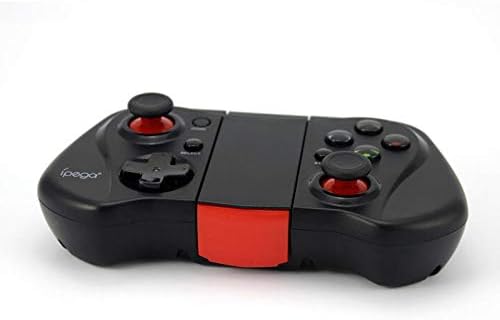
Figi 2: Yon bò view of the Ipega PG-9033 Bluetooth Gamepad, showcasing its ergonomic design and compact form factor when not in use. The red accent on the central hinge is visible.
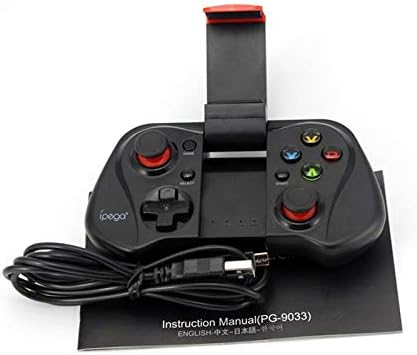
Figure 3: The Ipega PG-9033 Bluetooth Gamepad displayed alongside its USB charging cable and the included instruction manual, which clearly indicates the model number PG-9033.

Figi 4: Dèyè a view of the Ipega PG-9033 Bluetooth Gamepad, featuring a label with technical details such as "BLUETOOTH CONTROLLER," working voltage, working current, and input specifications.
Enstalasyon
Chaje Gamepad la
Before first use, fully charge the gamepad using the provided USB cable.
- Connect the micro-USB end of the charging cable to the gamepad's charging port.
- Connect the USB-A end to a USB power source (e.g., computer, USB wall adapter).
- The charging indicator light will illuminate. It will typically turn off or change color when fully charged.
Pairing ak yon Aparèy
The PG-9033 supports different pairing modes for various operating systems.
Aparèy Android
- Ensure the gamepad is off.
- Peze epi kenbe la LAKAY bouton ak a X button simultaneously until the indicator light flashes rapidly. This puts the gamepad into Android pairing mode.
- On your Android device, go to Bluetooth settings and search for available devices.
- Select "PG-9033" from the list to pair. The indicator light will become solid when connected.
iOS Pairing (iCade Mode)
- Ensure the gamepad is off.
- Peze epi kenbe la LAKAY bouton ak a B button simultaneously until the indicator light flashes rapidly. This puts the gamepad into iOS iCade pairing mode.
- On your iOS device, go to Bluetooth settings and search for available devices.
- Select "PG-9033" from the list to pair. The indicator light will become solid when connected.
Note: iCade mode has limited game compatibility. For broader iOS compatibility, check specific game requirements.
Aparèy PC
- Ensure the gamepad is off.
- Peze epi kenbe la LAKAY bouton ak a A button simultaneously until the indicator light flashes rapidly. This puts the gamepad into PC pairing mode.
- On your PC, go to Bluetooth settings and search for available devices.
- Select "PG-9033" from the list to pair. The indicator light will become solid when connected.
Note: A Bluetooth adapter may be required for PCs without built-in Bluetooth.
Enstriksyon Operasyon
Konekte telefòn entelijan ou an
- Gently extend the adjustable phone holder located on the top of the gamepad.
- Carefully place your smartphone into the holder, ensuring it is securely gripped and centered.
- Ajiste ang lan pou pi bon viewing.
Game Mode Selection
The gamepad automatically enters the last used mode upon reconnection. To switch modes, disconnect the gamepad and re-pair using the desired mode's button combination (HOME + X for Android, HOME + B for iOS, HOME + A for PC).
Power On/Off
Pou pouvwa sou, peze la LAKAY bouton. Pou etenn, peze epi kenbe la LAKAY button for approximately 5 seconds until the indicator light turns off. The gamepad will automatically power off after a period of inactivity.
Antretyen
To ensure the longevity and proper functioning of your Ipega PG-9033 gamepad, follow these maintenance guidelines:
- Kenbe aparèy la sèk. Evite ekspoze li a imidite oswa likid.
- Netwaye gamepad la avèk yon twal mou epi sèk. Pa sèvi ak pwodui chimik ki agresif oswa pwodui netwayaj abrazif.
- Sere gamepad la nan yon kote ki fre epi sèk, lwen limyè solèy dirèk ak tanperati ekstrèm.
- Evite lage gamepad la oswa soumèt li a gwo enpak.
- Charge the battery regularly, even if not in use, to maintain battery health.
Do not attempt to disassemble the gamepad. This will void the warranty and may cause damage.
Depanaj
Gamepad not connecting or pairing:
- Ensure the gamepad is fully charged.
- Verifye ke Bluetooth aktive sou aparèy ou an.
- Make sure the gamepad is in the correct pairing mode for your device (Android, iOS, or PC).
- Eseye bliye aparèy la nan paramèt Bluetooth ou yo epi konekte li ankò.
- Restart both the gamepad and your device.
Bouton oswa joystick pa reponn:
- Tcheke si gamepad la byen konekte.
- Ensure the game you are playing supports external controllers.
- Some games may require specific controller mapping or settings adjustments within the game.
- If the issue persists, try resetting the gamepad (if a reset button is available, typically a small pinhole).
Lag oswa reta antre:
- Ensure your device is not too far from the gamepad. Maintain a clear line of sight.
- Diminye entèferans ki soti nan lòt aparèy san fil yo.
- Fèmen aplikasyon ki pa nesesè pou itilize an background sou aparèy ou an.
Phone not fitting in holder:
- The holder is designed for most smartphones. Ensure your phone's dimensions are within the supported range.
- Retire tout kouvèti telefòn ki ankonbran ki ta ka anpeche l anfòm byen.
Espesifikasyon
| Karakteristik | Detay |
|---|---|
| Modèl | PG-9033 |
| Mak | Ipega |
| Koneksyon | Bluetooth |
| Konpatibilite | Android, iOS (iCade), PC |
| Travay Voltage | DC 3.7V |
| Travay aktyèl | 30mA |
| Antre Voltage | DC 5V 500mA |
| ASIN | B07P52YH7M |
Garanti ak sipò
For warranty information and technical support, please refer to the official Ipega websit la oubyen kontakte machann ou an. Kenbe resi acha ou kòm prèv acha.
Manyèl sa a se pou rezon enfòmasyon sèlman. Espesifikasyon yo ka chanje san avètisman.