
1. Entwodiksyon
This manual provides essential information for the safe and efficient operation of your Strong SRT 32HB3003 32-inch HD LED TV. Please read these instructions carefully before using the television and retain them for future reference.
2. Enfòmasyon sou Sekirite
Toujou obsève prekosyon sekirite sa yo pou anpeche chòk elektrik, dife oswa domaj nan televizyon an:
- Pa ekspoze televizyon an ak lapli oswa imidite.
- Pa ouvri televizyon an.asing; konfye tout antretyen bay pèsonèl kalifye.
- Asire bon vantilasyon alantou televizyon an.
- Dekonekte televizyon an pandan tanpèt zèklè oswa lè ou pa itilize li pou yon bon bout tan.
- Kenbe televizyon an lwen sous chalè ak limyè solèy dirèk.
3. Pake kontni
Verifye ke tout atik yo prezan nan anbalaj la:
- Strong SRT 32HB3003 LED TV
- Kontwòl Remote
- 2x AAA pil
- Kanpe televizyon
- Manyèl itilizatè

Image: The Strong SRT 32HB3003 TV packaging, highlighting key features such as DVB-T2/C/S2 tuner, HDMI, USB, and Dolby Audio.
4. Enstalasyon
4.1 Enstalasyon kanpe
Pou enstale sipò televizyon an:
- Mete televizyon an fas anba ak anpil atansyon sou yon sifas mou epi pwòp pou evite domaje ekran an.
- Aliyen baz sipò yo ak fant ki koresponn yo anba televizyon an.
- Fikse sipò yo avèk vis yo bay yo.
4.2 Koneksyon
Konekte aparèy ekstèn ou yo ak televizyon an lè l sèvi avèk pò ki apwopriye yo.
- Antèn/Kab: Connect your DVB-T2 or DVB-C antenna/cable to the 'ANT IN' port.
- Satelit: Connect your satellite dish to the 'SATELLITE IN' port for DVB-S2 reception.
- Aparèy HDMI: Use HDMI ports for high-definition devices like Blu-ray players, game consoles, or set-top boxes. HDMI 1 supports ARC (Audio Return Channel).
- Aparèy USB: Mete kle USB yo nan pò USB 2.0 yo pou li dosye medya.
- Modil CI+: Insert a CI+ module (Common Interface) into the CI+ slot for encrypted channels.
- Sòti odyo: Use the Headphone jack for private listening or the Digital Optical Output (TOS-Link) for external audio systems.
- AV NAN: For older devices, use the AV IN port.

Imaj: Dèyè view of the Strong SRT 32HB3003 TV, illustrating the placement of connection ports including HDMI, USB, and antenna inputs.

Image: A diagram detailing the Common Interface (CI) slot and other connectivity options such as USB, headphone jack, AV IN, HDMI 1, HDMI 2, Satellite IN, and S/PDIF (digital optical audio out).
4.3 Premye Enstalasyon
After connecting the power cable and turning on the TV, the First Time Installation wizard will guide you through initial setup steps, including language selection, country, and channel scanning for DVB-T2, DVB-C, or DVB-S2.
5. Opere
5.1 Remote Control Overview
The remote control allows you to access all TV functions. Insert the two AAA batteries into the remote control, ensuring correct polarity.

Image: The remote control for the Strong SRT 32HB3003 TV, featuring buttons for power, numerical input, volume control, channel selection, menu access, source input, and media playback functions.
5.2 Fonksyon debaz
- Pouvwa: Peze a bouton wouj pouvwa to turn the TV on or off.
- Volim: Sèvi ak la VOL +/- bouton pou ajiste volim la.
- Chèn: Sèvi ak la CH +/- bouton pou chanje chanèl.
- Bèbè: Peze a BÈN bouton pou fèmen odyo a tanporèman.
5.3 Seleksyon Sous
Peze a SOUS button on the remote control to select the desired input source (e.g., HDMI 1, HDMI 2, DVB-T2, DVB-C, DVB-S2, AV).
5.4 Navigasyon meni
Peze a MENI button to access the main menu. Use the arrow buttons to navigate and OK to confirm selections. The TOUNEN button returns to the previous menu or exits the current menu.
5.5 Lekti Medya (USB)
Insert a USB storage device into one of the USB ports. The TV supports playback of photos, videos, and music files. Access the media player through the main menu or by selecting the USB source.
5.6 Gid Pwogram Elektwonik (EPG)
Peze a EPG bouton pou view the Electronic Program Guide, which displays program schedules for digital channels.
5.7 Mòd Otèl
The TV features a Hotel Mode, which allows for restricted access to certain settings and functions, ideal for hospitality environments. Consult the advanced settings menu for Hotel Mode configuration.
6. Antretyen
6.1 Netwayaj
- Toujou debranche televizyon an anvan ou netwaye li.
- Sèvi ak yon twal mou epi sèk pou siye ekran an ak kabinè a.
- Pou mak ki difisil pou retire, pase yon ti krasampRense twal la avèk dlo oswa yon pwodui netwayaj dou ki pa abrazif, ki fèt espesyalman pou aparèy elektwonik.
- Never spray cleaning liquids directly onto the TV.
6.2 Depo
If storing the TV for an extended period, ensure it is kept in a cool, dry place, protected from dust and extreme temperatures. It is recommended to use the original packaging for storage.
NAN. Depanaj
Si w rankontre pwoblèm ak televizyon w lan, gade solisyon komen sa yo:
| Pwoblèm | Kòz posib / Solisyon |
|---|---|
| Pa gen pouvwa | Check if the power cable is securely connected. Ensure the power outlet is functional. |
| Pa gen imaj, men gen son | Tcheke seleksyon sous opinyon an. Asire w ke aparèy ekstèn yo limen epi yo konekte kòrèkteman. |
| Pa gen son, men imaj la la | Check volume level and mute status. Verify audio settings in the menu. |
| Remote kontwòl pa travay | Check and replace batteries. Ensure no obstructions between remote and TV sensor. |
| Pòv bon jan kalite foto | Check antenna/cable connection. Adjust picture settings in the menu. |
8. Espesifikasyon
Detailed technical specifications for the Strong SRT 32HB3003 HD LED TV:
| Karakteristik | Spesifikasyon |
|---|---|
| Nimewo Modèl | SRT 32HB3003 |
| Gwosè ekran | 32 pous (80 cm) |
| Rezolisyon | 1366 x 768 pixels (HD-Ready) |
| Teknoloji ekspozisyon | dirije |
| Rafrechisman pousantaj | 60 Hz |
| Tuner Teknoloji | DVB-C, DVB-S2, DVB-T2 |
| Pò HDMI | 2 (1x HDMI ARC) |
| Pò USB 2.0 | 2 |
| Lòt entèfas | Headphone, Digital Optical Out (TOS-Link), CI+ interface, AV IN |
| Karakteristik espesyal | Electronic Program Guide (EPG), USB Media Playback, Parental Control, Hotel Mode |
| Konsomasyon pouvwa | 50 Watt |
| Klas efikasite enèji | A+ |
| Konsomasyon enèji chak ane | 45 kWh / an |
| Pwodwi Dimansyon (W x H x D) | 73.2 x 43.5 x 7.78 cm |
| Pwa | 4.15 kg |

Image: The energy efficiency label for the Strong SRT 32HB3003, indicating an A+ rating and an annual energy consumption of 45 kWh.
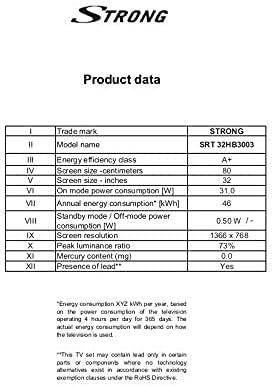
Image: A product data table providing detailed specifications for the Strong SRT 32HB3003, including screen size, resolution, and power consumption.
9. Garanti ak sipò
Your Strong SRT 32HB3003 TV comes with a limited warranty. For specific warranty terms and conditions, please refer to the warranty card included in your product packaging or visit the official Strong website. For technical support, troubleshooting assistance, or service inquiries, please contact Strong customer service through their official channels.
Pou plis asistans, tanpri vizite Strong official websit.