
Entwodiksyon
This manual provides detailed instructions for the installation, operation, and maintenance of your ASHATA MP5-SWM9601 Car Stereo. This single-DIN multimedia player features a 7-inch retractable touchscreen, Bluetooth connectivity for calls and music streaming, and supports various audio and video formats via USB, TF card, and AUX input. Please read this manual thoroughly before using the product to ensure proper function and safety.
Karakteristik pwodwi
- 7-inch high-definition retractable touchscreen display.
- Bluetooth pou apèl men lib ak difizyon odyo.
- Supports various audio formats including APE, FLAC, WAV, DIS, MP3, WMA, ACC, OGG, RA, AC3, MP2, AMR.
- Supports various video formats including AVI, MP4, FLV, PMP, RM, RMVB, MPG.
- USB 2.0 and TF card slot for media playback.
- AUX audio input for external devices.
- Sipò dèyè view camera input for parking assistance.
- Electronic sound processing (EQ) with adjustable treble, bass, balance, and sound field.
- Memory playback function for songs.
- Remote control included for convenient operation.
Enstalasyon ak Enstalasyon
Proper installation is crucial for the performance and safety of your car stereo. It is recommended to have this unit installed by a professional technician. Ensure the vehicle's battery is disconnected before starting installation.
Dimansyon
Before installation, verify that the unit's dimensions are compatible with your car's dashboard opening. The unit is a standard single-DIN size.

Figi 1: Dimensions of the ASHATA MP5-SWM9601 car stereo. The unit measures approximately 18.4 cm (7.2 inches) in width, 6.2 cm (2.4 inches) in height, and 17.8 cm (7.0 inches) in depth.
Dyagram fil elektrik
Refer to the following diagram for correct wiring connections. Incorrect wiring can cause damage to the unit or your vehicle's electrical system.
Figi 2: Dèyè view of the ASHATA MP5-SWM9601 showing the wiring harness connector and RCA outputs for audio and video. The wiring harness typically includes connections for power (ACC, B+, Ground), speakers, antenna, and steering wheel controls (if applicable).
- Koneksyon pouvwa: Connect the yellow wire to the constant 12V power supply (B+), the red wire to the accessory 12V power supply (ACC), and the black wire to ground.
- Koneksyon oratè: Connect the speaker wires to the corresponding positive and negative terminals for each speaker (e.g., front left +, front left -).
- Antèn: Connect the car's radio antenna to the antenna input.
- Dèyè View Kamera: Connect the video input from your rear view camera to the designated video input on the unit. Ensure the reverse trigger wire is connected to activate the camera display when reversing.
- Sòti RCA: Use the RCA outputs for connecting external amplifiers or additional displays.
Enstriksyon Operasyon
Power On/Off ak Kontwòl Debaz yo

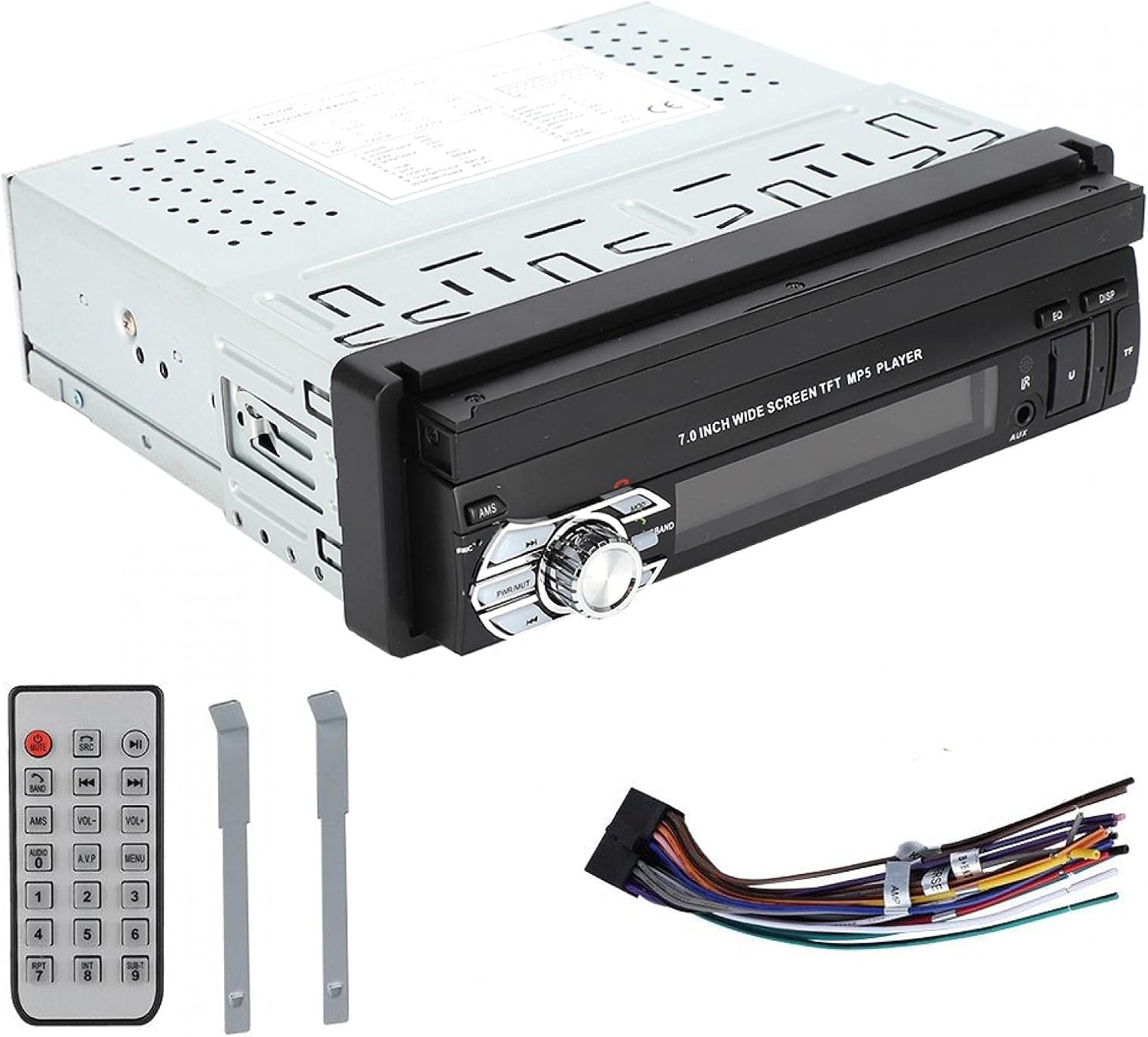
Figi 3: Front panel of the ASHATA MP5-SWM9601 showing the main controls, including the power/volume knob, mode button, band button, and USB/AUX/TF card slots.
- Limen/Etenyen: Peze a PWR/MUT button to turn the unit on. Press and hold to turn off. A short press will mute/unmute the audio.
- Kontwòl Volim: Rotate the central knob to adjust the volume.
- Seleksyon mòd: Peze a MÒD button to cycle through available sources (Radio, USB, TF, AUX, Bluetooth).
- Retract/Extend Screen: The screen can be manually or automatically retracted/extended. Refer to the on-screen menu for specific settings.
Koneksyon Bluetooth
Pair your mobile phone with the car stereo to enjoy hands-free calling and wireless audio streaming.
- Turn on the unit and select Bluetooth mode using the MÒD bouton.
- Sou telefòn mobil ou a, aktive Bluetooth epi chèche aparèy ki disponib yo.
- Select "ASHATA" or a similar device name from the list. If prompted for a password, enter "0000" or "1234".
- Once paired, you can make/receive calls and play music through the car stereo.
Media Playback (USB/TF/AUX)
- USB lèktur: Insert a USB drive into the USB port. The unit will automatically switch to USB mode and begin playing compatible media files.
- Lektur kat TF: Insert a TF (MicroSD) card into the TF card slot. The unit will automatically switch to TF mode and begin playing compatible media files.
- Antre AUX: Connect an external audio device (e.g., MP3 player, phone) to the AUX input using a 3.5mm audio cable. Select AUX mode using the MÒD bouton.
- Fòma sipòte:
- Audio: DIS, MP3, WMA, ACC, OGG, WAV, RA, AC3, MP2, AMR, APE, FLAC.
- Video: AVI, MP4, FLV, PMP, RM, RMVB, MPG.
- Image: JPEG.
Anviwònman son
Adjust the audio output to your preference using the electronic sound processing (EQ) features.
- Peze a EQ button to access equalizer presets or custom settings.
- Navigate through the menu to adjust electronic volume, treble, bass, left/right balance, and front/rear sound field.

Figi 4: The display showing sound adjustment options, including electronic volume, treble, bass, left and right balance, and front and rear sound field settings.
Dèyè View Fonksyon Kamera
When a rear view camera is connected and the vehicle is in reverse gear, the unit will automatically display the camera feed on the screen, providing assistance for parking and maneuvering.
Antretyen
- Netwaye ekran an: Use a soft, dry, lint-free cloth to gently wipe the touchscreen. Do not use abrasive cleaners or solvents.
- Netwaye inite a: Wipe the exterior of the unit with a soft, dry cloth. Avoid getting liquids inside the unit.
- Tanperati: Evite ekspoze aparèy la nan tanperati ekstrèm oswa anba limyè solèy dirèk pou yon peryòd tan pwolonje.
Depanaj
| Pwoblèm | Kòz posib | Solisyon |
|---|---|---|
| Pa gen pouvwa | Fil elektrik ki pa kòrèk; Fuzib boule; Batri machin nan fèb. | Check power connections (B+, ACC, Ground). Inspect and replace fuse if necessary. Check vehicle battery. |
| Pa gen son | Volim twò ba; Fonksyon silans aktif; Fil elektrik oratè ki pa kòrèk; Oratè ki gen pwoblèm. | Increase volume. Press PWR/MUT to unmute. Check speaker connections. Test with different speakers if possible. |
| Bluetooth pa konekte | Bluetooth not enabled on phone/unit; Incorrect pairing procedure; Device out of range. | Ensure Bluetooth is active on both devices. Repeat pairing steps. Move phone closer to the unit. |
| Kat USB/TF la pa ap jwe | Enkonpatib file fòma; Medya pèvèti; Kat/distribisyon pa byen mete. | Asire w files are in supported formats. Try a different USB drive/TF card. Reinsert the media. |
| Screen not retracting/extending | Mechanical obstruction; Software glitch. | Check for any physical obstructions. Try resetting the unit (if a reset button is available, or disconnect power briefly). |
Si pwoblèm nan pèsiste apre ou fin eseye solisyon sa yo, tanpri kontakte sèvis kliyan.
Espesifikasyon
| Karakteristik | Detay |
|---|---|
| Mak | ASHATA |
| Nimewo Modèl | MP5-SWM9601 (9601G) |
| Koneksyon Teknoloji | Bluetooth |
| Kalite kontwolè | Kontwòl Remote |
| Karakteristik espesyal | Jwè Miltimedya |
| Aparèy konpatib | MP3 Player, Mobile Phone |
| Kalite Connector | USB |
| Audio Sòti Mode | Stereo |
| Konfigirasyon chanèl son antoure | 2.0 |
| Kantite Chanèl | 2 |
| Metòd kontwòl | Kontwòl Remote |
| Kalite Sòti Audio | AUX, Speaker, USB |
| Smart Kay konpatibilite | Not Smart Home Compatible |
| Fòma Medya Dijital | AVI, WAV, WMA (also supports DIS, MP3, ACC, OGG, RA, AC3, MP2, AMR, APE, FLAC, MP4, FLV, PMP, RM, RMVB, MPG, JPEG) |
| UPC | 783335388899 |
| Peyi orijin | Lachin |
Garanti ak sipò
Pou enfòmasyon sou garanti a oswa pou sipò teknik, tanpri al gade dokiman ki vini ak acha ou a oswa kontakte machann/fabrikan an dirèkteman. Kenbe prèv acha ou a pou nenpòt reklamasyon garanti.