
Entwodiksyon
This manual provides essential instructions for the safe and efficient operation of your KINGONE K9 Super Bass Portable Bluetooth Speaker. Please read this manual thoroughly before using the device and retain it for future reference.
The KINGONE K9 is a portable Bluetooth speaker featuring powerful stereo sound, multiple input options including Bluetooth, MicroSD, and AUX, and convenient touch controls. It also supports hands-free calling and NFC for easy pairing.
Kontni pake
Asire w tout atik yo prezan nan pakè a:
- KINGONE K9 Super Bass Portable Bluetooth Speaker
- Mikwo USB Chaje Kab
- Kab Odyo 3.5mm (AUX)
- Manyèl Itilizatè (dokiman sa a)
Pwodwi souview
The KINGONE K9 speaker is designed for portability and high-quality audio. Below is an image illustrating the speaker and its packaging.
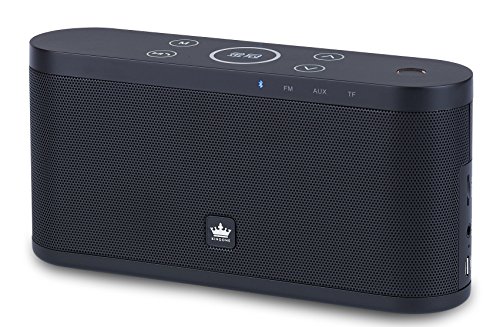
Image: The KINGONE K9 Super Bass Portable Bluetooth Speaker (left) shown next to its metallic-finish packaging (right).
Karakteristik kle:
- Koneksyon Bluetooth 4.0: Supports A2DP, AVRCP, HFP, HSP profiles for stable wireless audio streaming.
- Sipò NFC: For quick and easy pairing with compatible devices.
- Mòd Lekti miltip: Bluetooth, MicroSD card, and AUX input.
- Apèl men gratis: Built-in microphone for answering phone calls.
- Kontwòl manyen: Intuitive touch-sensitive buttons for volume, track navigation, and play/pause.
- Son Stereo Pwisan: 2 x 5W output for a rich audio experience.
- Konsepsyon pòtab: Compact dimensions and a 2200mAh battery for extended use.
Kontwòl ak Fonksyon
The speaker features touch-sensitive controls located on the top panel. Familiarize yourself with these controls for optimal use:
- Bouton pouvwa: Peze epi kenbe pou 3 segonn pou pouvwa sou / koupe.
- Bouton jwe/poz: Tap to play or pause audio. During a call, tap to answer/end.
- Volim moute (+): Tape pou ogmante volim nan.
- Volim desann (-): Tape pou diminye volim nan.
- Pwochen tras la (>>): Tape pou ale nan pwochen track la.
- Tras anvan an (<<): Tape pou ale nan tras anvan an.
- Bouton mòd (M): Tap to switch between Bluetooth, MicroSD, and AUX input modes.
Enstalasyon
1. Chaje Oratè a
- Konekte kab chaje Mikwo USB a nan pò chaje oratè a.
- Connect the other end of the USB cable to a DC 5V USB power source (e.g., computer USB port, USB wall adapter).
- Limyè endikatè chaje a ap limen.
- Charging typically takes 4-5 hours for a full charge. The indicator light will change or turn off once fully charged.
2. Powering On / Off
- To power on, press and hold the Power button for approximately 3 seconds until you hear an audible prompt.
- To power off, press and hold the Power button for approximately 3 seconds until you hear an audible prompt.
3. Pè Bluetooth
- Asire w ke oratè a limen epi li nan mòd Bluetooth (yon LED ble k ap flache endike sa). Si se pa sa, peze bouton 'M' (Mòd) la pou chanje an mòd Bluetooth.
- Aktive Bluetooth sou aparèy mobil ou a (telefòn entelijan, tablèt, òdinatè pòtab).
- Chèche pou available Bluetooth devices. You should see "KINGONE K9" in the list.
- Select "KINGONE K9" to pair. Once paired, the speaker will emit an audible confirmation, and the blue LED will stop flashing and remain solid.
- Oratè a ap rekonekte otomatikman ak dènye aparèy ki konekte a lè li limen, si Bluetooth aparèy la aktif epi li nan zòn li.
4. NFC Pairing (for compatible devices)
- Ensure NFC is enabled on your compatible smartphone or tablet.
- Power on the KINGONE K9 speaker.
- Gently tap your NFC-enabled device against the NFC area on the speaker (refer to the speaker's diagram for exact location, usually marked with an NFC logo).
- Your device will prompt you to confirm the pairing. Accept the connection.
5. AUX Input Connection
- Konekte yon bout kab odyo 3.5mm lan nan pò AUX ki sou oratè a.
- Connect the other end of the 3.5mm audio cable to the headphone jack or audio output port of your external audio device.
- Press the 'M' (Mode) button on the speaker to switch to AUX mode.
- Audio will now play through the speaker from your connected device. Control playback and volume from your external device.
6. Lekti Kat MicroSD
- Mete yon kat MicroSD (TF) ak odyo MP3 files nan fant kat MicroSD ki sou oratè a.
- Press the 'M' (Mode) button to switch to MicroSD card mode.
- Oratè a ap kòmanse jwe odyo otomatikman files soti nan kat la.
- Use the speaker's touch controls for play/pause, next track, and previous track.
Enstriksyon Operasyon
Kontwòl Volim
- Tap the 'Volume Up (+)' button to increase the volume.
- Tap the 'Volume Down (-)' button to decrease the volume.
Track Navigation (Bluetooth/MicroSD modes)
- Tap the 'Next Track (>>)' button to skip to the next song.
- Tap the 'Previous Track (<<)' button to go back to the beginning of the current song or to the previous song.
Rele men-gratis
- Lè yon apèl rive pandan oratè a konekte via Bluetooth, li pral sonnen.
- Tap the 'Play/Pause' button to answer the incoming call.
- Tap the 'Play/Pause' button again to end the call.
- To reject an incoming call, press and hold the 'Play/Pause' button for a few seconds.
Antretyen
- Kenbe oratè a lwen dlo, imidite, ak tanperati ekstrèm.
- Netwaye oratè a avèk yon twal mou epi sèk. Pa sèvi ak pwodui netwayaj abrazif oswa solvan.
- Evite lage oratè a oswa sibi gwo enpak.
- Lè w pa itilize oratè a pou yon bon bout tan, sere l nan yon kote ki fre epi sèk epi chaje l detanzantan pou batri a rete an bon eta.
Depanaj
- Pa gen pouvwa:
- Asire w ke oratè a chaje nèt.
- Tcheke kab chaje a ak adaptè kouran an pou wè si yo domaje.
- Pa gen son:
- Ogmante volim nan tou de sou oratè a ak sou aparèy ki konekte a.
- Ensure the speaker is in the correct input mode (Bluetooth, AUX, MicroSD).
- If using Bluetooth, ensure the device is properly paired and within the 10-meter operating range.
- If using AUX, ensure the 3.5mm cable is securely connected to both devices.
- Dekoneksyon Bluetooth:
- Deplase aparèy ou an pi pre oratè a.
- Asire w pa gen okenn obstak ant oratè a ak aparèy ou an.
- Turn off and on Bluetooth on your device, then try re-pairing.
- Kontwòl ki pa reponn:
- Asire w ke oratè a limen.
- Try restarting the speaker.
Espesifikasyon
| Modèl | K9 |
| Bluetooth vèsyon | 4.0 |
| Bluetooth Profiles | A2DP, AVRCP, HFP, HSP |
| Range opere | Jiska 10 mèt (33 pye) |
| Sortie pouvwa | 2 x 5W (Total 10W) |
| Chèn konte genyen | 2.0 Stereo |
| Opsyon Antre | Bluetooth, MicroSD (TF Card), AUX (3.5mm) |
| Kapasite batri | 2200mAh |
| Chaje Antre | DC 5V (Mikwo USB) |
| Tan pou chaje | 4-5 èdtan |
| Dimansyon (L x W x H) | 22 santimèt x 12 santimèt x 15 santimèt (apeprè) |
| Pwa | 1.5 kg (apeprè) |
| Metòd kontwòl | Manyen |
| Karakteristik espesyal | NFC, Hands-free Calling, Portable |
Enfòmasyon sou Sekirite
- Do not expose the speaker to direct sunlight, heat sources, or open flames.
- Do not disassemble, repair, or modify the device yourself. This may void the warranty and cause damage.
- Kenbe soti nan atenn timoun yo.
- Jete pwodwi a ak batri li yon fason responsab dapre règleman lokal yo.
- Avoid listening at high volumes for prolonged periods to prevent hearing damage.
Garanti ak sipò
For warranty information or technical support, please refer to the documentation provided at the time of purchase or contact your retailer. Keep your proof of purchase for warranty claims.