
1. Entwodiksyon
Thank you for choosing the XTUGA A4 4-Channel Audio Mixer. This compact and versatile mixing console is designed for various audio applications, including home music production, webcasting, and live sound. It features 4 channels, Bluetooth connectivity, USB recording and playback, 48V phantom power for condenser microphones, and built-in effects. This manual provides detailed instructions for setup, operation, maintenance, and troubleshooting to ensure optimal performance and longevity of your device.
2. Enfòmasyon sou Sekirite
- Pwovizyon pou pouvwa: Use only the specified power adapter or a reliable USB power source that meets the voltage and current requirements (greater than 5V and 1.5A). Incorrect power can damage the device or cause noise.
- Dlo ak imidite: Do not expose the unit to rain, moisture, or extreme humidity. Avoid placing liquid containers on or near the mixer.
- Vantilasyon: Asire w ke gen ase vantilasyon toutotou aparèy la. Pa bloke ouvèti vantilasyon yo.
- Chalè: Kenbe aparèy la lwen sous chalè tankou radyatè, recho, oswa lòt aparèy ki pwodui chalè.
- Netwayaj: Dekonekte kouran an anvan ou netwaye. Sèvi ak yon twal sèk epi mou. Pa sèvi ak pwodui netwayaj likid oswa ayewosòl.
- Sèvis: Pa eseye fè antretyen aparèy sa a tèt ou. Konfye tout antretyen bay pèsonèl sèvis kalifye.
3. Pake kontni
Tanpri verifye sa ki nan pake a lè w ap debale l pou asire w tout bagay yo la:
- XTUGA A4 4-Channel Audio Mixer
- USB pouvwa kab
- USB pouvwa adaptè

Image: The XTUGA A4 Audio Mixer shown with its included USB power cable and USB power adapter.
4. Pwodwi souview
The XTUGA A4 mixer features a compact design with essential controls for audio mixing. Key features include:
- 4 Chanèl Antre: Two MIC/LINE (XLR/TRS combo) inputs with 48V phantom power and two stereo LINE (RCA) inputs.
- Koneksyon Bluetooth: Wirelessly stream audio from your smartphone or other Bluetooth-enabled devices.
- Entèfas odyo USB: Connect to a computer for recording and playback. Supports U-Disk (USB drive) for MP3/WAV/WMA/FLAC playback and direct recording.
- Efè entegre: Adjustable DELAY and REPEAT effects for vocal enhancement.
- Siveyans: Dedicated PHONES output for headphone monitoring.
- Kontwòl EQ: HIGH and LOW equalization for each input channel.

Imaj: Devan view of the XTUGA A4 Audio Mixer, illustrating its Bluetooth connectivity feature with a smartphone icon.
5. Enstalasyon
5.1 Powering the Mixer
The A4 mixer can be powered via USB. For stable performance and to avoid noise, ensure your power source provides at least 5V and 1.5A.
- USB pouvwa adaptè: Connect the provided USB cable to the mixer's USB port and the USB power adapter, then plug into a wall outlet. This is the recommended method for optimal performance.
- Computer USB Port: Connect the USB cable directly to a computer's USB port. Note that some computer USB ports may not provide sufficient power, potentially leading to noise or unstable operation.
- Pouvwa Bank: For portable use, connect the USB cable to a power bank with sufficient output.

Image: Illustration of three ways to power the XTUGA A4 mixer: via a computer's USB port, a wall power adapter, or a portable power bank. A note emphasizes the requirement for a USB power supply of at least 5V and 1.5A.
5.2 Konekte Aparèy Audio
Refer to the diagram below for a general connection overview.

Image: A comprehensive diagram illustrating how to connect various audio equipment to the XTUGA A4 mixer, including condenser microphones, dynamic microphones, wireless microphones, a computer, a power amplifier, oratè pasif, ak kas ekoutè.
5.2.1 Koneksyon Antre
- Mikwofòn (Chanèl 1 ak 2): Connect XLR or 1/4" TRS cables from your microphones to the MIC/LINE inputs. For condenser microphones requiring phantom power, ensure the +48V switch is engaged.
- Line-Level Devices (Channels 3 & 4): Connect devices like CD players, media players, or other line-level sources using RCA cables to the LEFT and RIGHT LINE inputs.

Imaj: Yon gwo plan view of the mixer's input section, demonstrating the connection of both a 1/4-inch TRS cable and an XLR cable into the MIC/LINE combo jacks.
5.2.2 Koneksyon Sòti
- Main Sòti: Connect the L/R MAIN RCA outputs to your power amplifier, active speakers, or recording device.
- kas ekoutè: Connect your headphones to the PHONES 1/4" TRS output for monitoring.
6. Operasyon Enstriksyon
6.1 Melanj debaz
- Kontwòl GAIN: Adjust the input sensitivity for each MIC/LINE channel. Set it so the PEAK LED flashes only occasionally during the loudest parts of the signal.
- Egalizè HIGH/LOW: Use these knobs to adjust the treble (HIGH) and bass (LOW) frequencies for each channel.
- Voye EFX: Controls the amount of signal sent from each channel to the built-in effects processor.
- MAIN Output: Adjusts the overall volume of the main mix.
- Sòti TELEFÒN: Ajiste volim pou pwodiksyon kas ekoutè a.
- +48V Phantom Power: Activate this switch for condenser microphones that require phantom power. Ensure microphones are connected before activating.
6.2 Operasyon Bluetooth
Pou konekte yon aparèy Bluetooth:
- Press the MODE/BT button on the USB/Bluetooth section until the display shows "BT".
- On your smartphone or Bluetooth device, search for available devices and select "XTUGA A4" (or similar name).
- Once paired, audio from your device will play through channels 3/4. Adjust the volume using the 3-4/USB knob.
6.3 USB Playback (U-Disk)
Pou jwe odyo filesoti nan yon kle USB:
- Insert a USB flash drive (U-Disk) containing MP3/WAV/WMA/FLAC files nan pò USB a.
- The mixer will automatically detect and begin playing files. Use the playback controls (play/pause, next/previous) on the mixer.
- Adjust the volume using the 3-4/USB knob.

Image: The XTUGA A4 mixer with a USB flash drive inserted into its USB port, highlighting its U-Disk functionality for playing MP3/WAV/WMA/FLAC files ak anrejistreman odyo.
6.4 USB Recording to Computer
The mixer can send its main stereo mix to a computer for recording.
- Connect the mixer to your computer via the USB cable.
- Your computer should recognize the mixer as an audio input device. Select it in your recording software (e.g., Audacity, GarageBand, OBS).
- Adjust input levels on the mixer and in your software. The mixer will send a stereo mix of all active channels to the computer.

Image: A diagram illustrating the connection for recording. A computer sends background music to the audio mixer, and the audio mixer's output is recorded by a computer program.
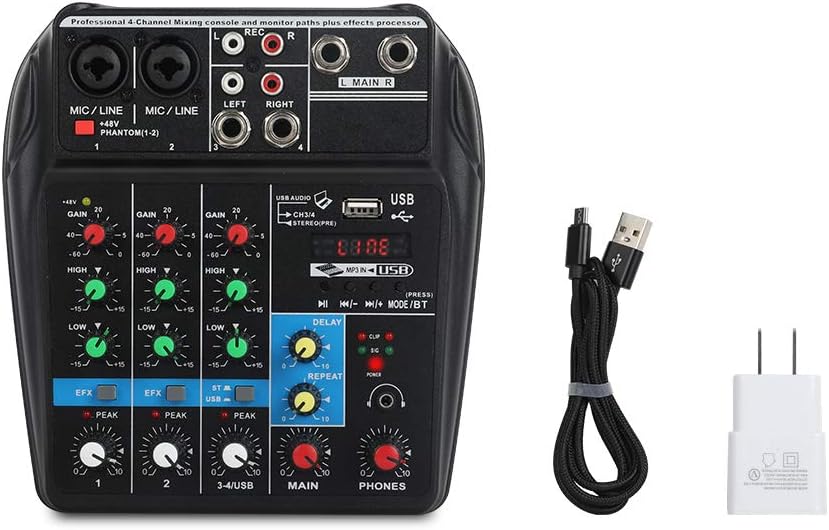
Image: A visual guide detailing the process of recording audio to a computer. Steps include connecting the USB cable, setting the mixer to 'Record' status, pressing record in a computer program (like GoldWave), and then playing back the recorded audio.
6.5 Effects (DELAY & REPEAT)
The mixer includes built-in delay and repeat effects:
- DETA: Adjusts the delay time of the effect.
- REPETE: Controls the number of repetitions for the delay effect.
- Use the EFX send knobs on individual channels to control how much of that channel's signal is sent to the effects processor.
6.6 Demonstrasyon Videyo Pwodwi
Watch this video for a visual demonstration of the XTUGA A4 Audio Mixer's features and operation.
Video: A demonstration of the XTUGA A4 4-Channel Audio Mixer, showcasing its various features, connections, and operational aspects. This video provides a visual guide to understanding the product's capabilities.
7. Antretyen
- Netwayaj: Siye sifas mixer a regilyèman avèk yon twal mou epi sèk. Evite itilize pwodui netwayaj abrazif oswa solvan.
- Depo: When not in use, store the mixer in a clean, dry environment away from direct sunlight and extreme temperatures.
- Swen kab: Handle cables carefully. Avoid sharp bends or excessive pulling, which can damage connectors or internal wiring.
NAN. Depanaj
| Pwoblèm | Kòz posib | Solisyon |
|---|---|---|
| Pa gen pouvwa | Incorrect or insufficient USB power supply. | Ensure the USB power adapter is properly connected to a wall outlet. If using a computer USB, try a different port or a dedicated USB power adapter (recommended). Verify the power source provides at least 5V and 1.5A. |
| Pa gen son oswa volim ki ba | Incorrect connections, low gain/volume settings, phantom power off for condenser mics. | Check all input and output cable connections. Increase GAIN for input channels, MAIN volume, and PHONES volume. Ensure +48V phantom power is engaged for condenser microphones. |
| Bri ronfleman oswa bri estatik | Ground loop, insufficient power, poor quality cables, interference. | Use the provided USB power adapter plugged into a wall outlet instead of a computer USB port. Ensure all cables are good quality and properly shielded. Try isolating the mixer from other electronic devices. |
| USB recording/playback issues (disconnects, not recognized) | Faulty USB cable, computer port issues, driver conflicts. | Try a different USB cable and a different USB port on your computer. Restart your computer. Ensure your operating system has the latest audio drivers. |
| Cannot record multiple microphones to separate tracks | The mixer outputs a stereo mix, not individual tracks. | This mixer is designed to output a combined stereo mix to your computer. It does not support multi-track recording of individual inputs. For multi-track recording, a dedicated multi-channel audio interface is required. |
9. Espesifikasyon
- Nimewo Modèl Atik: A4
- Pwa atik: 1.5 liv
- Dimansyon pwodwi: 3.15 x 9.45 x 9.45 pous
- Kantite chanèl: 4
- Entèfas pyès ki nan konpitè: Bluetooth, USB
- Koneksyon Teknoloji: Bluetooth
- Sous pouvwa: Fil elektrik (USB)
- Voltage: 48 Vòlt (pou pouvwa fantom)
- Kalite Connector Sòti: XLR (implied for mic inputs), RCA (Main Out), TRS (Phones Out)
10. Garanti ak sipò
For warranty information, technical support, or service inquiries, please contact the seller or manufacturer directly through the platform where the product was purchased. Keep your purchase receipt as proof of purchase.