
1. Entwodiksyon
Mèsi pou acha aasing the DACOM GF7 TWS V4.2 Bluetooth Earbuds. This manual provides detailed instructions on how to set up, operate, and maintain your earbuds to ensure optimal performance and longevity. Please read this manual thoroughly before using the product and retain it for future reference.
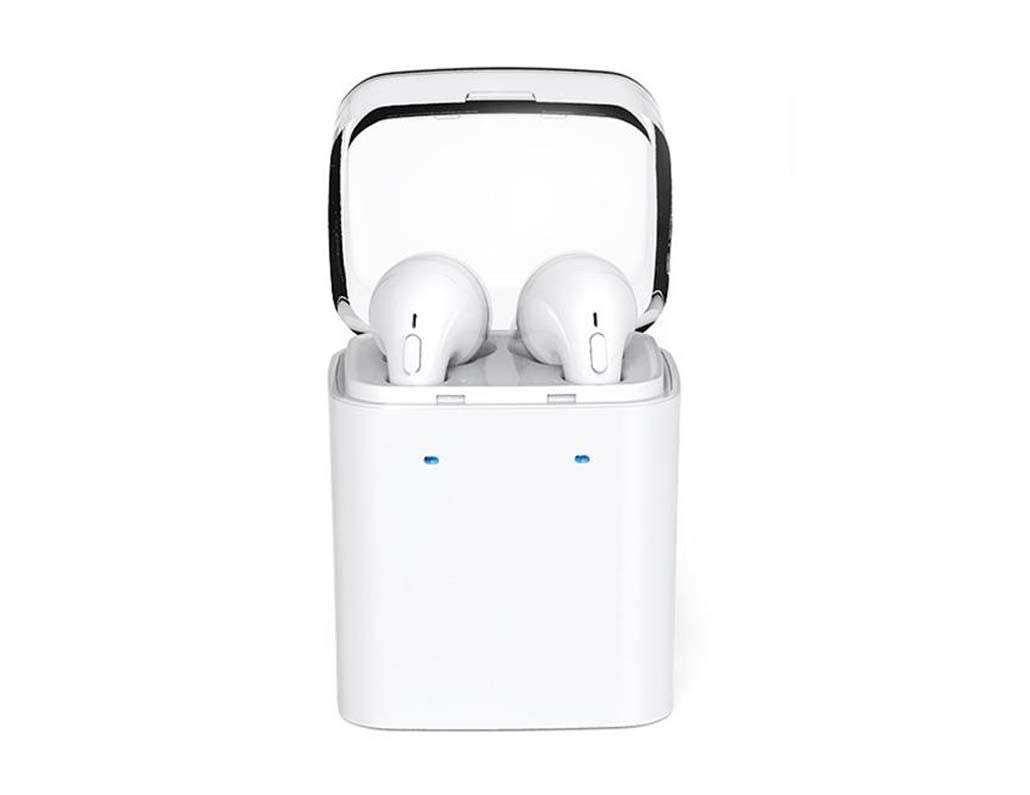
Image 1.1: DACOM GF7 TWS V4.2 Bluetooth Earbuds in their charging case.
2. Pake kontni
Tanpri verifye sa ki nan pake a lè w ap debale l. Si gen nenpòt atik ki manke oswa ki domaje, kontakte machann ou an.
- DACOM GF7 TWS V4.2 Bluetooth Earbuds (Left and Right)
- Ka chaje pòtab
- USB Chaje Kab
- Kousen zòrèy (divès gwosè)
- Manyèl Itilizatè (dokiman sa a)
3. Pwodwi souview
Familiarize yourself with the components of your DACOM GF7 TWS V4.2 Earbuds and charging case.

Image 3.1: Detailed diagram showing the Multifunction Button (MFB), Indicator Light, Microphone (Mic), Air Gate, DC5V Charge Jack Cover, Headphone Charging Indicator Light, USB Charging Input Port, and the Charging Indicator Light of the bottom on the DACOM GF7 TWS V4.2 Earbuds and Charging Case.
- Bouton miltifonksyon (MFB): Used for power, playback, call management, and voice assistant activation.
- Limyè Endikatè: Displays pairing status, charging status, and power status.
- Mikwo: Built-in microphone for calls and voice commands.
- Air Gate: Acoustic vent for sound performance.
- DC5V Charge Jack Cover: Protects the charging port on the earbuds.
- Headphone Charging Indicator Light: Shows charging status of individual earbuds within the case.
- USB Charging Input Port: For charging the portable charging case.
- Charging Indicator Light of the bottom: Montre eta chajman ka a.
4. Enstalasyon
4.1. Chaje ekoutè yo ak bwat chaje a
- Chaje ka a: Connect the USB charging cable to the USB Charging Input Port on the charging case and the other end to a 5V USB power adapter (not included). The Charging Indicator Light at the bottom of the case will illuminate to indicate charging. Once fully charged, the indicator light may change color or turn off.
- Chaje ekoutè yo: Place the earbuds into their respective slots in the charging case. Ensure the earbuds are properly seated. The Headphone Charging Indicator Light on the case will show the charging status of the earbuds. The earbuds' indicator lights will also show charging status (e.g., red while charging, off when fully charged).
- For first-time use, fully charge both the earbuds and the charging case.
4.2. Pè Bluetooth
- Pouvwa sou: Take both earbuds out of the charging case. They will automatically power on and attempt to pair with each other. You will hear an audible prompt indicating they are connected to each other.
- Pè Mode: Once the earbuds are paired with each other, one earbud's indicator light will flash red and blue alternately, indicating it is in pairing mode and ready to connect to your device.
- Konekte ak aparèy: On your smartphone or Bluetooth-enabled device, go to the Bluetooth settings and search for available devices. Select "DACOM GF7 TWS" (or similar name) from the list.
- Koneksyon siksè: Once connected, the earbud's indicator light will stop flashing, and you will hear a confirmation sound.
- Rekoneksyon otomatik: After initial pairing, the earbuds will automatically connect to the last paired device when taken out of the charging case, provided Bluetooth is enabled on your device.
5. Operasyon Enstriksyon
The DACOM GF7 TWS V4.2 Earbuds feature a Multifunction Button (MFB) for various controls.
5.1. Power On/Off
- Pouvwa sou: Take the earbuds out of the charging case. They will power on automatically. Alternatively, press and hold the MFB on both earbuds for approximately 3 seconds until you hear a power-on prompt.
- Pouvwa Off: Place the earbuds back into the charging case. They will power off automatically. Alternatively, press and hold the MFB on both earbuds for approximately 5 seconds until you hear a power-off prompt.
5.2. Mizik lèktur
- Jwe/Poz: Single press the MFB on either earbud.
- Pwochen Track: Double press the MFB on the right earbud.
- Track Previous: Double press the MFB on the left earbud.
5.3. Rele Jesyon
- Reponn/Fen Apèl: Single press the MFB on either earbud.
- Rejte apèl: Press and hold the MFB on either earbud for approximately 2 seconds.
5.4. Asistan vwa
- Aktive Asistan Vwa: Triple press the MFB on either earbud to activate your device's voice assistant (e.g., Siri, Google Assistant).
5.5. Anilasyon bri
- The DACOM GF7 TWS V4.2 features active noise cancellation. Specific activation methods may vary. Refer to the product's quick start guide or manufacturer's website for precise instructions if not detailed here. Typically, a long press or specific tap sequence on an MFB or dedicated button activates/deactivates ANC.
6. Antretyen
Bon antretyen asire lonjevite ak pèfòmans ekoutè ou yo.
- Netwayaj: Netwaye ekoutè yo ak bwat chaje a regilyèman avèk yon twal mou, sèk, ki pa gen pousyè. Pa sèvi ak pwodui chimik ki agresif oswa materyèl abrazif.
- Konsèy zòrèy: Retire epi netwaye bout zòrèy yo detanzantan avèk piblisite.amp twal ak savon dou, apresa rense epi seche byen anvan ou tache l ankò.
- Depo: Lè w pa ap itilize ekoutè yo, sere yo nan bwat chaje yo pou pwoteje yo kont pousyè ak domaj.
- Evite imidite: Keep the earbuds and charging case away from water, excessive humidity, and extreme temperatures.
NAN. Depanaj
If you encounter issues with your earbuds, refer to the following common problems and solutions.
| Pwoblèm | Solisyon |
|---|---|
| Ekoutè yo pa konekte youn ak lòt. |
|
| Ekoutè yo pa konekte ak aparèy la. |
|
| Pa gen son ki soti nan ekoutè yo. |
|
| Bwat chaje a oswa ekoutè yo pa chaje. |
|
8. Espesifikasyon
| Non mak | DACOM |
| Non modèl | GF7 TWS |
| Nimewo Modèl | 7TWS |
| Koulè | Blan |
| Ekoutè fòm faktè | Nan-zòrèy |
| Kontwòl bri | Anile aktif bri |
| Koneksyon Teknoloji | San fil (Bluetooth) |
| Teknoloji kominikasyon san fil | Bluetooth V4.2 (inferred from title) |
| Konpozan ki enkli | Kousen zòrèy |
| Karakteristik espesyal | Anilasyon bri, Mikwofòn enkli |
| Metòd kontwòl | Manyen |
| Aparèy konpatib | Tout aparèy |
| Materyèl | PU Metal Eraser (likely referring to ear tip material or casing finish) |
9. Enfòmasyon sou Sekirite
Tanpri li epi swiv konsèy sekirite sa yo pou evite aksidan oswa domaj nan aparèy ou an.
- Pa demonte, repare, oswa modifye pwodwi a. Sa ka lakòz dife, chòk elektrik, oswa domaje pwodwi a nèt.
- Keep the product away from extreme temperatures (hot or cold), direct sunlight, and sources of heat.
- Evite ekspoze pwodwi a nan dlo oswa lòt likid.
- Pa sèvi ak pwodwi a nan gwo volim pandan yon bon bout tan pou evite domaj nan tande.
- Sèvi ak sèlman kab chaje ak adaptè yo bay oswa rekòmande yo.
- Kenbe lwen timoun ak bèt kay. Ti moso yo ka poze yon danje toufe.
- Fè atansyon ak sa k ap pase bò kote w lè w ap itilize ekoutè yo, sitou nan trafik oswa lòt sitiyasyon ki ka danjere.
10. Garanti ak sipò
DACOM products are designed and manufactured to the highest quality standards. For detailed warranty information, please refer to the warranty card included with your purchase or visit the official DACOM websit.
For technical support, troubleshooting assistance, or to inquire about replacement parts, please contact DACOM customer service through their official websit la oswa enfòmasyon kontak ki nan anbalaj pwodwi ou a.
- Sipò sou entènèt: Visit the official DACOM websit pou FAQ, atik sipò, ak fòm kontak.
- Sipò Imèl: Refer to your product packaging for customer service email addresses.