
1. Entwodiksyon
This manual provides instructions for the Superior Electronics Universal Replacement Remote Control, model SUPTRB015. This remote is designed to be a direct replacement for original remote controls of LG, Samsung, and Sony televisions, including Smart TV models. It is ready to use without any programming.
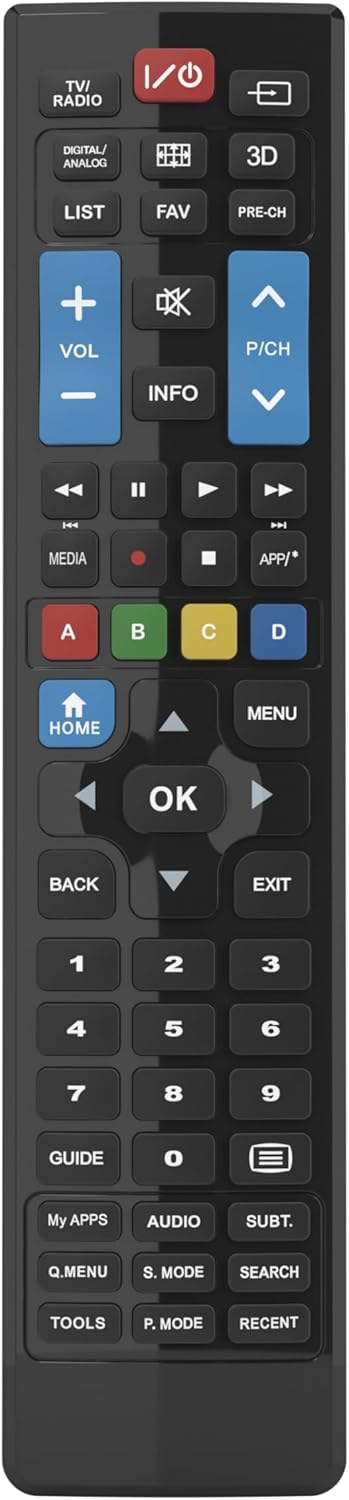
Figure 1: Superior Electronics Universal Remote Control (SUPTRB015)
2. Enstalasyon
2.1. Enstalasyon batri
Telekòmand lan bezwen de pil AAA (pa enkli). Swiv etap sa yo pou enstale yo:
- Jwenn lòj batri a sou do a nan kontwòl remote la.
- Peze sou lokèt la epi glise kouvèti batri a soti.
- Mete de pil AAA ladan l, asire w ke tèminal pozitif (+) ak negatif (-) yo koresponn ak dyagram ki anndan konpatiman an.
- Glise kouvèti batri a tounen nan plas li jiskaske li klike byen.

Figure 2: Battery Compartment on the back of the remote.
2.2. Initial Use (No Programming Required)
This universal remote control is designed for immediate use with LG, Samsung, and Sony televisions. Once batteries are installed, it is ready to operate your TV without any additional programming or code setup.
3. Operasyon Enstriksyon
The remote control features an intuitive layout with dedicated buttons for common functions and Smart TV access. Refer to Figure 3 for a visual guide to the buttons.

Figi 3: Dispozisyon bouton kontwòl remote la.
3.1. Fonksyon Televizyon Debaz yo
- Bouton pouvwa (ⓘ): Limen oswa etenn televizyon an.
- Volim Monte/Desann (VOL +/-): Ajiste volim son an.
- Channel Up/Down (P/CH +/-): Chanje chanèl televizyon yo.
- Bouton bèbè (🔇): Aktive oubyen dezaktive son televizyon an.
- Bouton nimewo (0-9): Directly select TV channels.
- Bouton Antre/Sous (⎌): Chwazi sous antre a (HDMI, AV, elatriye).
3.2. Navigation and Menu Functions
- Pav direksyon (Flèch monte, anba, agoch, adwat): Navige nan meni ak opsyon yo.
- Bouton OK: Konfime seleksyon yo.
- Bouton HOME: Accesses the TV's main home screen or Smart Hub.
- Bouton MENI: Ouvri meni prensipal televizyon an.
- Bouton BACK: Retounen nan ekran oswa meni anvan an.
- SOTI bouton: Kite meni oswa aplikasyon aktyèl la.
- INFO bouton: Montre enfòmasyon sou pwogram oswa antre aktyèl la.
3.3. Smart TV and Media Functions
- Dedicated Smart TV Buttons: Access popular streaming apps directly (e.g., Netflix, YouTube, Prime Video). These buttons are typically labeled or have recognizable logos.
- Bouton Kontwòl Medya (Jwe, Pòz, Sispann, Remonte, Avanse rapid): Kontwole lekti medya yo.
- Bouton ki gen koulè (wouj, vèt, jòn, ble): These buttons often have specific functions within Smart TV apps or teletext, as indicated on your TV screen.
4. Antretyen
4.1. Netwaye kontwòl remote la
Pou kenbe aparans ak fonksyonalite kontwòl remote la:
- Siye sifas la ak yon twal mou, sèk.
- Pou pousyè tè ki difisil pou retire, yon ti kras dampht twal la ak dlo oswa yon pwodui netwayaj dou, ki pa abrazif.
- Pa sèvi ak pwodui chimik ki fò, solvan, oswa kousen netwayaj abrazif, paske sa yo ka domaje fini telekòmand lan oswa konpozan entèn yo.
4.2. Ranplasman batri
Ranplase pil yo lè repons telekòmand lan vin ralanti oswa li sispann fonksyone. Toujou ranplase tou de pil yo an menm tan ak nouvo pil AAA. Pa melanje pil fin vye granmoun ak nouvo, oswa diferan kalite pil.
NAN. Depanaj
Si w gen pwoblèm ak kontwòl remote ou a, eseye solisyon sa yo:
- Remote pa reponn:
- Check if the batteries are correctly inserted with the correct polarity (+/-).
- Ranplase pil yo ak pil fre.
- Asire w pa gen okenn obstak ant kontwòl remote la ak reseptè enfrawouj televizyon an.
- Asire w ou nan zòn fonksyònman efektif la (jiska 10 mèt).
- Gen kèk bouton ki pa fonksyone:
- This remote is designed for LG, Samsung, and Sony TVs. Ensure your TV is one of these brands.
- Some advanced functions or very specific buttons might not be universally supported across all TV models, especially older ones.
- Clean the remote control, especially around the unresponsive buttons, to ensure no debris is preventing contact.
- Smart TV buttons not working:
- Asire w ke televizyon ou an se yon Smart TV epi li konekte ak entènèt la.
- The dedicated Smart TV buttons (e.g., Netflix, YouTube) are compatible with most LG, Samsung, and Sony Smart TV models. If they don't work, you may need to access these apps through your TV's main Smart Hub/Home menu using the navigation buttons.
6. Espesifikasyon
| Mak | Superior Electronics |
| Non modèl | Superior Electronics Replacement LG/Samsung/Sony SUPTRB015 |
| Karakteristik espesyal | Inivèsèl |
| Koulè | Nwa |
| Max Sipòte Aparèy | 3 (LG, Samsung, Sony) |
| Aparèy konpatib | Televizyon |
| Koneksyon Teknoloji | Enfrawouj |
| Kalite kontwolè | Kontwòl bouton |
| Maksimòm Range | 10 mèt |
| Kantite pil | 2 AAA (Required) |

Figure 4: Remote Control Dimensions (approx. 20 cm length, 4.5 cm width).
7. Garanti ak sipò
Superior Electronics products are manufactured to high-quality standards. For information regarding warranty coverage, please refer to the documentation provided with your purchase or visit the official Superior Electronics website. For technical support or further assistance, please contact Superior Electronics customer service through their official channels.
Tanpri kenbe manyèl sa a pou referans nan lavni.