
Entwodiksyon
This manual provides comprehensive instructions for the HUAYU URC1511 Universal Remote Control. This remote is designed for direct use with Sony, Samsung, and LG LCD/LED Smart TVs, offering a convenient solution to control multiple devices with a single remote. No complex setup is required for these compatible brands.
Enstalasyon
1. Enstalasyon batri
Telekòmand lan bezwen de pil AAA (pa enkli). Swiv etap sa yo pou enstale yo:
- Jwenn lòj batri a sou do a nan kontwòl remote la.
- Press down on the tab and slide the battery cover off.
- Mete de pil AAA ladan l, asire w ke tèminal pozitif (+) ak negatif (-) yo koresponn ak dyagram ki anndan konpatiman an.
- Slide the battery cover back on until it clicks into place.
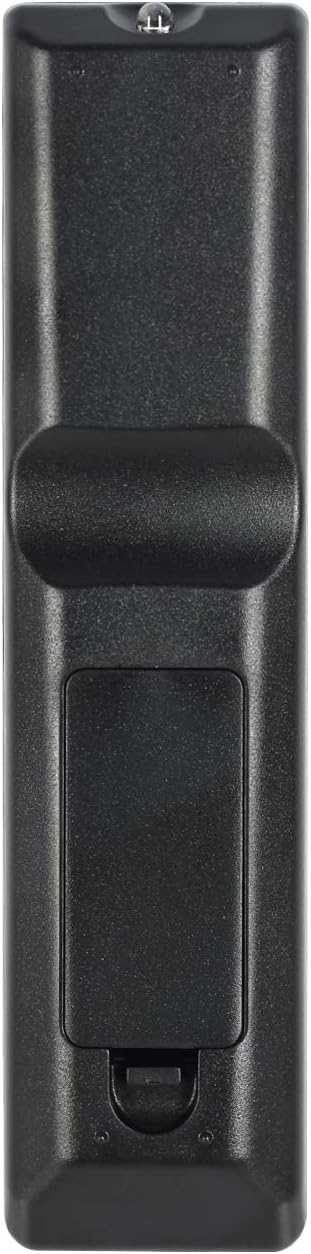
Image: Back of the remote control with battery compartment.
2. Premye Itilizasyon
For SAMSUNG, LG, and SONY brand TVs, the HUAYU URC1511 remote control is ready for use immediately after battery installation. No additional programming or setup is required. Simply point the remote at your TV and begin operating it.
Enstriksyon Operasyon
Remote Control Layout and Functions
The HUAYU URC1511 remote control features a standard layout with dedicated buttons for various TV functions. Refer to the image below for a visual guide to the button layout.
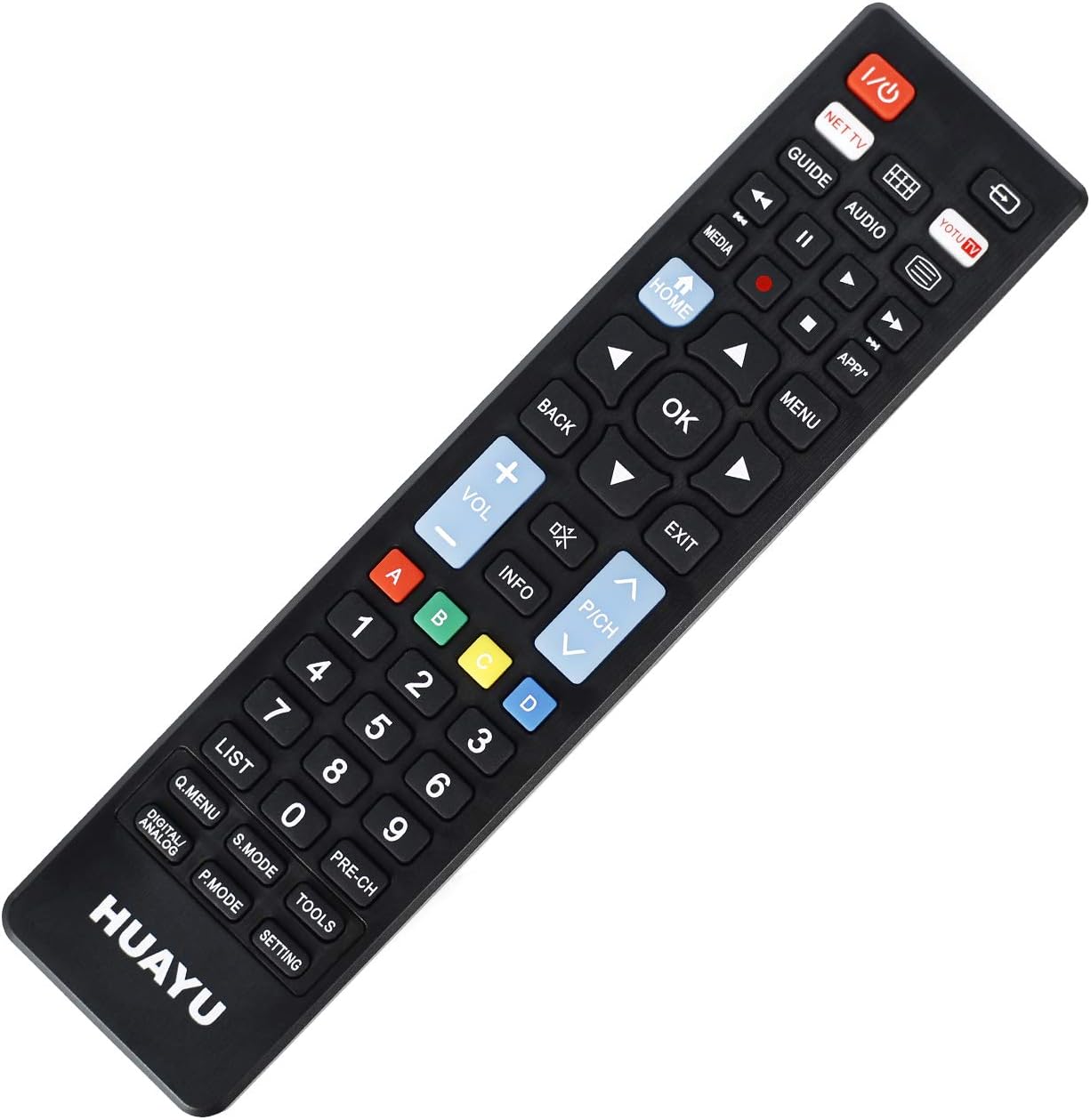
Imaj: Devan view nan kontwòl remote la ak layout bouton yo.
Fonksyon kle:
- Pouvwa (Bouton Wouj): Limen oswa etenn televizyon an.
- NET TV / YOTU TV: Dedicated buttons for accessing smart TV applications or specific streaming services.
- Gid: Montre gid pwogram elektwonik la.
- Medya: Accesses media playback functions.
- Kay: Retounen nan ekran prensipal televizyon an oswa nan sant entelijan an.
- Retounen: Navige tounen nan meni yo oswa aplikasyon yo.
- OK (Center Button): Konfime seleksyon yo.
- Flèch direksyonèl (Anwo, Anba, Agoch, Adwat): Navige nan meni ak opsyon.
- Volim monte/desann (+/-): Ajiste volim televizyon an.
- Channel Up/Down (P/CH +/-): Chanje chanèl televizyon yo.
- Bèbè: Sere oswa dekole odyo televizyon an.
- Meni: Ouvri meni prensipal televizyon an.
- Sòti: Kite meni oswa aplikasyon aktyèl la.
- Pav Nimerik (0-9): Antre dirèk sou chanèl la.
- Bouton ki gen koulè (A, B, C, D): Often used for specific functions within smart TV apps or teletext.
- Lis: Displays a list of channels or recordings.
- Q.MENU / DIGITAL ANALOG: Quick menu access or toggling between digital/analog inputs.
- S.MODE: Sound mode selection.
- P.MODE: Picture mode selection.
- ZOUTI: Accesses TV tools or settings.
- PRE-CH: Retounen nan anvan an viewed chanèl.
- Anviwònman: Ouvè paramèt televizyon.
Konpatibilite
Mak televizyon konpatib
This universal remote control is designed for direct compatibility with the following television brands:
- SAMSUNG
- LG
- SONY
No setup is required for these brands; simply insert batteries and begin use.
Espesifikasyon
Espesifikasyon pwodwi
| Karakteristik | Detay |
|---|---|
| Nimewo Modèl | URC1511 |
| Distans Operab | Plis pase 8 mèt |
| Kondisyon pou pouvwa | DC 3V |
| Kalite batri | De pil AAA (pa enkli) |
| Aparèy konpatib | Televizyon |
| Max Kantite Aparèy Sipòte | 3 (for specific brands) |
| Koulè | Nwa |
| Manifakti | HUAYU |
Swen ak Antretyen
- Keep the remote control dry. Avoid exposure to water or high humidity.
- Pa lage telekòmand lan oswa pa sibi gwo enpak.
- Clean the remote control with a soft, dry cloth. Do not use abrasive cleaners or solvents.
- Si ou pa pral itilize kontwòl remote la pou yon bon bout tan, retire pil yo pou anpeche likid koule.
- Avoid exposing the remote control to direct sunlight or extreme temperatures.
Depanaj
Kontwòl Remote pa reponn:
- Tcheke batri yo: Ensure batteries are inserted correctly with the correct polarity (+/-). Replace old or depleted batteries with new ones.
- Liy Vizyon: Make sure there is a clear line of sight between the remote control and the TV's infrared receiver. Obstructions can block the signal.
- Distans: Ensure you are within the operable distance (typically within 8 meters).
- Televizyon konpatibilite: Confirm your TV is one of the directly supported brands (SAMSUNG, LG, SONY).
Bouton ki pa fonksyone byen:
- Netwaye Remote: Dust or debris under buttons can cause issues. Gently clean around the buttons.
- Tcheke batri: Low batteries can sometimes cause intermittent button functionality. Replace batteries.
Garanti ak sipò pou kliyan
For warranty information or technical support regarding your HUAYU URC1511 Universal Remote Control, please refer to the documentation provided at the point of purchase or contact your retailer. Specific warranty terms may vary.