
1. Enstriksyon Sekirite Enpòtan
Please read all instructions carefully before using this projector and retain them for future reference. Improper operation may result in electric shock, fire, or other hazards.
- Sous pouvwa: Use only the power adapter supplied with the projector. Ensure the voltage matche ak ekipman pou pouvwa lokal la.
- Vantilasyon: Do not block any ventilation openings. Ensure adequate airflow around the projector to prevent overheating.
- Plasman: Mete pwojektè a sou yon sifas ki plat e ki estab. Evite mete l anba limyè solèy dirèk, toupre sous chalè, oswa nan anviwònman ki gen anpil imidite oswa pousyè.
- Dlo ak imidite: Do not expose the projector to rain, moisture, or immerse it in water. If liquid enters the device, disconnect power immediately and contact support.
- Netwayaj: Debranche pwojektè a nan priz kouran an anvan ou netwaye li. Sèvi ak yon twal mou epi sèk. Pa sèvi ak pwodui netwayaj likid oswa ayewosòl.
- Sèvis: Pa eseye fè reparasyon pwodui sa a tèt ou. Konfye tout antretyen bay pèsonèl sèvis kalifye. Ouvri bwat laasing ka ekspoze ou a vòltaj danjeretage oswa lòt danje.
- Pwoteksyon je: Pa gade dirèkteman nan lantiy pwojektè a lè l ap limen.amp limen, paske limyè klere a ka domaje je yo.
2. Pake kontni
Verifye ke tout atik ki nan lis anba a yo enkli nan pakè ou a. Si gen nenpòt atik ki manke oswa ki domaje, tanpri kontakte sèvis kliyan.
- DBPOWER T22 Portable Video Projector
- Kontwòl Remote
- HDMI kab
- AV Kab
- Pouvwa kab
- Manyèl itilizatè
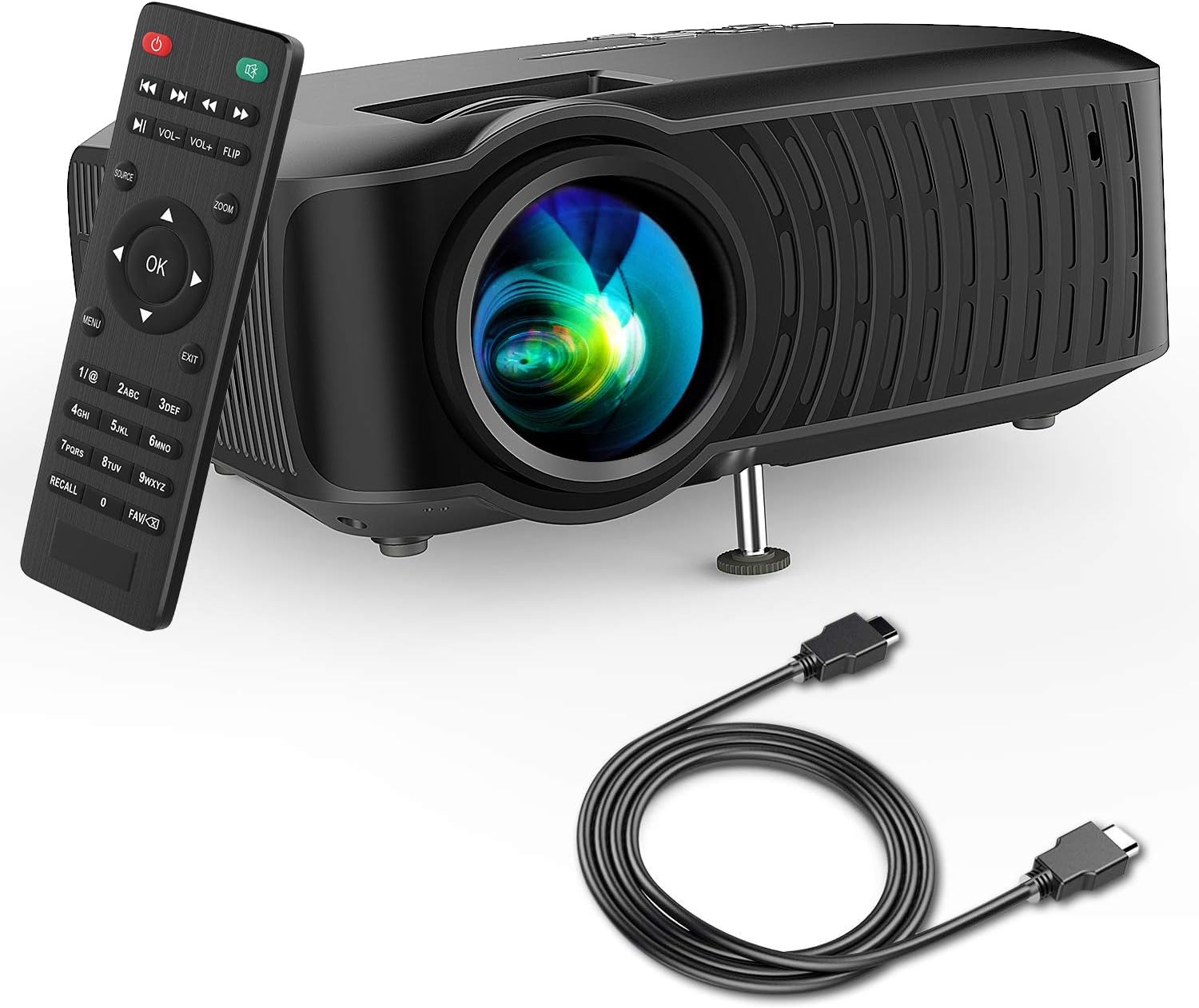
Image: The DBPOWER T22 Portable Video Projector, its remote control, and an HDMI cable, representing the typical package contents.
3. Pwodwi souview
Familiarize yourself with the various parts of your DBPOWER T22 projector.
3.1 Devan ak sou kote View

Imaj: Yon bò view of the DBPOWER T22 projector with dimensions indicating its compact and portable design (21.8cm length, 17.2cm width, 9.16cm height).
- Lantiy pwojeksyon: Emèt imaj la sou ekran an.
- Bag konsantre: Ajiste klète imaj la.
- Bag Koreksyon Keystone: Korije distòsyon imaj trapezoidal la.
- Pò vantilasyon: For heat dissipation. Do not block.
- Pye reglabl: Raises or lowers the front of the projector.
3.2 Panèl dèyè ak koneksyon
The rear panel provides various input and output ports for connecting external devices.
- HDMI Port: Connects to devices like laptops, Blu-ray players, game consoles, and TV sticks.
- Pò USB: Connects to USB flash drives for media playback.
- Pò AV: Connects to older devices using the included AV cable.
- Plas kat SD: Pou jwe medya dirèkteman nan yon kat SD.
- Sòti Odyo (Jack 3.5mm): Konekte ak oratè ekstèn oswa kas ekoutè.
- Antre pouvwa: Konekte ak adaptè pouvwa a.
3.3 Kontwòl Remote
The remote control allows convenient operation of the projector from a distance.
- Bouton pouvwa: Limen/éteint pwojektè a.
- Sous bouton: Selects input source (HDMI, AV, USB, SD).
- Bouton Navigasyon (Anwo/Anba/Agoch/Dwat): Navige nan meni yo.
- OK bouton: Konfime seleksyon yo.
- Bouton meni: Accesses projector settings.
- Bouton Sòti: Sòti nan meni oswa fonksyon aktyèl la.
- Volim +/-: Ajiste volim oratè.
- Bouton baskile: Rotates the projected image.
- Bouton Zoom: Adjusts image zoom (digital zoom).
4. Enstalasyon
4.1 Limen/Etenyen
- Connect the power cable to the projector's power input, then plug the other end into a power outlet.
- Press the power button on the projector or the remote control to turn it on. The indicator light will change.
- Pou fèmen, peze bouton pouvwa a ankò.
4.2 Adjusting Image Focus and Keystone
Achieve a clear and rectangular image by adjusting the focus and keystone correction.

Image: Diagram showing the manual keystone correction and focus rings on the side of the projector, with examples of de-focused and focused images, and trapezoidal correction.
- Konsantre: Vire a Konsantre bag until the projected image appears sharp and clear.
- Koreksyon Keystone: If the image appears trapezoidal (wider at the top or bottom), rotate the Keystone Correction Ring to make the image rectangular. The projector supports ±15° manual keystone correction.
4.3 Konekte Aparèy Ekstèn yo
The DBPOWER T22 supports multiple input sources.
- HDMI: Connect an HDMI cable from your device (e.g., laptop, game console, Amazon Fire TV Stick) to the projector's HDMI port.
- USB: Mete yon kle USB nan pò USB a.
- DE: Sèvi ak kab AV ki vini ak la pou konekte ak aparèy ki gen pwodiksyon AV.
- Kat SD: Insert an SD card into the SD card slot.
- Smartphones: For iOS devices, an external Lightning to HDMI adapter is required. For Android devices, an external Micro USB/Type-C to HDMI adapter is required. (Adapters not included).
5. Itilizasyon Pwojektè a
5.1 Chwazi Sous Antre
After connecting your device, you need to select the correct input source.
- Peze a Sous button on the remote control or the projector.
- Use the navigation buttons to select the desired input source (e.g., HDMI, USB, AV, SD).
- Peze OK pou konfime.
5.2 Media Playback (USB/SD)
When a USB drive or SD card is inserted, the projector will display a media browser.
- Navige nan dosye yo epi files using the remote control's navigation buttons.
- Chwazi yon file (e.g., video, photo, music, text) and press OK pou jwe.
5.3 Sòti odyo
The projector features an improved built-in speaker system. For enhanced audio, you can connect external speakers.

Image: An illustration of the DBPOWER T22 projector highlighting its stereo speakers, indicating that external speakers are not always necessary for an enjoyable audio experience.
- Oratè entegre: The projector's internal speaker provides audio. Adjust volume using the VOL +/- bouton sou remote la.
- External Speakers/Headphones: Connect a 3.5mm audio cable from your external audio device to the projector's Audio Out port.
5.4 Projector Settings (Menu)
Peze a Menu button on the remote to access settings such as Picture Mode, Aspect Ratio, Sound Mode, and other system preferences.
6. Antretyen
6.1 Netwaye Lantiy la
Use a professional lens cleaning cloth or lens paper to clean the projector lens. Avoid touching the lens directly with your hands.

Imaj: Yon eksplozyon view of the projector lens assembly, highlighting the tempered glass lens and the importance of a dust cover to protect it from scratches and dust.
6.2 Netwayaj kò pwojektè a
Wipe the projector body with a soft, dry cloth. Do not use abrasive cleaners or solvents.
6.3 Heat Dispersion System
The projector features an advanced cooling system to ensure stable operation and extend lamp life. Ensure ventilation ports are clear.

Imaj: Yon entèn view of the DBPOWER T22 projector, illustrating the advanced heat dispersion system with air flowing through cooling fins to maintain optimal operating temperature.
6.4 Lamp Lavi
Dirije lamp in your DBPOWER T22 projector has an extended lifespan of over 50,000 hours, significantly reducing the need for lamp ranplasman.
NAN. Depanaj
Si ou rankontre pwoblèm, gade pwoblèm ak solisyon komen sa yo.
| Pwoblèm | Kòz posib | Solisyon |
|---|---|---|
| Pa gen imaj oswa mesaj "Pa gen siyal" | Sous antre ki pa kòrèk la chwazi; koneksyon kab la lach; aparèy la pa limen. |
|
| Imaj twoub | Fokus la pa ajiste; pwojektè a twò pre/lwen ekran an. |
|
| Trapezoidal image | Pwojektè a pa pèpandikilè ak ekran an. |
|
| Pa gen son oswa volim ki ba | Volume too low; mute enabled; external audio device issues. |
|
| Remote kontwòl pa travay | Dead batteries; obstruction; remote not pointed at IR receiver. |
|
8. Espesifikasyon
Detailed technical specifications for the DBPOWER T22 Portable Video Projector.
| Karakteristik | Detay |
|---|---|
| Mak | DBPOWER |
| Nimewo Modèl | T22 |
| Klète | 120 ANSI Lumens (80% brighter than most market projectors) |
| Pwopòsyon kontras | 2000:1 |
| Rezolisyon sipòte | 1080P (Full HD) |
| Rezolisyon ekspozisyon natif natal | 800 x 480 |
| Kalite ekspozisyon | LCD |
| Lamp Lavi | 50,000 èdtan |
| Gwosè pwojeksyon | 32-176 pous |
| Distans pwojeksyon | 1-5.2 mèt |
| Koreksyon Keystone | Manyèl ±15° |
| Koneksyon Teknoloji | HDMI, USB, AV, SD Card |
| Oratè entegre | Yes (Improved system) |
| Dimansyon pwodwi | 21.59 x 17.02 x 9.14 cm |
| Pwa atik | 1.9 kg |
| Wattage | 24 wat |
9. Garanti ak sipò
DBPOWER products are designed and manufactured to the highest quality standards. For warranty information, technical support, or customer service inquiries, please refer to the contact information provided with your purchase or visit the official DBPOWER websit.
Ofisyèl Websit: www.dbpower.co (Tanpri sonje: URL may vary by region. Refer to product packaging for specific regional support details.)