
Entwodiksyon
This manual provides essential instructions for the safe operation, setup, and maintenance of your Protocol Director HD Foldable Drone. Please read this manual thoroughly before operating the drone to ensure proper function and to prevent damage or injury.
The Protocol Director HD is a foldable drone equipped with a live streaming HD camera, designed for capturing aerial video and photos. It features an intuitive 2.4 GHz remote control, an altitude sensor for stable flight, and a free downloadable app for enhanced camera control and flight path drawing.
Prekosyon Sekirite
- Toujou opere dron an nan zòn ouvè, san obstak, lwen moun, bèt ak obstak.
- Do not operate near airports, restricted airspace, or sensitive facilities.
- Kenbe yon distans ki an sekirite ak liy elektrik, pyebwa, ak kò dlo.
- Asire w ke tout elis yo byen tache epi yo pa domaje anvan chak vòl.
- Pa vole nan gwo van oswa move tan.
- Kenbe dwèt ak cheve lwen elis k ap vire yo.
- Adult supervision is recommended for users under 18 years of age. Recommended age for operation is 14 years and up.
- Only use original Protocol replacement parts and accessories.
- Pa eseye modifye dròn nan oswa konpozan li yo.
- Turn off the drone and remote control when not in use.
Kontni pake
Verifye ke tout atik yo prezan nan pakè a:
- Protocol Director HD Foldable Drone with Camera
- Remote Control with Phone Mount
- USB Chaje Kab
- 2 x Pil pou dròn
- Sak vwayaj
- Manyèl Enstriksyon (dokiman sa a)
- Spare Parts: Blades, Screwdriver

Image: The Protocol Director HD Foldable Drone, showcasing its compact design with propellers extended and camera visible at the front.
Enstalasyon
1. Chaje batri dròn nan
- Insert one of the drone batteries into the USB charging cable.
- Connect the USB charging cable to a USB power source (e.g., computer USB port, USB wall adapter).
- Limyè endikatè chaj la sou kab USB a ap limen pandan y ap chaje epi li etenn lè li konplètman chaje.
- Anjeneral, li pran apeprè 60-90 minit pou chaje. Pa chaje twòp.
2. Enstale Batri Remote Kontwòl
- Louvri lòj batri a sou do a nan kontwòl remote la.
- Mete 4 pil AA (pa enkli), asire polarite ki kòrèk la (+/-).
- Fèmen lòj batri a byen.

Image: The drone's remote control with a smartphone securely mounted, displaying a live feed from the drone's camera.
3. Depliye Dròn nan
- Gently unfold each of the four rotor arms until they click into place.
- Asire w ke tout bra yo byen lonje epi bloke anvan ou vole.
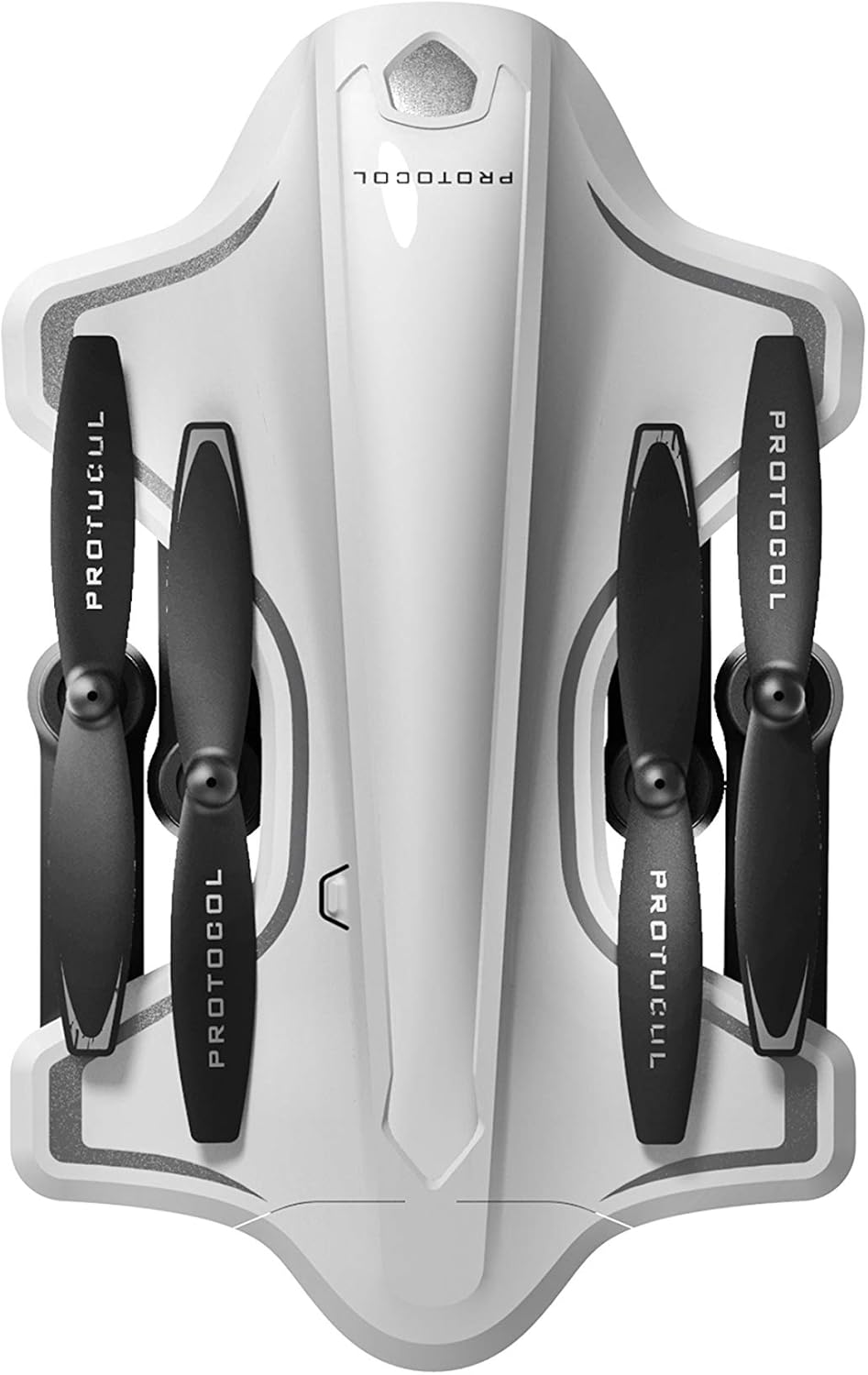
Image: The Protocol Director HD Foldable Drone in its compact, folded configuration, ready for transport.
4. Enstale Batri Dròn nan
- Jwenn lòj batri a sou abèy la.
- Insert the fully charged drone battery, ensuring it is securely seated.
- Fèmen kouvèti lòj batri a.
5. Downloading the App (Optional for Camera Features)
- Chèche pou the "Protocol Director HD" app in your smartphone's app store (iOS or Android).
- Download and install the free application.
- Mount your smartphone onto the remote control's phone mount.
Enstriksyon Operasyon
1. alimante sou ak appariement
- Mete abèy la sou yon sifas plat, nivo.
- Turn on the drone by pressing the power button. The drone's lights will flash.
- Vire sou kontwòl la aleka.
- Push the left joystick (throttle) all the way up, then all the way down. The drone's lights will become solid, indicating successful pairing.
2. Kalibrasyon jiroskop la
After pairing, it is recommended to calibrate the gyroscope for stable flight:
- With the drone on a flat surface, push both joysticks down and to the right simultaneously for a few seconds.
- The drone's lights will flash rapidly and then become solid, indicating calibration is complete.
3. Kontwòl vòl debaz yo
The Protocol Director HD features auto launch, hover, and land functions due to its altitude sensor.
- Auto Launch: Press the dedicated auto launch button on the remote. The drone will ascend to a stable hovering altitude.
- Akseleratè (joystick gòch):
- Push up: Increase altitude
- Push down: Decrease altitude
- Push left/right: Rotate drone left/right (yaw)
- Kontwòl direksyonèl (joystick dwat):
- Push up: Fly forward
- Push down: Fly backward
- Push left: Fly left (strafe)
- Push right: Fly right (strafe)
- Auto Land: Press the dedicated auto land button. The drone will slowly descend and land.
- Seleksyon vitès: Use the speed button on the remote to cycle through three selectable speeds (low, medium, high).
4. Camera and App Features
Connect your smartphone to the drone's Wi-Fi network (usually named "Protocol_Drone_XXXXXX") to access live streaming and advanced camera functions via the app.
- Difizyon an dirèk: View the drone's camera feed in real-time on your smartphone.
- Anrejistreman videyo: Initiate and stop video recording (480p resolution) through the app.
- Capture foto: Take still images through the app.
- Multiple Camera Angles: The app supports three different camera angles (Aerial, POV, Selfie) for varied content creation.
- Anrejistreman odyo: The app allows for audio recording alongside video.
- Draw Your Own Flight Path: Utilize the app's feature to draw a flight path on your screen, and the drone will follow it.
- VR Capability: The app is VR capable; VR goggles are sold separately.
Antretyen
- Enspeksyon elis: Regularly check propellers for cracks, bends, or damage. Replace any damaged propellers using the provided spare parts and screwdriver.
- Netwayaj: Use a soft, dry cloth to clean the drone and remote control. Avoid using liquids or harsh chemicals.
- Swen batri:
- Pa chaje twòp pil.
- Sere pil yo nan yon kote ki fre, sèk.
- Remove batteries from the drone and remote control during long periods of non-use.
- Depo: Fold the drone arms for compact storage in the provided travel bag when not in use. Store in a cool, dry environment.
Depanaj
| Pwoblèm | Kòz posib | Solisyon |
|---|---|---|
| Dròn nan pa limen. | Batri pa chaje oswa mal enstale. | Asire w ke batri a byen chaje epi li byen mete nan plas li. |
| Remote control does not power on. | AA batteries are dead or incorrectly installed. | Replace AA batteries, checking polarity. |
| Drone and remote do not pair. | Pairing sequence not followed correctly. | Ensure drone is on, then remote. Push left joystick up then down completely. |
| Dron an ap derive pandan vòl la. | Gyroscope needs calibration; uneven surface at launch. | Land the drone, place on a flat surface, and recalibrate the gyroscope (both joysticks down and right). |
| One propeller does not spin. | Propeller damaged or motor issue. | Check for obstructions. Replace damaged propeller. If issue persists, contact support. |
| No live video feed on smartphone. | Not connected to drone's Wi-Fi; app not open. | Ensure smartphone is connected to the drone's Wi-Fi network and the app is running. |
Espesifikasyon
| Mak | Pwotokòl |
| Non modèl | Director HD |
| Nimewo Modèl | 6182-7RCHA |
| Dimansyon (ki plwaye) | Approximately 4.75 inches (length) |
| Dimansyon (pwolonje) | Approximately 9 inches (length, including blades) |
| Pwa | 0.94 kilogram (940g) |
| Rezolisyon kamera | 480p (Video Capture) |
| Koneksyon | Wi-Fi (for app control and live streaming), 2.4 GHz (for remote control) |
| Estabilizasyon | 6-axis motion-sensitive auto stabilizers, Altitude sensor |
| Mod vitès | Three selectable speeds |
| Drone Batri | Rechargeable (2 enkli) |
| Batri kontwòl Remote | 4 x AA pil (pa enkli) |
| Materyèl | Plastic (Crash-resistant) |
| Laj Rekòmande | 14 ane ak plis |
Garanti ak sipò
For warranty information, technical support, or to purchase replacement parts, please visit the official Protocol websit la oubyen kontakte depatman sèvis kliyan yo. Kenbe resi acha w la kòm prèv acha.
Websit: www.protocolny.com (Egzamplyen an, lyen aktyèl la ka varye)
Kontakte: Refer to the Protocol website for contact details, including phone numbers or email support.