
1. Entwodiksyon
This manual provides essential information for the safe and effective operation, setup, and maintenance of your Sharp UA-HD50E-L Air Purifier with Humidification Function. Please read it thoroughly before using the appliance and keep it for future reference.
The Sharp UA-HD50E-L is designed to improve indoor air quality by combining a patented Plasmacluster ion generator with a 3-stage filtration system. It effectively removes airborne particles, allergens, viruses, pollen, dust mites, and odors. Additionally, it features an automatic humidification function to maintain a comfortable and healthy indoor climate. This unit is suitable for rooms up to 38 m² for air purification and 27 m² when using the humidification function.
2. Enfòmasyon sou Sekirite
Pou asire yon operasyon an sekirite, toujou swiv prekosyon debaz sa yo:
- Pa opere inite a ak yon kòd kouran oswa ploge ki domaje.
- Pa bloke antre oswa priz lè.
- Keep the unit away from water and moisture. Do not immerse in water.
- Pa mete objè nan okenn ouvèti.
- Debranche aparèy la anvan ou netwaye li oswa fè nenpòt antretyen.
- Aparèy sa a pa fèt pou itilize pa moun (ki gen ladan timoun) ki gen kapasite fizik, sansoryèl oswa mantal redwi, oswa ki pa gen eksperyans ak konesans, sof si yo te ba yo sipèvizyon oswa enstriksyon konsènan itilizasyon aparèy la pa yon moun ki responsab sekirite yo.
- Use only genuine Sharp replacement filters.
3. Pwodwi souview
Familiarize yourself with the main components of your Sharp UA-HD50E-L air purifier.
3.1 Devan View

Figure 3.1: The front of the Sharp UA-HD50E-L air purifier, showcasing its sleek, light grey design and the Sharp logo.
3.2 Dèyè View and Air Intake

Figure 3.2: The rear of the air purifier, showing the large air intake grille and the power cord connection point. This is where air is drawn into the unit for filtration.
3.3 Water Tank Access
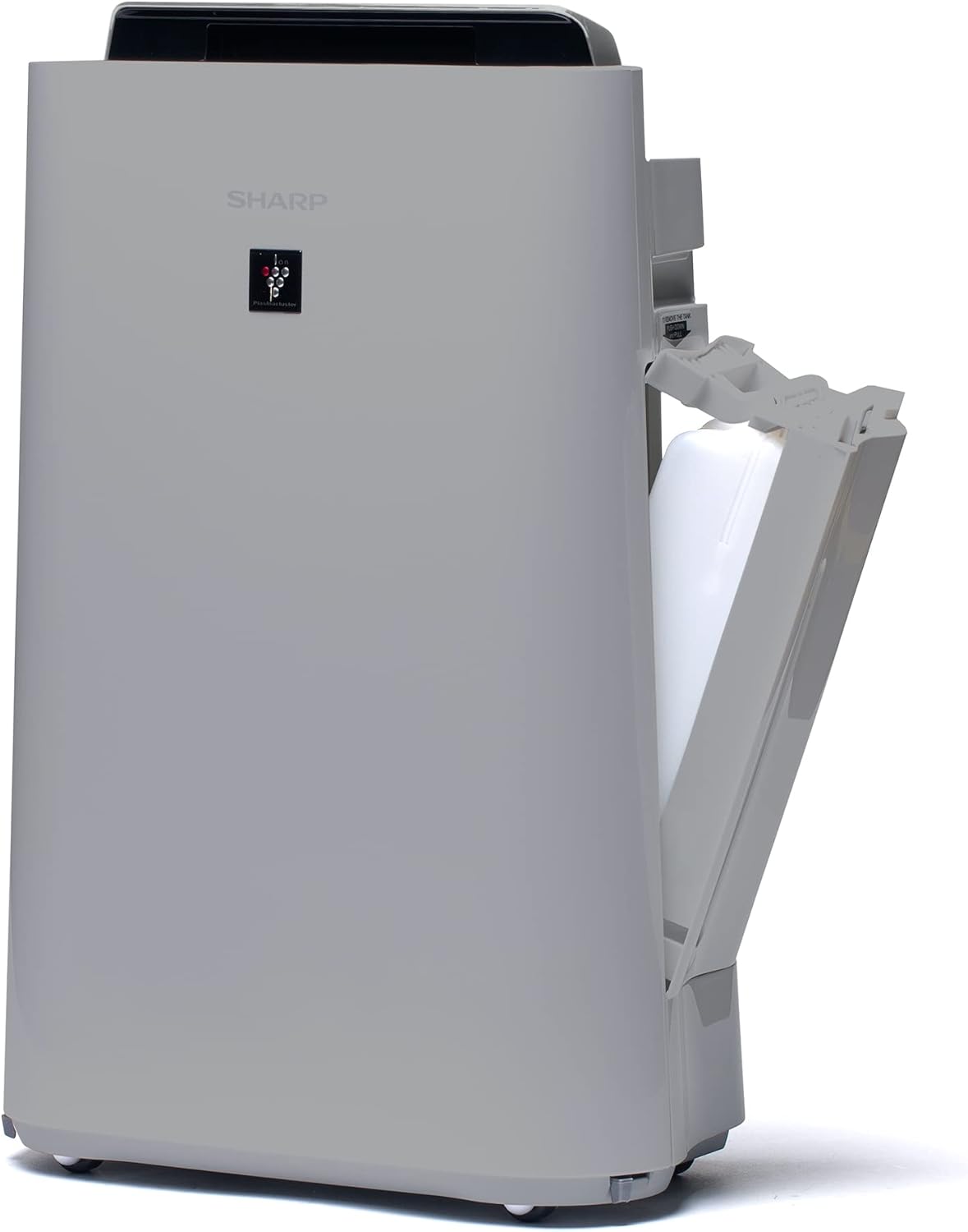
Figi 3.3: Yon bò view of the unit with the water tank compartment door open, revealing the removable water tank for humidification.
3.4 Control Panel and Air Outlet

Figi 3.4: Yon imaj anwo-anba view highlighting the intuitive control panel with various function buttons and the primary air outlet where purified and humidified air is released.
3.5 Filter System
The Sharp UA-HD50E-L utilizes a multi-stage filtration system for comprehensive air purification:
- Pre-filtre: Kaptire gwo patikil tankou pousyè ak pwal bèt kay.
- Deodorization Filter (UZ-HD4DF): Absorbs various odors, including cigarette smoke and household smells.
- HEPA Filter (UZ-HD4HF): Traps microscopic particles such as pollen, mold spores, and fine dust.
- Humidification Filter (UZ-HD6MF): Used for the humidification function.

Figi 3.5: Yon eksplozyon view illustrating the sequence of the pre-filter, deodorization filter, and HEPA filter within the unit's rear compartment.
4. Enstalasyon
Follow these steps to set up your air purifier for the first time.
- Depakete inite a: Carefully remove the air purifier and all its components from the packaging. Retain packaging for future transport or storage.
- Retire anbalaj filtè a: Open the rear panel of the unit. Remove all plastic packaging from the HEPA filter, deodorization filter, and humidification filter.
- Enstale filtè: Insert the filters back into the unit in the correct order: deodorization filter, then HEPA filter, followed by the pre-filter. Ensure they are securely seated. Close the rear panel.

Figure 4.1: Illustration of a filter being inserted into the side compartment of the air purifier.
- Fill Water Tank (for Humidification): Open the water tank compartment on the side of the unit. Remove the water tank, fill it with clean tap water, and securely close the cap. Reinsert the water tank into the unit.
Figure 4.2: The water tank being removed from its compartment for refilling.
- Plasman: Place the air purifier on a flat, stable surface, ensuring adequate clearance (at least 20 cm) from walls and furniture for optimal air circulation.
- Konekte pouvwa: Branche kòd kouran an nan yon priz elektrik ki apwopriye (220V).
5. Operasyon Enstriksyon
The control panel on the top of the unit allows you to manage all functions.

Figure 5.1: Close-up of the control panel with various buttons and indicators, including sensors for dust, odor, temperature, humidity, light, movement, and PM2.5.
5.1 pouvwa ON/OFF
- Peze a POUVWA bouton pou limen oswa etenn aparèy la.
5.2 Mòd Fonksyònman
- Mòd oto: The unit automatically adjusts fan speed and humidification based on sensor readings (dust, odor, temperature, humidity, light, movement, PM2.5). This mode ensures optimal air quality and comfort.
- Vitès Fanatik Manyèl: Select desired fan speed (Low, Medium, High) for continuous operation.
- Mòd Imidifikasyon: Activates the humidification function. The unit will maintain a comfortable humidity level. Ensure the water tank is filled.
- Air Purification Only: Disables the humidification function, focusing solely on air purification.
5.3 Plasmacluster Ion Function
- Peze a PLASMACLUSTER button to activate or deactivate the Plasmacluster ion generator.
- Ion Spot Mode: This mode provides a 10-fold more intensive airflow of Plasmacluster ions to target specific areas or strong odors. Activate it by pressing the dedicated button on the control panel.
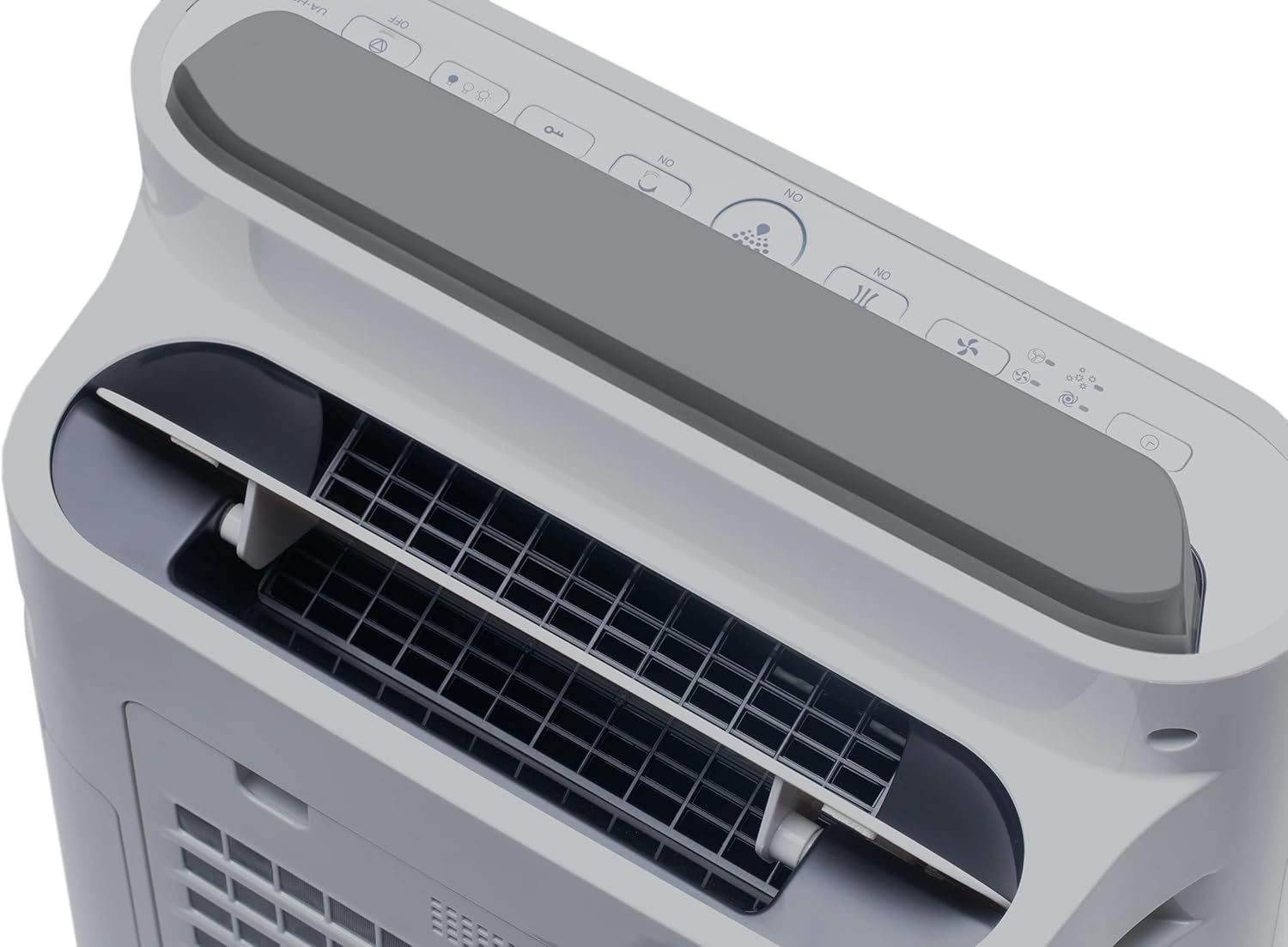
Figure 5.2: Visual representation of Plasmacluster ions being dispersed into the room, indicating the Ion Spot Mode's enhanced air circulation.
5.4 Air Circulation
The unit features 20° back air outlets to ensure perfect air circulation throughout the room, effectively distributing purified and humidified air.
Figure 5.3: A diagram showing the optimal air circulation pattern created by the unit's design, ensuring even distribution of clean air.
6. Antretyen
Antretyen regilye asire pèfòmans optimal epi pwolonje dire lavi pirifikatè lè ou la.
6.1 Cleaning the Pre-filter
- The pre-filter should be cleaned approximately once a month, or more frequently if used in dusty environments.
- Remove the rear panel and carefully detach the pre-filter.
- Use a vacuum cleaner to remove dust and debris. For stubborn dirt, wash with mild soap and water, then air dry completely before reinstallation.

Figure 6.1: The pre-filter being removed from the unit, with icons indicating its function against dust and pet hair.
6.2 Deodorization and HEPA Filters (UZ-HD4DF, UZ-HD4HF)
- These filters are not washable and should not be cleaned with water.
- Periodically check for excessive dust accumulation. A vacuum cleaner can be used gently on the surface of the HEPA filter to remove loose dust.
- Replace these filters approximately every 2-5 years, depending on usage and air quality. Refer to the indicator light on the control panel for replacement reminders.

Figure 6.2: The deodorization filter, designed to combat odors such as cigarette smoke and general household smells.
6.3 Humidification Filter (UZ-HD6MF) and Water Tank
- Clean the water tank daily or every few days to prevent mold and bacterial growth. Wash with mild detergent and rinse thoroughly.
- The humidification filter should be cleaned regularly (e.g., weekly) by rinsing under running water. If mineral deposits accumulate, soak the filter in a descaling solution (e.g., citric acid solution) as per product instructions.
- Replace the humidification filter approximately once a year, or when it becomes stiff or discolored.
6.4 Netwayaj Eksteryè
- Siye eksteryè inite a ak yon mou, damp twal. Pa sèvi ak pwodui netwayaj abrazif oswa solvang.
NAN. Depanaj
Si ou rankontre nenpòt pwoblèm, gade pwoblèm ak solisyon komen sa yo.
| Pwoblèm | Kòz posib | Solisyon |
|---|---|---|
| Inite pa limen. | Power cord not properly connected; Power outage. | Ensure power cord is securely plugged in; Check household circuit breaker. |
| Flux lè fèb. | Clogged pre-filter; Blocked air inlets/outlets. | Clean the pre-filter; Ensure nothing is obstructing air passages. |
| Pa gen imidite. | Water tank empty; Humidification filter clogged or improperly installed. | Refill water tank; Clean or correctly install humidification filter. |
| Unusual odor from unit. | Dirty filters; Stagnan dlo nan tank la. | Clean/replace filters; Clean water tank and humidification filter. |
| Gwo bri pandan operasyon an. | Foreign object in fan; Unit not on a stable surface. | Turn off and unplug, check for obstructions; Place on a flat, stable surface. |
Si pwoblèm nan pèsiste apre ou fin eseye solisyon sa yo, tanpri kontakte sèvis kliyan.
8. Espesifikasyon
| Mak | Sharp |
| Nimewo Modèl | UA-HD50E-L |
| Koulè | Limyè gri |
| Dimansyon (L x W x H) | 39.9 x 23 x 61.5 cm |
| Pwa | 7.9 Kilogram |
| Kapasite tank dlo | 1 lit |
| Pouvwa | 3600 (Please refer to product label for actual wattage) |
| Voltage | 220 Volts |
| Materyèl | Plastik |
| Fonksyon Auto-off | Wi |
| Nivo bri | 23 Desibèl |
| Kalite filtre | HEPA |
| Metòd kontwòl | Manyen, Kontwòl bouton |
| Room Coverage (Purification) | Jiska 38 m² |
| Room Coverage (with Humidification) | Jiska 27 m² |
9. Garanti ak sipò
Sharp provides a warranty for this product in accordance with local regulations. Please retain your proof of purchase for warranty claims.
- Disponibilite pyès rezèv: Pyès rezèv pou modèl sa a disponib pou yon peryòd 2 zan apati dat acha a.
- For technical support, service, or to purchase replacement filters, please contact your local Sharp authorized dealer or visit the official Sharp websit.