
Amazon B07KRY43KN
Echo Glow - Plizyè koulè Smart Lamp Manyèl itilizatè
Model: B07KRY43KN
1. Entwodiksyon
The Echo Glow is a multicolor smart lamp designed to enhance your smart home experience. It pairs with any compatible Alexa device, allowing you to control its color and brightness using voice commands. This device is ideal for creating colorful routines, setting visual timers, and adding dynamic lighting for various activities like gaming, watching videos, or listening to music. Its simple setup ensures a hassle-free experience.

Figure 1.1: The Echo Glow smart lamp nan yon anviwònman kay.
2. Enfòmasyon sou Sekirite
Please read and follow all safety instructions carefully to prevent injury or damage to your device.
- Pa ekspoze aparèy la ak dlo oswa imidite.
- Sèvi ak adaptè pouvwa a sèlman ki bay aparèy la.
- Pa eseye demonte, repare, oswa modifye aparèy la.
- Kenbe aparèy la lwen limyè solèy la dirèk ak sous chalè.
- Asire bon vantilasyon alantou aparèy la.
3. Ki sa ki nan bwat la
Verifye ke tout atik yo prezan nan anbalaj la:
- Echo Glow device
- Adaptè pouvwa (5W)
- Gid Quick Start
4. Enstalasyon
Setting up your Echo Glow is designed to be quick and straightforward.
4.1. Limen
- Plug the provided power adapter into the Echo Glow.
- Plug the other end of the power adapter into a wall outlet. The Echo Glow will power on automatically.
4.2. Connecting to Wi-Fi and Alexa
The Echo Glow connects to your Wi-Fi network and is controlled via an Alexa-enabled device or the Alexa app.
- Download and open the Amazon Alexa app on your Fire OS, Android, or iOS device.
- Ensure your Alexa-enabled device (e.g., Echo Dot, Echo Plus) is set up and connected to the same Wi-Fi network.
- In the Alexa app, navigate to the 'Devices' section.
- Tape ikòn '+' la pou ajoute yon nouvo aparèy.
- Select 'Light' and then 'Amazon Echo Glow'.
- Follow the on-screen instructions to complete the setup. The Echo Glow supports 2.4 GHz Wi-Fi only (802.11 b/g/n).
Amazon Wi-Fi simple setup can also be used to connect the device to your Wi-Fi network with minimal steps.
5. Operasyon Enstriksyon
The Echo Glow offers various functionalities controlled primarily through Alexa voice commands or the Alexa app.
5.1. Kontwòl vwa
Once paired with an Alexa-enabled device, you can control the Echo Glow using your voice. Ensure your Echo Glow has a recognizable name in the Alexa app (e.g., 'Glow Lamp', 'Charlie's Lamp').
- Chanje koulè: "Alexa, set [Glow Lamp name] to blue."
- Ajiste klète: "Alexa, dim [Glow Lamp name] to 50%." or "Alexa, brighten [Glow Lamp name]."
- Limen/Etenyen: "Alexa, turn on [Glow Lamp name]." / "Alexa, turn off [Glow Lamp name]."

Figure 5.1: The Echo Glow can display a wide spectrum of colors.
5.2. Routines and Timers
Integrate the Echo Glow into your daily routines or use it for visual timers.
- Color-Changing Timer: Use the Echo Glow as a visual reminder for activities. For example, "Alexa, set a Rainbow Timer for 30 minutes on Charlie's Lamp." The colors will change as time progresses.
- Wake-up Light Alarm: Create routines in the Alexa app to have the Echo Glow gradually brighten or change color to help with waking up. For example, "Alexa, set a wakeup light alarm for 7 AM on My Light."
- Bedtime Routines: Set the Echo Glow to dim or change to a calming color as part of a bedtime routine.
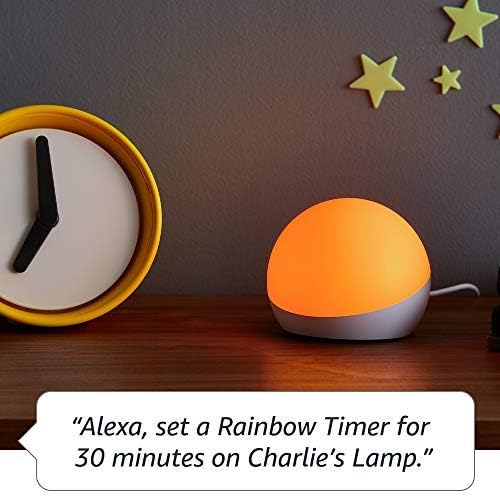
Figure 5.2: Using Echo Glow for a Rainbow Timer.
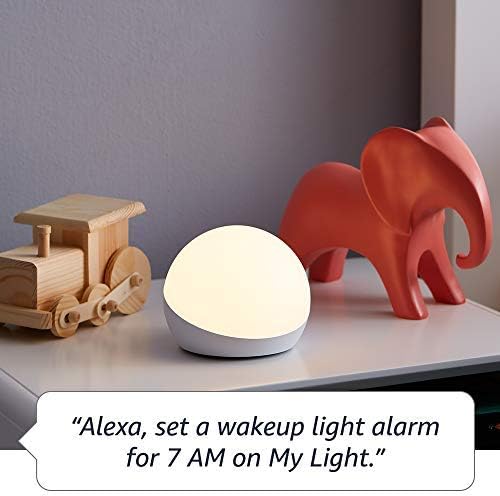
Figure 5.3: Echo Glow as a wake-up light alarm.
5.3. Creating and Choosing Lighting
The Echo Glow can add ambiance to various activities:
- Gaming: Set dynamic colors to match your gaming environment.
- Gade videyo: Create a cozy or immersive vieweksperyans nan.
- Tande Mizik: Sync the lighting to the mood of your music (requires specific Alexa routines or skills).

Figure 5.4: Echo Glow adding color to a child's play space.
6. Antretyen
The Echo Glow requires minimal maintenance.
- Netwayaj: Unplug the device before cleaning. Use a soft, dry, lint-free cloth to wipe the exterior. Do not use abrasive cleaners or sprays.
- Depo: Si w ap sere aparèy la pou yon bon bout tan, debranche l epi mete l nan yon kote ki fre epi sèk.
NAN. Depanaj
If you encounter issues with your Echo Glow, try the following steps:
- Aparèy pa reponn:
- Ensure the power adapter is securely plugged into both the Echo Glow and the wall outlet.
- Unplug the Echo Glow, wait 30 seconds, and plug it back in.
- Verify that your Alexa-enabled device is online and functioning correctly.
- Pa ka konekte ak Wi-Fi:
- Confirm your Wi-Fi network is 2.4 GHz. The Echo Glow does not support 5GHz networks.
- Ensure your Wi-Fi password is entered correctly in the Alexa app.
- Move the Echo Glow closer to your Wi-Fi router.
- Rekòmanse routeur Wi-Fi ou a.
- Kòmandman vwa pa travay:
- Ensure your Alexa-enabled device can hear you clearly.
- Verify the Echo Glow is correctly named in the Alexa app and use that name in your commands.
- Check the Alexa app for any pending updates for your Echo Glow or Alexa-enabled device.
8. Espesifikasyon
| Karakteristik | Detay |
|---|---|
| Dimansyon | 100 x 100 x 81 mm (3.9" x 3.9" x 3.2") |
| Pwa | 245 g (8.6 ons) |
| Koneksyon Wi-Fi | 2.4 GHz only, 802.11 b/g/n. Does not support 5GHz networks or ad-hoc networks. |
| Kalite limyè | 100 lumèn cho blan (2600K) ak LED koulè RGB |
| Konpatibilite | Works exclusively with Alexa-enabled devices (Echo Dot, Echo Plus, Alexa app). Compatible with Fire OS, Android, and iOS devices. Does not contain microphones or speakers. |
| Ranje laj | Laj 3 ak plis |
9. Garanti ak sipò
Your Echo Glow is covered by a limited warranty.
- Peryòd garanti: 90-day limited warranty and service.
- Kondisyon itilizasyon: Use of Echo Glow is subject to the terms found on the official Amazon websit.
- Sipò Kliyan: For further assistance, troubleshooting, or warranty claims, please visit the Amazon customer support websit la oubyen kontakte ekip sipò yo dirèkteman.
Ask a question about this manual
Ask about setup, troubleshooting, compatibility, parts, safety, or missing instructions. Manuals+ will review the question and use this page’s manual context to help answer it.