
1. Entwodiksyon
The Segway Ninebot Gokart Pro 2 is a high-performance electric go-kart designed for ages 14 and up, offering an exhilarating driving experience with speeds up to 23 mph and a range of 15.5 miles. It features a robust design, advanced control options, and a versatile setup that allows for both racing and drifting.

Figure 1: Segway Ninebot Gokart Pro 2
2. Enfòmasyon sou Sekirite
Your safety is paramount. Always wear a helmet and appropriate protective gear when operating the Gokart Pro 2. This product is UL-2272 certified by TUV Rheinland for safety standards. Key safety features include:
- High-Strength Steel Frame: Sipòte jiska 220 lbs.
- Triple Anti-Collision Protection: Integrated design for enhanced safety.
- Manual Handbrake: For emergency stops and controlled drifting.
- Ajuste reglabl: Accommodates riders from 4'5" to 6'3".
Always operate the go-kart in a safe, open environment, away from traffic and pedestrians. Ensure all components are securely fastened before each use.

Figure 2: Triple front protection system
3. Pake kontni
Before assembly, verify that all items listed below are present in your package:

Figure 3: Packing List for Gokart Pro Kit + Ninebot S MAX
- Manyèl itilizatè
- (AA) battery x 6
- Vise x 6
- Hex wrenches (4mm, 5mm, 2.5mm)
- Zouti pou retire bracket ba volan an
- Konpozan degaje rapid volan
- Batri Charger
- Oratè motè Ninebot
- beke dèyè
- Bar volan
4. Enstalasyon
The Gokart Pro 2 comes mostly pre-assembled. Follow these steps for final setup:
- Adjust Frame Length: Extend the frame to fit the rider's height (4'5" to 6'3"). Secure with the provided screws and hex wrenches.
- Adjust Steering Wheel: Use the quick-release mechanism to adjust the steering wheel column height for comfortable reach.
- Install Rear Spoiler: Attach the rear spoiler to the designated slots at the back of the seat.
- Install Ninebot Engine Speaker: Secure the Bluetooth speaker to the frame using the provided straps.
- Enstale Drapo Sekirite a: Mount the optional safety flag at the rear for increased visibility.
- Chaje batri: Fully charge the battery before first use. Refer to the 'Maintenance' section for charging details.
Video 1: Detailed setup and feature overview of the Segway Ninebot Gokart Pro.
5. Operasyon Enstriksyon
Familiarize yourself with the controls and driving modes before operating the Gokart Pro 2.
- Limen/Etenyen: Use the power button located on the Ninebot S MAX unit at the rear of the go-kart.
- Mòd kondwi: The Gokart Pro 2 offers four driving modes:
- Mòd sekirite: Up to 4.97 mph (for beginners).
- Regilye Mode: Up to 11.2 mph.
- Mòd espò: Up to 17.4 mph.
- Ras Mode: Up to 23 mph.
- Acceleration & Braking: Use the foot pedals for acceleration and braking. The manual handbrake can be used for drifting and emergency stops.
- Drifting: The special TPE rear tires and powerful rear-wheel drive allow for controlled drifting. Adjust drifting assistance levels via the Segway app.
- Smart Control (Segway App): Connect your smartphone via Bluetooth to the Segway app to:
- Switch driving modes.
- Adjust drifting assistance levels.
- Control ambient lights.
- Monitor battery status and mileage.
- Fè mizajou firmwèr yo.
- Immersive Engine Sounds: The Ninebot Engine Speaker simulates various engine sounds (single-cylinder, V8, double cylinder, V12) that synchronize with acceleration. It can also function as a Bluetooth speaker for music.

Figure 4: Four available driving modes

Figure 5: Ninebot Engine Sounds Simulator

Figure 6: Segway App Integration
Video 2: A closer look at the Segway Ninebot Gokart Pro, demonstrating features and operation.
6. Antretyen
Regular maintenance ensures optimal performance and longevity of your Gokart Pro 2.
- Chaje batri: Connect the provided charger to the charging port on the Ninebot S MAX unit. The battery level indicator will show charging progress.
- Enspeksyon kawotchou: Regularly inspect tires for wear and tear. Replace worn tires promptly to maintain performance and safety. Rear TPE tires are designed for drifting and may wear faster.
- Netwayaj: Clean the go-kart with a damp twal. Evite sèvi ak dlo anba gwo presyon oswa pwodui chimik ki agresif.
- Depo: Store the go-kart in a dry, cool place. The Gokart Pro 2 is collapsible for easy transport and storage.
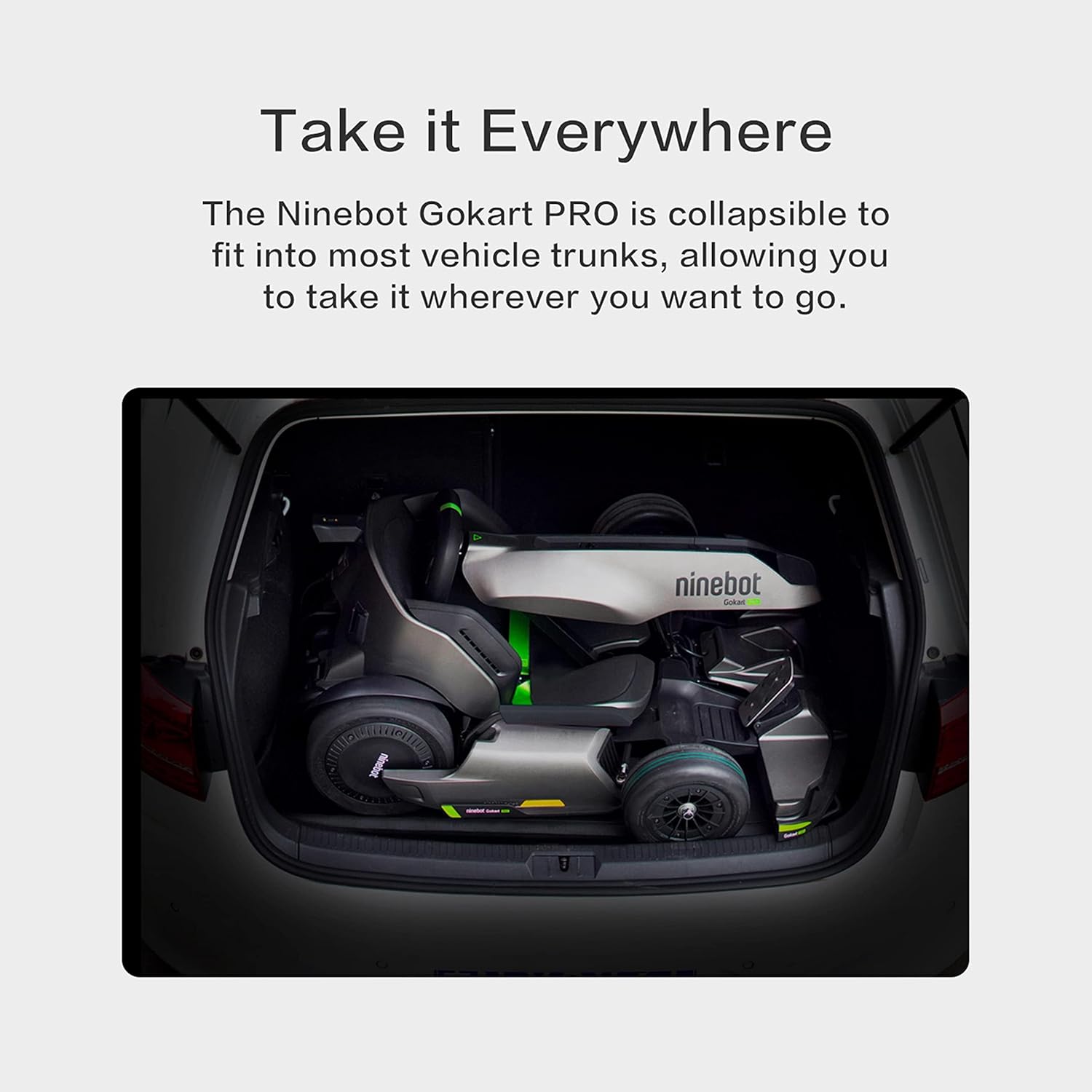
Figure 7: Gokart Pro 2 in collapsed state for transport
NAN. Depanaj
If you encounter any issues with your Gokart Pro 2, refer to the following common troubleshooting tips:
- Go-kart not powering on: Ensure the battery is charged and properly connected. Check the power button on the Ninebot S MAX unit.
- Reduced speed or range: This may indicate a low battery charge. Fully charge the battery. Performance can also be affected by rider weight, terrain, and driving mode.
- Pwoblèm koneksyon aplikasyon an: Ensure Bluetooth is enabled on your smartphone and the go-kart. Try restarting both the app and the go-kart.
- Bwi etranj: Inspect for any loose parts or obstructions around the wheels and frame. If the noise persists, contact customer support.
8. Espesifikasyon
| Karakteristik | Spesifikasyon |
|---|---|
| Non modèl | Transformers Electric GoKart Pro |
| Dimansyon pake atik L x W x H | 45 x 36 x 21.05 pous |
| Pwa pake | 65.77 Kilogram |
| Dimansyon atik LxWxH | 55.9 x 33.5 x 23.6 pous |
| Pwa atik | 112.9 liv |
| Non mak | Segway |
| Koulè | Nwa |
| Materyèl | Aliminyòm |
| Itilizatè yo sijere | Unisex-granmoun |
| Manifakti | Ninebot (Changzhou) Tech co, Ltd |
| Nimewo Pati | N3M432 |
| Ane ki gen konpòtman egzanplè | 2021 |
| Style | Gokart Pro |
| Konpozan ki enkli | Frame, Accessories |
| Gwosè | Siplemantè Gwo |
9. Garanti & Sipò
The Segway Ninebot Gokart Pro 2 comes with a 1 ane garanti limite. For any product inquiries, technical assistance, or warranty claims, please contact Segway Customer Support. You can find contact information on the official Segway website or through the Segway app.