
1. Entwodiksyon
This manual provides detailed instructions for the installation, operation, and maintenance of your TooQ TQE-2528B 2.5-inch SATA USB 3.1 Gen1 HDD Enclosure. This device allows you to convert a 2.5-inch SATA I/II/III hard disk drive or solid-state drive into an external storage solution, connecting via USB 3.1 Gen1 for high-speed data transfer.
2. Pake kontni
Tanpri verifye ke tout atik yo prezan nan pakè a:
- TooQ TQE-2528B 2.5-inch SATA USB 3.1 Gen1 HDD Enclosure
- Kab USB 3.0 Kalite-A pou Mikwo-B
- Manyèl Itilizatè (dokiman sa a)

Image 2.1: The TooQ TQE-2528B enclosure shown with its included USB 3.0 cable.
3. Pwodwi souview
The TooQ TQE-2528B is designed for ease of use and portability. Key features include:
- Compatible with 2.5-inch SATA I/II/III HDDs and SSDs up to 9.5mm height.
- USB 3.1 Gen1 (USB 3.0) interface for data transfer speeds up to 5.0 Gbps.
- Tool-free installation for quick setup.
- LED indicator for connection status and data access.
- Powered directly via USB port.
3.1. Idantifikasyon konpozan
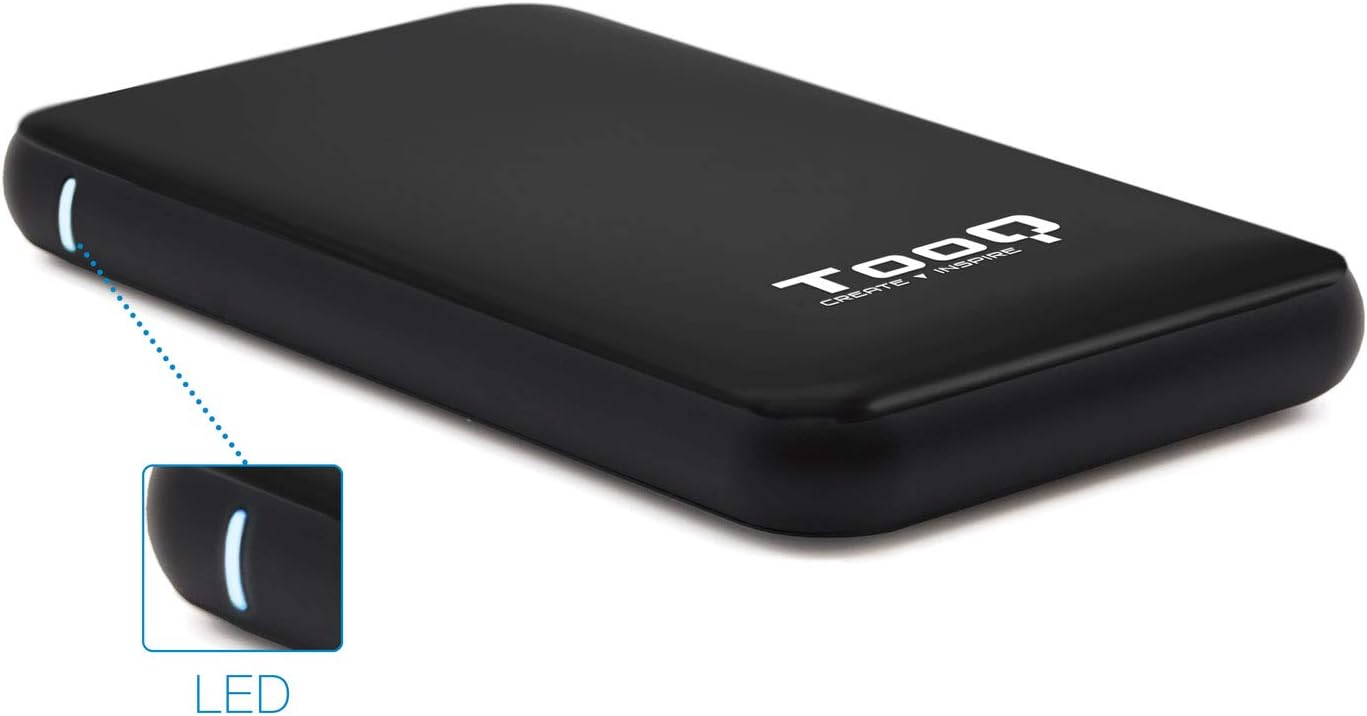
Image 3.1: The enclosure features an LED indicator on the side, which illuminates to show power and data activity.

Image 3.2: The rear of the enclosure includes a power button and a Micro-USB port for connection.
4. Setup: Hard Drive Installation
Follow these steps to install a 2.5-inch SATA HDD or SSD into the enclosure:
- Louvri bwat la: Gently slide the top cover of the enclosure to open it. The design allows for tool-free access.
- Konekte kondwi a: Align your 2.5-inch SATA HDD/SSD with the SATA connector inside the enclosure. Carefully push the drive into the connector until it is firmly seated. Ensure the drive is flush with the internal tray.
- Fèmen patiraj la: Slide the top cover back into place until it clicks securely.
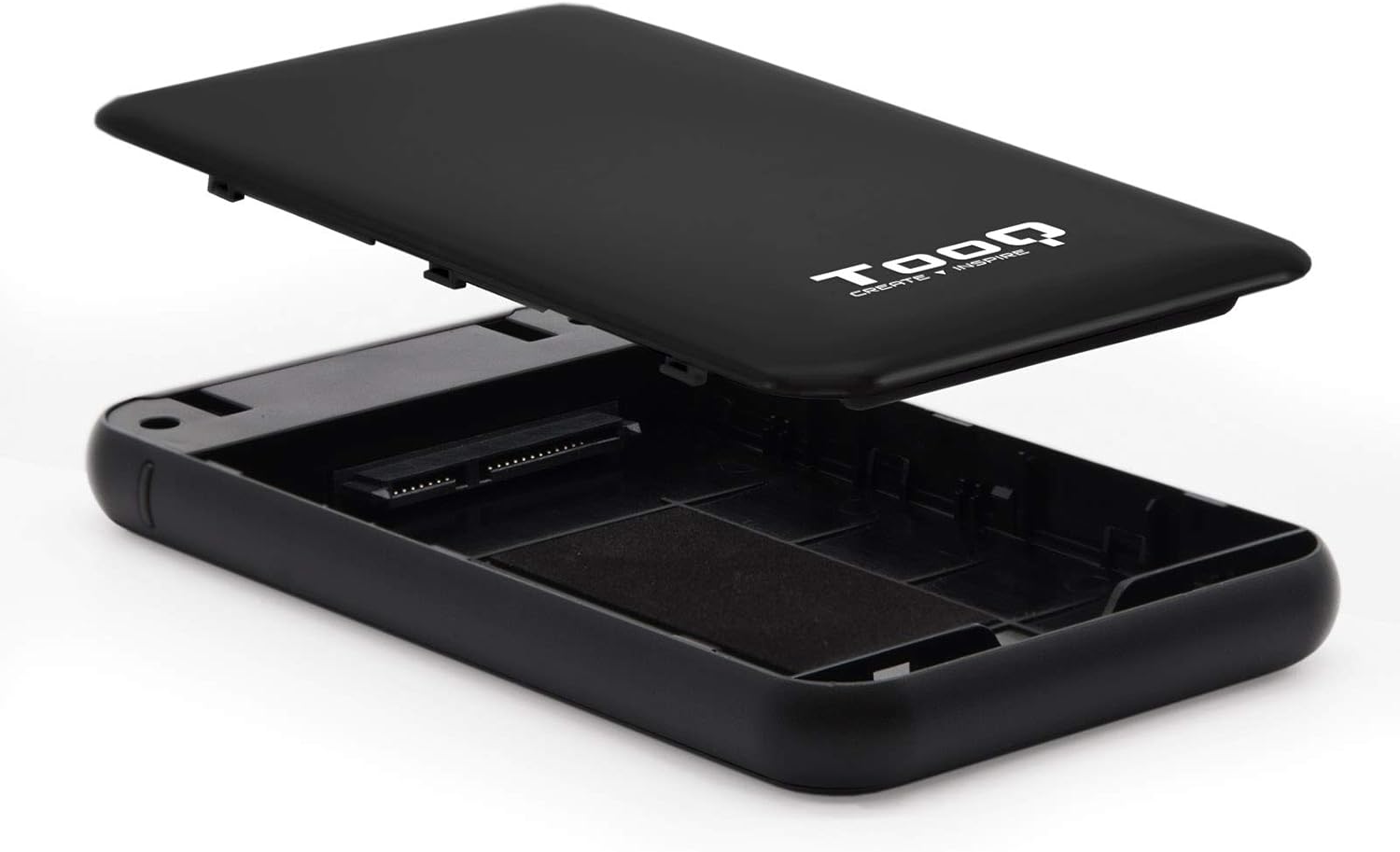
Image 4.1: The enclosure opened, revealing the internal SATA data and power connector for a 2.5-inch drive.
5. Operasyon Enstriksyon
After installing your hard drive, connect the enclosure to your computer:
- Konekte kab USB: Plug the Micro-B end of the included USB 3.0 cable into the enclosure's Micro-USB port.
- Konekte ak òdinatè: Plug the Type-A end of the USB cable into an available USB port on your computer. For optimal performance, use a USB 3.0 or USB 3.1 Gen1 port.
- Pouvwa sou: If the enclosure has a power button (refer to Image 3.2), press it to turn on the device. The LED indicator (Image 3.1) will illuminate, indicating power and connection status.
- Aksè nan Drive la: Your operating system should automatically detect the new storage device.
- New Drives: If you are using a brand new hard drive, it may need to be initialized and formatted before use. Refer to your operating system's disk management tools for this process.
- Existing Drives: If the drive contains data, it should appear as a removable drive in 'My Computer' (Windows) or on the desktop (macOS).

Image 5.1: The TooQ TQE-2528B enclosure connected to a laptop, demonstrating a typical usage scenario.
6. Antretyen
To ensure the longevity and optimal performance of your enclosure:
- Kenbe bwat la pwòp epi san pousyè. Sèvi ak yon twal mou epi sèk pou netwaye.
- Evite ekspoze aparèy la nan tanperati ekstrèm, imidite, oswa limyè solèy la dirèk.
- Pa lage bwat la oswa pa sibi gwo enpak.
- Toujou retire kle a nan sistèm operasyon ou an san danje anvan ou dekonekte kab USB a pou anpeche done yo pèvèti.
NAN. Depanaj
If you encounter issues with your TooQ TQE-2528B enclosure, refer to the following common solutions:
- Kondwi pa detekte:
- Asire w kab USB a byen konekte ak tou de bwat la ak òdinatè a.
- Eseye konekte nan yon pò USB diferan sou òdinatè w lan.
- Verify that the hard drive is correctly seated within the enclosure's SATA connector.
- Check your computer's Disk Management (Windows) or Disk Utility (macOS) to see if the drive is recognized but uninitialized or unformatted.
- Test the enclosure with a different 2.5-inch SATA drive, if available, to rule out a drive issue.
- Transfè Done Ralanti:
- Ensure you are connected to a USB 3.0 or USB 3.1 Gen1 port on your computer. Connecting to a USB 2.0 port will result in slower speeds.
- Verifye ke sistèm operasyon ou an ak chofè yo ajou.
- Enclosure Does Not Power On:
- Ensure the USB cable is properly connected and providing power. The enclosure is bus-powered.
- Eseye yon pò USB diferan sou òdinatè w lan.
8. Espesifikasyon
| Nimewo Modèl | TQE-2528B |
| Kondwi konpatib | 2.5-inch SATA I/II/III HDD/SSD (up to 9.5mm height) |
| Entèfas | USB 3.1 Gen1 (USB 3.0) |
| Pousantaj Transfè Done | Jiska 5.0 Gbps |
| Pwovizyon pou pouvwa | USB Bus-powered (5 Volts) |
| Materyèl | ABS plastik |
| Dimansyon (L x W x H) | 13.5 cm x 8 cm x 1.6 cm (apeprè 5.3 x 3.1 x 0.6 pous) |
| Pwa | 50 g (apeprè 0.11 liv) |
| Sistèm operasyon konpatibilite | Universal (Windows, macOS, Linux) |

Image 8.1: Technical drawing illustrating the dimensions of the TooQ TQE-2528B enclosure.
9. Garanti ak sipò
TooQ products are designed for reliability and performance. This product comes with a standard manufacturer's warranty. For specific warranty terms and conditions, please refer to the warranty card included with your product or visit the official TooQ websit.
For technical support, frequently asked questions, or to download the latest drivers (if applicable), please visit the official TooQ support websit la oubyen kontakte depatman sèvis kliyan yo. Anjeneral, ou ka jwenn enfòmasyon pou kontakte yo sou anbalaj pwodwi a oubyen sou dokiman ofisyèl la. websit.
Manifakti: TOOQ
Nimewo Global Komèsyal Atik (GTIN): 08433281008304