
1. Entwodiksyon
Welcome to the Batavia Maxxbrush 1020W electric cleaning brush. This powerful tool is designed for efficient removal of weeds, moss, algae, sand, and other stubborn dirt from various outdoor surfaces. It is also suitable for smoothing and combing artificial turf. Please read this instruction manual carefully before operating the device to ensure safe and effective use.

Yon souview of the Batavia Maxxbrush 1020W electric cleaning brush, showcasing its design with the telescopic handle and brush head.
2. Enstriksyon Sekirite
Always observe the following safety precautions when using electrical tools to reduce the risk of electric shock, fire, and serious injury.
- Li tout manyèl la: Familyarize w avèk kontwòl yo ak bon jan pou w itilize aparèy la.
- Mete ekipman pwoteksyon pèsonèl (EPI) ki apwopriye: Sa gen ladan l linèt sekirite, gan, ak soulye solid.
- Kenbe timoun yo ak moun ki prale yo lwen: Do not allow children or untrained persons to operate the device.
- Ensure proper power connection: Connect the device to a properly grounded outlet. Do not modify the plug.
- Evite kondisyon mouye: Do not operate the device in rain or damp environments. Keep the power cord away from water.
- Enspekte anvan ou itilize: Tcheke pou pyès ki domaje, koneksyon ki lach, oswa nenpòt lòt kondisyon ki ka afekte fonksyònman an.
- Deploge lè pa itilize: Always disconnect the power supply before cleaning, performing maintenance, or storing the device.
3. Konpozan ki enkli
The Batavia Maxxbrush 1020W package typically includes the following items:
- Batavia Maxxbrush main unit
- Telescopic handle (2 parts)
- Green nylon spiral brush
- Kab pouvwa

The Batavia Maxxbrush standing upright, demonstrating its compact design and the availability of different brush types for various cleaning tasks.
4. Enstalasyon ak Asanble
Follow these steps to assemble your Maxxbrush:
- Attach the telescopic handle: Connect the two parts of the telescopic handle securely. Then, attach the assembled handle to the main unit of the Maxxbrush. Ensure it clicks into place or is tightened according to the instructions on the device.
- Install the brush head: Align the green nylon spiral brush with the brush mounting mechanism on the main unit. Push and secure the brush until it is firmly seated.
- Konekte ak pouvwa: Plug the power cable into the device and then into a suitable electrical outlet. Ensure the power cord is routed safely to avoid tripping hazards.
5. Operasyon Enstriksyon
Before starting, ensure all safety precautions are followed and the device is properly assembled.
5.1 Limen/Etenyen
- To turn on the Maxxbrush, press the power switch located on the handle.
- To turn off, release or press the power switch again, depending on the switch type.
5.2 Adjusting Brush Speed
The Maxxbrush features a rotary dial to adjust the brush head speed. Turn the dial to increase or decrease the speed according to the surface and the type of dirt being removed. Lower speeds are suitable for lighter cleaning or delicate surfaces, while higher speeds provide more aggressive cleaning.
5.3 Cleaning Techniques
- For Patios and Paved Surfaces: Guide the Maxxbrush slowly and steadily over the surface. Apply light pressure. The rotating brush will dislodge dirt, moss, and weeds. Be aware that the brush may splash dirt forward and backward, especially on heavily soiled surfaces.
- For Wooden Decks: Use a moderate speed setting. Move the brush along the grain of the wood to avoid damage.
- For Artificial Turf: Use a lower speed setting to gently comb and smooth the artificial grass fibers. This helps to restore the turf's appearance.
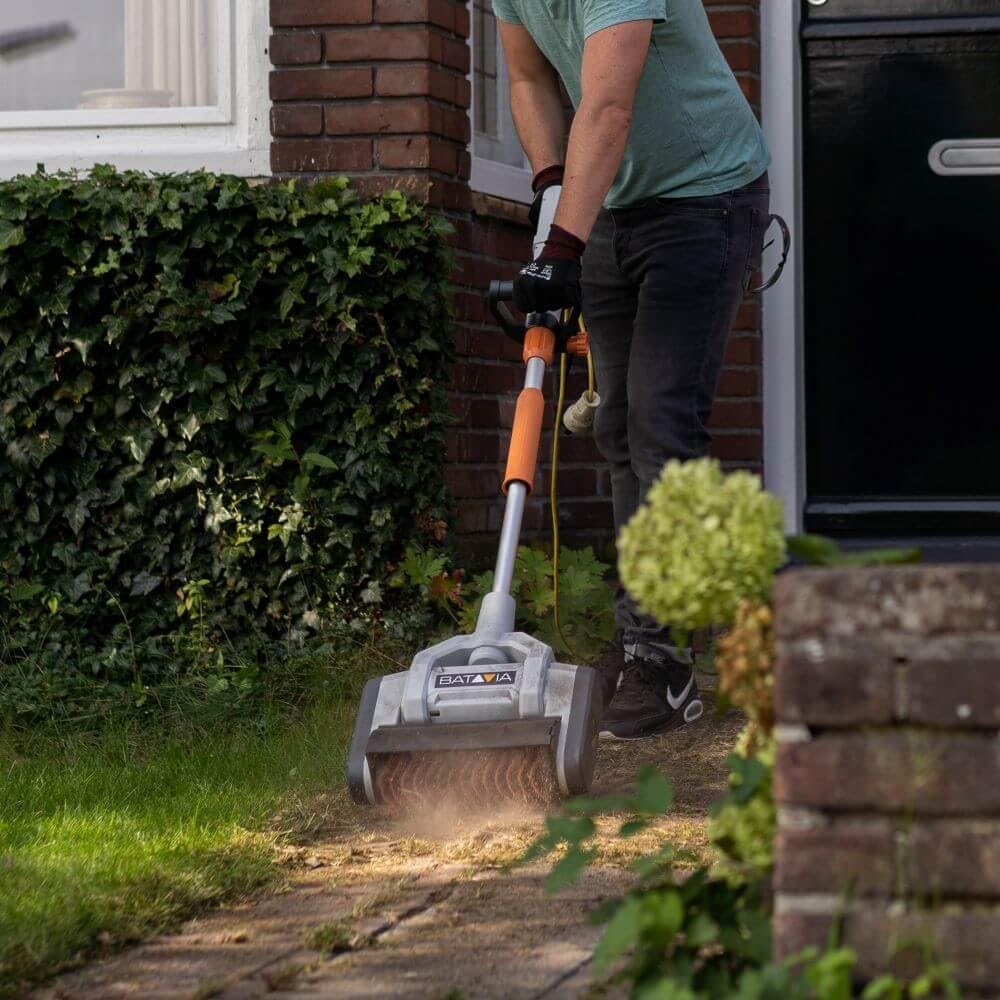
A user operating the Batavia Maxxbrush on a paved outdoor path, illustrating the ergonomic handling and effective cleaning action.

Yon fèmen view of the Maxxbrush in action, effectively cleaning a wet patio surface and removing accumulated dirt.
6. Antretyen
Regular maintenance ensures the longevity and optimal performance of your Maxxbrush.
- Netwaye tèt bwòs la: After each use, remove any debris, weeds, or dirt accumulated on the brush bristles. If necessary, rinse the brush head with water, ensuring no water enters the motor housing. Allow it to dry completely before storage.
- Netwaye inite prensipal la: Siye inite prensipal la ak anonsamp twal. Pa sèvi ak pwodui chimik piman bouk oswa pwodui netwayaj abrazif.
- Depo: The 2-part telescopic handle allows for compact storage. Disassemble the handle if desired and store the Maxxbrush in a dry, secure location, away from direct sunlight and extreme temperatures.
NAN. Depanaj
If you encounter issues with your Maxxbrush, refer to the following common problems and solutions:
| Pwoblèm | Kòz posib | Solisyon |
|---|---|---|
| Aparèy pa kòmanse | No power supply; Power switch off; Damaged cable | Check power connection; Ensure switch is on; Inspect cable for damage and replace if necessary |
| Pèfòmans netwayaj pòv | Brush worn out; Incorrect brush type for surface; Insufficient speed | Replace brush; Use appropriate brush for the task; Adjust speed setting |
| Twòp vibrasyon oswa bri | Brush unbalanced or damaged; Debris caught in brush mechanism | Inspect and clean brush; Replace brush if damaged |
Si pwoblèm nan pèsiste apre ou fin eseye solisyon sa yo, tanpri kontakte sèvis kliyan.
8. Espesifikasyon teknik
| Karakteristik | Spesifikasyon |
|---|---|
| Mak | Batavia |
| Nimewo Modèl | 7062678 |
| Pouvwa | 1020 W |
| Dimansyon pwodwi (L x W x H) | 22 x 139 x 38 cm |
| Pwa atik | 7.51 Kilogram |
| Manch Materyèl | Plastic (Durable, corrosion-resistant, easy-care) |
| Materyèl Bristle | Nylon |
| Itilizasyon pwodwi rekòmande | Netwayaj etaj |
| Sifas Rekòmandasyon | Hard surfaces, artificial turf |
| Konpozan ki enkli | 1 piece (main unit with brush) |
9. Enfòmasyon sou Garanti
This product comes with a standard manufacturer's warranty. Please refer to the warranty card included in your product packaging for specific terms, conditions, and duration. Keep your proof of purchase for any warranty claims.
10. Sipò pou Kliyan
For further assistance, technical support, or spare parts inquiries, please contact Batavia customer service. Contact details can typically be found on the official Batavia websit la oubyen sou anbalaj pwodwi ou a.
Websit: www.batavia.eu (Egzamplyen an, tanpri verifye ofisyèl la websit)