
1. Entwodiksyon ak souview
The Xiaomi Mi Air Purifier 2S AC-M4-AA is designed to improve indoor air quality by efficiently filtering out pollutants. This intelligent air purifier is suitable for rooms up to 37m² and features a Clean Air Delivery Rate (CADR) of 310m³ per hour. It offers smart connectivity for app control and integrates with voice assistants for convenient operation, providing real-time air quality monitoring via its OLED display.
2. Pwodwi Features
- European Version for compliance with regional standards.
- Smart air purifier with Wi-Fi connectivity and mobile app control (Mi Home app).
- Effective for rooms up to 37m² (approximately 398 sq ft).
- High air purification capacity of 310m³/h CADR.
- Integrated OLED display for real-time air quality (PM2.5), temperature, humidity, and filter status.
- Equipped with a high-efficiency HEPA filter for comprehensive air purification.
- Low noise operation, especially in Night Mode (as low as 32 dB).
- Voice control compatibility with supported smart home platforms.
3. Pake kontni
Verifye ke tout atik yo prezan nan pakè a:
- Xiaomi Mi Air Purifier 2S (AC-M4-AA)
- Pouvwa kab
- Manyèl itilizatè
- HEPA Filter (pre-installed or separately packaged)
4. Enstriksyon Sekirite
To ensure safe operation and prevent damage, please read and follow these safety guidelines:
- Always unplug the air purifier before cleaning, maintenance, or moving it.
- Do not block the air inlet or outlet vents. Maintain at least 20 cm (8 inches) clearance from walls and other objects.
- Use only the power adapter provided with the device. Ensure the voltage matche ak ekipman pou kouran lokal ou a.
- Do not operate the air purifier in wet or humid environments, such as bathrooms. Keep it away from water and other liquids.
- Aparèy sa a pa fèt pou itilize pa moun (ki gen ladan timoun) ki gen kapasite fizik, sansoryèl oswa mantal redwi, oswa ki pa gen eksperyans ak konesans, sof si yo te ba yo sipèvizyon oswa enstriksyon konsènan itilizasyon aparèy la pa yon moun ki responsab sekirite yo.
- Pa mete dwèt oswa objè etranje nan antre oswa priz lè a.
- Do not use the air purifier near heat sources, flammable gases, or volatile substances.
- Si kòd elektrik la domaje, li dwe ranplase pa manifakti a, ajan sèvis li yo, oswa moun ki kalifye menm jan an pou evite yon danje.
5. Enstalasyon
Follow these steps to set up your Xiaomi Mi Air Purifier 2S:
- Depake aparèy la: Carefully remove the air purifier from its packaging. Remove any protective films or tapes.
- Install/Check Filter: Open the filter compartment cover, usually located at the back or bottom of the unit. Ensure the HEPA filter is correctly seated and any plastic packaging around the filter is removed. Close the cover securely.
- Pozisyon pirifikatè a: Place the air purifier on a flat, stable surface. Ensure there is at least 20 cm (8 inches) of clear space around all sides and above the unit for optimal air circulation.
- Konekte pouvwa: Plug the power cable into the power port on the back of the purifier, then plug the other end into a suitable electrical outlet.
- Telechaje aplikasyon Mi Home la: Scan the QR code in the manual or search for "Mi Home" in your smartphone's app store (Google Play Store or Apple App Store). Download and install the app.
- Konekte ak aplikasyon: Open the Mi Home app, create an account or log in. Follow the in-app instructions to add your Xiaomi Mi Air Purifier 2S. This typically involves selecting the device, connecting to its temporary Wi-Fi hotspot, and then connecting it to your home Wi-Fi network (2.4GHz only).

Imaj: Devan view of the Xiaomi Mi Air Purifier 2S, showing the main body and the circular OLED display.

Imaj: Anwo-anba view of the Xiaomi Mi Air Purifier 2S, highlighting the fan grille and control buttons on the top surface.
6. Operasyon Enstriksyon
Your air purifier can be operated via the physical buttons on the unit or through the Mi Home app.
6.1. Using Physical Buttons
- Bouton pouvwa: Press the power button on the top of the unit to turn the air purifier on or off.
- bouton mòd: Press the mode button (often integrated with the power button or a separate button) to cycle through operating modes: Automatic, Night, and Manual.
6.2. Using the Mi Home App
The Mi Home app provides comprehensive control and monitoring features:
- Kontwòl Remote: Turn the purifier on/off, change modes, and adjust fan speed from anywhere.
- Siveyans an tan reyèl: View current PM2.5 levels, temperature, and humidity in your room.
- Orè: Set schedules for the purifier to turn on/off or change modes automatically.
- Estati Filtre: Monitor the remaining lifespan of your filter and receive notifications when it's time for replacement.
- Anviwònman: Adjust display brightness, enable/disable sounds, and other device-specific settings.
6.3. Operasyon Modes
- Mòd otomatik: The purifier intelligently adjusts its fan speed based on the real-time air quality detected by its sensors.
- Mòd lannwit: Operates at the lowest fan speed with minimal noise and a dimmed OLED display to ensure undisturbed sleep.
- Mòd manyèl: Allows you to manually select a desired fan speed or purification intensity.
6.4. OLED Display Information
The circular OLED display provides key information at a glance:
- Konsantrasyon PM2.5: Shows the current particulate matter level in µg/m³.
- Tanperati: Displays the ambient room temperature.
- Imidite: Shows the relative humidity level.
- Wi-Fi Ki dènye nouvèl: Indicates connection status to your home network.
- Operasyon mòd: Shows the currently active purification mode.
- Vite filtè: Displays the remaining percentage of the filter's life.

Image: The Xiaomi Mi Air Purifier 2S positioned in a modern living room, demonstrating its compact design and how it blends with home decor.
7. Antretyen
Antretyen regilye asire pèfòmans optimal epi pwolonje dire lavi pirifikatè lè ou la.
7.1. Filtre Ranplasman
The HEPA filter has a limited lifespan, typically 6-12 months, depending on usage and air quality. The Mi Home app and the OLED display will indicate when the filter needs replacement.
- Unplug the Purifier: Always disconnect the power before replacing the filter.
- Louvri konpatiman filtè a: Locate and open the filter compartment cover (usually at the back or bottom).
- Retire ansyen filtè a: Retire filtè ki itilize a avèk prekosyon. Jete l dapre règleman lokal yo.
- Mete yon nouvo filtè: Place a new, genuine Xiaomi HEPA filter into the compartment, ensuring it is correctly oriented and seated.
- Fèmen Kouvèti a: Fèmen kouvèti konpatiman filtè a byen fèm.
- Reset Filter Lifespan: After replacement, open the Mi Home app and follow the prompts to reset the filter lifespan counter. This ensures accurate tracking of the new filter's usage.

Imaj: Dèyè view of the Xiaomi Mi Air Purifier 2S, illustrating the location of the filter compartment cover for maintenance.
7.2. Cleaning the Purifier
- Netwayaj eksteryè: Wipe the exterior surfaces of the air purifier with a soft, dry cloth. Do not use abrasive cleaners, solvents, or harsh chemicals, as these can damage the finish.
- Air Inlet/Outlet Grilles: Use a soft brush or a vacuum cleaner with a brush attachment to gently clean dust and debris from the air inlet and outlet grilles.
- Laser Particle Sensor: Periodically clean the laser particle sensor, usually located on the back of the unit. Refer to the detailed manual or Mi Home app for specific instructions on how to access and clean this sensor, as it is crucial for accurate air quality readings.
NAN. Depanaj
Si ou rankontre pwoblèm ak pirifikatè lè ou a, gade pwoblèm ak solisyon komen sa yo:
| Pwoblèm | Kòz posib | Solisyon |
|---|---|---|
| Aparèy pa limen | Power cable not connected; Filter compartment not closed properly; Power outlet issue. | Ensure power cable is securely plugged in. Close the filter compartment cover completely. Test the power outlet with another device. |
| No Wi-Fi connection / App control not working | Incorrect Wi-Fi password; Router too far; 5GHz Wi-Fi network; App pairing issue. | Ensure your Wi-Fi network is 2.4GHz. Move the purifier closer to the router. Restart the purifier and your router. Follow the Mi Home app's re-pairing instructions. |
| Pèfòmans pirifikasyon pòv | Filter lifespan expired; Air inlets/outlets blocked; Dirty laser particle sensor. | Check filter lifespan in the app and replace if necessary. Ensure no obstructions around the air inlets/outlets. Clean the laser particle sensor as per maintenance instructions. |
| Bri dwòl pandan operasyon an | Foreign object inside; Filter not seated correctly. | Unplug the device and check for any foreign objects. Ensure the filter is properly installed and secured. |
| OLED display not working or showing incorrect information | Temporary glitch; Sensor malfunction. | Try restarting the device by unplugging and plugging it back in. If the issue persists, contact customer support. |
9. Espesifikasyon
Detailed technical specifications for the Xiaomi Mi Air Purifier 2S AC-M4-AA:
| Spesifikasyon | Valè |
|---|---|
| Nimewo Modèl | AC-M4-AA |
| Dimansyon (L x W x H) | 24 x 24 x 52 cm (9.4 x 9.4 x 20.5 pous) |
| Pwa | 4.5 kg (9.9 liv) |
| Sous pouvwa | Kab elektrik |
| Rated pouvwa | 29 Watts |
| Kalite filtre | HEPA |
| Zòn ki aplikab | Jiska 37 m² (398 pye kare) |
| Nivo bri | 32 Decibels (in Night Mode) |
| Kalite kontwòl | Application and Physical Buttons |
| Karakteristik espesyal | Wi-Fi Connectivity, OLED Display |
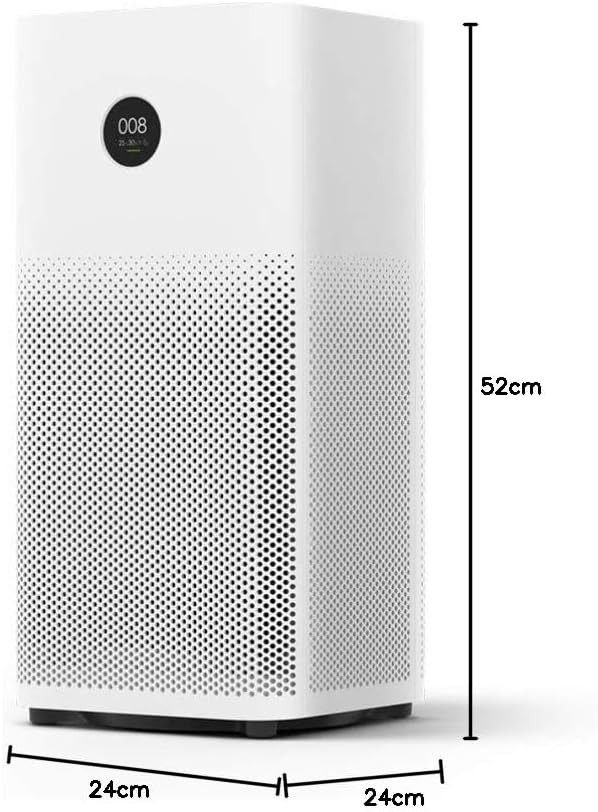
Image: Diagram illustrating the dimensions (height, width, depth) of the Xiaomi Mi Air Purifier 2S.
10. Garanti ak sipò
For detailed warranty information, terms, and conditions, please refer to the warranty card included with your product or visit the official XIAOMI websit la. Kenbe resi acha ou kòm prèv acha pou nenpòt reklamasyon garanti.
For technical support, service, or inquiries regarding your Xiaomi Mi Air Purifier 2S, please contact XIAOMI customer service or your local authorized retailer. Contact information can typically be found on the official XIAOMI websit la oubyen nan dokimantasyon pwodwi ou a.