
Entwodiksyon
Thank you for choosing the Riwbox CT-7S Kids Wireless Headphones. These headphones are designed with children in mind, featuring a fun cat-ear design with LED lights, 85dB volume limiting for hearing protection, and versatile wired/wireless connectivity. This manual provides detailed instructions to help you get the most out of your new headphones.
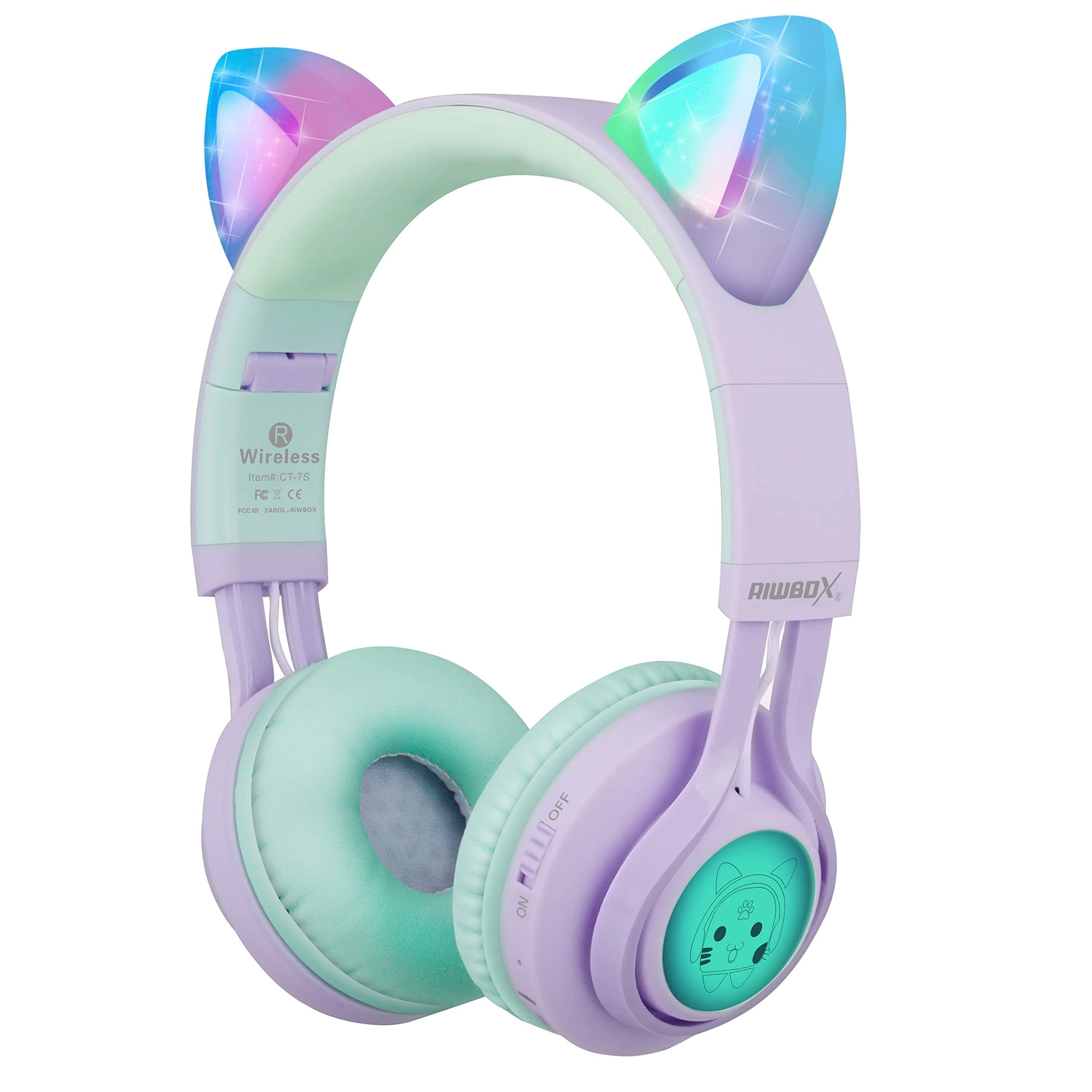
Image: Riwbox CT-7S Kids Wireless Headphones in purple and green, showcasing the cat-ear design and soft earcups.
Ki sa ki nan bwat la
- Volume limiting cat ear headphones (Wireless)
- 3.5mm Anti-Tangle Audio Cable with Mic
- USB-C chaje kab
- Manyèl itilizatè

Image: The included 3.5mm audio cable and USB-C charging cable.
Enstalasyon
1. Chaje kas ekoutè yo
Before first use, fully charge the headphones. Connect the provided USB-C charging cable to the charging port on the headphone and the other end to a USB power source (e.g., computer, wall adapter). The LED indicator will show charging status. A full charge takes approximately 2 hours and provides up to 40 hours of playback.
2. Powering On / Off
Locate the ON/OFF switch on the side of the headphone. Slide the switch to the "ON" position to power on. Slide to "OFF" to power off.
3. Pè Bluetooth
- Asire w ke kas ekoutè yo etenn.
- Slide the ON/OFF switch to the "ON" position. The headphones will automatically enter pairing mode, and the LED indicator will flash.
- Sou aparèy ou an (telefòn entelijan, tablèt, òdinatè pòtab), aktive Bluetooth epi chèche aparèy ki disponib yo.
- Select "CT-7S" from the list of devices.
- Once paired, the LED indicator will stop flashing and remain solid, and a voice reminder will confirm the connection.
- The connection status and battery level will be shown on your smartphone screen.

Image: Detailed diagram showing the location of the ON/OFF switch, microphone, LED indicator, USB charge port, and 3.5mm audio AUX port on the headphones.
Enstriksyon Operasyon
1. Mòd Filaire (Si ou vle)
If the headphone battery runs out, or if you prefer a wired connection, you can use the provided 3.5mm anti-tangle audio cable. Simply plug one end into the headphone's AUX port and the other end into your device's 3.5mm audio jack. The cable includes a built-in microphone for phone calls.
2. Kontwòl Volim
In Bluetooth mode, use the volume control buttons on the headphone to adjust the sound level. The 85dB volume limiting feature ensures safe listening levels for children.
3. Music Playback & Call Management
- Jwe/Poz: Yon ti tan peze bouton Jwe/Paz la.
- Pwochen chante: Peze bouton pou monte volim nan (+) pandan yon bon bout tan.
- Chante Previous: Peze bouton Diminye Volim nan (-) pandan yon bon bout tan.
- Reponn/Fen Apèl: Yon ti tan peze bouton Jwe/Paz la.
4. dirije limyè kontwòl
The cat ears and side panels feature colorful LED lights that can blink and change color with the rhythm of the music. To turn the LED lights ON or OFF, press and hold the 'M' button for 3 seconds. Turning off the LED lights can help conserve battery for longer music playback.

Image: Illustration showing the LED lights on the cat ears and side panels of the headphones.
Antretyen
- Kenbe kas ekoutè yo pwòp lè w siye yo ak yon twal mou, sèk.
- Evite ekspoze kas ekoutè yo nan tanperati ekstrèm oswa limyè solèy la dirèk.
- Sere kas ekoutè yo nan yon kote ki fre epi sèk lè w pa ap itilize yo. Design pliyab la pèmèt ou sere yo byen.
- Pa eseye demonte oswa repare kas ekoutè yo tèt ou, paske sa ka anile garanti a.
- Keep away from water. While the product description mentions "Waterproof" in one specification, it's generally safer to avoid direct water exposure for electronic devices.

Image: Riwbox CT-7S headphones shown in their folded position, highlighting portability.
Depanaj
| Pwoblèm | Solisyon |
|---|---|
| Kas ekoutè yo pa vle limen. | Ensure the headphones are charged. Connect the USB-C charging cable and try again. |
| Pa ka konekte atravè Bluetooth. |
|
| Pa gen son nan mòd san fil. |
|
| Pa gen son nan mòd filaire. |
|
| Limyè ki ap dirije yo pa travay. | Press and hold the 'M' button for 3 seconds to toggle the LED lights on/off. Ensure headphones are charged. |
Espesifikasyon
| Karakteristik | Detay |
|---|---|
| Nimewo Modèl | CT-7S |
| Mak | ripbox |
| Koneksyon Teknoloji | Bluetooth, Wired, Wireless |
| Bluetooth vèsyon | 5.3 |
| Gamme Bluetooth | 50 pye |
| Gwosè Chofè Audio | 40 Milimèt |
| Sansiblite | 85 dB (Volume Limiting) |
| Repons Frekans | 2 KHz |
| Tan chaj batri | 2 èdtan |
| Lavi Mwayèn Batri | 40 èdtan |
| Kalite kontwòl | Kontwòl Volim, Touche, Bouton |
| Plasman Zòrèy | Sou Zòrèy |
| Faktè fòm | Over Ear, Foldable |
| Materyèl | Plastik |
| Pwa atik | 0.35 liv |
Garanti ak sipò
Riwbox offers a 1-ane garanti for products purchased from Amazon. To register for warranty service, please email support@riwbox.com within one week of purchase. Don't forget to offer your order number for verification.
For further assistance or inquiries, please visit the official Riwbox websit oswa kontakte sipò kliyan yo.