
Entwodiksyon
Thank you for choosing the LENRUE A38S Computer Speakers. This manual provides essential information for setting up, operating, and maintaining your speakers to ensure optimal performance. The A38S speakers are designed to deliver clear audio for your desktop, laptop, and tablet, featuring a plug-and-play design with USB power and 3.5mm auxiliary audio input, complemented by dynamic RGB lighting.
Enstalasyon
Follow these steps to connect your LENRUE A38S speakers to your device.
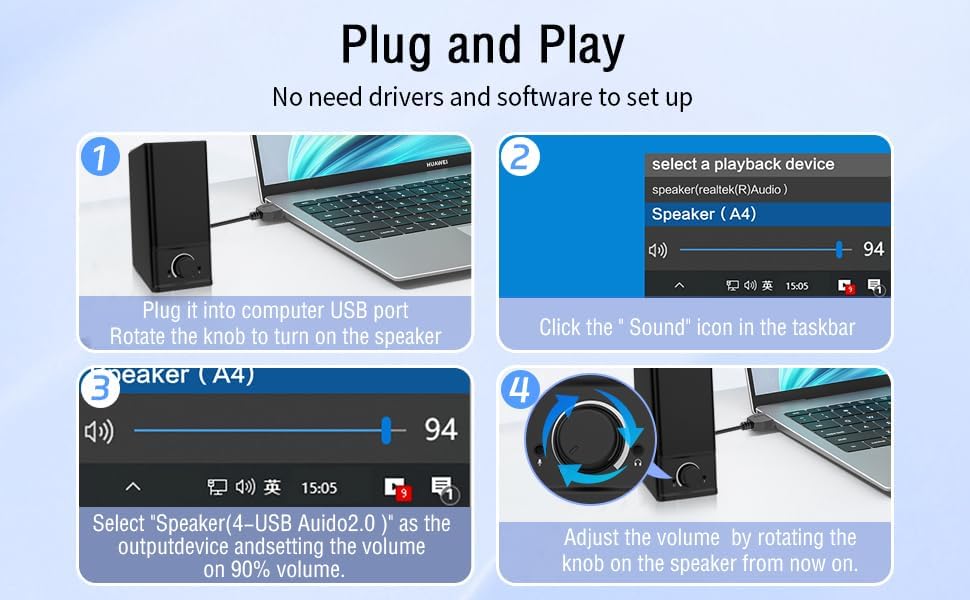
- Konekte pouvwa: Insert the USB-A plug into an available USB port on your computer or a USB power adapter. If your device has a USB-C port, use the provided USB-A to Type-C adapter. The speakers are powered via USB and contain an internal battery for portable use.
- Konekte odyo: Plug the 3.5mm audio jack into the headphone or audio output port of your computer, laptop, or tablet.
- Pouvwa sou: Rotate the main knob on the speaker clockwise to turn it on. The RGB lights will illuminate.
- Select Playback Device: On your computer, navigate to your sound settings and select "Speaker (4-USB Audio 2.0)" or a similar option as the output device. Adjust the volume to approximately 90% on your computer for optimal control via the speaker knob.
Operasyon
The LENRUE A38S speakers feature a multi-function knob for easy control.
- Limen/Etenyen: Rotate the knob clockwise to turn on the speakers. Rotate counter-clockwise until it clicks to turn off.
- Kontwòl Volim: Rotate the knob clockwise to increase volume and counter-clockwise to decrease volume.
- Mòd ekleraj RGB: Double-click the knob to cycle through the three dynamic RGB lighting modes.
- Turn Off RGB Lights: Triple-click the knob to turn off all RGB lighting.

Antretyen
Bon swen asire lonjevite oratè ou yo.
- Netwayaj: Use a soft, dry cloth to wipe the speaker's surface. Do not use liquid cleaners or abrasive materials.
- Depo: Store the speakers in a cool, dry place away from direct sunlight and extreme temperatures.
- Rezistans dlo: The speakers are waterproof. However, avoid prolonged submersion or exposure to high-pressure water jets to prevent damage. Ensure all ports are dry before connecting cables.
Depanaj
Si ou rankontre pwoblèm, gade solisyon komen sa yo:
| Pwoblèm | Solisyon |
|---|---|
| Pa gen son ki soti nan moun kap pale |
|
| Limyè RGB pa travay |
|
| Odyo defòme |
|
Espesifikasyon
Detailed technical specifications for the LENRUE A38S Computer Speakers.
- Non modèl: A38S
- Kalite oratè: Coaxial
- Sòti odyo: Dual 5W drivers (10W RMS total), 18W Max Output
- Konfigirasyon chanèl son antoure: 2.0 Stereo
- Koneksyon: USB (for power), 3.5mm Aux-in (for audio)
- Sous pouvwa: USB Powered with internal Lithium Ion Battery
- Aparèy konpatib: Desktops, PCs, Laptops, Mac, Tablets, Phones, Projectors, PS4, MP3 players
- Karakteristik: Dynamic RGB Lighting, Plug-n-Play, Waterproof
- Dimansyon pwodwi: 2.1 pous (P) x 16 pous (Lajè) x 2.5 pous (Wotè)
- Pwa atik: 286 gram (10.1 ons)
- Longè kab: Approximately 47.3 inches (USB and 3.5mm audio)
- Eleman ki enkli: LENRUE A38S Speaker Unit, USB-A to Type-C Adapter, USB Power Cable, 3.5mm Audio Cable


Garanti ak sipò
LENRUE is committed to providing quality products and customer satisfaction.
- Garanti: Your LENRUE A38S speakers come with a 12-month worry-free replacement service from the date of purchase. This limited warranty covers manufacturing defects.
- Sèvis Kliyan: We offer lifetime customer service for any questions or issues you may encounter. For support, please refer to the contact information provided with your purchase or visit the official LENRUE websit.