
1. Entwodiksyon
Thank you for choosing the KAIDI KD-904 Bluetooth Earphones. These wireless in-ear headphones are designed for comfort and stability, making them ideal for sports and daily use. Featuring Bluetooth connectivity and a built-in microphone, they allow for hands-free calls and high-quality audio playback. This manual provides essential information for the proper setup, operation, and maintenance of your earphones.
2. Pake kontni
- KAIDI KD-904 Bluetooth Earphones
- USB Chaje Kab
- Manyèl itilizatè
3. Pwodwi souview
The KAIDI KD-904 earphones feature an ergonomic design with ear hooks for a secure fit, especially during physical activity. The earbuds are magnetic, allowing them to clip together for convenient storage around your neck when not in use. An inline control module provides easy access to power, volume, and call functions.

Imaj: Gwo plan view of a single KAIDI KD-904 earphone, highlighting the in-ear bud and the flexible ear hook designed for stability.

Imaj: Detaye view of the earbud housing with the 'KAIDI' brand logo, showing the design and finish of the earphone unit.
4. Enstalasyon
4.1 Chaje ekoutè yo
- Connect the micro USB end of the charging cable to the charging port on the inline control module of the earphones.
- Konekte bout USB-A kab chaje a nan yon sous kouran USB (pa egzanp, yon pò USB òdinatè, yon adaptè miray).
- The LED indicator on the control module will illuminate, typically red, during charging.
- Once fully charged (approximately 1-2 hours), the LED indicator will change color (e.g., blue) or turn off.
Note: Ensure the earphones are fully charged before first use for optimal battery life.
4.2 Bluetooth Pairing
- Pouvwa sou: Press and hold the multi-function button (usually the center button on the inline control) for approximately 3-5 seconds until the LED indicator flashes blue and red alternately. This indicates the earphones are in pairing mode.
- Aktive Bluetooth: Sou telefòn entelijan ou oswa lòt aparèy ki gen Bluetooth, ale nan paramèt Bluetooth yo epi asire w ke Bluetooth la aktive.
- Chèche pou Aparèy: Your device will scan for available Bluetooth devices. Look for "KD-904" or a similar name in the list.
- Konekte: Select "KD-904" from the list to initiate the connection. Once successfully paired, the LED indicator on the earphones will typically flash blue slowly or turn solid blue, and you may hear an audible confirmation.
- Rekonekte: After initial pairing, the earphones will automatically attempt to connect to the last paired device when powered on, provided the device's Bluetooth is active and within range.
5. Operasyon Enstriksyon
5.1 Fonksyon debaz
- Pouvwa sou: Peze epi kenbe bouton milti-fonksyon an pou 3 segonn.
- Pouvwa Off: Peze epi kenbe bouton milti-fonksyon an pou 5 segonn.
- Jwe/Poz: Kout peze bouton milti-fonksyon an.
- Volim moute: Peze bouton '+' la yon ti kras.
- Volim desann: Peze bouton '-' la yon ti moman.
- Pwochen Track: Peze bouton '+' la pandan lontan.
- Track Previous: Peze bouton '-' la pandan lontan.
5.2 Jesyon Apèl
- Reponn apèl: Short press the multi-function button when an incoming call rings.
- Fini apèl: Short press the multi-function button during a call.
- Rejte apèl: Long press the multi-function button when an incoming call rings.
- Recomposition Dènye Nimewo: Peze bouton milti-fonksyon an de fwa.
6. Antretyen
- Netwayaj: Use a soft, dry cloth to clean the earphones. Do not use abrasive cleaners or immerse in water.
- Depo: Store the earphones in a cool, dry place away from direct sunlight and extreme temperatures. The magnetic earbuds help prevent tangling during storage.
- Swen batri: To prolong battery life, avoid completely discharging the earphones frequently. Charge them regularly, even if not in use for extended periods.
- Evite domaj: Do not drop, disassemble, or modify the earphones. Keep away from sharp objects.
NAN. Depanaj
| Pwoblèm | Kòz posib | Solisyon |
|---|---|---|
| Ekoutè yo pa limen. | Batri ki ba. | Chaje ekoutè yo nèt. |
| Pa ka konekte ak aparèy la. | Earphones not in pairing mode; Bluetooth off on device; device out of range. | Ensure earphones are in pairing mode (flashing red/blue). Turn on Bluetooth on your device. Move device closer to earphones (within 10 meters). Try re-pairing. |
| Pa gen son oswa volim nan ba. | Volim twò ba; pa konekte; yo chwazi yon move sòti odyo. | Increase volume on both earphones and connected device. Ensure earphones are successfully connected. Check audio output settings on your device. |
| Chaje a pa fonksyone. | Kab oswa sous kouran ki defektye. | Try a different USB charging cable and/or a different USB power source. |
8. Espesifikasyon
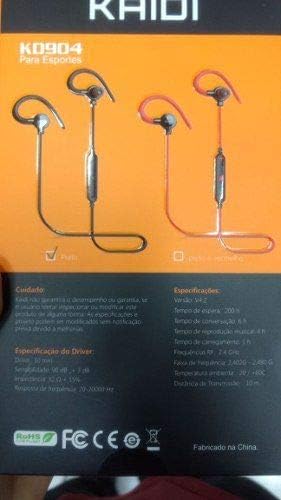
Image: Back of the KAIDI KD-904 product box, displaying detailed technical specifications and features in text.
- Modèl: KD-904
- Bluetooth vèsyon: V4.2
- Ranje operasyon: Jiska 10 mèt (33 pye)
- Tan Lektur Mizik: Apeprè 4 èdtan
- Tan sibstiti: Apeprè 200 èdtan
- Tan pou chaje: Apeprè 1-2 èdtan
- Gwosè Chofè: 10 mm
- Sansiblite Chofè: 98 dB
- Repons frekans: 20Hz - 20kHz
- Koneksyon: Wireless Bluetooth
- Plasman Zòrèy: Nan zòrèy (Intra-aurikilè)
- Itilizasyon espesifik: Sports, Running
- Aparèy konpatib: Android, Samsung, iPhone
9. Garanti ak sipò
For warranty information or technical support, please refer to the purchase documentation or contact your retailer. Keep your proof of purchase for any warranty claims. KAIDI is committed to providing quality products and support.