
1. Entwodiksyon
Thank you for choosing the Logic Life30 Smartwatch. This device is designed to integrate seamlessly into your active lifestyle, offering features such as Bluetooth calling, fitness tracking, sleep monitoring, and real-time notifications. This manual provides detailed instructions for setup, operation, and maintenance to ensure optimal performance and longevity of your smartwatch.

Image 1.1: Logic Life30 Smartwatches in multiple colors, showcasing different display options including a dialer, messages, contacts, time, date, and heart rate monitor.
2. Enfòmasyon sou Sekirite
- Do not attempt to disassemble, repair, or modify the device. This may void the warranty and cause damage.
- Kenbe aparèy la lwen tanperati ekstrèm, limyè solèy dirèk, ak imidite ki wo.
- Evite ekspoze aparèy la a gwo enpak oswa tonbe.
- Use only the provided charging cable and adapter. Using unauthorized accessories may cause damage or fire.
- Consult a medical professional before starting any new exercise regimen, especially if you have pre-existing health conditions. The heart rate monitor is for reference only and should not be used for medical diagnosis.
- Kenbe aparèy la lwen timoun ak bèt kay.
- Netwaye aparèy la avèk yon twal mou epi sèk. Pa sèvi ak pwodui chimik ki agresif oswa materyèl abrazif.
3. Pake kontni
Tanpri verifye sa ki nan pake a lè w ap debale l. Si gen nenpòt atik ki manke oswa ki domaje, kontakte sèvis kliyan.
- Logic Life30 Smartwatch
- USB Chaje Kab
- Manyèl Itilizatè (dokiman sa a)
4. Aparèy souview
Familiarize yourself with the physical components of your Logic Life30 Smartwatch.
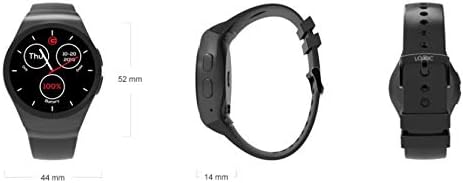
Image 4.1: Front, side, and back views of the Logic Life30 Smartwatch with dimensions (44mm width, 52mm height, 14mm thickness).
4.1 Devan View
- IPS LCD Touch Display: The main interface for interacting with the smartwatch.
4.2 Bò View
- Bouton pouvwa: Used to power on/off the device and wake/sleep the screen.
- Mikwofòn: For voice commands and calls.
4.3 Retounen View

Imaj 4.2: Dèyè view of the Logic Life30 Smartwatch, highlighting the optical heart rate sensor and magnetic charging contacts.
- Capteur batman kè: Li kontwole batman kè ou.
- Kontak chaje: For connecting the magnetic USB charging cable.
- Oratè: For audio output during calls or media playback.
5. Enstalasyon
5.1 Chaje mont entelijan an
- Connect the USB charging cable to a power adapter (not included) or a computer's USB port.
- Align the magnetic end of the charging cable with the charging contacts on the back of the smartwatch. It will snap into place.
- The watch display will show a charging indicator. Allow the device to fully charge before first use (approximately 2 hours).
5.2 Limen/Etenyen
- Pou limen: Press and hold the Power Button on the side of the watch until the Logic logo appears.
- Pou etenn: Press and hold the Power Button, then select "Power Off" on the screen.
5.3 Pairing with Your Smartphone (Bluetooth)
To access all features, including calls, notifications, and data synchronization, pair your Life30 Smartwatch with your smartphone via Bluetooth.
- Ensure your smartwatch is powered on and Bluetooth is enabled on your smartphone.
- Sou mont entelijan ou an, ale nan paramèt Bluetooth yo.
- On your smartphone, open Bluetooth settings and search for available devices.
- Select "Logic Life30" (or similar name) from the list of found devices on your smartphone.
- Konfime demann koneksyon an sou tou de telefòn entelijan ou ak mont entelijan ou.
5.4 Companion App Installation
For full functionality, including fitness data tracking and advanced settings, download the recommended companion app from your smartphone's app store. Refer to the smartwatch's display or packaging for the specific app name or QR code.
- Scan the QR code displayed on the smartwatch or in the quick start guide, or search for the app name in your phone's app store.
- Install the app and follow the on-screen instructions to create an account and connect your Life30 Smartwatch.
6. Operasyon Enstriksyon
6.1 Navige nan Entèfas la
- Glise anlè/desann: Defile nan meni yo oswa notifikasyon yo.
- Glise agoch/dwat: Access different screens, widgets, or app lists.
- Tape: Chwazi yon atik oubyen louvri yon aplikasyon.
- Peze bouton pouvwa: Return to the home screen or wake/sleep the display.
6.2 Karakteristik Kominikasyon
- Fè/Resevwa Apèl: Once paired via Bluetooth, you can dial numbers directly from the watch or answer incoming calls.
- Mesaj: View incoming text messages and social media notifications directly on your watch.
- Kontak: Access your phone's contact list from the smartwatch.
6.3 Suivi Sante ak Fòm Fizik

Image 6.1: The Logic Life30 Smartwatch supports fitness tracking, monitoring activities like running.
- Monitè batman kè: Access the heart rate app to measure your current heart rate. The watch can also log your heart rate over time.
- Pedomètr: Tracks your steps, distance, and estimated calories burned throughout the day.
- Monitè dòmi: Kontwole modèl dòmi ou, tankou dòmi pwofon, dòmi lejè, ak lè ou reveye.
- Rapèl sedantèr: Notifies you when you have been inactive for too long, encouraging you to move.
6.4 Multimedia and Other Features
- Camera/Remote Camera: Use the built-in camera (if available) or control your smartphone's camera remotely from the smartwatch.
- MP3/MP4 Player: Play music or videos stored on the device or control media playback on your connected smartphone.
- Son Anrejistrè: Record audio directly from the smartwatch.
- Calculator, Calendar, Alarm, Stopwatch: Standard utility applications.
- Anti-vòl: Helps locate your phone if it's out of range or alerts you if the connection is lost.
- Asistan vwa: Access your phone's voice assistant through the smartwatch.
6.5 Personnalisation
- Gade figi: Personalize your smartwatch by choosing from various pre-installed watch faces or downloading new ones via the companion app.
- Tèm: Adjust the overall visual theme of the smartwatch interface.
7. Antretyen
7.1 Netwaye Smartwatch ou a
- Wipe the screen and body of the watch with a soft, lint-free cloth.
- Pou tach fè tèt di, yon ti kras dampen the cloth with water. Avoid using harsh cleaning agents, solvents, or abrasive materials.
- Asire w ke kontak chaj yo pwòp epi sèk anvan ou chaje yo pou anpeche yo koroze.
7.2 Depo
- Lè w pa itilize mont entelijan an pou yon bon bout tan, sere l nan yon kote ki fre epi sèk.
- Charge the device periodically (e.g., every 3 months) to prevent deep discharge of the battery.
NAN. Depanaj
| Pwoblèm | Solisyon posib |
|---|---|
| Smartwatch won't turn on. | Asire w aparèy la byen chaje. Konekte l nan plato a pou omwen 30 minit. |
| Pa ka konekte ak telefòn entelijan an. |
|
| Yo pa resevwa notifikasyon. |
|
| Lekti batman kè yo pa egzak. | Asire w ke mont lan byen sere sou ponyèt ou, ni twò sere ni twò lach. Netwaye detèktè ki dèyè mont lan. |
| Ekran an pa reponn. | Restart the smartwatch by pressing and holding the power button. If the issue persists, ensure the screen is clean and dry. |
9. Espesifikasyon
| Karakteristik | Detay |
|---|---|
| Non modèl | Lavi30 |
| Mak | Lojik |
| Ekspozisyon | 1.3 Inch IPS LCD Touch Screen |
| Koneksyon | Bluetooth |
| Kominikasyon san fil | Bluetooth |
| Karakteristik espesyal | Email, Sleep Monitor, Notifications, Heart Rate Monitor, Pedometer, Remote Camera, MP3/MP4 Player |
| Antre Entèfas Imèn | Touchscreen |
| Dimansyon pwodwi | 3.81 x 1.3 x 4.5 cm (1.5 x 0.51 x 1.77 pous) |
| Pwa atik | 426 g (0.94 liv) |
| Opsyon koulè | Silver/White (other colors may be available) |
| Fòm | Round |
10. Garanti ak sipò
10.1 Enfòmasyon sou Garanti
The Logic Life30 Smartwatch comes with a standard manufacturer's warranty. Please refer to the warranty card included in your package or visit the official Logic websit la pou wè kondisyon detaye konsènan pwoteksyon garanti a, dire a, ak pwosesis reklamasyon an.
10.2 Sipò pou Kliyan
For technical assistance, troubleshooting, or any questions regarding your Logic Life30 Smartwatch, please contact Logic customer support. Contact information can typically be found on the official Logic websit la oubyen sou anbalaj pwodwi a.
- Sipò sou entènèt: Visit the official Logic websit pou FAQ, atik sipò, ak fòm kontak.
- Sipò Imèl: Gade dokimantasyon pwodwi ou a pou adrès imel sèvis kliyan an.
- Sipò telefòn: Refer to your product documentation for customer service phone numbers.