
Entwodiksyon
This manual provides essential instructions for the safe and effective use of your Andoer Portable 1080P Digital Camera D11773S. Please read this manual thoroughly before operating the device and retain it for future reference. This digital camera is designed for capturing high-resolution photos and videos, featuring a 48MP image sensor, 1080P video recording, 8X digital zoom, and a 2.7-inch LCD screen.
Enfòmasyon sou Sekirite
- Pa ekspoze kamera a ak dlo oswa imidite.
- Evite lage kamera a oswa sibi gwo enpak.
- Kenbe kamera a lwen chan mayetik fò.
- Do not attempt to disassemble or modify the camera. Repairs should only be performed by qualified personnel.
- Use only the specified battery type and charging cable.
- Sere kamera a nan yon kote ki fre, sèk lè li pa itilize.
- Kenbe lwen timoun piti yo.
Kontni pake
Verifye ke tout atik yo prezan nan pakè a:
- Andoer Portable Digital Camera (Model D11773S)
- Batri ityòm (3.7V 550mAh)
- Kalite-C Charge Kab
- senti ponyèt
- Pote Sak
- Manyèl itilizatè

Image: Contents of the camera package, showing the camera, battery, USB-C cable, wrist strap, carry bag, and user manual.
Kamera souview
Familyarize w ak konpozan prensipal kamera w la.
Devan View

Imaj: Devan view of the Andoer D11773S camera. Key features visible include the digital lens, built-in flash, and the 2.7" TFT display and 48 Mega pixels indicators.
- Lantiy: Kaptire imaj ak videyo.
- Flash: Bay ekleraj nan kondisyon ki pa twò klere.
- Mikwofòn: Anrejistre odyo pandan kaptire videyo.
Dèyè View

Imaj: Dèyè view of the Andoer D11773S camera, displaying the 2.7-inch LCD screen and various control buttons for navigation and settings.
- LCD Screen (2.7 Inch): Montre an dirèk view, meni, ak lekti.
- Bouton kontwòl: For menu navigation, mode selection, zoom, and playback.
- Oratè: Pou lekti odyo.
Side View ak dimansyon

Image: Diagram illustrating the dimensions of the Andoer D11773S camera: 9.2cm length, 6.1cm width, and 1.4cm thickness.
- Pò USB (Kalite-C): Pou chaje ak transfè done.
- Plas pou kat memwa: For inserting a Micro SD card.
- Lòj batri: Li gen pil ityòm rechargeable la.
Enstalasyon
1. Chaje batri a
- Insert the provided lithium battery into the camera's battery compartment.
- Connect the camera to a power source (e.g., computer USB port or USB wall adapter) using the supplied Type-C charge cable.
- Limyè endikatè chaj la ap limen. Yon fwa li fin chaje nèt, limyè a ka chanje koulè oswa etenn.
2. Mete yon kat memwa
The camera requires a Class-10 external Micro SD memory card (not included) with a maximum capacity of 128GB.
- Jwenn emplacement kat memwa sou bò kamera a.
- Insert the Micro SD card with the metal contacts facing the front of the camera until it clicks into place.
- Pou retire kat la, peze kat la dousman anndan jiskaske li soti.
Enstriksyon Operasyon
Power On/Off
- Pou limen, peze epi kenbe bouton Pouvwa a.
- Pou etenn li, peze epi kenbe bouton Pouvwa a ankò.
Pran Foto
The camera supports picture resolutions up to 48MP.
- Limen kamera a.
- Ankadre foto ou a avèk ekran LCD 2.7 pous la.
- Press the Shutter button halfway to focus (if applicable), then fully press to capture the photo.

Image: Visual representation of the camera's capabilities, showing a 48MP photo example and a 1080P video example.
Anrejistreman videyo
The camera supports video resolution up to 1920x1080 (1080P).
- Switch the camera to video recording mode (refer to on-screen icons or mode button).
- Peze bouton an Dosye yo kòmanse anrejistreman.
- Peze bouton an Dosye ankò yo sispann anrejistreman.
Fonksyon Zoom
The camera features 8X digital zoom.
- Use the zoom buttons (often marked 'W' for Wide and 'T' for Telephoto) to adjust the zoom level.
Anviwònman Flash
The built-in flash can be used in dark conditions.
- Access the flash settings through the camera's menu to select modes like Auto Flash, Fill-in Flash, Red-eye Reduction, or Flash Off.
Special Features: Anti-Shake, Face Detect, Smile Capture, Self-Timer
These features enhance your photography experience.
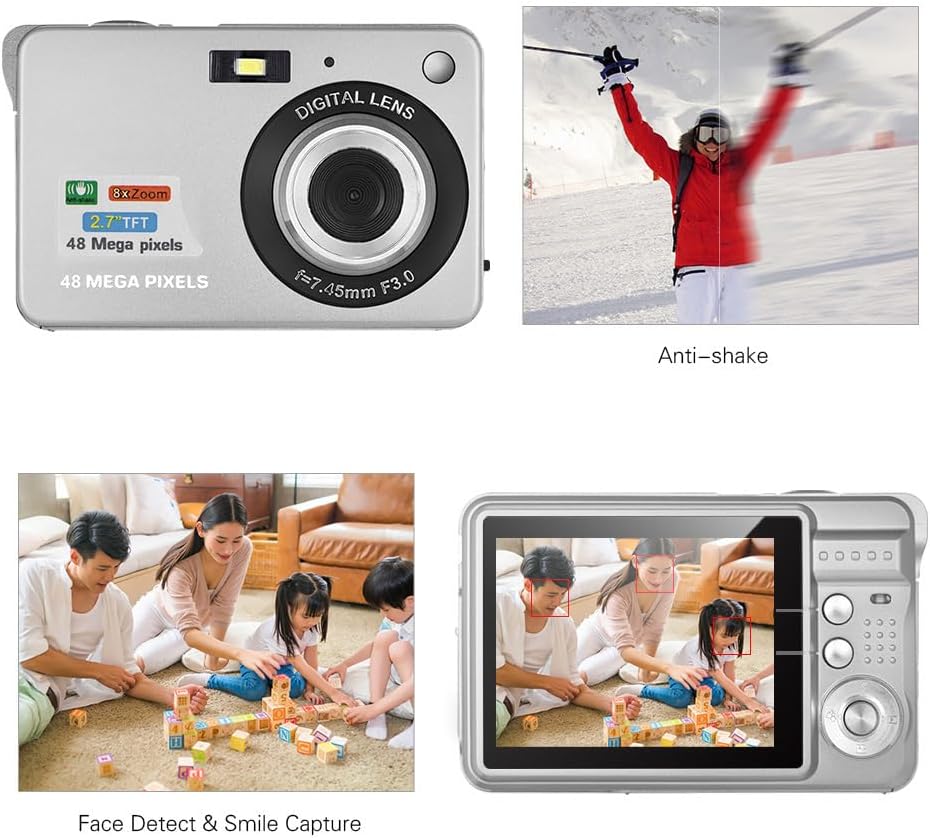
Image: Demonstrations of the camera's Anti-shake function (reducing blur from movement) and Face Detect & Smile Capture (identifying faces and automatically taking a photo when a smile is detected).
- Anti-souke: Helps reduce blur caused by camera movement. This feature is typically enabled by default or can be toggled in settings.
- Face Detect & Smile Capture: The camera can detect faces and automatically capture a photo when a smile is detected. Enable these options in the camera's menu.
- Oto-revèy: Set a delay (2, 5, or 10 seconds) before the photo is taken, allowing you to be in the shot.
Mòd Macro
Pou pran foto ti objè an plan sere.

Image: A close-up photograph of an ant, demonstrating the camera's Macro Mode capability for detailed shots of small subjects.
- Activate Macro Mode through the camera's menu or a dedicated button for close-up shots.
Lektur mòd
- Peze bouton Lekti a pou re-lektireview captured photos and videos on the LCD screen.
- Use the navigation buttons to scroll through your media.
Konekte ak yon òdinatè
You can transfer photos and videos to a computer using the supplied Type-C USB cable.
- Asire w ke kamera a limen.
- Connect one end of the Type-C USB cable to the camera's USB port and the other end to an available USB port on your computer.
- The camera should appear as a removable disk or media device on your computer.
- Open the camera's folder to access and transfer your files.
- Retire aparèy la nan òdinatè w la san danje anvan ou dekonekte kab la.
Antretyen
- Netwayaj: Use a soft, dry cloth to clean the camera body. For the lens and LCD screen, use a specialized lens cleaning cloth and solution. Do not use abrasive cleaners.
- Depo: When not in use for extended periods, remove the battery and store the camera in a cool, dry place, preferably in its carry bag.
- Swen batri: Recharge the battery periodically even if not in use to maintain its lifespan.
Depanaj
| Pwoblèm | Solisyon posib |
|---|---|
| Kamera a pa limen. | Asire w ke batri a byen chaje epi li byen mete l. |
| Pa ka pran foto/anrejistre videyo. | Check if a memory card is inserted and has sufficient free space. Ensure the camera is in the correct mode. |
| Imaj yo flou. | Ensure the lens is clean. Hold the camera steady during capture. Check lighting conditions and use flash if necessary. |
| Odinatè a pa rekonèt kamera a. | Ensure the USB cable is securely connected. Try a different USB port or restart the computer. |
| Batri vide byen vit. | Reduce LCD brightness. Limit flash usage. Ensure the camera is powered off when not in use. |
Espesifikasyon
| Karakteristik | Detay |
|---|---|
| Capteur Imaj | CMOS Capteur |
| Ekspozisyon | 2.7 pous LCD |
| File Fòma | JPEG (Photo), AVI (Video) |
| Rezolisyon foto | Jiska 48M (8000x6000) |
| Rezolisyon videyo | 1920x1080 (1080P), 1280x720 |
| Zoom dijital | 8X |
| Konpansasyon Ekspozisyon | EV-3 to EV+3 |
| Self-Timer | Off / 2 sec / 5 sec / 10 sec |
| Karakteristik espesyal | Anti-Shake, Face Detect, Smile Capture |
| Pwovizyon pou pouvwa | 1 * Lithium battery (3.7V 550mAh) |
| Sipòte kat memwa | Class-10 Micro SD, max. 128GB (not included) |
| Entèfas | Kalite-C USB |
| Dimansyon (L * W * H) | 9.2 * 6.1 * 1.4 cm / 3.6 * 2.4 * 0.5 inch |
| Pwa | 99g / 3.5oz |
| Sistèm Sipòte | Windows XP, VISTA, WIN7, MAC |
Garanti ak sipò
This product comes with a standard manufacturer's warranty. Please refer to the warranty card included in your package for specific terms and conditions. For technical support, troubleshooting assistance, or further inquiries, please visit the official Andoer websit la oubyen kontakte depatman sèvis kliyan yo. Kenbe resi acha w la kòm prèv acha pou reklamasyon garanti.
Sipò sou entènèt: Visit the Andoer Store on Amazon