
Entwodiksyon
This manual provides essential information for the safe and effective use of your Walfront A4 LED Tracing Light Pad. Please read these instructions carefully before operation and retain them for future reference.

Image: The Walfront A4 LED Tracing Light Pad displayed on a desk, ready for use with various art supplies.
Enfòmasyon sou Sekirite
- Pa ekspoze aparèy la nan dlo oswa imidite twòp.
- Evite jete oswa sibi aparèy la nan gwo enpak.
- Sèvi sèlman ak kab USB ki vini ak li a pou kouran.
- Pa eseye demonte oswa repare aparèy la tèt ou. Kontakte sèvis kliyan si gen pwoblèm.
- Kenbe soti nan atenn timoun yo.
Kontni pake
Verifye ke tout atik yo prezan nan pakè a:
- 1 x Walfront A4 LED Tracing Light Pad
- 1 x Micro USB kab
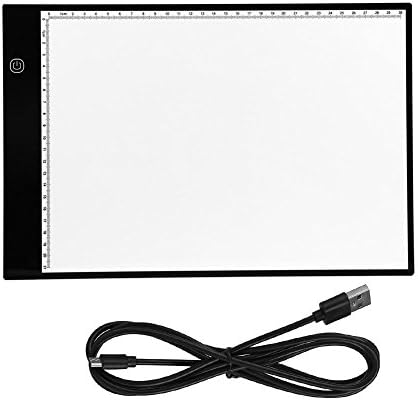
Image: The Walfront A4 LED Tracing Light Pad and its accompanying Micro USB cable.
Pwodwi souview
The Walfront A4 LED Tracing Light Pad is a portable and versatile tool designed for artists, animators, and hobbyists. It features a slim design, adjustable brightness, and eye-protected LED lighting.
Karakteristik kle:
- Konsepsyon ultra-mens: With a thickness of only 0.2 inches (5mm) and a weight of 1.5 pounds (685g), it is highly portable.
- A4 Size with Scale: Standard A4 paper size with integrated measurement scales for convenience.
- USB Powered: Easily powered via any USB port (computer, power bank, wall adapter).
- Klate reglabl: 3-level adjustable brightness with a simple touch control.
- Eye-Protected LED: Designed to provide stable, uniform light, reducing eye strain during extended use.
- Konsomasyon pouvwa ki ba: Operates at 5V with 2.2W power consumption, emitting minimal heat.

Image: Visual representation of the light pad's features, including eyesight protection, ultra-thin profile, low power consumption, and touch control.
Enstalasyon
- Dekonpoze: Carefully remove the light pad and USB cable from its packaging.
- Konekte pouvwa: Insert the micro USB end of the cable into the light pad's micro USB port.
- Sous pouvwa: Connect the standard USB end of the cable to a compatible 5V USB power source, such as a computer, power bank, or a USB wall adapter.

Image: Illustration demonstrating the various USB power source options for the light pad, including laptops, computers, power banks, and wall chargers.
Enstriksyon Operasyon
- Limen/Etenyen: Once connected to a power source, touch the power button icon on the light pad to turn it on. Touch it again to turn it off.
- Ajiste klète: With the light pad on, touch and hold the power button icon to cycle through the three brightness levels (low, medium, high). Release your finger when the desired brightness is reached.
- Trase: Place your original image or design on the light pad. Then, place a blank sheet of paper over the original. The illuminated surface will allow you to see through both layers, enabling easy tracing.
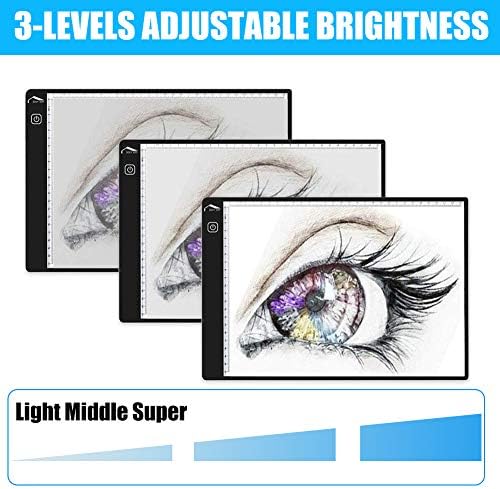
Image: Depiction of the three adjustable brightness levels (Light, Middle, Super) available on the tracing pad.
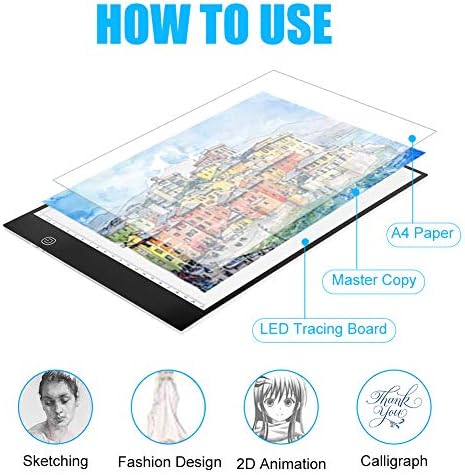
Image: Step-by-step visual guide on how to layer paper for tracing, illustrating its application in various creative fields.
Antretyen
- Netwayaj: Use a soft, dry cloth to wipe the surface of the light pad. For stubborn marks, slightly dampRense twal la avèk dlo. Evite pwodui netwayaj abrazif oswa solvan.
- Depo: Store the light pad in a dry, dust-free environment when not in use. Avoid placing heavy objects on it.
- Swen kab: Handle the USB cable gently. Do not bend or crimp it excessively.
Depanaj
| Pwoblèm | Kòz posib | Solisyon |
|---|---|---|
| Kousen limyè a pa limen. | No power, loose connection, faulty cable/power source. |
|
| Ajisteman klète a pa fonksyone. | Incorrect operation, touch sensor issue. |
|
| Limyè a ap tranble oswa li pa estab. | Unstable power supply, faulty cable. |
|
Espesifikasyon
| Non modèl | A4 LED Tracing Light Pad |
| Mak | Walfront |
| Materyèl | Acrylic |
| Koulè | Blan |
| Kalite sous limyè | Dyòd emisyon limyè (LED) |
| Sous pouvwa | Fil elektrik (USB 5V) |
| Dimansyon pwodwi (L x W x H) | 13.78" x 9.25" x 0.16" (35cm x 23.5cm x 0.4cm) |
| Epesè atik | 0.2 pous (5mm) |
| Pwa atik | 1.5 liv (685g) |
| UPC | 700890033088 |
| ASIN | B07G25WT4T |
Garanti ak sipò
For warranty information or technical support, please contact Walfront customer service through the retailer where the product was purchased or visit the official Walfront store page on Amazon: Walfront Store.
Please have your product model number (A4 LED Tracing Light Pad) and ASIN (B07G25WT4T) ready when contacting support.