
Entwodiksyon
This manual provides essential instructions for setting up, operating, and maintaining your Optoma W335 WXGA DLP Professional Projector. Designed for business presentations, classrooms, and home use, this projector delivers bright, clear images with a long lamp life. Please read this manual thoroughly before use to ensure optimal performance and safety.
Enstalasyon
Debalaj ak premye enspeksyon
Carefully remove the projector and all accessories from the packaging. Verify that all components listed in the 'What's in the Box' section are present and undamaged.
- W335 projector
- Kòd pouvwa
- Remote
- Batri
Plasman
The Optoma W335 is portable, weighing less than 7 pounds, making it easy to move between rooms. For optimal viewing, place the projector on a stable, flat surface. Ensure adequate ventilation around the unit to prevent overheating.

Image: The Optoma W335 projector showing its compact size and dimensions (12.44" width, 9.2" depth, 4.27" height).
The projector features adjustable legs for easy height and angle adjustments, allowing you to find the perfect screen area for projection. This helps in achieving a level and properly aligned image.
Koneksyon
The W335 offers a variety of input options for connecting to different devices:
- HDMI: Pou videyo ak odyo dijital an wo definisyon.
- VGA: For analog video connections, commonly used with computers.
- Videyo konpoze: Pou videyo definisyon estanda.
- Antre/soti odyo: For connecting external audio sources or speakers.
- USB Power Out (5V/1.0A): For powering external devices like streaming sticks.
- RS232: Pou entegrasyon sistèm kontwòl.
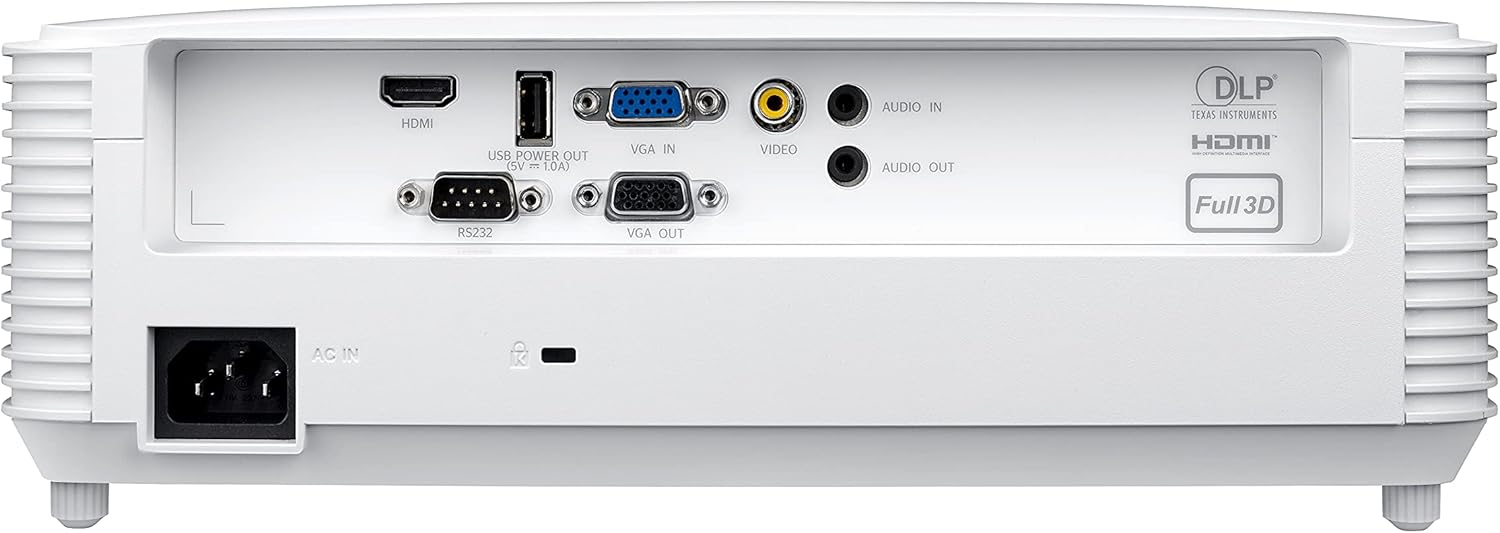
Image: Rear panel of the Optoma W335 projector, clearly showing the HDMI, VGA In, VGA Out, Video, Audio In, Audio Out, RS232, and USB Service Only ports.
Connect your source device (e.g., laptop, Blu-ray player) to the appropriate input port on the projector. Ensure the power cord is securely connected to the projector and a power outlet.
Enstriksyon Operasyon
Limen / Off
Press the power button on the projector's control panel or the remote control to turn the unit on or off. Allow a few moments for the projector to warm up or cool down.

Imaj: Anlè view of the Optoma W335 projector, highlighting the control panel with power, menu, and navigation buttons, along with focus and zoom rings.
Ajiste imaj la
- Konsantre: Vire bag konsantre a sou lantiy la pou mete imaj la an valè.
- Zoom: Use the zoom ring to adjust the image size without moving the projector.
- Koreksyon Keystone: The W335 supports vertical keystone correction to square the image if the projector is not perfectly perpendicular to the screen. This can be adjusted via the on-screen menu.
The projector delivers vibrant and sharp WXGA resolution (1280 x 800) images with a 22,000:1 contrast ratio, suitable for various environments including well-lit rooms due to its 3,800 lumens brightness.
Odyo
An integrated 10-watt speaker provides room-filling audio. For enhanced sound, connect external speakers to the Audio Out port.
Antretyen
Lamp Lavi
Pwojektè a lamp has a life of up to 15,000 hours, providing many years of use with minimal maintenance. When the lamp reaches the end of its life, a warning indicator will appear, and the lamp will need to be replaced. Refer to the full user manual for detailed lamp enstriksyon ranplasman.
Netwayaj
- Lantiy: Use a soft, lint-free cloth and lens cleaning solution to gently clean the projector lens.
- Eksteryè: Siye deyò c laasinSiye ak yon twal mou epi sèk. Evite pwodui netwayaj abrazif oswa solvan.
- Vant lè: Regularly check and clean the air vents to ensure proper airflow and prevent overheating. Use a soft brush or compressed air to remove dust.
Depanaj
- Pa gen imaj:
- Ensure the projector is powered on and the source device is connected and active.
- Check the input source selection on the projector.
- Verifye tout kab yo byen konekte.
- Imaj twoub:
- Ajiste bag konsantrasyon an sou lantiy la.
- Ensure the projector is at the correct distance from the screen.
- Use keystone correction if the image is distorted.
- Pa gen son:
- Tcheke paramèt volim yo sou pwojektè a ak aparèy sous la.
- Ensure external speakers (if used) are properly connected and powered.
- Verify the audio cable connection.
- Pwojektè a ap chofe twòp:
- Ensure air vents are clear and not obstructed.
- Sèvi ak pwojektè a nan yon zòn ki byen ayere.
- If the issue persists, power off the projector and allow it to cool down before restarting.
Espesifikasyon
| Karakteristik | Detay |
|---|---|
| Dimansyon pwodwi | 9.6 x 12.4 x 3.9 pous |
| Pwa atik | 6.61 liv |
| Nimewo Modèl Atik | W335 |
| Mak | Optoma |
| Itilizasyon Rekòmande | Business, Education |
| Karakteristik espesyal | Kout jete |
| Koneksyon Teknoloji | Dmi, VGA |
| Rezolisyon ekspozisyon | 1280 x 800 (WXGA) |
| Klète | 3800 Lumen |
| Pwopòsyon kontras | 22,000:1 |
| Lamp Lavi | Jiska 15,000 èdtan |
| Entegre Oratè | 10-watt |
| Jete rapò | 1.55 – 1.73:1 |
Garanti ak sipò
For detailed warranty information and technical support, please refer to the official Optoma website or the documentation included with your product. You can also contact Optoma customer service directly for assistance.
Vizite la Optoma Store on Amazon pou plis enfòmasyon pwodwi.