
1. Entwodiksyon
This manual provides essential instructions for the safe and effective operation of the Mustool MT866 Digital True RMS Clamp Meter. The MT866 is a versatile instrument designed for measuring AC/DC voltage, AC/DC current, frequency, temperature, capacitance, resistance, and continuity. It also features a live wire check function and non-contact voltage detection for enhanced safety. Please read this manual thoroughly before using the device.
2. Enfòmasyon sou Sekirite
Always adhere to the following safety precautions to prevent personal injury or damage to the meter:
- Pa depase limit maksimòm antre yo for any measurement function.
- Egzèsis anpil prekosyon when working with live circuits. High voltages ka danjere.
- Ensure the test leads are in good condition, without any damage to the insulation.
- Do not operate the meter if it appears damaged or if the battery cover is not properly closed.
- Always disconnect the test leads from the circuit before changing the function dial.
- Use the correct function and range pou chak mezi.
- Kenbe dwèt yo dèyè pwoteksyon dwèt yo sou sond tès yo pandan mezi yo.
- Avoid using the meter in wet environments or in the presence of explosive gases or dust.
- The meter is rated for CAT III 600V and CAT II 600V. Do not use it for measurements exceeding these categories.
3. Pwodwi souview
The Mustool MT866 is a compact and feature-rich clamp meter. Familiarize yourself with its components:
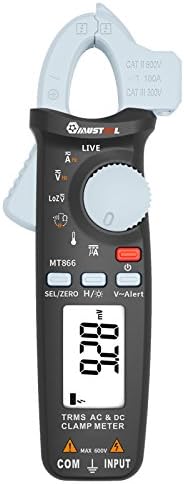
Figi 1: Devan View of the Mustool MT866 Clamp Mèt. This image displays the main components including the clamp jaw, LCD display, function dial, and control buttons.
3.1. Eleman yo
- Clamp Machwa: Itilize pou mezire kouran AC/DC san kontak.
- Clamp Levier lage: Opens the clamp machwè.
- Ki pa Peye-Kontakte VoltagCapteur e (NCV): Detekte AC voltage san kontak dirèk.
- Ekspozisyon LCD: Montre lekti mezi, inite, ak endikatè fonksyon.
- Fonksyon Dial: Selects the desired measurement mode.
- SEL/ZERO Button: Selects sub-functions or zeros the DC current reading.
- H/💡 Button: Activates Data Hold or backlight.
- V~Alert Button: Activates the V~ alert function for live wire detection.
- Input Terminals (COM, INPUT): Pou konekte fil tès pou volimtage, mezi rezistans, kapasitans, frekans, ak tanperati.
- Back Hook: For convenient hanging of the meter.
3.2. Montre Endikatè
- AC/DC: Indicates Alternating Current or Direct Current.
- V: Volts (Voltagak).
- A: Amperes (Current).
- Ω: Ohms (Resistance).
- F: Farads (Capacitance).
- Hz: Hertz (Frequency).
- °C/°F: Degrees Celsius/Fahrenheit (Temperature).
- LIVE: Live wire detection indicator.
- LOZ: Ba enpedans voltage mòd mezi.
- H: Data Hold activated.
- Senbòl pil: Endikatè batri ki ba.
4. Enstalasyon
4.1. Enstalasyon batri
The Mustool MT866 requires batteries for operation (not included in the package). To install or replace batteries:
- Asire w ke mèt la etenn epi tout fil tès yo dekonekte.
- Jwenn kouvèti konpatiman pil la sou dèyè mèt la.
- Devise vis (yo) ki kenbe yo epi retire kouvèti a.
- Insert new batteries, observing the correct polarity (+ and -).
- Remèt kouvèti batri a epi byen sere l ak vis(yo).
4.2. Konekte fil tès yo
Pou pifò mezi (voltage, resistance, capacitance, etc.), test leads are required.

Figure 2: Mustool MT866 with Test Leads. The black test lead is connected to the COM terminal, and the red test lead is connected to the INPUT terminal.
- Konekte a black test lead a la COM tèminal antre (komen).
- Konekte a red test lead a la Antre tèminal.
- Ensure connections are firm before taking any measurements.
5. Operasyon Enstriksyon
Turn the function dial to the desired measurement mode. Use the SEL/ZERO button to switch between sub-functions (e.g., AC/DC, Resistance/Continuity/Diode).
5.1. AC/DC Voltage Mezi (V)
- Vire kadran fonksyon an sou V pozisyon.
- Sèvi ak la SEL/ZERO button to select AC (V~) or DC (V=) voltage.
- Konekte fil tès yo an paralèl ak sikwi a oswa konpozan ki anba tès la.
- Li voltage valè sou ekspozisyon an.
5.2. Low Impedance Voltage (LOZ) Measurement
- Vire kadran fonksyon an sou LOZ pozisyon.
- This mode automatically detects AC or DC voltage with a low input impedance, which can help drain ghost voltages and provide more accurate readings in certain applications.
- Connect the test leads in parallel to the circuit.
5.3. AC/DC Current Measurement (A) - Clamp
- Vire kadran fonksyon an sou A pozisyon.
- Sèvi ak la SEL/ZERO button to select AC (A~) or DC (A=) current.
- Peze cl laamp lage levye pou louvri clamp machwè.
- Mete sèlman yon sèl kondiktè nan sikwi a andedan cl la.amp machwè.
- For DC current, press SEL/ZERO to zero the reading before measurement if necessary.
- Li valè aktyèl la sou ekran an.
5.4. Resistance (Ω), Continuity, Diode Test
- Vire kadran fonksyon an sou Ω pozisyon.
- Sèvi ak la SEL/ZERO button to cycle between Resistance, Continuity, and Diode Test modes.
- Rezistans: Connect test leads across the component. Ensure the circuit is de-energized.
- Kontinwite: If resistance is below approximately 30Ω, the buzzer will sound.
- Tès dyòd: Connect the red lead to the anode and black lead to the cathode. The display shows the forward voltage gout. Ranvèse fil yo pou tcheke si gen sikwi louvri.
5.5. Capacitance (µF) Measurement
- Vire kadran fonksyon an sou µF pozisyon.
- Discharge the capacitor completely before connecting the test leads.
- Connect the test leads across the capacitor terminals.
- Li valè a kapasite sou ekspozisyon an.
5.6. Frequency (Hz) Measurement
- Frequency can be measured from the jaw (when in AC current mode) or from the input terminals (when in AC voltage mòd).
- When in ACV or ACA mode, press the SEL/ZERO button to cycle to the frequency measurement.
- Konekte fil tès yo oubyen cl laamp the conductor as appropriate for the primary measurement.
5.7. Temperature (°C/°F) Measurement

Figure 3: Mustool MT866 with Temperature Probe. The temperature probe is connected to the input terminals for temperature measurements.
- Vire kadran fonksyon an sou TEMP pozisyon.
- Connect the temperature test probe to the input terminals (red to INPUT, black to COM).
- Mete pwent sond tanperati a sou oswa toupre objè ou vle mezire tanperati a.
- Read the temperature on the display. Use SEL/ZERO chanje ant Sèlsiyis ak Farennayt.
5.8. Live Wire Check (LIVE)
- Vire kadran fonksyon an sou LIVE pozisyon.
- Insert the red test lead into the live wire socket. The display will show "LIVE" and an alarm will sound if a live wire is detected.
5.9. Ki pa Peye-Kontak Voltage (V~Alert) Detection
- Peze a V ~ Alèt bouton an pou aktive mòd NCV a.
- Move the top of the meter (where the NCV sensor is located) close to a conductor or outlet.
- Si AC voltage is detected, the meter will beep and the LED indicator will flash, with the intensity increasing as the voltage strength increases.
5.10. µA HVAC Flame Rod Test
- Vire kadran fonksyon an sou µA pozisyon.
- This function is specifically designed for measuring microamperes in HVAC flame rod applications (0-200.0µA).
- Connect the test leads in series with the flame rod circuit.
5.11. Data Hold (H) and Backlight (💡)
- Peze a H/💡 button briefly to activate Data Hold, freezing the current reading on the display. Press again to release.
- Peze epi kenbe la H/💡 bouton pou limen oswa etenn ekleraj la.
6. Antretyen
6.1. Netwayaj
- Siye kontè a ak piblisiteamp twal ak detèjan twò grav. Pa sèvi ak abrazif oswa solvang.
- Asire w ke mèt la sèk nèt anvan w itilize li.
6.2. Ranplasman batri
When the battery symbol appears on the display, replace the batteries as described in Section 4.1. Prompt battery replacement ensures accurate readings and proper device function.
6.3. Depo
- If the meter is not used for an extended period, remove the batteries to prevent leakage.
- Sere mèt la nan yon kote ki fre epi sèk, lwen limyè solèy dirèk ak tanperati ekstrèm.
NAN. Depanaj
| Pwoblèm | Kòz posib | Solisyon |
|---|---|---|
| Pa gen ekspozisyon oswa ekspozisyon fèb | Pil ki fèb oswa ki mouri; move enstalasyon pil. | Ranplase pil yo; verifye polarite pil yo. |
| "OL" oswa "OVER" parèt | Mezi a depase limit ki te chwazi a. | Select a higher range or check if the input is too high for the meter. |
| Lekti kòrèk | Poor test lead connection; incorrect function/range selected; external interference. | Ensure firm connections; select appropriate function/range; move away from strong electromagnetic fields. |
| Pa gen bip kontinwite | Circuit resistance too high; continuity mode not selected. | Ensure resistance is below 30Ω; press SEL/ZERO to select continuity mode. |
8. Espesifikasyon
The following are the general specifications for the Mustool MT866 Digital True RMS Clamp Mèt:
- Max. Display: 6000 konte
- AC Current (ACA): 6A/60A/100A (±2.5%+5)
- DC Current (DCA): 6A/60A/100A (±2.5%+5)
- AC Voltage (ACV): 6V/60V/600V (±1%+3)
- DC Voltage (DCV): 6V/60V/600V (±1%+3)
- Low Enpedans Voltage (LoZ ACV-DCV Auto Scan): 600.0V / 300kΩ input impedance
- Rezistans (OHM): 600Ω/6KΩ/60KΩ/600KΩ/6MΩ/60MΩ (±1%+3)
- Kapasite: 600.0µF/6000µF (±4%+3)
- Frekans (Hz): 60Hz/1000Hz (from jaw or input terminals)
- Tanperati: -20 ~ 500 ° C / -4 ~ 932 ° F.
- µA HVAC Flame Rod Test: 0 ~ 200.0µA
- Sonèt Kontinuite: Mwens pase 30Ω
- Style: Digital
- Kalite mezi: Miltimèt
- Evalyasyon sekirite: CAT III 600V, CAT II 600V
9. Pake kontni
The Mustool MT866 package typically includes the following items:
- 1 x Mustool MT866 Digital True RMS Clamp Meter (Batteries are not included)
- 1 x Pair Test Probe (Red and Black)
- 1 x 1M (Length) Temperature Test Probe
- 1 x English User Manual (This document)
10. Garanti ak sipò
Pou enfòmasyon sou garanti a, sipò teknik, oswa kesyon sou sèvis, tanpri al gade dokiman yo te bay lè w te achte a oswa kontakte machann ou an. Kenbe resi acha w la kòm prèv acha.