
DBPOWER MK101
DBPOWER Portable DVD Player User Manual
Modèl: MK101
Entwodiksyon
Mèsi pou acha aasing the DBPOWER Portable DVD Player. This manual provides detailed instructions on how to set up, operate, and maintain your device. Please read this manual thoroughly before using the product to ensure proper functionality and to maximize your viewing experience. This portable DVD player is designed for versatile entertainment on the go, featuring a swivel screen, long-lasting battery, and broad media compatibility.

Image: The DBPOWER Portable DVD Player in blue, shown with its remote control. The screen displays a child happily watching a movie, highlighting the player's entertainment purpose.
Karakteristik pwodwi
- Pwolonje lavi batri: Equipped with a 2,500 mAh rechargeable lithium battery, providing up to 4 hours of continuous playback. Can also be powered by car charger or AC adapter.
- Wide Multimedia Support: Compatible with CD, DVD, CD-R/RW, DVD -R/+R, DVD+RW/-RW, VCD, SVCD (not Blu-ray DVD). Region-free playback. Supports USB and SD cards up to 32GB for MP3/WMA/WAV, JPEG, MPEG2/AVI/DIVX files.
- Swivel Display Screen: Features a 10.5-inch (1024x600 resolution) screen with 270-degree rotation and 180-degree flip, allowing for optimal viewing angles. Easily attachable to car headrests.
- Plizyè Opsyon Lekti: AV output for connecting to a TV for larger screen viewing. Two DVD players can be connected by an AV to AV cable for synchronized viewing.
- Break-Point Memory Function: Automatically resumes playback from where you left off.
Kontni pake
Tanpri verifye ke tout atik yo prezan nan pakè ou a:
- 1 x DBPOWER Portable DVD Player
- 1 x manyèl itilizatè
- 1 x Car Charger (1.8 Meter)
- 1 x AV kab
- 1 x pouvwa adaptè
- 1 x kontwòl remote
- 1 x Car Headrest Mount (as per product description, though not explicitly listed in the image)

Image: A visual representation of the package contents, including the DVD player, user manual, car charger, AV cable, power adapter, and remote control.
Pwodwi souview ak Konpozan
Familiarize yourself with the various ports and controls on your portable DVD player.

Imaj: Yon bò detaye view of the portable DVD player, clearly labeling its USB port, SD card slot, earphone jack, AV input/output, power switch, and DC input.
Control Panel and Disc Tray

Image: A composite image showing close-ups of the player's control buttons (Stop, Play/Pause, navigation, volume, menu, setup, mode, DVD/USB/SD, audio, TFT Off, Mute) and the open disc tray.
Enstalasyon ak Premye Itilizasyon
- Premye chaj: Before first use, fully charge the portable DVD player using the provided AC power adapter. Connect the adapter to the DC IN port on the player and plug it into a wall outlet. The charging indicator light will show the charging status.
- Limen/Etenyen: Slide the ON/OFF switch to the 'ON' position to power on the device. To power off, slide the switch to 'OFF'.
- Inserting a DVD: Gently open the disc cover. Place the DVD disc onto the spindle with the label side facing up. Press down gently on the center of the disc until it clicks into place. Close the disc cover firmly.
- Ajiste ekran an: The 10.5-inch screen can swivel 270 degrees and flip 180 degrees. Adjust the screen to your preferred viewang ang.
- Connecting to a TV (AV Output):
Use the provided AV cable to connect the player's AV OUT port to the AV IN ports (Yellow for Video, White for Left Audio, Red for Right Audio) on your television. Select the correct AV input on your TV to view pwodiksyon jwè a.

Image: A visual guide demonstrating the connection of the portable DVD player to a television using the included AV cable for synchronized screen viewing.
- Itilizasyon machin: Use the 1.8-meter car charger to power the device in your vehicle. The player can be easily attached to a car headrest using the included mount (mount not shown in image, but mentioned in product description).
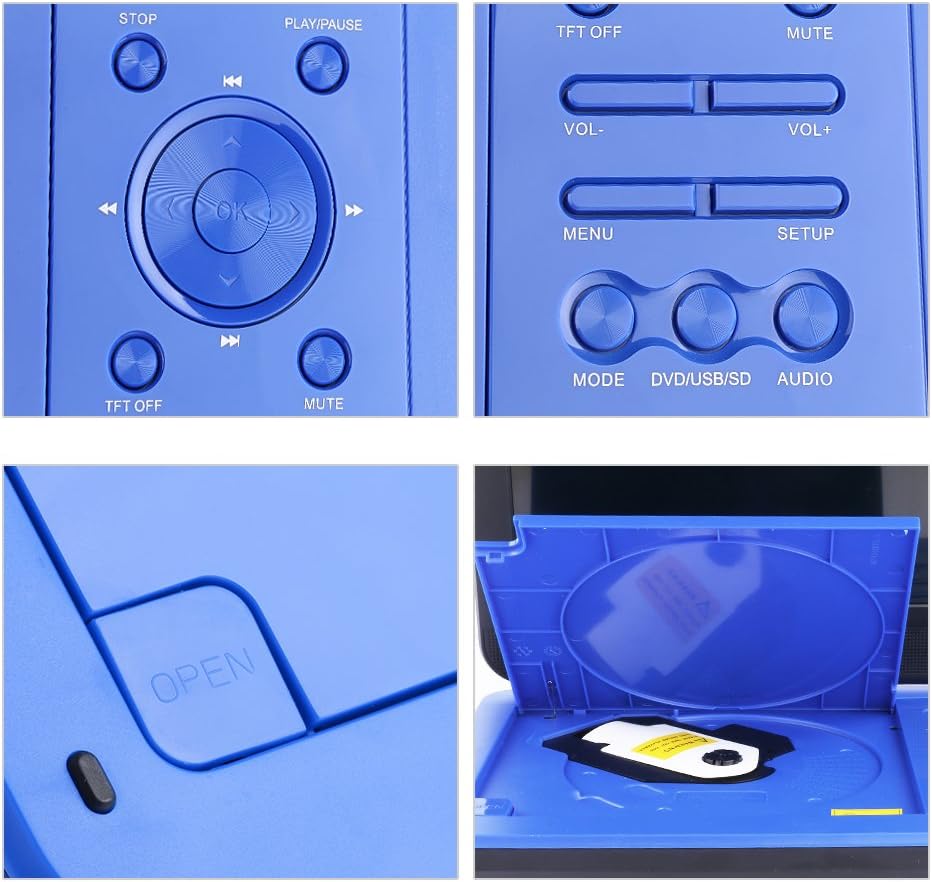
Image: The portable DVD player shown mounted on a car headrest, illustrating its suitability for travel. Note: Bag is not included in the package.
Enstriksyon Operasyon
Lektur debaz
- Jwe/Poz: Peze a JWE/POZ bouton pou kòmanse oswa pran yon poz lekti.
- Sispann: Peze a SISPANN bouton pou sispann lèktur.
- Skip Tracks/Chapters: Sèvi ak la SOTE bouton (Previous/Next) to navigate between tracks or chapters.
- Vit Avant/Remonte: Sèvi ak la FF/RW buttons to fast forward or rewind through content.
- Kontwòl Volim: Ajiste volim nan lè l sèvi avèk la VOL+ epi VOL- bouton.
- Bèbè: Peze a BÈN bouton an pou fèmen son an. Peze ankò pou debloke son an.
- Break-Point Memory: The player automatically remembers the last playback position. When you power on the device again, it will prompt you to resume from where you left off.
Using USB and SD Cards
- Mete yon kle USB nan pò USB a oubyen yon kat SD nan fant kat SD a.
- Peze a MÒD or DVD/USB/SD button to switch to USB or SD card mode.
- Navige nan ou filesèvi ak bouton direksyon yo epi peze OK to select and play.
Connecting Two Players
To watch the same movie on two DBPOWER portable DVD players simultaneously:
- Set one player to DVD mode to play the disc. Connect an AV cable to its AV OUT port.
- Set the second player to AV mode. Connect the other end of the AV cable to its AV IN port.
- The movie playing on the first player will now be displayed on the second player.
Media konpatibilite
Your DBPOWER Portable DVD Player supports a wide range of media formats:
- Fòma Disk: CD, DVD, CD-R/RW, DVD -R/+R, DVD+RW/-RW, VCD, SVCD. (Note: Blu-ray DVDs are not supported).
- Digital Media (USB/SD Card): MP3, WMA, WAV (audio), JPEG (images), MPEG2, AVI, DIVX (video).
- The player is region-free, allowing playback of DVDs from any region.

Image: A graphic illustrating the multiple DVD and CD formats supported by the player, including EVD, DVD, CD-R, DVD-R, DVD-RW, VCD, SVCD, CD, and HDCD.
Chaje ak enfòmasyon batri
The portable DVD player is equipped with a built-in 2,500 mAh rechargeable lithium battery, providing approximately 4-5 hours of playback time on a full charge.
- Chaje: Use the provided AC power adapter for home charging or the car charger for in-vehicle charging.
- Antretyen batri: To prolong battery life, it is recommended to charge the battery once per month if not in regular use and to unplug the charger once the battery is fully charged.

Image: A visual display of the charging accessories included: a car charger, a power adapter, and an icon representing the rechargeable lithium battery.
Antretyen ak Swen
- Kenbe aparèy la lwen dlo, imidite, ak limyè solèy dirèk.
- Clean the screen and exterior with a soft, dry cloth. Do not use liquid cleaners or abrasive materials.
- Evite jete aparèy la oswa soumèt li a gwo enpak.
- Lè w pa itilize jwè a pou yon bon bout tan, sere l nan yon kote ki fre epi sèk.
Depanaj
If you encounter issues with your DBPOWER Portable DVD Player, please refer to the following common solutions:
| Pwoblèm | Kòz posib / Solisyon |
|---|---|
| Jwè a pa limen. | Ensure the power switch is in the 'ON' position. Check if the battery is charged or if the power adapter is properly connected. |
| Disc does not play / "No Disc" error. | Ensure the disc is inserted correctly with the label side up. Check if the disc is clean and free of scratches. Verify the disc format is supported (not Blu-ray). |
| Pa gen son. | Check the volume level and ensure the device is not muted. If using headphones, ensure they are properly plugged in. If connected to a TV, check the TV's volume and input settings. |
| Bon jan kalite imaj. | Ensure the disc is clean. Adjust the screen's brightness/contrast settings if available. If connected to a TV, check the AV cable connection. |
| Kat USB/SD a pa rekonèt. | Ensure the USB drive or SD card is properly inserted. Check if the file format is supported. The maximum supported capacity is 32GB. |
For further assistance, please contact DBPOWER customer support.
Espesifikasyon pwodwi
- Modèl: MK101
- Mak: DBPOWER
- Gwosè ekran: 10.5 pous
- Kalite ekspozisyon: LCD
- Dimansyon pwodwi: 10.24 x 7.17 x 1.57 pous
- Pwa atik: 1.98 liv
- Batri: 1 Lithium Metal battery (included), 2,500 mAh
- Lavi batri: Up to 5 hours (approx. 4 hours for DVD playback)
- Kalite medya sipòte: CD, DVD, CD-R/RW, DVD -R/+R, DVD+RW/-RW, VCD, SVCD, MP3, WMA, WAV, JPEG, MPEG2, AVI, DIVX
- USB/SD Card Support: Maksimòm 32GB
- Rejyon: Rejyon Lib
- Peyi orijin: Lachin
- Dat premye disponib: 27 oktòb 2016
Videyo pwodwi ofisyèl yo
Watch these official videos from the seller for more information and demonstrations of your DBPOWER Portable DVD Player.
Great portable DVD player
Videyo: Videyo sa a bay yon vizyon konplè souview of the DBPOWER portable DVD player, showcasing its features and functionality. (Duration: 7 minutes 40 seconds)
Kids like the portable dvd player!
Video: This short video demonstrates children enjoying the portable DVD player, highlighting its ease of use and entertainment value for younger users. (Duration: 11 seconds)
Garanti ak sipò
DBPOWER is committed to providing excellent customer service and support for your product.
- Garanti: The product comes with a 12-month exchange or return policy.
- Sèvis Kliyan:
- Amazon messenger support within 24 hours.
- Live Product Assistance Chat.
- Local Phone Support.
For any inquiries or issues, please reach out to DBPOWER customer support through the Amazon platform or via the contact information provided in your product packaging.
Ask a question about this manual
Ask about setup, troubleshooting, compatibility, parts, safety, or missing instructions. Manuals+ will review the question and use this page’s manual context to help answer it.