
Entwodiksyon
The Mitel 6920W is a powerful, feature-rich IP phone designed for business communication. Equipped with Wi-Fi connectivity, it offers flexibility in deployment and ensures reliable voice communication. This manual provides comprehensive instructions for setting up, operating, maintaining, and troubleshooting your Mitel 6920W IP Phone.
Kontni pake
Anvan ou kòmanse, tanpri verifye si pake ou a gen atik sa yo ladan l:
- Mitel 6920W IP Phone Unit
- Aparèy
- Aparèy kòd
- Telefòn kanpe
- Ethernet kab
- Power Adapter (if not using Power over Ethernet - PoE)
- Gid pou kòmanse rapidman (si li enkli)
Enstalasyon
1. Attaching the Phone Stand
The phone stand allows you to position your phone at an optimal viewing angle. Align the tabs on the stand with the slots on the back of the phone and push firmly until it clicks into place.
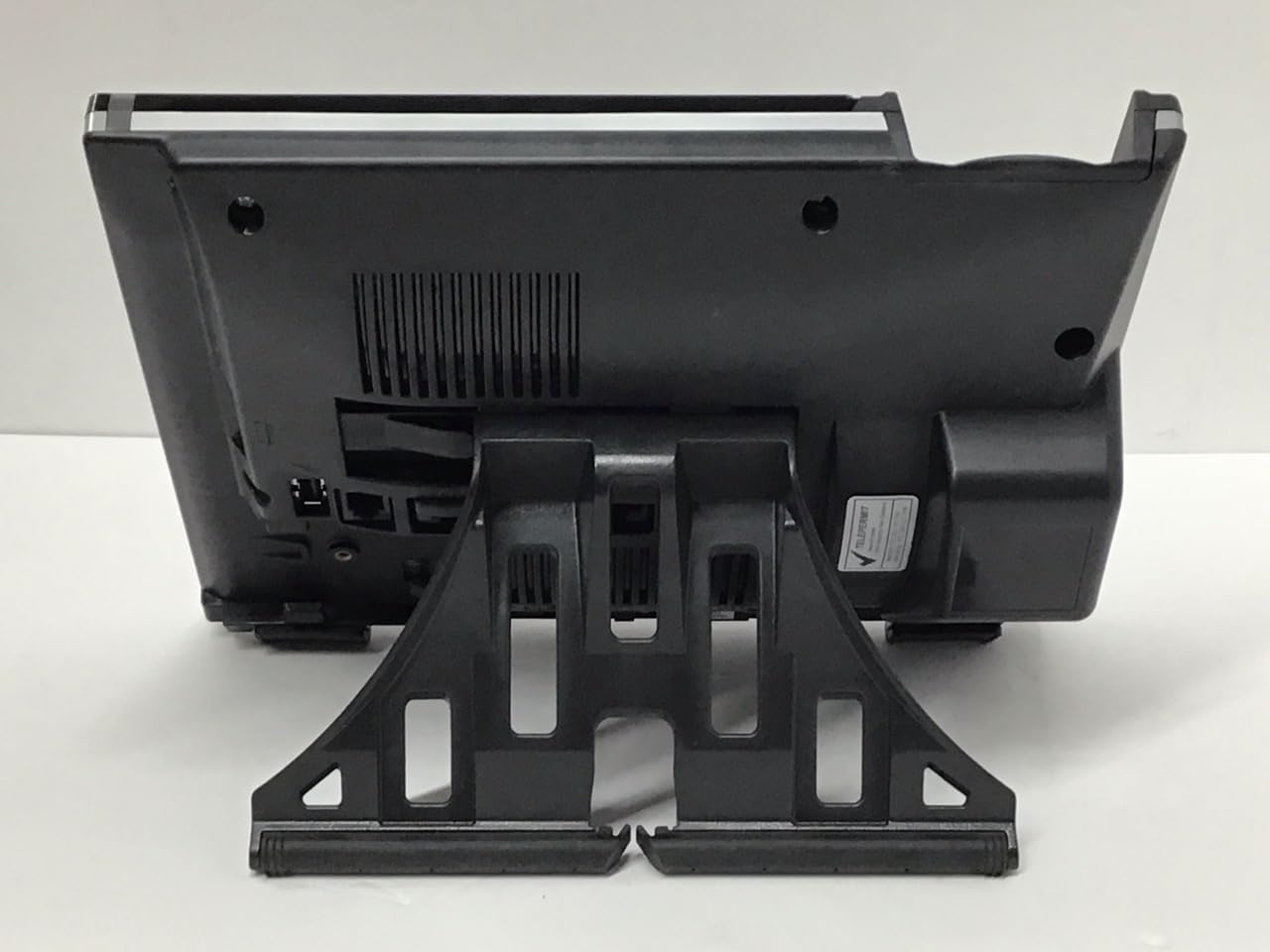
Imaj: Retounen view of the Mitel 6920W IP Phone with its stand attached, showing the connection points and the angled support.
2. Connecting the Handset and Headset
- Connect one end of the coiled handset cord to the handset and the other end to the handset port on the back of the phone (usually marked with a handset icon).
- If using a headset, connect it to the dedicated headset port (usually marked with a headset icon).
3. Connecting to the Network and Power
- Koneksyon Ethernet: Connect one end of the Ethernet cable to the LAN port on the back of the phone and the other end to your network switch or router. If your network provides Power over Ethernet (PoE), the phone will power on automatically.
- Power Adapter (if no PoE): If PoE is not available, connect the power adapter to the power port on the back of the phone and then plug it into a wall outlet.

Imaj: Devan view of the Mitel 6920W IP Phone, displaying its screen, physical keypad, and programmable soft keys.
4. Premye Limen ak Konfigirasyon
Once powered on, the phone will boot up and attempt to connect to your network. It may automatically download configuration settings from your VoIP system. Follow any on-screen prompts for initial setup, such as language selection or time zone.
5. Wi-Fi Koneksyon Enstalasyon
To connect your 6920W to a Wi-Fi network:
- Peze a Anviwònman button (gear icon) on the phone.
- Navige nan Anviwònman rezo or Anviwònman Wi-Fi.
- Enable Wi-Fi and select your desired network from the list of available networks.
- Enter the Wi-Fi password (if required) using the keypad and on-screen prompts.
- Confirm the connection. The phone should display a Wi-Fi icon indicating a successful connection.
Operating Your Mitel 6920W IP Phone
Fonksyon Apèl Debaz yo
- Fè yon apèl: Ranmase appareil la oswa peze la Speakerphone button. Dial the number and press the Rele or Voye mou kle.
- Reponn yon apèl: Ranmase appareil a, peze la Speakerphone bouton, oswa peze la Repons mou kle.
- Fini yon apèl: Kwoke appareil a oswa peze la Fini apèl mou kle.
Keypad and Navigation
The phone features a standard 12-button dial pad. Use the navigation cluster (up, down, left, right arrows, and select button) to move through menus and options on the display.
Display and Soft Keys
The phone's display shows call information, menus, and status indicators. The soft keys located directly below the display change their function based on the current context (e.g., during a call, in a menu). Their current function is indicated on the display above each key.
Aksè mesajri vwa
Pou jwenn aksè nan mesaj vokal ou a, peze bouton an Mesaj vwa button (envelope icon) and follow the audio prompts.
Karakteristik avanse apèl
- Kenbe: Pandan yon apèl aktif, peze la Kenbe Peze l ankò pou reprann apèl la.
- Transfè: Pandan yon apèl aktif, peze la Transfè soft key. Dial the number to transfer to, and once connected, press Transfè again (consultative transfer) or hang up (blind transfer).
- Konferans: Pandan yon apèl aktif, peze la Konferans soft key. Dial the number of the third party, and once connected, press Konferans ankò pou rantre nan tout pati yo.
- Oratè: Peze a Speakerphone button to toggle speakerphone mode on or off.
- Bèbè: Peze a bèbè bouton pou mete mikwofòn ou an silans pandan yon apèl. Peze l ankò pou debloke son an.
Antretyen
Netwayaj Telefòn lan
To keep your phone clean, gently wipe the surfaces with a soft, damp, lint-free cloth. Avoid using abrasive cleaners, solvents, or aerosol sprays, as these can damage the phone's finish and internal components.
Mizajou lojisyèl
Your Mitel 6920W IP Phone may receive software updates periodically to improve performance and add new features. These updates are typically managed by your system administrator. Do not attempt to manually update the firmware unless instructed by your IT department or Mitel support.
Depanaj
Pwoblèm komen ak solisyon yo
| Pwoblèm | Solisyon posib |
|---|---|
| Pa gen Ton Dial | Check all cable connections (Ethernet, power, handset). Ensure the phone is powered on. Contact your system administrator if the issue persists. |
| Pa ka konekte ak Wi-Fi | Verify Wi-Fi password. Ensure the phone is within range of the Wi-Fi access point. Restart the phone and try again. Check network settings. |
| Montre Pa Travay | Check power connection. Restart the phone. If the display remains blank or faulty, contact support. |
| Pòv Kalite Rele | Check network connection stability (wired or Wi-Fi signal strength). Ensure no other devices are heavily using network bandwidth. |
Reset faktori
A factory reset will erase all custom settings and return the phone to its default state. This should only be performed as a last resort and typically under the guidance of your system administrator or Mitel support. Consult your system administrator for the specific procedure for your deployment.
Espesifikasyon
| Karakteristik | Detay |
|---|---|
| Mak | Mitel |
| Modèl | 6920W |
| ASIN | B07DD9BW2Z |
| Koulè | Nwa |
| Kalite Telefòn | Kòde |
| Materyèl | Plastik |
| Sous pouvwa | Fil elektrik |
| Kalite diler | Single klavye |
| Kalite sistèm repons | Digital |
| Aparèy konpatib | Computer Systems, VoIP Services, Telephone Networks |
| Operasyon Plizyè Liy | Operasyon Plizyè Liy |
| Idantifikasyon Moun k ap rele a | Wi |
| Dimansyon pake | 10.71 x 7.91 x 3.66 pous |
| Pwa atik | 2.38 liv |
| Manifakti | Mitel |
| Dat Premye Disponib | 20 desanm 2022 |
Garanti ak sipò
The Mitel 6920W IP Phone comes with a standard manufacturer's warranty. For specific warranty terms and conditions, please refer to the documentation provided with your purchase or visit the official Mitel websit.
For technical support, troubleshooting assistance, or warranty claims, please contact your system administrator or authorized Mitel reseller. You can also find additional resources and contact information on the official Mitel support websit: www.mitel.com/sipò