
1. Entwodiksyon
The Canon PowerShot G5 X is a compact digital camera featuring a 1.0-inch, 20.2 Megapixel High-Sensitivity CMOS sensor and a built-in 2.36 million dot electronic viewfinder. This camera is designed for advanced photographers seeking high-quality stills and video with comprehensive control. It includes Wi-Fi and NFC capabilities for easy sharing and remote operation.
Karakteristik kle yo enkli:
- 1.0-inch, 20.2 Megapixel High-Sensitivity CMOS sensor.
- Canon DIGIC 6 Image Processor for enhanced image quality and fast operation.
- Built-in 2.36 million dot electronic viewChèche.
- Multi-angle capacitive 3.0-inch touch panel LCD with 1.04 million dots.
- Full HD 1080p video recording at 60p/30p/24p.
- Integrated Wi-Fi and NFC for wireless connectivity.
2. Ki sa ki nan bwat la
Verifye ke tout atik yo prezan anvan premye itilizasyon an:
- Canon PowerShot G5 X Camera Body
- pake batri
- Batri Charger
- Neck senti

Figure 2.1: Included items with the Canon PowerShot G5 X camera.
3. Inisyal Enstalasyon
3.1 Chaje batri a
- Mete batri a nan plato batri a.
- Branche chargeur a nan yon priz kouran. Limyè endikatè chaj la ap limen.
- Yon fwa chajman an fini, limyè endikatè a ap chanje oswa etenn. Retire batri a.
3.2 Mete pil la ak kat memwa a
- Louvri kouvèti konpatiman batri/kat la ki anba kamera a.
- Insert the charged battery into the compartment, ensuring correct orientation.
- Insert a compatible SD, SDHC, or SDXC memory card into the card slot until it clicks into place.
- Fèmen kouvèti lòj la byen.
3.3 Limen Kamera a
Peze a ON/OFF button located on the top of the camera to power it on. The lens will extend, and the LCD screen will activate.

Figi 3.1: Devan view of the Canon PowerShot G5 X.
4. Itilizasyon Kamera a
4.1 Mòd Debaz pou Tire Foto
Kadran mòd ki anlè kamera a pèmèt ou chwazi plizyè mòd pou pran foto:
- Mòd oto: For automatic settings.
- P (Pwogram AE): Camera sets aperture and shutter speed, but allows other adjustments.
- Av (Priyorite Ouvèti AE): Ou fikse ouvèti a, kamera a fikse vitès obturatè a.
- Televizyon (Priyorite Vitès AE): Ou fikse vitès obturatè a, kamera a fikse ouvèti a.
- M (Manyèl): Ou kontwole tou de ouvèti a ak vitès obturatè a.
- Custom Modes (C1/C2): Save and recall your preferred settings.
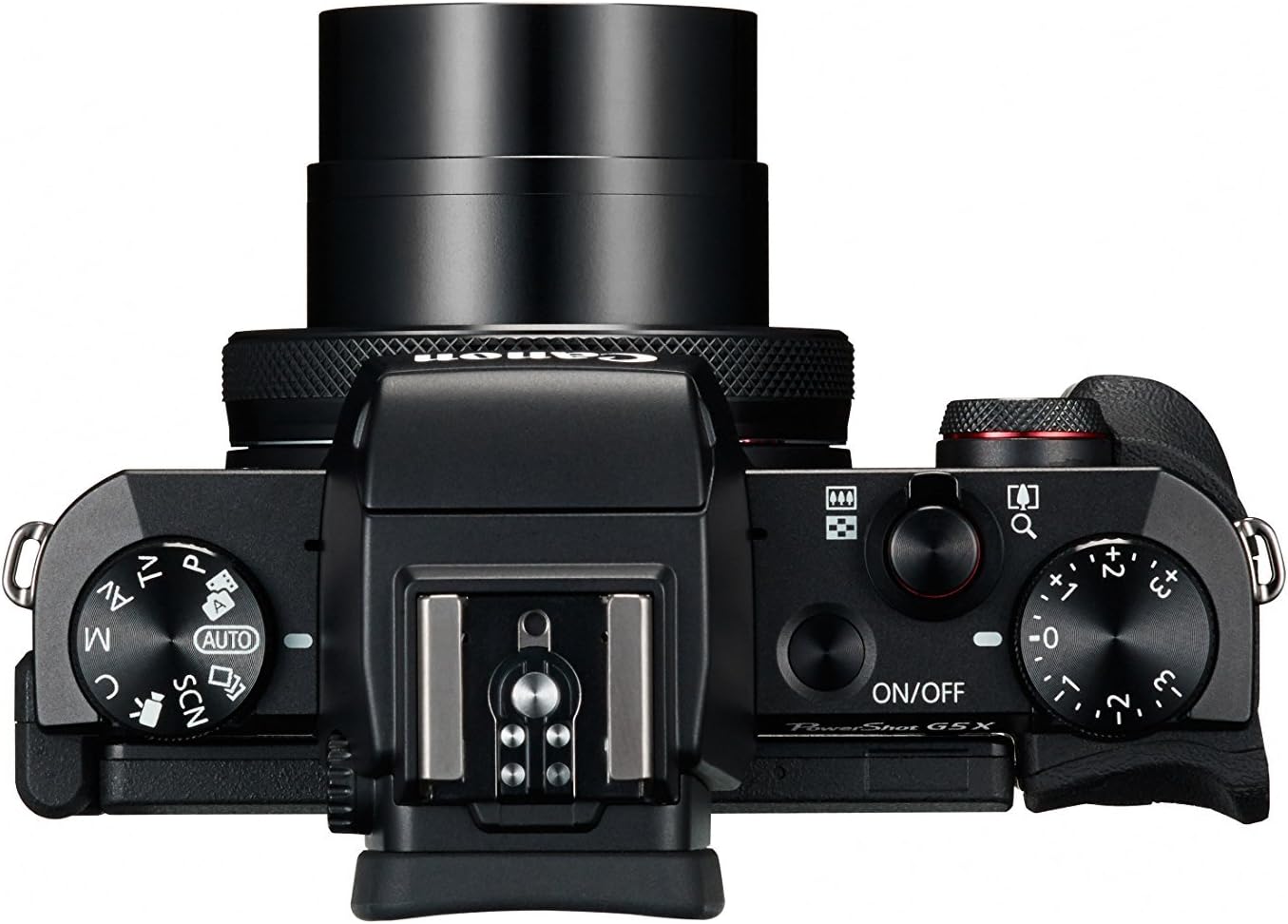
Figure 4.1: Top controls of the Canon PowerShot G5 X.
4.2 Sèvi ak ViewChèchè ak ekran LCD
The camera features both an electronic viewfinder (EVF) and a multi-angle touch panel LCD. You can switch between them or use the EVF for composing shots in bright conditions. The LCD screen can be articulated for various shooting angles and touch operations.

Figure 4.2: Canon PowerShot G5 X with articulated LCD screen.

Figi 4.3: Dèyè view of the Canon PowerShot G5 X.
4.3 Anrejistreman Videyo
To record video, set the mode dial to the movie mode icon. Press the dedicated movie button to start and stop recording. The camera supports 1080p Full HD video at various frame rates (60p/30p/24p).
4.4 Koneksyon Wi-Fi ak NFC
The camera's built-in Wi-Fi and NFC functions allow for wireless transfer of images and videos to compatible smart devices or computers. Refer to the camera's menu for detailed instructions on setting up these connections.
5. Antretyen ak Swen
5.1 Netwayaj Kamera a
- Lantiy: Use a lens brush or blower to remove dust, then gently wipe with a microfiber lens cloth. Avoid touching the lens surface directly.
- Ekran LCD: Wipe gently with a soft, dry cloth. For stubborn smudges, use a screen cleaner specifically designed for electronics.
- Kò kamera: Siye avèk yon twal mou epi sèk. Pa sèvi ak solvang òganik oswa ajan netwayaj fò.
5.2 Depo
Lè w pa ap itilize kamera a, sere l nan yon kote ki fre epi sèk, lwen limyè solèy dirèk ak tanperati ekstrèm. Retire pil la si w pa pral itilize kamera a pou yon peryòd tan pwolonje.
NAN. Depanaj
This section addresses common issues you might encounter with your Canon PowerShot G5 X camera.
| Pwoblèm | Kòz posib / Solisyon |
|---|---|
| Kamera a pa limen. | Battery is depleted. Charge the battery. Ensure battery is inserted correctly. |
| Imaj yo flou. | Lens is dirty. Clean the lens. Shutter speed is too slow. Increase shutter speed or use image stabilization. Camera shake. Hold the camera steady or use a tripod. |
| Cannot connect to Wi-Fi/NFC. | Ensure Wi-Fi/NFC is enabled in camera settings. Check device compatibility and network settings. Refer to the camera's connectivity guide in the menu. |
| Erè kat memwa. | Memory card is full. Delete unnecessary files or replace card. Card is corrupted. Format the card (this will erase all data). Card is incompatible. Use a supported SD, SDHC, or SDXC card. |
| Flash la pa tire. | Flash is set to OFF. Change flash mode to Auto or On. Subject is too far. Check flash range. |
7. Espesifikasyon
| Karakteristik | Detay |
|---|---|
| Kalite Capteur | 1.0-inch High-Sensitivity CMOS |
| Rezolisyon toujou efikas | 20.2 MP |
| Imaj processeur | DIGIK 6 |
| Zoom optik | 4.2x |
| Ouverture Lens | f/1.8-2.8 |
| Focal Length (35mm equivalent) | 24-100mm |
| Estabilizasyon Imaj | Digital |
| Viewjwenn | Built-in Electronic Viewfinder (2.36 million dots) |
| Ekran LCD | 3.0-inch Multi-angle Capacitive Touch Panel (1.04 million dots) |
| Rezolisyon videyo | 1080p Full HD (60p/30p/24p) |
| Koneksyon | Wi-Fi, NFC, HDMI, USB |
| Medya Depo | Kat memwa SD, SDHC, SDXC |
| Pwa atik | 1.8 liv |
| Nimewo Modèl | 0510C001 |
| UPC | 748926548632 |
8. Garanti ak sipò
8.1 Enfòmasyon sou Garanti
This Canon PowerShot G5 X camera comes with a 90-day limited warranty from the date of purchase. This warranty covers manufacturing defects under normal use. Please retain your proof of purchase for warranty claims.
8.2 Sipò pou Kliyan
Pou asistans teknik, sèvis, oswa lòt kesyon, tanpri al gade sipò ofisyèl Canon an. websit entènèt la oubyen kontakte depatman sèvis kliyan yo. Anjeneral, ou ka jwenn enfòmasyon pou kontakte yo sou sit fabrikan an. websit.