
Pwodwi souview
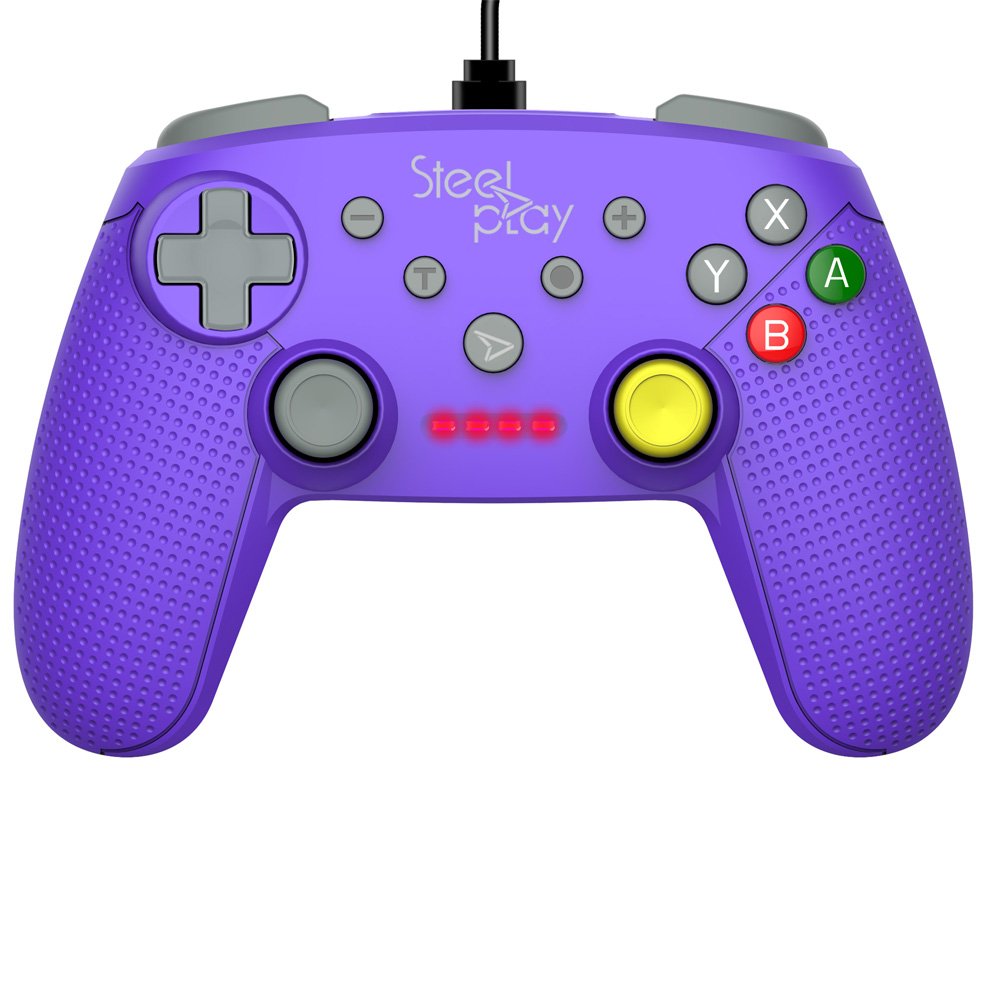
The Steelplay Wired Controller GCUBE (model ECO0622) is designed for use with the Nintendo Switch console, providing a reliable wired connection for uninterrupted gameplay. This controller features a comfortable ergonomic grip, a 2.5-meter USB cable, and includes advanced functionalities such as a gyro sensor, dual vibration feedback, and a turbo function button.
Enstriksyon Enstalasyon
- Konekte kontwolè a: Insert the USB connector of the Steelplay Wired Controller GCUBE into an available USB port on your Nintendo Switch dock.
- Power On the Console: Ensure your Nintendo Switch console is powered on and connected to your TV or in handheld mode with the dock.
- Rekonesans Otomatik: The console should automatically detect the controller. The player indicator lights on the controller will illuminate to show its assigned player number.
- Begin Gameplay: You can now use your Steelplay Wired Controller GCUBE for gaming.
Opere kontwolè a
The Steelplay Wired Controller GCUBE features a standard layout for intuitive gameplay.
Fonksyon bouton:
- Bwat analogik gòch/dwat: Pou mouvman ak kontwòl kamera.
- D-Pad (Pad Direksyon): Pou yon antre direksyonèl presi.
- Bouton A/B/X/Y: Action buttons, typically used for jumping, attacking, interacting, etc.
- L/R Buttons (Shoulder Buttons): Often used for quick actions or menu navigation.
- ZL/ZR Buttons (Trigger Buttons): Analog or digital triggers for specific in-game actions.
- Moins (-) bouton: Typically opens in-game menus or performs specific actions.
- Plus (+) bouton: Typically pauses the game or opens system menus.
- Bouton Kay: Retounen nan meni AKÈY Nintendo Switch la.
- Bouton Capture: Takes screenshots of your gameplay.
Karakteristik espesyal:
- Gyro Function: The controller includes a built-in gyro sensor for motion control in compatible games. This allows for intuitive aiming or steering by tilting the controller.
- Dual Vibration Feedback: Experience enhanced immersion with haptic feedback that responds to in-game events.
- Turbo Fonksyon: The turbo function allows for rapid, repeated input of a button press. To activate, press and hold the Turbo button, then press the desired action button (e.g., A, B, X, Y, L, R, ZL, ZR). To deactivate, repeat the process.
Antretyen
Proper care ensures the longevity and optimal performance of your controller.
- Netwayaj: Sèvi ak yon twal mou epi sèk pou siye kontwolè a. Pou pousyè tè ki difisil pou retire, siye l yon ti kras.ampRense twal la avèk dlo. Evite itilize pwodui chimik ki agresif, solvang, oswa pwodui netwayaj abrazif.
- Depo: Sere kontwolè a nan yon kote ki fre epi sèk, lwen limyè solèy dirèk ak tanperati ekstrèm.
- Swen kab: Avoid bending or twisting the USB cable excessively. Do not pull the cable to disconnect the controller; always grasp the plug.
- Evite likid: Keep the controller away from liquids to prevent internal damage.
Depanaj
- Kontwolè pa reponn:
- Ensure the USB cable is securely connected to both the controller and the Nintendo Switch dock.
- Try connecting the controller to a different USB port on the dock.
- Rekòmanse konsole Nintendo Switch ou a.
- Bouton oswa joystick pa fonksyone byen:
- Tcheke pou nenpòt obstak fizik oswa debri ozalantou bouton yo oswa joystick yo.
- Ensure the controller's firmware is up to date. Firmware updates may be necessary and typically require connection to a PC. Refer to the Steelplay official website for specific instructions and update tools.
- Vibrasyon an pa fonksyone:
- Verify that vibration is enabled in your Nintendo Switch system settings and within the game you are playing.
- Asire w ke kontwolè a byen konekte.
Espesifikasyon
| Karakteristik | Detay |
|---|---|
| Nimewo Modèl | ECO0622 |
| Konpatibilite | Nintendo switch |
| Koneksyon | Branche (USB) |
| Longè kab | 2.5 mèt |
| Dimansyon | 17.2 x 7 x 20.3 cm |
| Pwa | 360 g |
| Karakteristik espesyal | Gyro Function, Dual Vibration Feedback, Turbo Function Button, Rubberized Grip Surface, Ergonomic Grip |
Enfòmasyon sou Garanti
For detailed warranty information regarding your Steelplay Wired Controller GCUBE, please refer to the warranty card included with your product or visit the official Steelplay websit. Tèm ak kondisyon garanti yo ka varye selon rejyon an ak détayan an.
Sipò pou Kliyan
If you encounter any issues or have questions not covered in this manual, please contact Steelplay customer support. Contact information can typically be found on the official Steelplay websit la oubyen sou anbalaj pwodwi a.